

編輯:關於 Android 程式設計
Spinner 的作用有點像 HTML 裡的下拉框 <select></select>:使用者點開後從清單中挑選一項。本文分享具體的實現代碼,供大家參考。
<LinearLayout xmlns:android="https://schemas.android.com/apk/res/android"
    xmlns:tools="https://schemas.android.com/tools"
    android:layout_width="match_parent"
    android:layout_height="match_parent"
    android:orientation="vertical"
    tools:context=".Main" >

    <Spinner
        android:id="@+id/spinner"
        android:layout_width="300sp"
        android:layout_height="50sp"
        android:layout_gravity="center_horizontal" />
</LinearLayout>
package com.app.main;

import android.app.Activity;
import android.os.Bundle;
import android.widget.ArrayAdapter;
import android.widget.Spinner;

public class Main extends Activity {

    Spinner spinner = null;

    @Override
    protected void onCreate(Bundle savedInstanceState) {
        super.onCreate(savedInstanceState);
        setContentView(R.layout.main);

        spinner = (Spinner) this.findViewById(R.id.spinner);

        ArrayAdapter adapter = new ArrayAdapter(this,
                android.R.layout.simple_spinner_item,
                new String[] { "第一項", "第二項", "第三項" });

        // 設置下拉樣式
        adapter.setDropDownViewResource(android.R.layout.simple_dropdown_item_1line);
        spinner.setAdapter(adapter);
    }
}
效果如下:
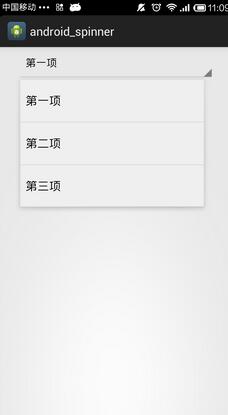
這裡其實牽涉到兩個系統 XML:一個是填充資料時用的 simple_spinner_item.xml,另一個是控制下拉樣式的 simple_dropdown_item_1line.xml。理解這兩者的分工,有助於日後替換成自訂樣式。
<TextView xmlns:android="https://schemas.android.com/apk/res/android"
    android:id="@android:id/text1"
    android:singleLine="true"
    android:layout_width="match_parent"
    android:layout_height="wrap_content"
    android:ellipsize="marquee"
    android:textAlignment="inherit" />
<TextView xmlns:android="https://schemas.android.com/apk/res/android"
    android:id="@android:id/text1"
    android:textAppearance="?android:attr/textAppearanceLargePopupMenu"
    android:singleLine="true"
    android:layout_width="match_parent"
    android:layout_height="?android:attr/listPreferredItemHeight"
    android:ellipsize="marquee" />
以上就是本文的全部內容,希望對大家學習 Android 軟體編程有所幫助,也歡迎多多支持本站。
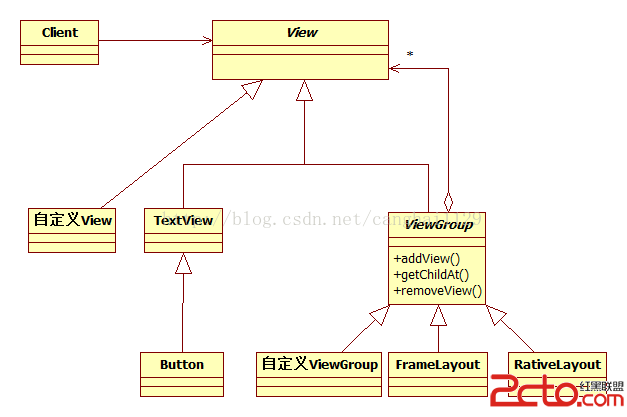 Android 與設計模式:組合(Composite)模式入門
定義(GoF《設計模式》):將物件組合成樹形結構,以表示「部分—整體」的層次結構。組合模式使得使用者對「單個物件」和「組合物件」的使用具有一致性。 一句話理解:它讓你把「
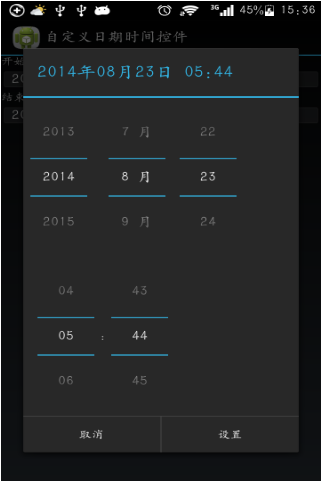 Android 自定義日期時間選擇器:同時選擇年月日與時分
需求說明 在某些表單中,使用者需要一次選取日期與時間,例如設定開始時間、結束時間或提醒時間。若分開使用兩個選擇器,操作會較繁瑣,因此可以自定義一個整合 DatePicke
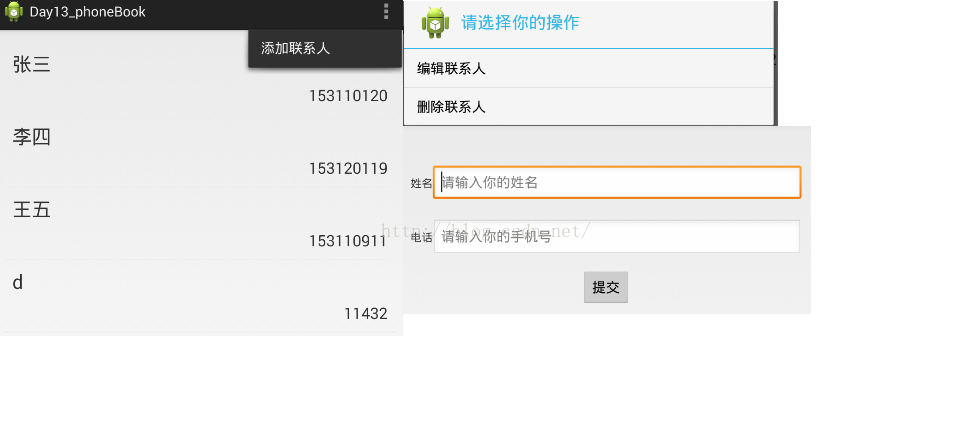 Android 數據存儲之 SQLite:從 SQL 語句到完整通訊錄案例
SQLite 是一款數據庫,與 Oracle、SQLServer、MySQL 同屬關系型數據庫。Android 系統自帶了這個輕量級的 SQLite。一、特點輕量級:只有
 小米手環怎麼充電?充不進電的排查方法
小米手環要求 Android 4.4 以上系統,不少人為此先升了手機系統,結果卻遇到手環充不進電。這個問題通常不難處理,先照下面的順序試。 充不進電怎麼辦 1. 多插拔