

編輯:關於 Android 程式設計
廢話不多說,直接上程式碼。以下是一個完整的 ZipUtils 工具類,涵蓋批次壓縮、全量解壓、選擇性解壓與壓縮內容查詢等常用操作。
package com.maidong.utils;

import java.io.BufferedInputStream;
import java.io.BufferedOutputStream;
import java.io.File;
import java.io.FileInputStream;
import java.io.FileNotFoundException;
import java.io.FileOutputStream;
import java.io.IOException;
import java.io.InputStream;
import java.io.OutputStream;
import java.io.UnsupportedEncodingException;
import java.util.ArrayList;
import java.util.Collection;
import java.util.Enumeration;
import java.util.zip.ZipEntry;
import java.util.zip.ZipException;
import java.util.zip.ZipFile;
import java.util.zip.ZipOutputStream;
import org.apache.http.protocol.HTTP;

public class ZipUtils {

    private static final int BUFF_SIZE = 1024 * 1024; // 1M Byte

    /**
     * 批量壓縮文件(夾)
     *
     * @param resFileList 要壓縮的文件(夾)列表
     * @param zipFile     生成的壓縮文件
     */
    public static void zipFiles(Collection<File> resFileList, File zipFile) throws IOException {
        ZipOutputStream zipout = null;
        try {
            zipout = new ZipOutputStream(
                    new BufferedOutputStream(new FileOutputStream(zipFile), BUFF_SIZE));
            for (File resFile : resFileList) {
                zipFile(resFile, zipout, "");
            }
        } finally {
            if (zipout != null) zipout.close();
        }
    }

    /**
     * 批量壓縮文件(夾),並帶上註釋
     */
    public static void zipFiles(Collection<File> resFileList, File zipFile, String comment)
            throws IOException {
        ZipOutputStream zipout = null;
        try {
            zipout = new ZipOutputStream(
                    new BufferedOutputStream(new FileOutputStream(zipFile), BUFF_SIZE));
            for (File resFile : resFileList) {
                zipFile(resFile, zipout, "");
            }
            zipout.setComment(comment);
        } finally {
            if (zipout != null) zipout.close();
        }
    }

    /**
     * 解壓縮一個文件
     *
     * @param zipFile    壓縮文件
     * @param folderPath 解壓縮的目標目錄
     */
    public static void upZipFile(File zipFile, String folderPath)
            throws ZipException, IOException {
        File desDir = new File(folderPath);
        if (!desDir.exists()) {
            desDir.mkdirs();
        }
        ZipFile zf = new ZipFile(zipFile);
        InputStream in = null;
        OutputStream out = null;
        try {
            for (Enumeration<?> entries = zf.entries(); entries.hasMoreElements();) {
                ZipEntry entry = ((ZipEntry) entries.nextElement());
                in = zf.getInputStream(entry);
                String str = folderPath + File.separator + entry.getName();
                // 修正中文檔名亂碼
                str = new String(str.getBytes("8859_1"), HTTP.UTF_8);
                File desFile = new File(str);
                if (!desFile.exists()) {
                    File fileParentDir = desFile.getParentFile();
                    if (!fileParentDir.exists()) {
                        fileParentDir.mkdirs();
                    }
                    desFile.createNewFile();
                }
                out = new FileOutputStream(desFile);
                byte buffer[] = new byte[BUFF_SIZE];
                int realLength;
                while ((realLength = in.read(buffer)) > 0) {
                    out.write(buffer, 0, realLength);
                }
            }
        } finally {
            if (in != null) in.close();
            if (out != null) out.close();
        }
    }

    /**
     * 解壓文件名包含傳入文字的文件
     *
     * @param zipFile      壓縮文件
     * @param folderPath   目標文件夾
     * @param nameContains 傳入的文件匹配名
     * @return 成功解出的檔案列表
     */
    public static ArrayList<File> upZipSelectedFile(File zipFile, String folderPath,
                                                    String nameContains)
            throws ZipException, IOException {
        ArrayList<File> fileList = new ArrayList<File>();
        File desDir = new File(folderPath);
        if (!desDir.exists()) {
            desDir.mkdir();
        }
        ZipFile zf = new ZipFile(zipFile);
        InputStream in = null;
        OutputStream out = null;
        try {
            for (Enumeration<?> entries = zf.entries(); entries.hasMoreElements();) {
                ZipEntry entry = ((ZipEntry) entries.nextElement());
                if (entry.getName().contains(nameContains)) {
                    in = zf.getInputStream(entry);
                    String str = folderPath + File.separator + entry.getName();
                    str = new String(str.getBytes("8859_1"), HTTP.UTF_8);
                    File desFile = new File(str);
                    if (!desFile.exists()) {
                        File fileParentDir = desFile.getParentFile();
                        if (!fileParentDir.exists()) {
                            fileParentDir.mkdirs();
                        }
                        desFile.createNewFile();
                    }
                    out = new FileOutputStream(desFile);
                    byte buffer[] = new byte[BUFF_SIZE];
                    int realLength;
                    while ((realLength = in.read(buffer)) > 0) {
                        out.write(buffer, 0, realLength);
                    }
                    fileList.add(desFile);
                }
            }
        } finally {
            if (in != null) in.close();
            if (out != null) out.close();
        }
        return fileList;
    }

    /**
     * 獲得壓縮文件內文件列表
     */
    public static ArrayList<String> getEntriesNames(File zipFile)
            throws ZipException, IOException {
        ArrayList<String> entryNames = new ArrayList<String>();
        Enumeration<?> entries = getEntriesEnumeration(zipFile);
        while (entries.hasMoreElements()) {
            ZipEntry entry = ((ZipEntry) entries.nextElement());
            entryNames.add(new String(getEntryName(entry).getBytes(HTTP.UTF_8), "8859_1"));
        }
        return entryNames;
    }

    /**
     * 獲得壓縮文件內壓縮文件對象以取得其屬性
     */
    public static Enumeration<?> getEntriesEnumeration(File zipFile)
            throws ZipException, IOException {
        ZipFile zf = new ZipFile(zipFile);
        return zf.entries();
    }

    /**
     * 取得壓縮文件對象的註釋
     */
    public static String getEntryComment(ZipEntry entry) throws UnsupportedEncodingException {
        return new String(entry.getComment().getBytes(HTTP.UTF_8), "8859_1");
    }

    /**
     * 取得壓縮文件對象的名稱
     */
    public static String getEntryName(ZipEntry entry) throws UnsupportedEncodingException {
        return new String(entry.getName().getBytes(HTTP.UTF_8), "8859_1");
    }

    /**
     * 壓縮文件(遞迴處理目錄)
     *
     * @param resFile  需要壓縮的文件(夾)
     * @param zipout   壓縮的目的文件
     * @param rootpath 壓縮的文件路徑
     */
    private static void zipFile(File resFile, ZipOutputStream zipout, String rootpath)
            throws FileNotFoundException, IOException {
        rootpath = rootpath + (rootpath.trim().length() == 0 ? "" : File.separator)
                + resFile.getName();
        rootpath = new String(rootpath.getBytes("8859_1"), HTTP.UTF_8);

        BufferedInputStream in = null;
        try {
            if (resFile.isDirectory()) {
                File[] fileList = resFile.listFiles();
                for (File file : fileList) {
                    zipFile(file, zipout, rootpath);
                }
            } else {
                byte buffer[] = new byte[BUFF_SIZE];
                in = new BufferedInputStream(new FileInputStream(resFile), BUFF_SIZE);
                zipout.putNextEntry(new ZipEntry(rootpath));
                int realLength;
                while ((realLength = in.read(buffer)) != -1) {
                    zipout.write(buffer, 0, realLength);
                }
                in.close();
                zipout.flush();
                zipout.closeEntry();
            }
        } finally {
            if (in != null) in.close();
        }
    }
}
幾個實作上的重點值得留意:私有方法 zipFile 以遞迴方式處理目錄結構,能保留完整的路徑層級;全程使用 1MB 的緩衝區並搭配 BufferedStream,避免大檔案造成記憶體壓力;而針對中文檔名,透過 "8859_1" 與 UTF-8 之間的字碼轉換來避免解壓後出現亂碼,這是實務上很容易踩到的坑。
程式碼到此結束。關於 Android 實現壓縮與解壓縮文件的內容就介紹到這裡,希望能對大家有所幫助。
 風雲直播怎麼關閉彈幕?兩步取消滿螢幕飄字
看直播時彈幕有兩面:熱鬧的時候很帶氣氛,人少或內容雜的時候就只剩遮擋畫面。風雲直播的彈幕預設開啟,關閉方式其實很簡單,藏在「我」的頁面裡。第一步:開啟風雲直播,點擊首頁右
 詳解 Android MVP 架構的職責拆分與落地實作
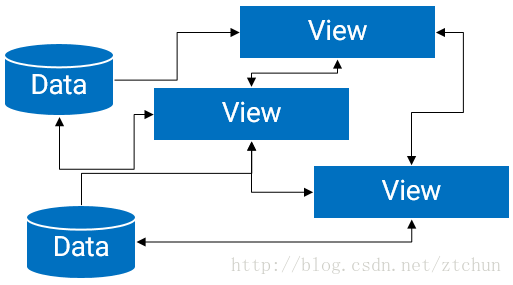
一、概述 傳統 Android 開發多採用 MVC 模式: Model:業務邏輯與實體模型 View:對應版面配置檔 Controller:對應 Activity
 Android 圖片選擇器與預覽功能完整實作
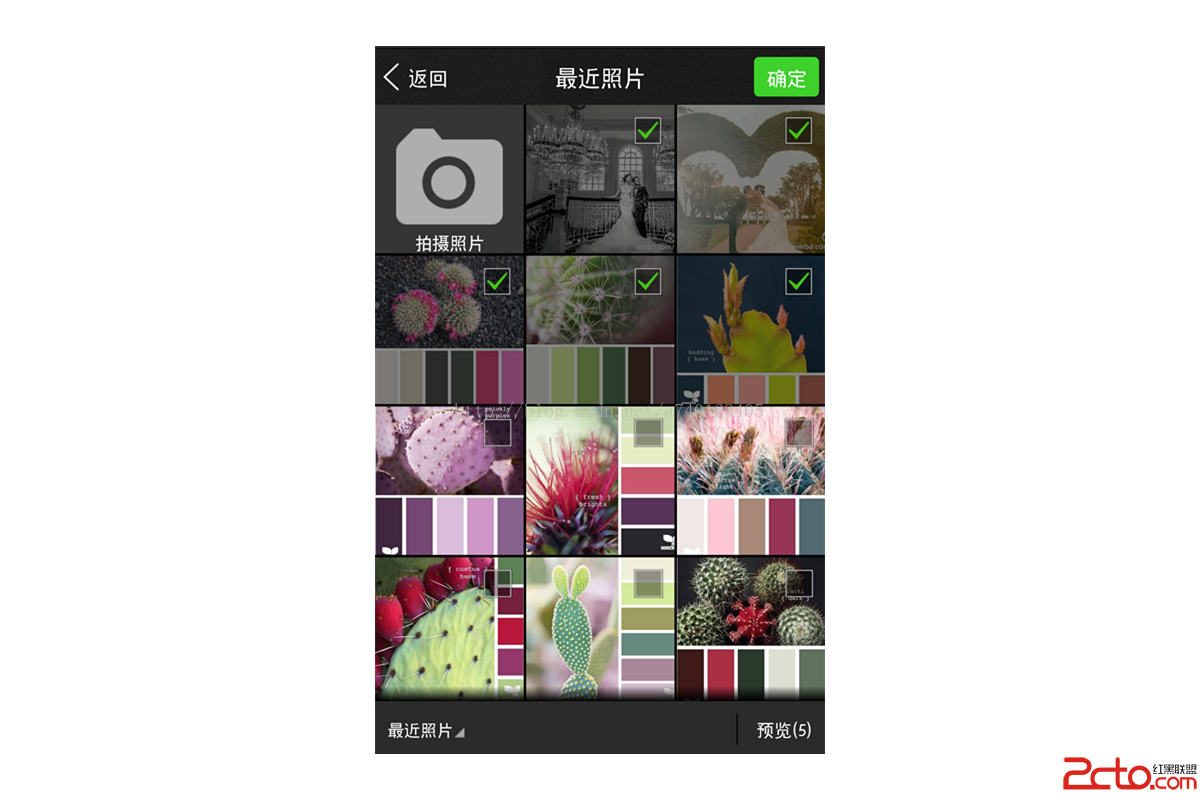
公司要求做一個類似微信「選擇照片」的圖片瀏覽器。原本想直接找現成的開源方案套,找了一圈沒有合適的,只好自己寫。整理成 library 專案后打包分享,需要的朋友可以直接拿
 Unity3D uGUI 基本布局:RectTransform 與錨點完全解析
在 Unity3D 的 uGUI 系統中,UI 布局主要圍繞 Canvas、RectTransform、Pivot 與 Anchors 展開。理解這些概念,才能在不同解析