

編輯:關於 Android 程式設計
AsyncTask 自 API level 3 起提供,因此幾乎所有仍在流通的 Android 版本都能使用。它是 Thread 之外的另一種選擇:Android 團隊鼓勵主執行緒(UI thread)專注於操作與畫面的流暢呈現,其餘工作(網路傳輸、檔案/磁碟/資料存取)最好都放到背景執行。Thread 通常還得搭配 Handler 使用,而 AsyncTask 的用意正是簡化背景執行緒程式碼的撰寫。
選擇的原則很簡單:如果預期工作能在幾秒內完成,用 AsyncTask 很合適;若執行時間很長,Android 強烈建議改用 Executor、ThreadPoolExecutor 與 FutureTask。
使用 AsyncTask 必須建立一個繼承自它的子類,並傳入三個泛型參數:
doInBackground() 的參數,數量不限。doInBackground() 執行過程中回報給 UI thread 的中途資料,數量不限。若某項沒有資料要傳,填入 Void(注意 V 大寫)。
onPreExecute():執行前的準備工作,例如在畫面上顯示進度表。doInBackground():實際要跑的背景程式碼寫在這裡。onProgressUpdate():用來更新目前的進度顯示。onPostExecute():執行完畢,Result 會傳入這裡。除了 doInBackground() 之外,其餘三個方法都在 UI thread 中被呼叫——這正是我們能直接操作控制項的原因。
需求是「點擊按鈕開始下載 QQ Android 安裝包,並用一個對話框即時顯示下載進度」。進度條選用 GitHub 上可顯示百分比的 NumberProgressBar,觸發按鈕則用帶有動畫效果的 CircleButton。開源社群裡這類好用的控制項很多,後續再來研究它們的實作原理。
 builder = new AlertDialog.Builder(MainActivity.this);
 LayoutInflater inflater = LayoutInflater.from(MainActivity.this);
 mDialogView = inflater.inflate(R.layout.progress_dialog_layout, null);
 mNumberProgressBar = (NumberProgressBar) mDialogView.findViewById(R.id.number_progress_bar);
 builder.setView(mDialogView);
 mDialog = builder.create();
 findViewById(R.id.circle_btn).setOnClickListener(new View.OnClickListener() {
     @Override
     public void onClick(View v) {
         dismissDialog();
         mNumberProgressBar.setProgress(0);
         myTask = new MyAsyncTask();
         myTask.execute(qqDownloadUrl);
     }
 });
 private class DownloadAsyncTask extends AsyncTask<String, Integer, String> {

     @Override
     protected void onPreExecute() {
         super.onPreExecute();
         mDialog.show();          // 開始前先彈出進度視窗
     }

     @Override
     protected void onPostExecute(String aVoid) {
         super.onPostExecute(aVoid);
         dismissDialog();
     }

     @Override
     protected void onProgressUpdate(Integer... values) {
         super.onProgressUpdate(values);
         mNumberProgressBar.setProgress(values[0]);
     }

     @Override
     protected void onCancelled(String aVoid) {
         super.onCancelled(aVoid);
         dismissDialog();
     }

     @Override
     protected void onCancelled() {
         super.onCancelled();
         dismissDialog();
     }

     @Override
     protected String doInBackground(String... params) {
         String urlStr = params[0];
         FileOutputStream output = null;
         try {
             URL url = new URL(urlStr);
             HttpURLConnection connection = (HttpURLConnection) url.openConnection();

             String qqApkFile = "qqApkFile";
             File file = new File(Environment.getExternalStorageDirectory() + "/" + qqApkFile);
             if (file.exists()) {
                 file.delete();
             }
             file.createNewFile();

             InputStream input = connection.getInputStream();
             output = new FileOutputStream(file);

             int total = connection.getContentLength();
             if (total <= 0) {
                 return null;     // 拿不到大小就算不出百分比
             }

             int plus = 0;
             int totalRead = 0;
             byte[] buffer = new byte[4 * 1024];
             while ((plus = input.read(buffer)) != -1) {
                 output.write(buffer);
                 totalRead += plus;
                 // 把百分比回報給 UI thread
                 publishProgress(totalRead * 100 / total);
                 if (isCancelled()) {
                     break;
                 }
             }
             output.flush();
         } catch (MalformedURLException e) {
             e.printStackTrace();
             if (output != null) {
                 try { output.close(); } catch (IOException e2) { e2.printStackTrace(); }
             }
         } catch (IOException e) {
             e.printStackTrace();
             if (output != null) {
                 try { output.close(); } catch (IOException e2) { e2.printStackTrace(); }
             }
         } finally {
             if (output != null) {
                 try { output.close(); } catch (IOException e) { e.printStackTrace(); }
             }
         }
         return null;
     }
 }
幾個關鍵點:publishProgress() 只能在 doInBackground() 中呼叫,它會把數值經由內部 Handler 送到 UI thread 的 onProgressUpdate();而迴圈中主動檢查 isCancelled(),是為了讓取消操作能即時生效——否則一個長時間下載即使被 cancel 也會拖到結束才停。
 @Override
 protected void onPause() {
     super.onPause();
     if (myTask != null && isFinishing()) {
         myTask.cancel(false);
     }
 }
這一步為什麼重要?假設 Activity 正在背景跑一個耗時任務,使用者按返回退出 Activity 甚至離開 App,背景任務不會自動停止。更糟的是,若 AsyncTask 內部持有 Activity 成員變數的參考,還會造成 Activity 的回收被延遲,形成一段時間的記憶體洩漏。
加上這段判斷後,Activity 退出時任務會一併取消,資源得以順利回收。這個步驟平時看不出效果,也不會有明顯症狀,但一旦出問題就很難排查——所以養成寫的習慣,比事後除錯划算得多。
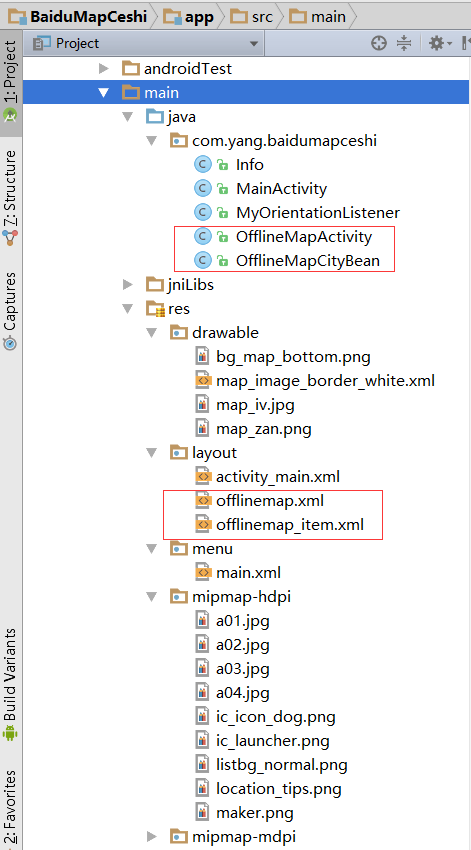 Android 百度地圖離線包導入:下載、進度與快取資料處理
在百度地圖 SDK 中,離線地圖能減少網路依賴,提升地圖載入穩定性。本文整理如何在一個既有地圖頁面中加入離線地圖下載功能,並以列表呈現城市、進度與狀態。 開發準備 官方
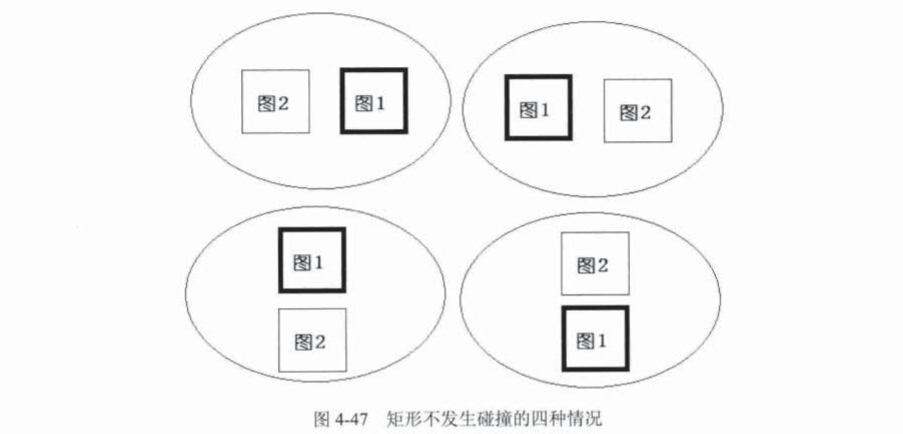 Android 遊戲開發中的碰撞檢測:矩形、圆形與多矩形方案
碰撞檢測是遊戲開發中的基礎環節。本文將介紹幾種常見的碰撞檢測方案,並附上基於 SurfaceView 的完整示例代碼。 矩形碰撞——原理:判斷兩個矩形位置的四種「不相交」
 12308 網上訂汽車票全攻略:春運返鄉輕鬆訂票
12308 全國汽車票網是由中國道路運輸協會與全國站場工作委員會攜手共建,是一個服務全國旅客公路客運出行的互聯網平台。臨近過年,返鄉人潮眾多,加上時間有限,越來越多人選擇
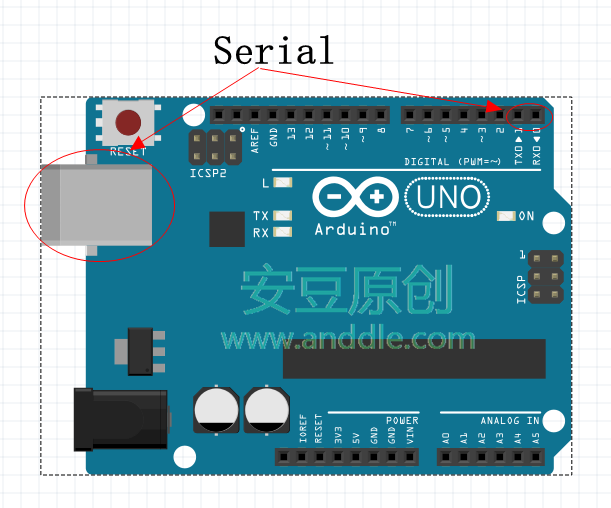 Arduino 藍牙小車(二):手機與 Arduino 的藍牙通信
在上一節中,我們開始接觸 Arduino 與 Android 的藍牙通信。本節將繼續深入,重點說明如何讓手機與 Arduino 之間完成穩定的數據收發,並分析官方 Blu