

編輯:關於 Android 程式設計
SimpleAdapter 適合將靜態或簡單結構的資料快速綁定到清單畫面。它接受由 Map 組成的 List,並依指定的 from 與 to 對應,把資料填入 XML 佈局中的元件。
第一個參數是 Context;第二個是資料來源;第三個是單行佈局;第四個 from 指定 Map 的鍵;第五個 to 指定要填入的 View 資源。若 Map 缺少某個鍵,通常只會得到空值,不會讓程式崩潰,但畫面可能空白。
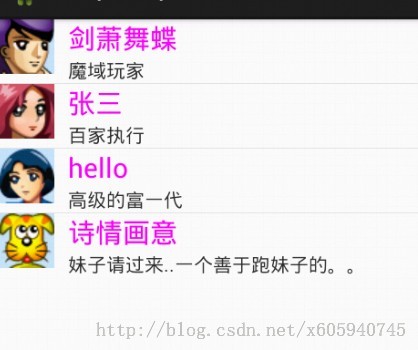
例如要顯示頭像、名稱與描述,可準備包含 head、name、desc 三個鍵的 Map 清單,再讓 SimpleAdapter 對應到 ImageView 與兩個 TextView。若需要更複雜的互動,可自訂 ViewBinder 或改用 BaseAdapter。
SimpleAdapter adapter = new SimpleAdapter(this, listems, R.layout.simple_item, new String[] { "name", "head", "desc" }, new int[] { R.id.name, R.id.head, R.id.desc });
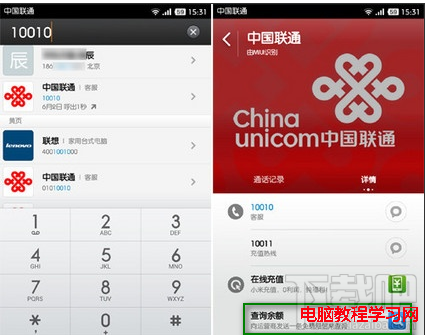 小米(MIUI)怎麼在撥號介面查話費餘額
如果你用的是小米手機或 MIUI 系統,撥號介面其實藏著一個很實用的小功能:直接查話費餘額。不必再撥客服聽語音、也不用傳簡訊,兩下就能知道还剩多少。以下看看怎麼做。 MI
 Android SeekBar 用法總結
SeekBar 是 Android 中常見的進度條控制項,常用於音量調整、播放進度、亮度設定或表單評分。它可以是系統預設樣式,也可以替換成自訂的背景與滑塊圖形。 基本屬性
 Android 簡訊驗證碼整合實作(Eclipse 版)
許多 App 都需要透過簡訊驗證碼確認手機號碼,例如註冊、登入或帳號綁定。以 Eclipse 專案為例,整合簡訊驗證碼 SDK 通常包含四個步驟:取得 SDK、導入專案、
 Android Activity 啟動原理與生命週期完全解析
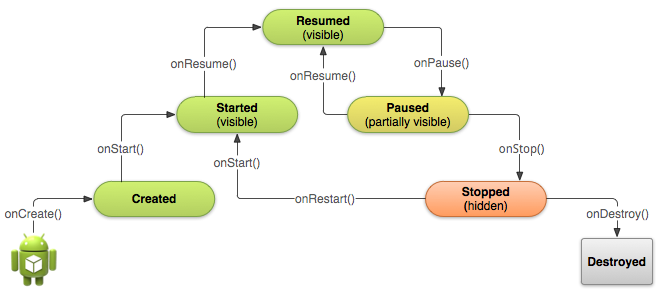
從 main() 到回呼:Android 的啟動邏輯有何不同 在傳統的 Java 程式裡,應用程式由一個 main() 方法作為入口拉起來;但 Android 完全不是這