

編輯:關於 Android 程式設計
本文通過實例分析 Android 持久化技術中的文件讀取與寫入操作,供感興趣的讀者參考。
1、文件存儲要點
(1)在 Android 的持久化技術中,文件存儲是最基本的一種數據存儲方式。
(2)它對內容不做任何處理,原樣寫入文件。
(3)Context 提供了文件讀寫方法:openFileOutput 用於寫入,openFileInput 用於讀取。
(4)寫入時可指定多種模式,例如覆蓋寫入或追加寫入。
(5)寫入的文件默認存儲在 /data/data/包名/files/ 目錄下。
2、示例
這裡設置一個簡單的應用場景:在文本框中輸入內容後,下次再次進入應用時自動顯示上次輸入的內容。
(1)activity_main.xml
<LinearLayout xmlns:android="https://schemas.android.com/apk/res/android" android:layout_width="fill_parent" android:layout_height="fill_parent" android:orientation="horizontal" > <TextView android:id="@+id/textView1" android:layout_width="wrap_content" android:layout_height="wrap_content" android:text="Account:" /> <EditText android:id="@+id/editText1" android:layout_width="match_parent" android:layout_height="wrap_content" android:ems="10" > </EditText> </LinearLayout>
佈局中包含一個 TextView 和一個輸入框。
(2)MainActivity.java
package com.example.testfilestore; import java.io.BufferedReader; import java.io.BufferedWriter; import java.io.FileInputStream; import java.io.FileNotFoundException; import java.io.FileOutputStream; import java.io.IOException; import java.io.InputStreamReader; import java.io.OutputStreamWriter; import android.app.Activity; import android.content.Context; import android.os.Bundle; import android.text.TextUtils; import android.view.Menu; import android.widget.EditText; /** * 文件存儲:寫入與讀取 * @author yy * */ public class MainActivity extends Activity { private EditText editText; @Override protected void onCreate(Bundle savedInstanceState) { super.onCreate(savedInstanceState); setContentView(R.layout.activity_main); //獲取editText對象 editText = (EditText) findViewById(R.id.editText1); //首先加載上次輸入的內容 String inputContent = readFromFile(); if(!TextUtils.isEmpty(inputContent)){ //如果上次輸入的內容不為空,則加載進來 editText.setText(inputContent); //設置光標位置,使之位於文本末尾,默認是在文本頭部 editText.setSelection(inputContent.length()); } } /** * 當活動銷毀時,保存輸入的內容 */ @Override protected void onDestroy() { super.onDestroy(); //獲取輸入的內容 String data = editText.getText().toString(); //寫入文件 writeToFile(data); } /** * 輸入的內容寫入文件 */ public void writeToFile(String data){ FileOutputStream fileOutputStream = null; BufferedWriter bufferedWriter = null; try { //Context中的方法,用於存儲數據 //第一個參數是文件名 //第二個參數是寫入模式,表示覆蓋寫入,如果原來有內容,則會覆蓋 fileOutputStream = openFileOutput("first",Context.MODE_PRIVATE); bufferedWriter = new BufferedWriter(new OutputStreamWriter(fileOutputStream)); bufferedWriter.write(data); } catch (FileNotFoundException e) { e.printStackTrace(); } catch (IOException e) { e.printStackTrace(); }finally{ //關閉流 try { if(bufferedWriter!=null){ bufferedWriter.close(); } } catch (IOException e) { e.printStackTrace(); } } } /** * 從文件中讀取數據 * @return */ public String readFromFile(){ FileInputStream fileInputStream = null; BufferedReader bufferedReader = null; StringBuffer stringBuffer = new StringBuffer(); try { fileInputStream = openFileInput("first"); bufferedReader = new BufferedReader(new InputStreamReader(fileInputStream)); String line = ""; while((line = bufferedReader.readLine())!=null){ stringBuffer.append(line); } } catch (FileNotFoundException e) { e.printStackTrace(); } catch (IOException e) { e.printStackTrace(); }finally{ //關閉流 try { if (bufferedReader != null) { bufferedReader.close(); } } catch (IOException e) { e.printStackTrace(); } } //返回 return stringBuffer.toString(); } @Override public boolean onCreateOptionsMenu(Menu menu) { // Inflate the menu; this adds items to the action bar if it is present. getMenuInflater().inflate(R.menu.main, menu); return true; } }
該類提供兩個核心方法:把輸入內容寫入文件,以及從文件中加載上次的內容,二者分別調用了 Context 提供的 openFileOutput 與 openFileInput。
幾點說明:寫入時只需給出文件名(可帶後綴),無需指定路徑,系統會存到默認目錄;寫入時機放在活動銷毀(onDestroy)時,加載時機則放在活動創建(onCreate)時。此外,讀取後通過 setSelection 把光標移到文本末尾,是一個貼心的小細節。
3、結果
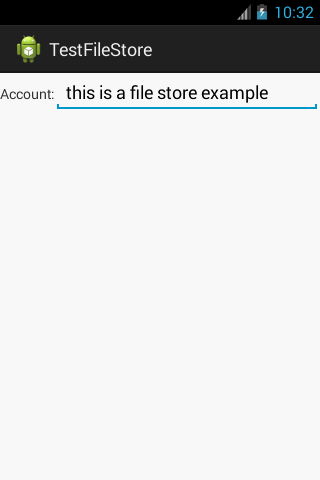
再次進入應用時,會自動加載上次輸入的內容,且光標位於末尾。
希望本文所述對大家的 Android 開發有所幫助。
 用 ListView 做時間軸:快遞物流軌跡頁的完整實作
實現思路 整個畫面以 ListView 為骨架,每個 ListItem 由兩個欄位構成:內容(content)與時間(time)。 時間軸的視覺部分並不是一張圖片,而是用
 Android 關於頁面怎麼做:用 AlertDialog 擴充一個 AboutDialog
幾乎每個 App 都會有這麼一頁:版本號、作者、聯絡方式、簡介。它不需要獨立 Activity,用一個 AlertDialog 承載自訂版面就足夠,而且實作乾淨。 一
 Android Studio 找不到 recyclerview-v7?先搞懂 support 庫的拆分方式
在 Android Studio 裡寫 RecyclerView 時,如果直接照著網路上的教學加入依賴,很可能會看到「找不到 com.android.support:re
 Android 讀取手機已安裝程式列表,並啟動與查看詳情
效果的兩部分:程式列表展示,以及點擊後可啟動程式或查看詳情。 程式列表: 啟動程式、獲取程式資訊: 一、用 AppInfo 承載應用資訊 public clas