

編輯:關於 Android 程式設計
首先在配置文件中加入讀寫 SD 卡的權限:
<uses-permission android:name="android.permission.WRITE_EXTERNAL_STORAGE" />
以下透過 Unity 的 C# 腳本,調用 Android 原生插件來實現截屏與分享功能:
using UnityEngine;
using System.Collections;
using System.IO;

public class Share : MonoBehaviour {
    public static string imagePath;
    static AndroidJavaClass sharePluginClass;
    static AndroidJavaClass unityPlayer;
    static AndroidJavaObject currActivity;
    private static Share mInstance;

    public static Share instance {
        get { return mInstance; }
    }

    void Awake() {
        mInstance = this;
    }

    void Start() {
        imagePath = Application.persistentDataPath + "/HKeyGame.png";
        sharePluginClass = new AndroidJavaClass("com.ari.tool.UnityAndroidTool");
        if (sharePluginClass == null) {
            Debug.Log("sharePluginClass is null");
        } else {
            Debug.Log("sharePluginClass is not null");
        }
        unityPlayer = new AndroidJavaClass("com.unity3d.player.UnityPlayer");
        currActivity = unityPlayer.GetStatic<AndroidJavaObject>("currentActivity");
    }

    public void CallShare(string handline, string subject, string text, bool image) {
        Debug.Log("share call start : " + imagePath);
        if (image) {
            sharePluginClass.CallStatic("share",
                    new object[] { handline, subject, text, imagePath });
        } else {
            sharePluginClass.CallStatic("share",
                    new object[] { handline, subject, text });
        }
        Debug.Log("share call end");
    }

    public void ScreenShot() {
        StartCoroutine(GetCapture());
    }

    IEnumerator GetCapture() {
        yield return new WaitForEndOfFrame();
        int width = Screen.width;
        int height = Screen.height;
        Texture2D tex = new Texture2D(width, height, TextureFormat.RGB24, false);
        tex.ReadPixels(new Rect(0, 0, width, height), 0, 0, true);
        byte[] imagebytes = tex.EncodeToPNG();  // 轉化為 png 圖
        tex.Compress(false);                    // 對屏幕緩存進行壓縮
        // image.mainTexture = tex;             // 顯示縮略圖
        File.WriteAllBytes(Application.persistentDataPath + "/HKeyGame.png",
                imagebytes);                    // 存儲 png 圖
        Debug.Log(Application.persistentDataPath);
    }
}
這段代碼的關鍵在於:先透過 ScreenShot() 觸發協程截取當前畫面並保存為 PNG,再透過 CallShare() 調用 Android 原生分享插件,把文字與圖片路徑傳遞過去,由系統分享面板完成社交分享。
 Android 打包時啟用代碼混淆:ProGuard 配置實戰
只要 APK 被簽名釋出,有心人用常見的反編譯工具就能把 class 的實作大致還原出來。開啟代碼混淆,就是讓這種常規反編譯立刻失效的最基本手段。 第一步:在 build
 Android 萬能適配器實作:BaseAdapter、ViewHolder 與 CommonAdapter
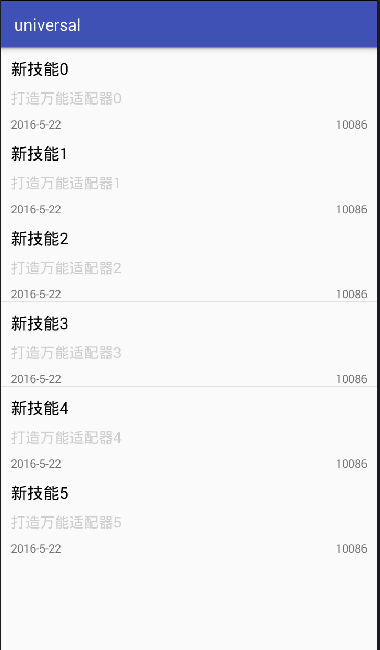
在 Android 中,ListView、GridView 等元件經常需要 Adapter 來綁定資料。若每次都要重新撰寫大量重複程式碼,開發效率會受到影響。本文示範如何
 Android 實現兩個 ScrollView 聯動同步滾動的完整做法
本文分享如何讓兩個 ScrollView 互相聯動、同步滾動的效果,程式碼完整,供大家參考。最近在做的專案裡需要用到兩個 ScrollView 一起滾動的效果——滑動其中
 RxAndroid 使用方式完整解析:從鏈式表達式到執行緒安全與 RxBinding
RxAndroid 是 RxJava 的擴充套件,能用相當優雅的方式處理非同步請求。之前寫過一些相關內容,這次再補充,把 RxAndroid 的用法完整走一遍。 本文範例