

編輯:關於 Android 程式設計
想讓 App 的標題欄更有質感?除了單純的純色背景,我們還可以為標題欄設定具有凹凸感的背景圖片。本文將一步步示範如何自訂標題欄背景。
設定標題欄背景
1> 準備背景圖片 background_pix.png

註:用背景圖片比單純用顏色的好處,是可以讓背景看起來有凹凸的層次感。
2> 在 drawable 文件夾下放 XML 檔案
bitmap_repeat.xml
<?xml version="1.0" encoding="utf-8"?> <bitmap xmlns:android="https://schemas.android.com/apk/res/android" android:src="@drawable/title_pic" android:tileMode="repeat"> </bitmap>
3> 定義樣式檔案 style.xml
<?xml version="1.0" encoding="utf-8"?> <resources> <!-- 自定義標題樣式 --> <style name="StatusBarBackground"> <item name="android:background">@drawable/bitmap_repeat </item> </style> <style name="XTheme" parent="android:Theme"> <!-- Window attributes --> <item name="android:windowTitleBackgroundStyle">@style/StatusBarBackground </item> </style> <!-- 自定義標題樣式 --> </resources>
4> 在 manifest.xml 中引用主題 android:theme="@style/XTheme"
<activity android:name=".activity.MainActivty" android:screenOrientation="portrait" android:configChanges="keyboardHidden|orientation" android:theme="@style/XTheme"> </activity>
如果你想要更靈活地自訂標題欄布局,可以建立一個自訂標題欄的 layout 檔案 ct_title.xml。注意:若在 ct_title.xml 中直接用 android:background="@drawable/bitmap_repeat" 來設定標題欄背景,會出現填充不滿的效果,因此建議改用上面的主題樣式方式。接著在 Activity 中引用:
@Override public void onCreate(Bundle savedInstanceState) { super.onCreate(savedInstanceState); requestWindowFeature(Window.FEATURE_CUSTOM_TITLE); setContentView(R.layout.main); getWindow().setFeatureInt(Window.FEATURE_CUSTOM_TITLE,R.layout.ct_title); }
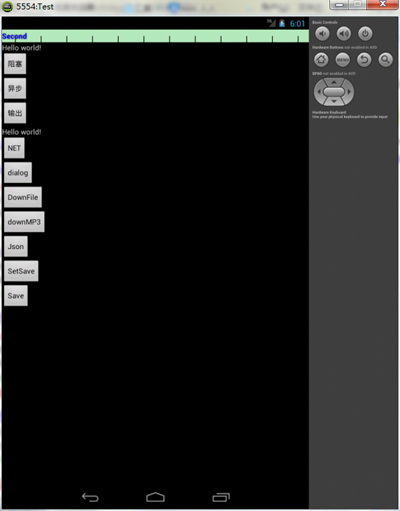
透過主題樣式 + 自訂標題欄布局的組合,你就能打造出具個人風格、且能正確鋪滿背景的標題欄了。
 Android 類加載機制淺析
Android 的類加載機制與傳統 Java 虛擬機有相似之處,也有其獨特之處。開發者在進行外掛化、動態載入或熱修復相關技術時,往往需要理解 DexClassLoader
 Picasso 圖片下載與快取庫:一行程式碼搞定圖片載入
在 Android 裡手寫圖片載入是件苦差事:要開背景執行緒、要處理快取、要應對 ListView 的 View 重用、還要在失敗時給個佔位圖。Square 開源的 Pi
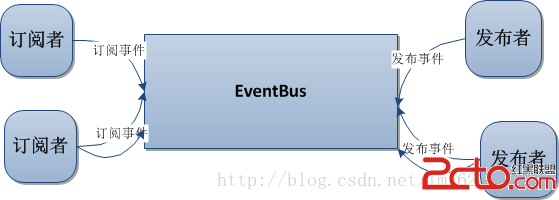 Android EventBus 入門:事件發布訂閱與 ThreadMode
EventBus 是什麼 EventBus 是一個發布與訂閱的事件總線。它讓元件之間不需要直接依賴,也能透過事件傳遞資料。發布者送出事件,訂閱者只要註冊對應方法,就能收到
 自製 ClearEditText:為 Android 輸入框加上一鍵清除功能
這次要分享一個實用的小元件 ClearEditText:在 Android 輸入框右側放上一個小圖示,點一下就能清空輸入內容。iOS 只要設定某個屬性就能做到,但 And