

編輯:關於 Android 程式設計
在開發中我們常有這樣的需求:當 Activity 創建時,需要獲取某個 View 的寬高,然後進行相應的操作。但如果你在 onCreate、onStart 中直接獲取 View 的大小,往往拿到的都是 0。這是因為此時 View 的繪製流程尚未完成——原理和在 onCreate 中彈出 Dialog 或 PopupWindow 會報「Activity not running」類似。
那麼,如何在合適的時機正確獲取 View 的寬高呢?下面介紹四種常用方法:
第一種方式:重寫 onWindowFocusChanged
當 Activity 獲取到焦點時,View 已經繪製完成,也能獲取到準確的寬高了。同樣地,Dialog 和 PopupWindow 也可以在這裡彈出。需要注意的是,這個方法會被調用多次,只有在 hasFocus 為 true 時才可進行相應操作。
@Override public void onWindowFocusChanged(boolean hasFocus) { super.onWindowFocusChanged(hasFocus); if (hasFocus) { System.out.println("onWindowFocusChanged width=" + tvTest.getWidth() + " height=" + tvTest.getHeight()); } }
第二種方式:透過 ViewTreeObserver 的 OnPreDrawListener
/** * 會執行多次 */ private void getSize1() { ViewTreeObserver vto = tvTest.getViewTreeObserver(); vto.addOnPreDrawListener(new ViewTreeObserver.OnPreDrawListener() { @Override public boolean onPreDraw() { int height = tvTest.getMeasuredHeight(); int width = tvTest.getMeasuredWidth(); System.out.println("height" + height); System.out.println("width" + width); return true; } }); }
第三種方式:透過 ViewTreeObserver 的 OnGlobalLayoutListener
private void getSize2() { ViewTreeObserver viewTreeObserver = tvTest.getViewTreeObserver(); viewTreeObserver .addOnGlobalLayoutListener(new OnGlobalLayoutListener() { @Override public void onGlobalLayout() { tvTest.getViewTreeObserver() .removeGlobalOnLayoutListener(this); System.out.println("onGlobalLayout width=" + tvTest.getWidth() + " height=" + tvTest.getHeight()); } }); }
第四種方式:透過 View.post()
利用 post 方法將任務加入 View 的訊息佇列,待 View 繪製完成後再執行,即可拿到正確尺寸。
private void getSize3() { tvTest.post(new Runnable() { @Override public void run() { System.out.println("postDelayed width=" + tvTest.getWidth() + " height=" + tvTest.getHeight()); } }); }
以上就是 Android 獲取 View 寬高的四種方式。實際開發中,最常用且最推薦的是 onWindowFocusChanged 與 View.post(),前者適合在頁面加載完成後執行一次性操作,後者則簡潔直觀。希望對你的學習有所幫助。
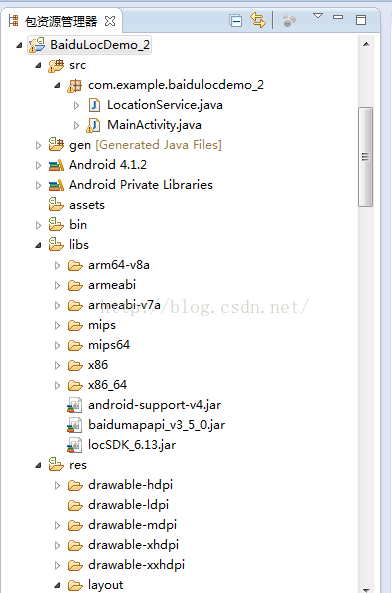 百度定位 SDK 接入示例:LocationService 與定位回呼
百度定位 SDK 接入概覽 在 Android 應用中接入定位能力時,百度定位 SDK 是常見選擇之一。它提供位置獲取、座標轉換、地址解析與多種定位模式,適合需要顯示周邊
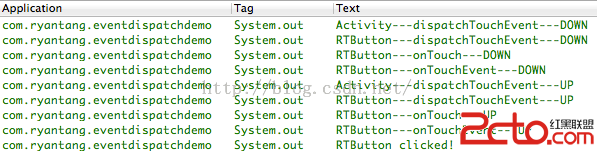 Android 事件分發機制完全解析:三個方法、單層與嵌套布局
一、Android 事件的構成 Android 中的事件包含點按、長按、拖拽、滑動等,點按又分單擊與雙擊,此外還有單指與多指操作。但無論多複雜,所有事件都以三個基本動作為
 Android Studio 效率技巧:一次改多行的「多行編輯」
Android Studio 大家應該都不陌生,但多數人大概只用到它最基礎的功能。其實這個 IDE 相當強大,藏著不少實用卻鮮為人知的小技巧,熟練之後能大幅拉高開發效率。
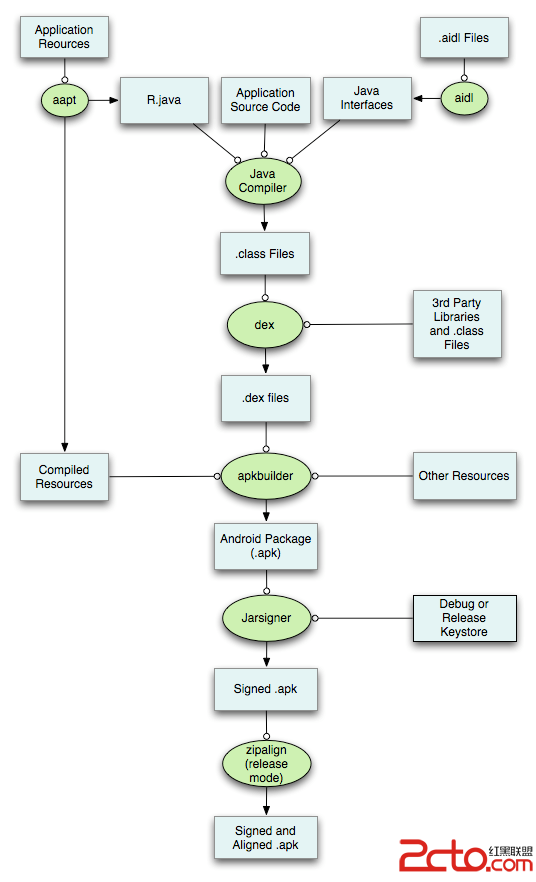 美團 Android DEX 自動拆包與動態加載實踐全解析
問題的起點 對 Android 開發者而言,隨著業務規模不斷擴張,新功能與新類庫層出不窮,程式碼急遽膨脹,APK 體積也水漲船高。終有一天,你會迎面撞上這類錯誤: 打包