

編輯:關於 Android 程式設計
Service 是 Android 系統中的一種組件,級別與 Activity 相當,但它不能自行運行,只能後台運行,並可與其他組件交互。本文總結了幾種提升 Service 存活能力的常用技巧,供大家參考。
每次調用 startService(Intent) 時都會觸發該 Service 的 onStartCommand(Intent, int, int) 方法。從官方文檔可知,onStartCommand 有 4 種 int 返回值。
START_STICKY:若 service 進程被 kill,系統會保留其為「已啟動」狀態並嘗試重建,重建後一定會調用 onStartCommand;若期間沒有新的啟動命令,Intent 參數為 null。
START_NOT_STICKY:「非粘性」,執行完 onStartCommand 後若服務被異常 kill,系統不會自動重啟。
START_REDELIVER_INTENT:若服務被異常 kill,系統會自動重啟並把最後的 Intent 重新傳入。
START_STICKY_COMPATIBILITY:START_STICKY 的兼容版本,但不保證服務被 kill 後一定能重啟。
1、重寫 onStartCommand 返回 START_STICKY 或 START_STICKY_COMPATIBILITY:
@Override public int onStartCommand(Intent intent, int flags, int startId) { return START_STICKY_COMPATIBILITY; //return super.onStartCommand(intent, flags, startId); }
或
@Override public int onStartCommand(Intent intent, int flags, int startId) { flags = START_STICKY; return super.onStartCommand(intent, flags, startId); // return START_REDELIVER_INTENT; } @Override public void onStart(Intent intent, int startId) { // 再次動態注冊廣播 IntentFilter localIntentFilter = new IntentFilter("android.intent.action.USER_PRESENT"); localIntentFilter.setPriority(Integer.MAX_VALUE);// 整形最大值 myReceiver searchReceiver = new myReceiver(); registerReceiver(searchReceiver, localIntentFilter); super.onStart(intent, startId); }
2、在 Service 的 onDestroy() 中重啟 Service:
public void onDestroy() { Intent localIntent = new Intent(); localIntent.setClass(this, MyService.class); // 銷毀時重新啟動Service this.startService(localIntent); }
3、創建一個廣播接收器:
public class myReceiver extends BroadcastReceiver { @Override public void onReceive(Context context, Intent intent) { context.startService(new Intent(context, Google.class)); } }
4、在 AndroidManifest.xml 中註冊 myReceiver 及 MyService:
<receiver android:name=".myReceiver" > <intent-filter android:priority="2147483647" ><!--優先級加最高--> <!-- 系統啟動完成後會調用 --> <action android:name="android.intent.action.BOOT_COMPLETED" /> <!-- 解鎖完成後會調用 --> <action android:name="android.intent.action.USER_PRESENT" /> <!-- 監聽情景切換 --> <action android:name="android.media.RINGER_MODE_CHANGED" /> </intent-filter> </receiver> <service android:name=".MyService" >
注意:解鎖、啟動、切換場景激活廣播需相應權限,如:
<uses-permission android:name="android.permission.RECEIVE_BOOT_COMPLETED" /> <uses-permission android:name="android.permission.READ_PHONE_STATE" />
1、settings 中 stop service:在 onDestroy 中調用 startService 重啟 Service。
2、settings 中 force stop 應用:捕捉系統廣播(action 為 android.intent.action.PACKAGE_RESTARTED)。
3、借助第三方應用 kill 掉 running task:可提升 Service 優先級、進行程序簽名,或 adb push 到 system\app 下等。
相較於 /data/app 下的應用,放在 /system/app 下的應用享受更多特權。例如在其 Manifest 中設置 android:persistent="true",可使其免受 out-of-memory killer 的影響:
<application android:name="PhoneApp" android:persistent="true" android:label="@string/dialerIconLabel" android:icon="@drawable/ic_launcher_phone"> ... </application>
需要客觀說明的是,隨著 Android 版本的不斷升級,系統對後台進程的限制日益嚴格,上述部分技巧在新系統上可能失效,且頻繁喚醒後台服務也會增加電量消耗。合理的做法是採用官方推薦的 WorkManager、前台服務(Foreground Service)等機制來規劃後台任務。以上就是提升 Service 存活能力的常見思路,希望對大家的開發有所幫助。
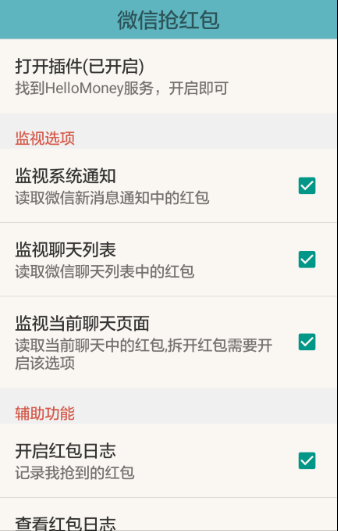 以 AccessibilityService 為基礎,拆解 Android 自動化操作的三個環節
本文以「自動處理聊天中的紅包消息」為案例,說明 Android 無障礙服務(AccessibilityService)在自動化場景下的完整用法:監聽畫面變化、定位目標控制
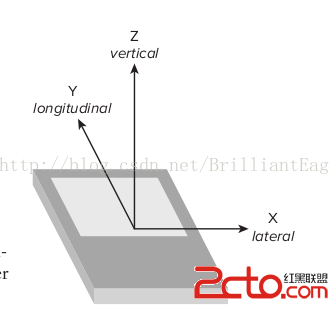 Android 取得三軸方向資料的兩種方案(磁力計+加速度計)
基礎概念 先釐清 Android 座標系統下三個旋轉角的定義: ・繞 Z 軸旋轉:Azimuth(方位角),可理解為指南針的磁北方向偏角。・繞 X 軸旋轉:Pitch(
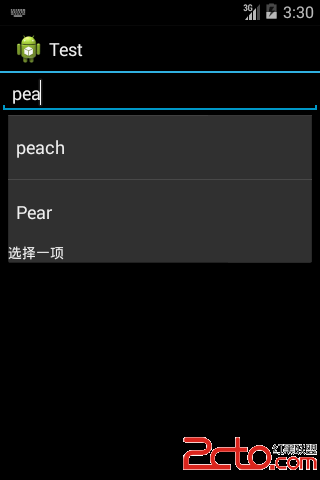 Android AutoCompleteTextView 自動完成輸入框的使用
AutoCompleteTextView 是可編輯的文本輸入框,但它多做了一件事:當用戶輸入字符時,會自動彈出一個下拉列表,展示所有與已輸入內容匹配的候選項,讓用戶直接
 Android Activity 生命週期完全指南:狀態、回調與資源管理
Activity 生命週期為什麼重要 Activity 是使用者直接互動的介面。當來電、切換應用程式、旋轉螢幕或返回上一頁時,系統會依情境改變 Activity 狀態。若