

編輯:關於 Android 程式設計
本文介紹如何透過 SharedPreferences 實現記住密碼與自動登錄,具體如下。
主要程式碼:
public class LoginActivity extends Activity { private EditText username; private EditText userpassword; private CheckBox remember; private CheckBox autologin; private Button login; private SharedPreferences sp; private String userNameValue,passwordValue; @Override protected void onCreate(Bundle savedInstanceState) { // TODO Auto-generated method stub super.onCreate(savedInstanceState); setContentView(R.layout.login); // 初始化用戶名、密碼、記住密碼、自動登錄、登錄按鈕 username = (EditText) findViewById(R.id.username); userpassword = (EditText) findViewById(R.id.userpassword); remember = (CheckBox) findViewById(R.id.remember); autologin = (CheckBox) findViewById(R.id.autologin); login = (Button) findViewById(R.id.login); sp = getSharedPreferences("userInfo", 0); String name=sp.getString("USER_NAME", ""); String pass =sp.getString("PASSWORD", ""); boolean choseRemember =sp.getBoolean("remember", false); boolean choseAutoLogin =sp.getBoolean("autologin", false); // Toast.makeText(this, name, Toast.LENGTH_SHORT).show(); //如果上次選了記住密碼,那進入登錄頁面也自動勾選記住密碼,並填上用戶名和密碼 if(choseRemember){ username.setText(name); userpassword.setText(pass); remember.setChecked(true); } //如果上次登錄選了自動登錄,那進入登錄頁面也自動勾選自動登錄 if(choseAutoLogin){ autologin.setChecked(true); } login.setOnClickListener(new OnClickListener() { // 默認可登錄帳號tinyphp,密碼123 @Override public void onClick(View arg0) { userNameValue = username.getText().toString(); passwordValue = userpassword.getText().toString(); SharedPreferences.Editor editor =sp.edit(); // TODO Auto-generated method stub if (userNameValue.equals("tinyphp") && passwordValue.equals("123")) { Toast.makeText(LoginActivity.this, "登錄成功", Toast.LENGTH_SHORT).show(); //保存用戶名和密碼 editor.putString("USER_NAME", userNameValue); editor.putString("PASSWORD", passwordValue); //是否記住密碼 if(remember.isChecked()){ editor.putBoolean("remember", true); }else{ editor.putBoolean("remember", false); } //是否自動登錄 if(autologin.isChecked()){ editor.putBoolean("autologin", true); }else{ editor.putBoolean("autologin", false); } editor.commit(); //跳轉 Intent intent =new Intent(LoginActivity.this,SuccessActivity.class); startActivity(intent); } else { Toast.makeText(LoginActivity.this, "用戶名或密碼錯誤,請重新登錄!", Toast.LENGTH_SHORT).show(); } } }); } } 布局檔:
<?xml version="1.0" encoding="utf-8"?> <LinearLayout xmlns:android="https://schemas.android.com/apk/res/android" android:layout_width="match_parent" android:layout_height="match_parent" android:orientation="vertical" android:padding="10dp" > <TextView android:layout_width="wrap_content" android:layout_height="wrap_content" android:text="用戶名:" /> <EditText android:id="@+id/username" android:layout_width="match_parent" android:layout_height="wrap_content" android:ems="10" android:inputType="textPersonName" > </EditText> <TextView android:layout_width="wrap_content" android:layout_height="wrap_content" android:layout_marginTop="10dp" android:text="密碼:" /> <EditText android:id="@+id/userpassword" android:layout_width="match_parent" android:layout_height="wrap_content" android:ems="10" android:inputType="textPassword" > </EditText> <CheckBox android:id="@+id/remember" android:layout_width="wrap_content" android:layout_height="wrap_content" android:text="記住密碼" /> <CheckBox android:id="@+id/autologin" android:layout_width="wrap_content" android:layout_height="wrap_content" android:text="自動登錄" /> <Button android:id="@+id/login" android:layout_width="match_parent" android:layout_height="wrap_content" android:text="登錄" /> </LinearLayout>
核心在於用 getSharedPreferences 讀寫用戶名、密碼與勾選狀態:登入成功時透過 Editor 存入並 commit,下次進入時再讀回自動帶入與勾選。以上就是本次分享,希望對你的學習有所幫助。
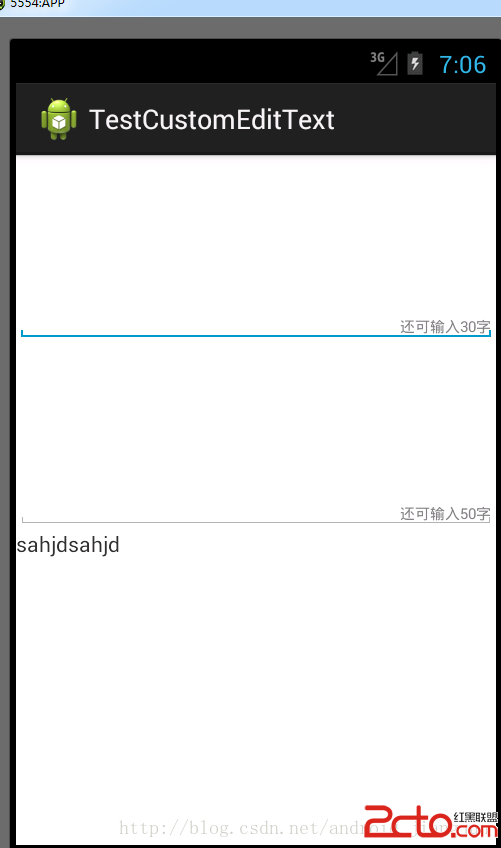 自定義一個會提示剩餘字數的 EditText
最近專案有個需求:即時提示使用者還能打幾個字,也就是要監聽 EditText 的文字變化。功能本身不難,但每次都用組合方式重寫一遍實在麻煩,於是就把它包成一個自定義控件,
 優步電話加密服務什麼時候上線?隱號通話方案介紹
優步電話加密服務與隱號通話方案 優步在全球多個城市提供即時用車服務。為保障車主與乘客隱私,優步在部分城市上線電話加密功能,並採用雲之訊的隱號通話方案。 該功能在乘客與車
 Android 中實現圖片翻頁效果的完整做法
翻頁效果能為電子書、相簿這類應用帶來擬真而優雅的閱讀體驗。以下透過一個自定義的 PageWidget 來實現類似真實書本翻頁的效果,核心在於利用 Canvas 繪製前景圖
 Android 左右雙向側滑選單實作:SlidingMenu 搭配 Fragment 的完整流程
側滑選單已經是國內 App 的標準配備,但大多數教學只示範單側滑出。本文實作的是左右皆可滑出的版本:左側與右側各掛一個 Fragment,滑出來的內容既能是 Fragme