

編輯:關於 Android 程式設計
不少 App 的聯絡人頁面都有一條貼在右側的字母索引欄,手指一滑就能快速定位到對應的姓氏分組,操作起來相當順手。本文就帶大家動手做一個類似通訊錄的 SiderBar 側邊滑動效果,完整分享實作思路與程式碼,供大家參考交流。
自個兒琢磨出來的東西難免還有打磨的空間,若有不夠周全之處,還請各位多多包涵。
先來看看效果:
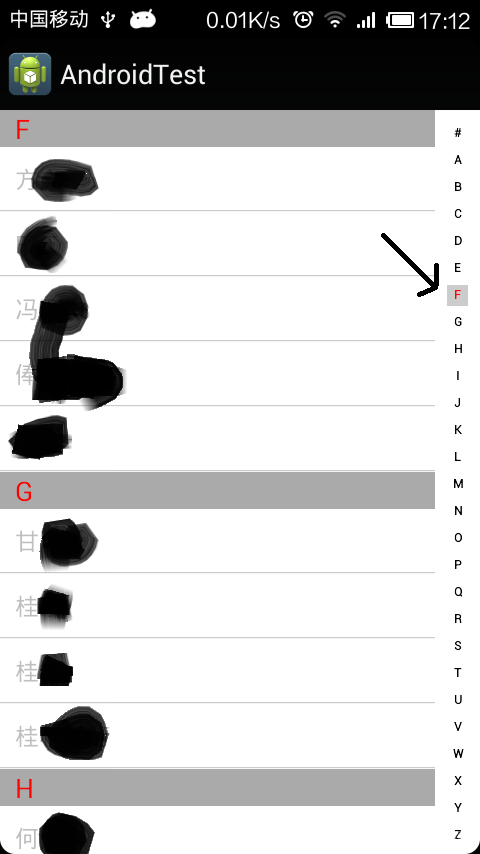
核心實作程式碼如下:
package com.freesonfish.listview_index; import android.content.Context; import android.graphics.Canvas; import android.graphics.Color; import android.graphics.Paint; import android.util.AttributeSet; import android.view.MotionEvent; import android.view.View; public class MySideBar extends View { private OnTouchingLetterChangedListener touchListener; // 26個字母 public static String[] b = { "#", "A", "B", "C", "D", "E", "F", "G", "H", "I", "J", "K", "L", "M", "N", "O", "P", "Q", "R", "S", "T", "U", "V", "W", "X", "Y", "Z" }; private boolean showBkg = false; int choose = -1; int scrollChoose = -1; Paint paint = new Paint(); Paint rectPaint = new Paint(); float rectWidth = 0f; public MySideBar(Context context, AttributeSet attrs, int defStyle) { super(context, attrs, defStyle); init(); } public MySideBar(Context context, AttributeSet attrs) { super(context, attrs); init(); } public MySideBar(Context context) { super(context); init(); } private void init() { rectPaint.setColor(Color.parseColor("#CCCCCC")); rectWidth = paint.measureText("#"); } /** * 重寫這個方法 */ protected void onDraw(Canvas canvas) { super.onDraw(canvas); if (showBkg) { canvas.drawColor(Color.parseColor("#CCCCCC")); } final int height = getHeight(); final int width = getWidth(); final int singleHeight = height / b.length; final float xRectPos = ((float) width - paint.measureText("#")) / 2.0f - rectWidth; final float xRectPos2 = xRectPos + 3.0f * rectWidth; for (int i = 0; i < b.length; i++) { paint.setFakeBoldText(true); paint.setAntiAlias(true); final float xPos = ((float) width - paint.measureText(b[i])) / 2.0f; final float yPos = singleHeight * i + singleHeight; if (i == choose) { paint.setColor(Color.RED); canvas.drawRect(xRectPos, yPos - singleHeight / 2.0f, xRectPos2, yPos + rectWidth, rectPaint); } canvas.drawText(b[i], xPos, yPos, paint); paint.reset(); } } @Override public boolean dispatchTouchEvent(MotionEvent event) { final int action = event.getAction(); final float y = event.getY(); final int c = (int) (y / getHeight() * b.length); switch (action) { case MotionEvent.ACTION_DOWN: showBkg = true; if (choose != c && touchListener != null) { doOnActionDown(c); } break; case MotionEvent.ACTION_MOVE: if (choose != c && touchListener != null) { doOnActionDown(c); } break; case MotionEvent.ACTION_UP: showBkg = false; invalidate(); break; } return true; } /** * listview滾動時候調用它 * * @param c */ public void setColorWhenListViewScrolling(int c) { if (scrollChoose != c) { scrollChoose = c; String string = ListContantsUtil.AbcList.get(c); for (int i = c; i < b.length; ++i) { if (string.equals(b[i])) { choose = i; invalidate(); break; } } } } /** * 當側邊欄被按下的動作 * @param c */ private void doOnActionDown(int c) { if (c > 0 && c < b.length) { if (ListContantsUtil.indexPositionMap.containsKey(b[c])) { touchListener.onTouchingLetterChanged(b[c]); choose = c; invalidate(); } else { c = c - 1; doOnActionDown(c); } } } @Override public boolean onTouchEvent(MotionEvent event) { return super.onTouchEvent(event); } public void setOnTouchingLetterChangedListener(OnTouchingLetterChangedListener touchListener) { this.touchListener = touchListener; } /** * 用來通知activity顯示選中的字母 * @author freeson * */ public interface OnTouchingLetterChangedListener { public void onTouchingLetterChanged(String s); } } 另外一個 ListContantsUtil 類,負責存放聯絡人姓名對應的拼音首字母等資料,程式碼如下:
package com.freesonfish.listview_index; import java.util.ArrayList; import java.util.HashMap; import java.util.List; public class ListContantsUtil { static final List<Integer> indexPositionList = new ArrayList<Integer>(); static final List<String> AbcList = new ArrayList<String>(); static final HashMap<String, Integer> indexPositionMap = new HashMap<String, Integer>(); static void putNameIndexToMap(List<String> list, HashMap<String, String> nameAndPinyin) { int lenght = list.size(); for (int i = 0; i < lenght; ++i) { String name = nameAndPinyin.get(list.get(i)).substring(0, 1); // 判斷該字符是屬於字母還是數字或其他的 int ascii = name.toCharArray()[0]; if (ascii >= 65 && ascii <= 90) { if (!indexPositionMap.containsKey(name)) { indexPositionMap.put(name, i); AbcList.add(name); indexPositionList.add(i); } } else { if (!indexPositionMap.containsKey("#")) { indexPositionMap.put("#", i); AbcList.add("#"); indexPositionList.add(i); } } } } } 需要提醒的是,上面這份程式碼仍存在一些細節可以打磨,建議大家動手優化一下。完整的範例程式碼可至本站下載使用。
希望本文的分享能對大家的 Android 開發有所幫助。
 Android Material Design 新 UI 元件入門:NavigationView、TextInputLayout 與 Snackbar
前言 自 Google 推出 Material Design 後,Android 應用的視覺與互動體驗大幅提升。為了讓舊版本也能使用新樣式,Android 提供 Mate
 Volley 深度實戰:從 Request 到自訂框架封裝
Volley 是 Google 在 I/O 2013 端出的官方網路通訊庫。在它出現之前,Android 開發者多半在幾個成熟的三方庫之間做選擇——android-asy
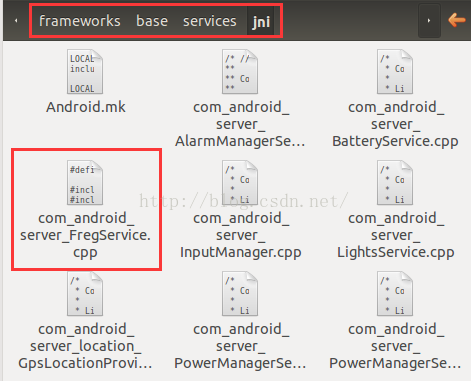 Android 系統篇:如何編寫並註冊系統服務
本文接續先前的驅動開發主題,說明如何把一個簡單的驅動能力,透過 JNI 與 Framework 層服務,包裝成可供上層應用呼叫的系統服務。這是一個從內核層一路延伸到 Fr
 Android 檔案加密與解密實作
在培訓、教育或企業內部應用中,常需要限制下載的影片與文件只能用自家 App 開啟。此時可對檔案進行加密與解密,避免使用者直接轉傳給其他播放器。 加解密流程 加密時,從檔案