

編輯:關於 Android 程式設計
App 需要備份資料、下載資源包、或把多張圖打包上傳時,都會用到 zip。Java 標準庫的 java.util.zip 已經足夠勝任,本文把它包成一個好用的工具類,並附帶一個遞迴走訪目錄的小工具。
壓縮前得先知道要壓哪些檔案。這裡提供兩種走訪方式:非遞迴(用 LinkedList 當佇列,逐層展開)與遞迴(直觀但要注意堆疊深度)。
package com.once;

import java.io.File;
import java.util.ArrayList;
import java.util.LinkedList;

/** 文件夾遍歷 */
public class DirTraversal {

    /** 非遞迴版本:用佇列逐層處理 */
    public static LinkedList<File> listLinkedFiles(String strPath) {
        LinkedList<File> list = new LinkedList<File>();
        File dir = new File(strPath);
        File[] files = dir.listFiles();
        if (files == null) return list;

        for (File file : files) {
            if (file.isDirectory()) {
                list.add(file);
            } else {
                System.out.println(file.getAbsolutePath());
            }
        }

        File tmp;
        while (!list.isEmpty()) {
            tmp = list.removeFirst();
            files = tmp.listFiles();
            if (files == null) continue;
            for (File file : files) {
                if (file.isDirectory()) {
                    list.add(file);
                } else {
                    System.out.println(file.getAbsolutePath());
                }
            }
        }
        return list;
    }

    /** 遞迴版本:找出所有 zip 檔 */
    public static ArrayList<File> listFiles(String strPath) {
        return refreshFileList(strPath);
    }

    private static ArrayList<File> refreshFileList(String strPath) {
        ArrayList<File> filelist = new ArrayList<File>();
        File dir = new File(strPath);
        File[] files = dir.listFiles();
        if (files == null) return filelist;

        for (File file : files) {
            if (file.isDirectory()) {
                filelist.addAll(refreshFileList(file.getAbsolutePath()));
            } else if (file.getName().toLowerCase().endsWith("zip")) {
                filelist.add(file);
            }
        }
        return filelist;
    }
}
這裡修掉了原版的兩個問題:遞迴時原本沒有把子目錄的結果併回清單(導致只會回傳最底層的檔案),以及 listFiles() 可能回傳 null 卻直接 for-each 造成 NPE。
package com.once;

import java.io.*;
import java.util.ArrayList;
import java.util.Collection;
import java.util.Enumeration;
import java.util.zip.ZipEntry;
import java.util.zip.ZipException;
import java.util.zip.ZipFile;
import java.util.zip.ZipOutputStream;

/** Java 實現的 Zip 工具類 */
public class ZipUtils {

    private static final int BUFF_SIZE = 1024 * 1024;   // 1 MB 緩衝區

    /** 批量壓縮文件(夾) */
    public static void zipFiles(Collection<File> resFileList, File zipFile) throws IOException {
        zipFiles(resFileList, zipFile, null);
    }

    /** 批量壓縮文件(夾),可指定註釋 */
    public static void zipFiles(Collection<File> resFileList, File zipFile, String comment)
            throws IOException {
        try (ZipOutputStream zipout = new ZipOutputStream(
                new BufferedOutputStream(new FileOutputStream(zipFile), BUFF_SIZE))) {
            for (File resFile : resFileList) {
                zipFile(resFile, zipout, "");
            }
            if (comment != null) {
                zipout.setComment(comment);
            }
        }
    }

    /** 解壓縮整個檔案 */
    public static void upZipFile(File zipFile, String folderPath)
            throws ZipException, IOException {
        File desDir = new File(folderPath);
        if (!desDir.exists()) {
            desDir.mkdirs();
        }
        try (ZipFile zf = new ZipFile(zipFile)) {
            for (Enumeration<?> entries = zf.entries(); entries.hasMoreElements();) {
                ZipEntry entry = (ZipEntry) entries.nextElement();
                try (InputStream in = zf.getInputStream(entry)) {
                    // zip 內的檔名編碼需轉換,否則中文會變亂碼
                    String str = folderPath + File.separator + entry.getName();
                    str = new String(str.getBytes("8859_1"), "GB2312");

                    File desFile = new File(str);
                    File parent = desFile.getParentFile();
                    if (parent != null && !parent.exists()) {
                        parent.mkdirs();
                    }
                    if (!desFile.exists()) {
                        desFile.createNewFile();
                    }

                    try (OutputStream out = new FileOutputStream(desFile)) {
                        byte[] buffer = new byte[BUFF_SIZE];
                        int realLength;
                        while ((realLength = in.read(buffer)) > 0) {
                            out.write(buffer, 0, realLength);
                        }
                    }
                }
            }
        }
    }

    /** 只解壓檔名包含指定字串的檔案,回傳解出的檔案清單 */
    public static ArrayList<File> upZipSelectedFile(File zipFile, String folderPath,
                                                    String nameContains)
            throws ZipException, IOException {
        ArrayList<File> fileList = new ArrayList<File>();
        File desDir = new File(folderPath);
        if (!desDir.exists()) {
            desDir.mkdirs();
        }

        try (ZipFile zf = new ZipFile(zipFile)) {
            for (Enumeration<?> entries = zf.entries(); entries.hasMoreElements();) {
                ZipEntry entry = (ZipEntry) entries.nextElement();
                if (!entry.getName().contains(nameContains)) continue;

                try (InputStream in = zf.getInputStream(entry)) {
                    String str = folderPath + File.separator + entry.getName();
                    str = new String(str.getBytes("8859_1"), "GB2312");

                    File desFile = new File(str);
                    File parent = desFile.getParentFile();
                    if (parent != null && !parent.exists()) {
                        parent.mkdirs();
                    }
                    if (!desFile.exists()) {
                        desFile.createNewFile();
                    }

                    try (OutputStream out = new FileOutputStream(desFile)) {
                        byte[] buffer = new byte[BUFF_SIZE];
                        int realLength;
                        while ((realLength = in.read(buffer)) > 0) {
                            out.write(buffer, 0, realLength);
                        }
                    }
                    fileList.add(desFile);
                }
            }
        }
        return fileList;
    }

    /** 取得壓縮檔內所有條目名稱 */
    public static ArrayList<String> getEntriesNames(File zipFile)
            throws ZipException, IOException {
        ArrayList<String> entryNames = new ArrayList<String>();
        Enumeration<?> entries = getEntriesEnumeration(zipFile);
        while (entries.hasMoreElements()) {
            ZipEntry entry = (ZipEntry) entries.nextElement();
            entryNames.add(new String(getEntryName(entry).getBytes("GB2312"), "8859_1"));
        }
        return entryNames;
    }

    /** 取得壓縮檔的條目列舉,可用來讀取各項屬性 */
    public static Enumeration<?> getEntriesEnumeration(File zipFile)
            throws ZipException, IOException {
        ZipFile zf = new ZipFile(zipFile);
        return zf.entries();
    }

    public static String getEntryComment(ZipEntry entry) throws UnsupportedEncodingException {
        return new String(entry.getComment().getBytes("GB2312"), "8859_1");
    }

    public static String getEntryName(ZipEntry entry) throws UnsupportedEncodingException {
        return new String(entry.getName().getBytes("GB2312"), "8859_1");
    }

    /** 核心:把單一檔案或目錄寫進 zip 串流 */
    private static void zipFile(File resFile, ZipOutputStream zipout, String rootpath)
            throws IOException {
        rootpath = rootpath + (rootpath.trim().length() == 0 ? "" : File.separator)
                + resFile.getName();
        rootpath = new String(rootpath.getBytes("8859_1"), "GB2312");

        if (resFile.isDirectory()) {
            File[] fileList = resFile.listFiles();
            if (fileList != null) {
                for (File file : fileList) {
                    zipFile(file, zipout, rootpath);
                }
            }
        } else {
            byte[] buffer = new byte[BUFF_SIZE];
            try (BufferedInputStream in = new BufferedInputStream(
                    new FileInputStream(resFile), BUFF_SIZE)) {
                zipout.putNextEntry(new ZipEntry(rootpath));
                int realLength;
                while ((realLength = in.read(buffer)) != -1) {
                    zipout.write(buffer, 0, realLength);
                }
                zipout.flush();
                zipout.closeEntry();
            }
        }
    }
}
中文檔名的編碼問題。zip 格式誕生時沒有 UTF-8 的概念,Windows 產生的壓縮檔通常用 GBK 編碼檔名,而 Java 的 ZipFile 預設以 UTF-8 解讀,就會出現亂碼。程式中 new String(str.getBytes("8859_1"), "GB2312") 這行就是在做編碼轉換。若讀取的是新格式的 zip(general purpose bit 11 被設為 1),檔名已是 UTF-8,這行反而會造成亂碼,實務上最好依情況判斷。
Zip Slip 安全風險。解壓時若 zip 內含 ../../etc/passwd 這類路徑,檔案可能被寫到指定目錄之外。這在處理使用者上傳的壓縮檔時是嚴重漏洞。防禦方式是解壓前先比對:
File target = new File(destDir, entry.getName());
if (!target.getCanonicalPath().startsWith(
        destDir.getCanonicalPath() + File.separator)) {
    throw new IOException("可疑的路徑:" + entry.getName());
}
所有串流都要關。範例已改用 try-with-resources,即使中途拋例外也會自動關閉,避免檔案描述符洩漏。
記得 closeEntry。每寫完一個條目就呼叫,否則下一個 putNextEntry 會失敗。
壓縮等級可調。用 zipout.setLevel(Deflater.BEST_SPEED) 可在檔案大小與耗時之間取捨;已經壓縮過的格式(jpg、mp4、zip)再壓幾乎沒有效果,設為 Deflater.NO_COMPRESSION 反而更快。
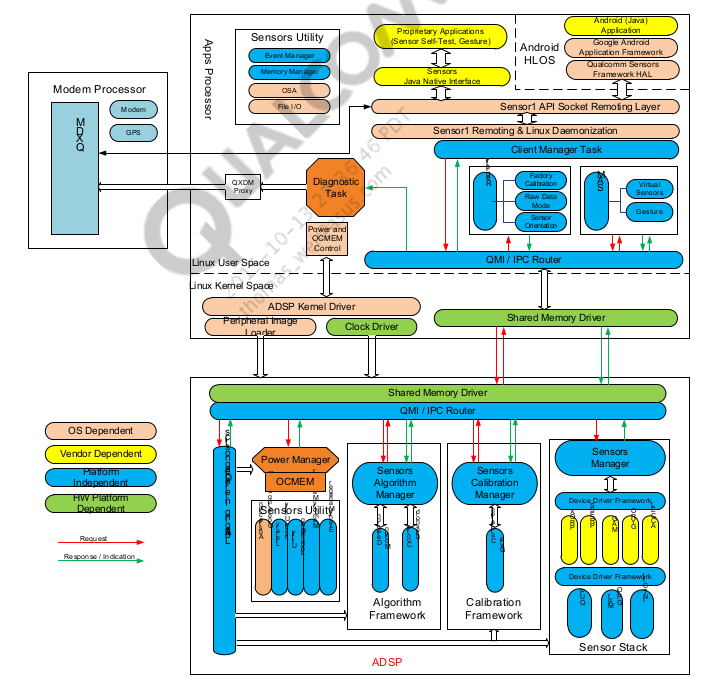 Android Sensor詳解(1):簡介與系統架構
前言 近來正在學習如何porting sensor,藉此機會寫部落格來督促自己進步。若有人對文中的理解提出不同看法,那是最好不過的,大家可以一起交流成長。本系列將從底層到
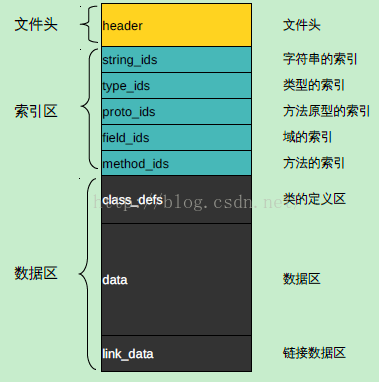 深入 dex 與 odex:文件結構、驗證與優化流程剖析
一、dex 文件結構 從邏輯上可把 dex 檔切成三個區塊:頭部(header)、索引區與數據區。索引區中以 ids 為後綴的字段,是 identifiers 的縮寫。
 Android 百度語音整合實務:語音喚醒、識別與合成的完整交互
百度語音提供語音喚醒、語音識別與語音合成能力,適合用來打造免手動的語音交互流程。使用者說出喚醒詞後,應用可進入識別狀態,並透過合成語音回饋結果。 整合重點 使用百度語音
 OpenGLES 2.0 等腰直角三角形與彩色三角形
在 OpenGLES 2.0 中,若希望三角形在畫面上呈現正確比例,僅靠頂點座標並不足夠,還需要透過矩陣變換處理相機與投影。 矩陣與投影 矩陣常用於圖形處理與遊戲開發。O