

編輯:關於 Android 程式設計
想讓 TextView 中的部分文字呈現不同顏色?可以透過 SpannableStringBuilder 搭配 ForegroundColorSpan 來達成,讓同一段文字裡的不同片段各自套用不同的色彩。
package cc.testspannablestringbuilder;

import android.os.Bundle;
import android.text.Spannable;
import android.text.SpannableStringBuilder;
import android.text.style.ForegroundColorSpan;
import android.widget.TextView;
import android.app.Activity;
import android.graphics.Color;

/**
 * Demo 描述: 利用 SpannableStringBuilder 設定 TextView 中部分文字的顏色
 *
 * 注意事項:
 * setSpan(new ForegroundColorSpan(Color.RED), 1, 3, Spannable.SPAN_EXCLUSIVE_INCLUSIVE)
 * 第一個參數: 顏色
 * 第二個參數: 開始位置
 * 第三個參數: 結束位置
 * 第四個參數: SPAN_EXCLUSIVE_INCLUSIVE,用來對第二、三個參數做進一步限制
 * 此處表示「不包含 1,但包含 3」
 */
public class MainActivity extends Activity {
    private TextView mTextView;

    @Override
    protected void onCreate(Bundle savedInstanceState) {
        super.onCreate(savedInstanceState);
        setContentView(R.layout.main);
        init();
    }

    private void init() {
        mTextView = (TextView) findViewById(R.id.textView);
        String str = " Hello everyone!";
        SpannableStringBuilder mSpannableStringBuilder = new SpannableStringBuilder(str);
        // 將索引 1~3 的文字設為紅色
        mSpannableStringBuilder.setSpan(
            new ForegroundColorSpan(Color.RED), 1, 3, Spannable.SPAN_EXCLUSIVE_INCLUSIVE);
        // 將索引 5~9 的文字設為綠色
        mSpannableStringBuilder.setSpan(
            new ForegroundColorSpan(Color.GREEN), 5, 9, Spannable.SPAN_EXCLUSIVE_INCLUSIVE);
        mTextView.setText(mSpannableStringBuilder);
    }
}
<RelativeLayout xmlns:android="https://schemas.android.com/apk/res/android"
    xmlns:tools="https://schemas.android.com/tools"
    android:layout_width="match_parent"
    android:layout_height="match_parent">

    <TextView
        android:id="@+id/textView"
        android:layout_width="wrap_content"
        android:layout_height="wrap_content"
        android:text="@string/hello_world"
        android:layout_centerInParent="true" />
</RelativeLayout>
關鍵在於 setSpan 的第四個參數 SPAN_EXCLUSIVE_INCLUSIVE,它決定了起訖位置的包含關係——此處代表「包含結束位置、但不包含起始位置」。只要調整這些索引值,就能為 TextView 中的任意片段套用不同顏色。
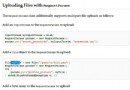 使用 AsyncHttpClient 實作 Android 文件上傳
AsyncHttpClient 可簡化非同步請求。上傳檔案時,先建立 RequestParams,再將 File 放入 params,最後呼叫 client.post。權
 Android 從 init 到開機動畫的啟動流程簡析
這裡簡單記錄一下 Android 從 init 啟動到開機動畫顯示、再到桌面出現的整體流程,並標出 SurfaceFlinger 的啟動位置。 整體流程 init 主進
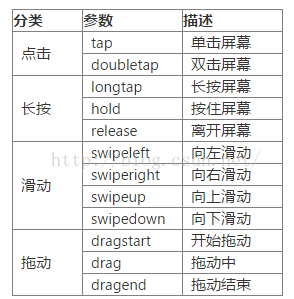 MUI事件管理全解:綁定、取消、觸發、手勢與自定義事件
事件是交互的靈魂。本文系統梳理MUI的事件體系,涵蓋事件綁定、取消、觸發、手勢事件與自定義事件五大主題。 一、事件綁定 除了用addEventListener()監聽特定
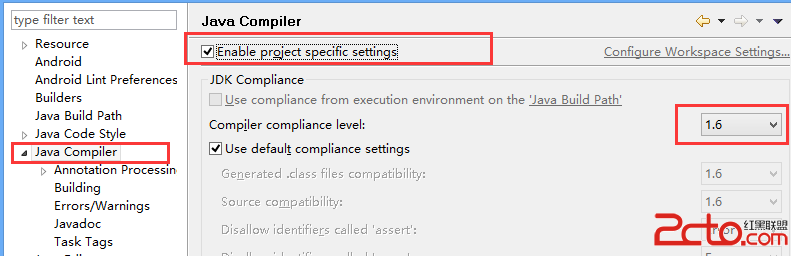 AndroidAnnotations 配置指南:Android Studio 與 Eclipse 兩種環境完整設定
AndroidAnnotations 用註解簡化 Activity、View、Intent 等樣板程式碼,寫起來乾淨不少。要用它,第一步是把環境配置好。 一、Androi