

編輯:關於 Android 程式設計
本文整理了十幾個 Android 開發中經常用到的實用程式碼片段,涵蓋儲存卡檢測、Activity 透明、發送簡訊與彩信、廣播接收、取得手機資訊等常見需求,方便日後查閱參考。
復制代碼 代碼如下:
String status=Environment.getExternalStorageState();
if(status.equals(Enviroment.MEDIA_MOUNTED))
{
說明有SD卡插入
}
在 onCreate 中不設定 Layout,改呼叫 this.setTheme(R.style.Theme_Transparent),並在樣式中定義 Theme_Transparent(注意 transparent_bg 是一張透明圖片)。
使用 Activity.findViewById 取得螢幕上元素的句柄,透過該句柄即可設定或取得任何該物件對外開放的值。
復制代碼 代碼如下:
TextView msgTextView = (TextView)findViewById(R.id.msg);
msgTextView.setText(R.string.push_me);
復制代碼 代碼如下:
String body="this is mms demo";
Intent mmsintent = new Intent(Intent.ACTION_SENDTO, Uri.fromParts("smsto", number, null));
mmsintent.putExtra(Messaging.KEY_ACTION_SENDTO_MESSAGE_BODY, body);
mmsintent.putExtra(Messaging.KEY_ACTION_SENDTO_COMPOSE_MODE, true);
mmsintent.putExtra(Messaging.KEY_ACTION_SENDTO_EXIT_ON_SENT, true);
startActivity(mmsintent);
復制代碼 代碼如下:
StringBuilder sb = new StringBuilder();
sb.append("file://");
sb.append(fd.getAbsoluteFile());
Intent intent = new Intent(Intent.ACTION_SENDTO, Uri.fromParts("mmsto", number, null));
// Below extra datas are all optional.
intent.putExtra(Messaging.KEY_ACTION_SENDTO_MESSAGE_SUBJECT, subject);
intent.putExtra(Messaging.KEY_ACTION_SENDTO_MESSAGE_BODY, body);
intent.putExtra(Messaging.KEY_ACTION_SENDTO_CONTENT_URI, sb.toString());
intent.putExtra(Messaging.KEY_ACTION_SENDTO_COMPOSE_MODE, composeMode);
intent.putExtra(Messaging.KEY_ACTION_SENDTO_EXIT_ON_SENT, exitOnSent);
startActivity(intent)
復制代碼 代碼如下:
mime = "img/jpg";
shareIntent.setDataAndType(Uri.fromFile(fd), mime);
shareIntent.putExtra(Intent.EXTRA_STREAM, Uri.fromFile(fd));
shareIntent.putExtra(Intent.EXTRA_SUBJECT, subject);
shareIntent.putExtra(Intent.EXTRA_TEXT, body);
復制代碼 代碼如下:
registerReceiver(mMasterResetReciever, new IntentFilter("oms.action.MASTERRESET"));
private BroadcastReceiver mMasterResetReciever = new BroadcastReceiver() {
public void onReceive(Context context, Intent intent){
String action = intent.getAction();
if("oms.action.MASTERRESET".equals(action)){
RecoverDefaultConfig();
}
}
}
復制代碼 代碼如下:
private ContentObserver mDownloadsObserver = new DownloadsChangeObserver(Downloads.CONTENT_URI);
private class DownloadsChangeObserver extends ContentObserver {
public DownloadsChangeObserver(Uri uri) {
super(new Handler());
}
@Override
public void onChange(boolean selfChange) {}
}
復制代碼 代碼如下:
public String getUserAgent()
{
String user_agent = ProductProperties.get(ProductProperties.USER_AGENT_KEY, null);
return user_agent;
}
復制代碼 代碼如下:
CookieSyncManager.createInstance(getApplicationContext());
CookieManager.getInstance().removeAllCookie();
復制代碼 代碼如下:
//Dial the GPRS link.
private boolean openDataConnection() {
// Set up data connection.
DataConnection conn = DataConnection.getInstance();
if (connectMode == 0) {
ret = conn.openConnection(mContext, "cmwap", "cmwap", "cmwap");
} else {
ret = conn.openConnection(mContext, "cmnet", "", "");
}
}
復制代碼 代碼如下:
public class Setting extends PreferenceActivity
{
public void onCreate(Bundle savedInstanceState) {
super.onCreate(savedInstanceState);
addPreferencesFromResource(R.xml.settings);
}
}
Setting.xml:
復制代碼 代碼如下:
android:key="seting2″
android:title="@string/seting2″
android:summary="@string/seting2″/>
android:key="seting1″
android:title="@string/seting1″
android:summaryOff="@string/seting1summaryOff"
android:summaryOn="@stringseting1summaryOff"/>
復制代碼 代碼如下:
DefaultHttpClient httpClient = new DefaultHttpClient();
HttpGet method = new HttpGet("https://www.baidu.com/1.html");
HttpResponse resp;
Reader reader = null;
try {
// AllClientPNames.TIMEOUT
HttpParams params = new BasicHttpParams();
params.setIntParameter(AllClientPNames.CONNECTION_TIMEOUT, 10000);
httpClient.setParams(params);
resp = httpClient.execute(method);
int status = resp.getStatusLine().getStatusCode();
if (status != HttpStatus.SC_OK) return false;
// HttpStatus.SC_OK;
return true;
} catch (ClientProtocolException e) {
// TODO Auto-generated catch block
e.printStackTrace();
} catch (IOException e) {
// TODO Auto-generated catch block
e.printStackTrace();
} finally {
if (reader != null) try {
reader.close();
} catch (IOException e) {
// TODO Auto-generated catch block
e.printStackTrace();
}
}
以上片段涵蓋了日常開發中相當實用的操作,收錄起來以備不時之需。
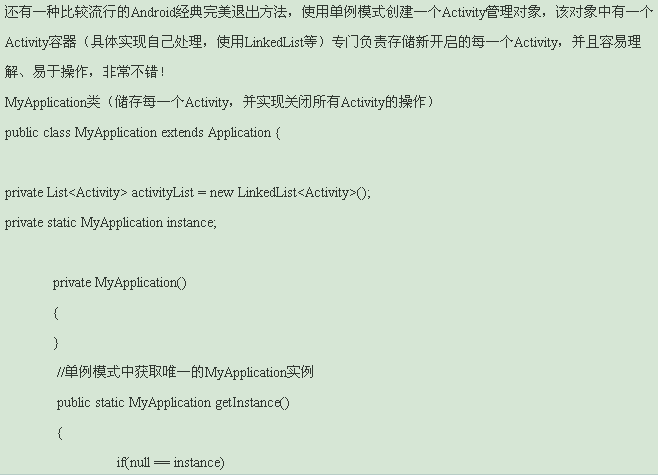 Android 完全退出應用程式的實作方式
在 Android 中,若要完全退出應用程式,不能只依賴單一 Activity 的 finish。若 App 內有多個 Activity,直接呼叫 killProcess
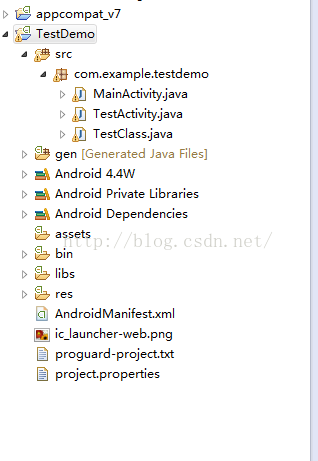 Android 在 Eclipse 中進行單元測試:Activity 與 Class 測試
在 Android 專案中,單元測試可以幫助開發者快速驗證局部功能,而不必每次都重新執行整個應用。尤其是在 Eclipse 時代,透過 Instrumentation T
 Android Studio 搭配 Git 與 GitHub 管理專案的完整設定
轉載請註明出處:https://shenshanlaoyuan.com 以下流程以 Windows 為主,Mac 的使用者概念相同,只是路徑與安裝方式不同。 一、安裝本機
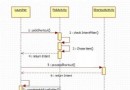 深入原理:Android 創建桌面快捷方式 Shortcut
網路上寫過創建桌面快捷方式的文章很多,但大部分只講了「怎麼用」,其實技術操作起來都很簡單,問題是下次你還記得嗎?根本原因還是不清楚原理。今天我就來講講 shortcut