

編輯:關於 Android 程式設計
當使用者掃描二維碼下載App時,如何讓iOS與Android使用者自動導向各自對應的下載頁面呢?實現原理是檢測瀏覽器的 USER-AGENT 這個 header,再透過正則表達式來判斷客戶端類型。若都不匹配,則採用回退策略顯示一個讓使用者自行選擇的頁面。
這種做法特別適合採用二維碼掃描方式下載App的場景。以下提供JSP版本的程式碼,其他服務端語言版本可自行搜尋:
<%@page import="java.util.regex.Matcher"%> <%@page import="java.util.regex.Pattern"%> <%@ page language="java" pageEncoding="UTF-8"%> <%! // \b 是單詞邊界(連著的兩個(字母字符 與 非字母字符) 之間的邏輯上的間隔),字符串在編譯時會被轉碼一次,所以是 "\\b" // \B 是單詞內部邏輯間隔(連著的兩個字母字符之間的邏輯上的間隔) String androidReg = "\\bandroid|Nexus\\b"; String iosReg = "ip(hone|od|ad)"; Pattern androidPat = Pattern.compile(androidReg, Pattern.CASE_INSENSITIVE); Pattern iosPat = Pattern.compile(iosReg, Pattern.CASE_INSENSITIVE); public boolean likeAndroid(String userAgent){ if(null == userAgent){ userAgent = ""; } // 匹配 Matcher matcherAndroid = androidPat.matcher(userAgent); if(matcherAndroid.find()){ return true; } else { return false; } } public boolean likeIOS(String userAgent){ if(null == userAgent){ userAgent = ""; } // 匹配 Matcher matcherIOS = iosPat.matcher(userAgent); if(matcherIOS.find()){ return true; } else { return false; } } %> <% String path = request.getContextPath(); String basePath = request.getScheme()+"://"+request.getServerName()+":"+request.getServerPort()+path+"/"; // String userAgent = request.getHeader( "USER-AGENT" ).toLowerCase(); System.out.println("userAgent: "+userAgent); if(null == userAgent){ userAgent = ""; } if(likeAndroid(userAgent)){ System.out.println("likeAndroid: "+true); response.sendRedirect("https://m.iyhjy.com/download.jsp?platform=android"); return; //request.getRequestDispatcher("/download.html").forward(request,response); } else if(likeIOS(userAgent)){ System.out.println("likeIOS: "+true); response.sendRedirect("https://itunes.apple.com/us/app/id714751061"); return; //request.getRequestDispatcher("/index.html").forward(request,response); } %> <!DOCTYPE html PUBLIC "-//W3C//DTD XHTML 1.0 Transitional//EN" "https://www.w3.org/TR/xhtml1/DTD/xhtml1-transitional.dtd"> <html xmlns="https://www.w3.org/1999/xhtml"> <head> <meta http-equiv="Content-Type" content="text/html; charset=utf-8" /> <meta name="viewport" content="width=device-width, initial-scale=1, maximum-scale=1, minimum-scale=1, user-scalable=no"> <title>下載客戶端 - 永恆記憶</title> <link href="css/style.css" rel="stylesheet" type="text/css" /> </head> <body> <div class="p_down"> <div> <a href="index.html"> <img src="images/p_logo.png" class="p_logo" /> </a> </div> <a href="itms-services://?action=download-manifest&url=https://m.iyhjy.com/upload/client/yhjyios.plist" class="apple download"><img src="images/p_down_apple.png" /></a> <a href="https://m.iyhjy.com/download.jsp?platform=android" class="download"><img src="images/p_down_and.png" /></a> </div> </body> </html>
這段程式碼的關鍵在於兩個正則表達式:androidReg 用來匹配包含 android 或 Nexus 的 User-Agent,iosReg 則用來匹配 iPhone、iPod、iPad。當判斷為Android時,就重定向到Android的APK下載頁;判斷為iOS時,則跳轉到App Store頁面;若都不匹配,則顯示同時提供兩平台下載入口的頁面,讓使用者自行選擇。這是一個兼顧使用者體驗與自動化的實用小技巧。
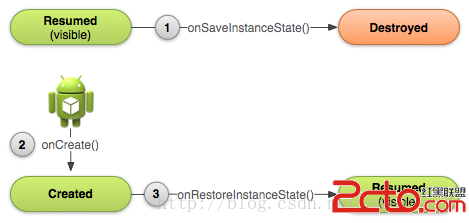 Android 學習路線(十五):Activity 生命週期之重新創建
有幾種情況會導致 Activity 在正常流程下被摧毀:使用者按下返回鍵,或者 Activity 自行呼叫 finish() 宣告結束。此外,若 Activity 已停止
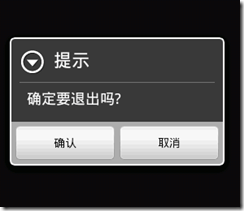 Android 攔截返回鍵:用 onKeyDown 加上退出確認對話框
Android 的返回鍵預設行為是直接關閉目前的 Activity。但使用者常常只是手滑按到,導致正在填寫的內容或播放中的進度全部消失。解法很簡單:攔下按鍵事件,先跳出一
 Android圖像控件進階:Gallery、ImageSwitcher、Palette與CardView
Gallery畫廊控件Gallery是Android早期提供的畫廊控件,支持左右滑動展示圖片列表。雖然官方已將其標記為不建議使用,但在一些簡單輪播場景中,它仍然便於理解圖
 Unity 滑頁嵌套實作:解決 ScrollRect 橫向與縱向捲動衝突
簡介 在 Unity 的 UGUI 系統中,ScrollRect 是製作捲動列表與滑頁界面的常用元件。不過,當橫向滑頁裡又需要嵌入縱向滑頁時,兩層 ScrollRect