

編輯:關於 Android 程式設計
App 工程檔案解析
關於如何建立一個最簡單的 Android App,請參考:
《Android 學習筆記(一)環境安裝及第一個 hello world》 https://www.jb51.net/article/52593.htm
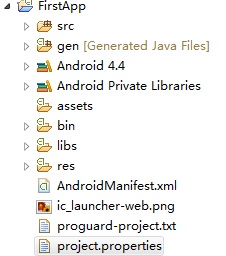
建立完成後的工程結構如下圖所示,本文將針對幾個主要檔案逐一解析。
src 檔案解析
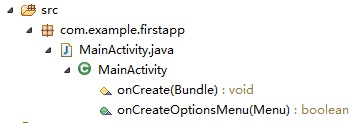
App 原始碼如下圖:
開啟原始碼 MainActivity.java 後可看到以下程式碼:
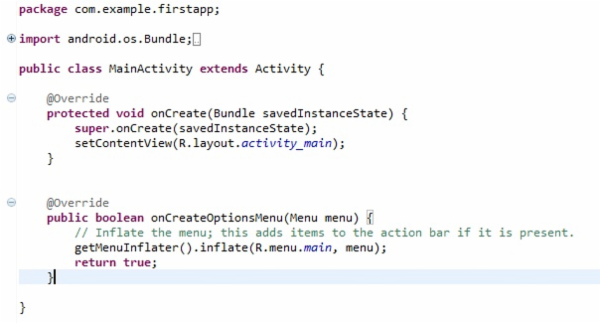
原始碼的主要功能如下:
App 原始碼目錄
package com.example.firstapp;
匯入 App 所需的類別
import android.os.Bundle; import android.app.Activity; import android.view.Menu;
MainActivity 繼承自 Activity
public class MainActivity extends Activity
重載 onCreate 方法,以版面配置初始化 Activity
@Override protected void onCreate(Bundle savedInstanceState) { super.onCreate(savedInstanceState); setContentView(R.layout.activity_main); }
重載 onCreateOptionsMenu 方法,以版面配置初始化選單
@Override public boolean onCreateOptionsMenu(Menu menu) { // Inflate the menu; this adds items to the action bar if it is present. getMenuInflater().inflate(R.menu.main, menu); return true; }
gen 與 res 檔案
gen 資料夾下的 R.java 會在建立工程時自動產生,屬於唯讀檔案,定義了專案所有資源的索引,其中每個靜態類別都對應一項資源。
例如:
1. 類別 drawable 與 res 中包含 drawable 字樣的資料夾相互關聯
2. 類別 layout 與 res 中的 layout 資料夾關聯
3. 類別 menu 與 res 中的 menu 資料夾關聯
res 資料夾存放 App 所使用的資源檔案,其中:
1. drawable 與圖示相關
2. layout 與版面配置相關
3. menu 與選單配置相關
4. values 定義了專案設定中所採用的值
舉例來說:介面中的文字
values 資料夾下的 strings.xml 定義了一個名為 hello_world 的字串,其值為「hello world!」
而 layout 資料夾下的 activity_main.xml 則將 TextView 中的文字設定為 hello_world 這個字串。
Android Manifest.xml
App 的主要設定檔,內容如下:
設定 App 資訊
package="com.example.firstapp" android:versionCode="1" android:versionName="1.0"
設定 SDK 等級
android:minSdkVersion="8" android:targetSdkVersion="19"
設定 App 資源
設定 App 的圖示、名稱與主題等,其資源與 res 資料夾相互對應。
android:allowBackup="true" android:icon="@drawable/ic_launcher" android:label="@string/app_name" android:theme="@style/AppTheme"
設定 App 的 Activity 與名稱
android:name="com.example.firstapp.MainActivity" android:label="@string/app_name"
設定 App 的 intent-filter
action android:name="android.intent.action.MAIN" category android:name="android.intent.category.LAUNCHER"
最後
以上即為 App 工程檔案的解析,屬個人理解,僅供參考。
 Android 基礎入門教程 10.5:AlarmManager 鬧鐘服務詳解
標籤:Android 基礎入門教程 本節引言 本節要介紹的是 AlarmManager,顧名思義,用它就能開發手機鬧鐘這類應用。官方文檔的解釋是:在指定時刻為我們廣播一
 Android RelativeLayout 相對布局介紹
RelativeLayout 是 Android 中非常靈活的布局之一,它允許子元件依彼此之間的相對位置,或相對於父容器的位置進行排列。對於需要自由對齊的畫面,Relat
 Android 五大布局 Layout 完全解析
Android 的版面配置由多種 Layout 組成。初學者看到複雜畫面時,可以先把畫面拆成幾個基本區塊,再選擇最適合的布局方式。常見五大布局如下:LinearLayou
 Android 權限管理(下):uid、gid、gids 與 setUid 的來龍去脈
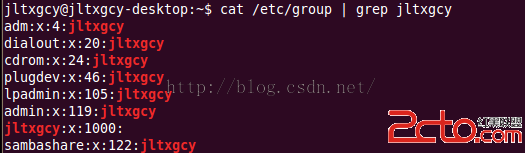
先回顧 Linux 的 uid/gid 機制 1. 用戶的 uid、gid、gids 以 Ubuntu 為例,當前登錄用戶是 jltxgcy,則它的 uid 與 gid