

編輯:關於 Android 程式設計
混淆器 ProGuard 做三件事:刪掉從未被使用的程式碼、把類別/欄位/方法的名稱改成晦澀難解的名字、並對位元碼做優化。結果是一個體積更小的 APK,以及一份難以逆向的工程——因此當你的應用對安全性有要求,例如涉及授權驗證時,混淆就是一道重要的防線。
好消息是 ProGuard 已整合進 Android 建置系統,不必手動呼叫;而且它只在 release 模式下的建置才會執行,除錯時完全不必理會被混淆的程式碼。啟用它雖是可選項,但強烈建議開啟。
# This file is automatically generated by Android Tools.
# Do not modify this file -- YOUR CHANGES WILL BE ERASED!
#
# This file must be checked in Version Control Systems.
#
# To customize properties used by the Ant build system edit
# "ant.properties", and override values to adapt the script to your
# project structure.
#
# To enable ProGuard to shrink and obfuscate your code, uncomment this
# (available properties: sdk.dir, user.home):
#proguard.config=${sdk.dir}/tools/proguard/proguard-android.txt:proguard-project.txt

# Project target.
target=android-19
把 proguard.config 前面的註解符號去掉即可。若使用 Gradle 建置,則對應寫法是在 build.gradle 的 buildTypes 中設 minifyEnabled true 並指定 proguardFiles。
這個檔案用來放專案特有的規則,預設內容多半只是說明性的註解:
# To enable ProGuard in your project, edit project.properties
# to define the proguard.config property as described in that file.
#
# Add project specific ProGuard rules here.
# By default, the flags in this file are appended to flags specified
# in ${sdk.dir}/tools/proguard/proguard-android.txt
# You can edit the include path and order by changing the ProGuard
# include property in project.properties.
#
# For more details, see
# https://developer.android.com/guide/developing/tools/proguard.html

# Add any project specific keep options here:

# If your project uses WebView with JS, uncomment the following
# and specify the fully qualified class name to the JavaScript interface
# class:
#-keepclassmembers class fqcn.of.javascript.interface.for.webview {
#   public *;
#}
專案裡若用了第三方的 jar 包,混淆後經常會出錯——因為對方的類別名稱是被反射呼叫的,改名就找不到人了。這時必須在 proguard-project.txt 中明確告訴 ProGuard「這些不要動」。
# 不混淆類名,保持原類名與包名
-keep public class * extends android.app.Activity

# 指定介面下所有 public、protected 方法名不混淆
-keep public abstract interface com.asqw.android.Listener {
    public protected <methods>;
}

# 指定類別的指定方法不混淆
-keep public class com.asqw.android {
    public void Start(java.lang.String);
}

# 所有類別的 native 方法名不混淆
-keepclasseswithmembernames class * {
    native <methods>;
}

# 指定建構子不混淆(常用於自訂 View,XML 需要它)
-keepclasseswithmembers class * {
    public <init>(android.content.Context, android.util.AttributeSet);
}

# Activity 中接收 View 點擊的方法不混淆(android:onClick 靠反射)
-keepclassmembers class * extends android.app.Activity {
    public void *(android.view.View);
}

# 列舉類型的兩個關鍵方法
-keepclassmembers enum * {
    public static **[] values();
    public static ** valueOf(java.lang.String);
}

# 實作 Parcelable 的類別,其 CREATOR 欄位不可改名
-keepclassmembers class * implements android.os.Parcelable {
    public static final android.os.Parcelable$Creator *;
}

# 指定類別的指定欄位不混淆
-keepclasseswithmembers class org.jboss.netty.util.internal.LinkedTransferQueue {
    volatile transient org.jboss.netty.util.internal.LinkedTransferQueue$Node head;
    volatile transient org.jboss.netty.util.internal.LinkedTransferQueue$Node tail;
    volatile transient int sweepVotes;
}

# 整個 package 都不混淆:類名、方法名、變量名一律保留
-keep public class com.unionpay.** { *; }
完成上述兩步重新編譯,反編譯後會看到程式碼已被混淆,但四大元件(Activity、Service、BroadcastReceiver、ContentProvider)的類名仍在。原因很簡單:它們是在 AndroidManifest.xml 中以類別名稱註冊的,若一併混淆,系統就會找不到對應的實作。ProGuard 內建的 proguard-android.txt 已經預設保留了它們。
若你有些方法要開放給他人反射呼叫,或使用了本身已混淆過的第三方 jar(再混淆一次就會出錯),就把下面這段貼進去:
-keepattributes *Annotation*
-keep public class * extends android.app.Activity
-keep public class * extends android.app.Application
-keep public class * extends android.app.Service
-keep public class * extends android.content.BroadcastReceiver
-keep public class * extends android.content.ContentProvider
-keep public class * extends android.app.backup.BackupAgent
-keep public class * extends android.preference.Preference
-keep public class * extends android.support.v4.app.Fragment
-keep public class * extends android.app.Fragment
-keep public class com.android.vending.licensing.ILicensingService
-keep class com.itheima.mobilesafe.engine.AppInfoProvider
-keep class net.youmi.android.** { *; }
別忘了 mapping.txt。每次 release 建置都會產生一份 mapping.txt,記錄混淆前後的名稱對照。線上版本出了 crash,就靠它把人類看不懂的 a.b.c 還原回原本的類別與行號。若不保存,等於放棄了排查線上問題的能力。務必每個版本都存檔,並整合進你的 CI 流程。
-keepattributes 很重要。除了註解,還可能需要 Signature(泛型簽名,Gson 等序列化庫依賴它)、InnerClasses、EnclosingMethod 與 SourceFile,LineNumberTable(保留行號以利除錯)。
序列化的模型類別要保留欄位。用 Gson、Jackson 或 OrmLite 時,欄位名稱就是資料的鍵,一旦被改成 a、b,解析出來全是 null。這類問題在測試環境不會出現,只在 release 包中爆發,是混淆最常見的坑。
最後提醒,若你使用的是 Android Gradle Plugin 3.4 以上版本,建置系統已改用 R8 取代 ProGuard。R8 在設定語法上幾乎完全相容,但做了更積極的程式碼消除與資源縮減,因此更容易「優化掉你以為需要保留的東西」。遇到只在 release 包出現的 ClassNotFoundException 或 NoSuchMethodError 時,先從 keep 規則下手,再考慮用 -keep 換成較寬鬆的 -keepclassmembers 逐步縮小範圍。
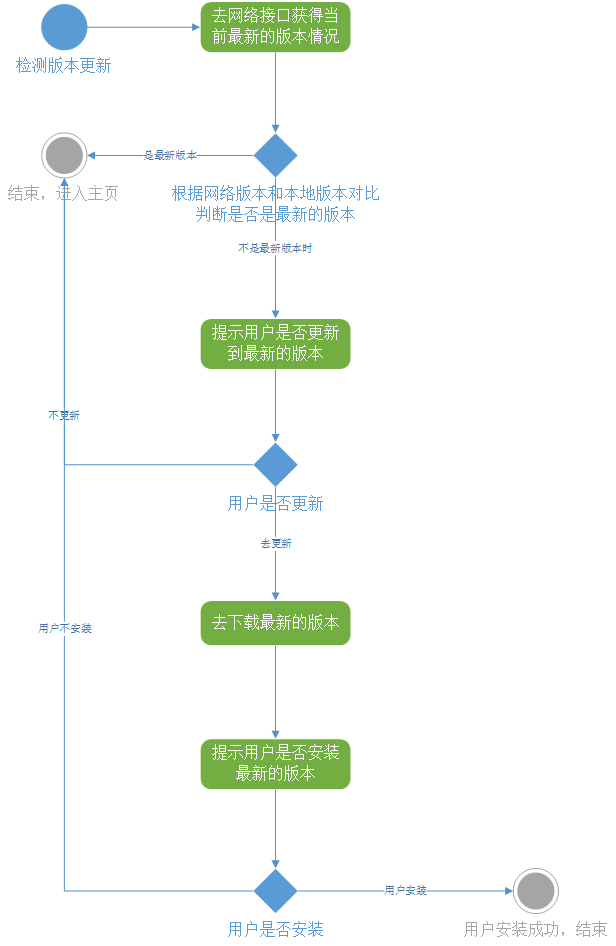 Android進階教學:Splash啟動頁的版本更新業務邏輯
本單元聚焦於Android進階開發中常見的Splash(啟動引導頁)設計,重點在於梳理啟動頁在「版本更新」情境下的業務判斷流程:應用啟動時,Splash頁會先確認目前的版
 Android Studio 永久顯示代碼行數的設置方法
Android Studio 其實也能像 Eclipse 一樣設置顯示代碼行數。在打開的文件左側單擊鼠標右鍵,即可臨時開啟行號顯示。不過它跟 Eclipse 有個很大的區
 Android 高仿 QQ 圖片選擇器實現詳解
做一款需要選擇本地圖片的 APP 時,首先想到的無疑是系統相冊。但 Android 手機五花八門,加上手機像素不斷提升、大圖無法回傳等異常因素,導致適配機型相當困難。微信
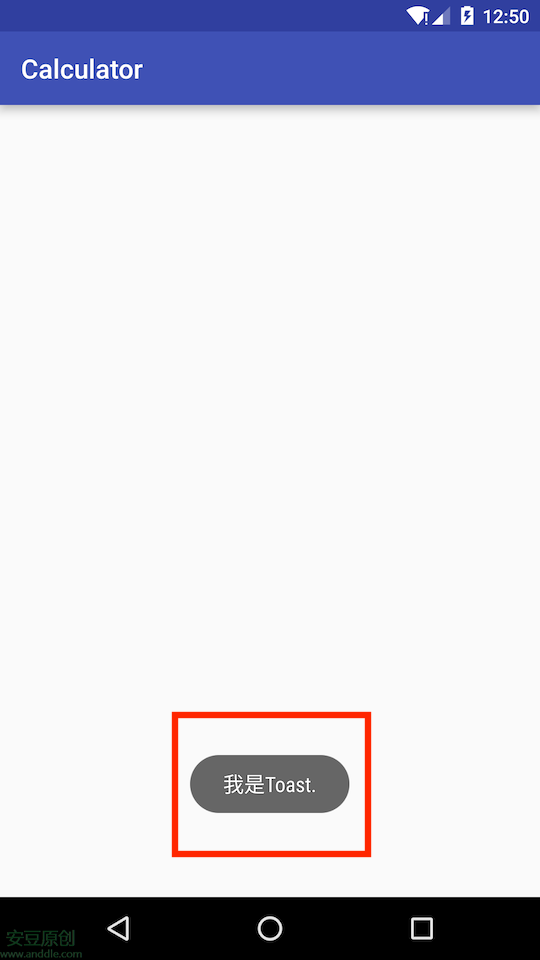 布局與控件(五)——Toast 吐司與抽象標簽 merge、include、ViewStub
第5節 Toast 5.1 使用效果 Toast 的作用是向用戶彈出一條提示信息,停留片刻後自動消失,無需用戶點擊關閉: 這個名字的由來挺形象:烤麵包機把麵包烤好之後「