

編輯:關於 Android 程式設計
「開機自動啟動」在 Android 上其實是兩個獨立能力的組合:一個是監聽 BOOT_COMPLETED 的廣播接收器(BroadcastReceiver),負責在系統啟動完成的那一刻被喚醒;另一個是常駐的背景服務(Service),負責在之後的時間裡持續執行巡邏任務。兩者搭配,還能做出「主程式被結束後自動拉回」的守護效果。
別忘了在 AndroidManifest.xml 中宣告 android.permission.RECEIVE_BOOT_COMPLETED 權限,否則即使接收器寫得再正確,系統也不會把開機廣播投遞給你的 App。
這裡刻意不用 bindService,而是走 startService。差別在於:綁定式服務的生命週期跟著綁定者走,Activity 一銷毀,服務也跟著解體;而啟動式服務由系統的服務管理員持有,界面關掉之後它仍然能繼續跑。守護型服務要的就是這種「不依附介面」的特性。
<service
    android:name=".DaemonService"
    android:enabled="true"
    android:process=".DaemonService" >
    <intent-filter android:priority="1000">
        <action android:name="cn.test.DaemonService" />
        <category android:name="android.intent.category.DEFAULT" />
    </intent-filter>
</service>
android:process 讓服務跑在獨立程序中,與主界面互不拖累;intent-filter 裡自訂的 action 則讓外部(例如開機廣播)可以精準地把它叫起來。
服務用 Handler.postDelayed 做自我排程,每隔 5 秒檢查一次主程式是否還活著;若發現已被結束,就透過 getLaunchIntentForPackage() 取得啟動 Intent,把主界面重新拉起來。
package cn.start.test;

import java.util.List;
import android.annotation.SuppressLint;
import android.app.ActivityManager;
import android.app.Service;
import android.app.ActivityManager.RunningAppProcessInfo;
import android.content.Intent;
import android.os.Handler;
import android.os.IBinder;
import android.util.Log;

public class DaemonService extends Service {

    private static final String TAG = "Alarmreceiver";
    Handler hd1 = new Handler();
    int delay = 5000;

    public IBinder onBind(Intent intent) {
        return null;
    }

    @SuppressLint("NewApi")
    public void onCreate() {
        System.out.println("服務啟動成功。。。。。。。。。。");
        hd1.postDelayed(mTasks, delay);
    }

    private Runnable mTasks = new Runnable() {
        @SuppressLint("NewApi")
        public void run() {
            android.os.Process.setThreadPriority(android.os.Process.THREAD_PRIORITY_FOREGROUND);
            if (checkMainAppIsActive()) {
                Log.d(TAG, "服務檢測主應用還在運行");
            } else {
                Log.d(TAG, "服務檢測主應用已經關閉");
                Intent intent = getPackageManager().getLaunchIntentForPackage("cn.start.test");
                if (intent != null) {
                    DaemonService.this.startActivity(intent);
                    Log.d(TAG, "服務啟動主應用程序。");
                } else {
                    Log.d(TAG, "服務檢測到沒有安裝主應用,自動退出。");
                    return;
                }
            }
            hd1.postDelayed(mTasks, delay);
        }
    };

    /**
     * 檢測主程序是否還在運行
     */
    @SuppressLint({ "NewApi", "NewApi" })
    public boolean checkMainAppIsActive() {
        ActivityManager am = (ActivityManager) getSystemService(ACTIVITY_SERVICE);
        List<RunningAppProcessInfo> run = am.getRunningAppProcesses();
        for (RunningAppProcessInfo ra : run) {
            if (ra.processName.equals("cn.start.test")) {
                return true;
            }
        }
        return false;
    }
}
兩個細節值得留意:把執行緒優先權調成 THREAD_PRIORITY_FOREGROUND,可降低被系統回收的機率;而 postDelayed 一定要在 run() 的最後再排一次,這才是「循環」而非「單次」的關鍵。
<receiver android:name=".StartupReceiver" >
    <intent-filter android:priority="1000" >
        <action android:name="android.intent.action.BOOT_COMPLETED" />
    </intent-filter>
</receiver>
public class StartupReceiver extends BroadcastReceiver {

    @Override
    public void onReceive(Context context, Intent intent) {
        Intent i = new Intent(context, LoginActivity.class);
        i.setFlags(Intent.FLAG_ACTIVITY_NEW_TASK);
        context.startActivity(i);

        Intent serviceIntent = new Intent(context, DaemonService.class);
        context.startService(serviceIntent);
    }
}
從非 Activity 環境啟動 Activity 必須帶上 FLAG_ACTIVITY_NEW_TASK,因為每個 Activity 都需要自己的 Task 容器;而 onReceive 執行完之後接收器實例就會被回收,所以任何需要長時間存活的工作都應該交給 Service,不要寫在廣播裡。
getRunningAppProcesses() 比對自己的行程名稱,即可判斷本應用是否仍在運行。getPackageManager().getLaunchIntentForPackage() 取得啟動意圖,就能把自家程式喚回前景。補充一個現實面的提醒:Android 8.0 之後系統對背景服務與背景啟動 Activity 都有更嚴格的限制,上述寫法在舊版本上很有效,若要在新版本實現類似需求,通常得改用 WorkManager、前景服務(Foreground Service)搭配常駐通知,或 JobScheduler 等官方推薦機制。
 Android sdcard 讀寫權限問題排查
在 Android 開發中,涉及外部存儲的讀寫操作經常會遇到權限問題。即使已在 AndroidManifest.xml 中聲明相關權限,運行時仍可能提示無法訪問 sdca
 Android BLE 進階:掃描並解析 iBeacon 基站參數
前一篇講了 Android 手機與 BLE 終端之間的通信,而最常見的 BLE 終端莫過於 Apple 倡議的 iBeacon 基站。iBeacon 技術建立在 BLE
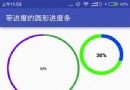 手把手教你用自定義View實現圓形進度條
自定義View的套路其實就那麼幾步: 1、定義自定義View的屬性 2、在View的構造方法中獲取這些屬性 3、重寫onMeasure 4、重寫onDraw 下面就按這幾
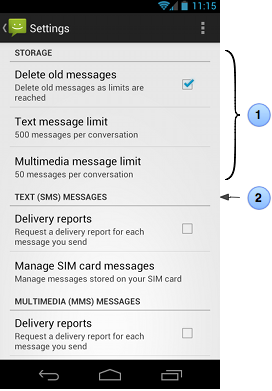 Android 官方文檔導讀:用 Preference API 打造設定頁面
設定頁面(Settings)用來讓使用者調整並保存 App 的特性與行為——日夜模式、清除快取、是否允許推播通知等等,幾乎每個稍具規模的 App 都有這一頁。 在 And