

編輯:關於 Android 程式設計
在 Android 上做自適應版面時,經常需要知道螢幕有多高、狀態列佔了多少、標題列又吃掉多少像素。這些數值分散在不同 API 上,稍不注意就會拿到錯誤的答案——例如把「可用區域高度」誤當成「螢幕高度」。本文把常用的幾條路徑整理清楚。
最直觀的做法,是對已經完成佈局的 View 呼叫 getWidth() 與 getHeight()。要注意的是,只有在 onMeasure()/onLayout() 之後,或等到第一幀繪製完成,這些值才是有效的;在 onCreate() 裡立刻取值往往會得到 0。
另一條路是透過 Activity 取得系統內容根節點。Android 在繪製時,會把你要顯示的 View 掛到一個 FrameLayout 之下,這個容器可以透過 Window.ID_ANDROID_CONTENT 找到:
// 直接量測目前這個 View
int w = view.getWidth();
int h = view.getHeight();

// 透過 Activity 取得內容根容器(FrameLayout)
View content = getWindow().findViewById(Window.ID_ANDROID_CONTENT);
int contentHeight = content.getHeight();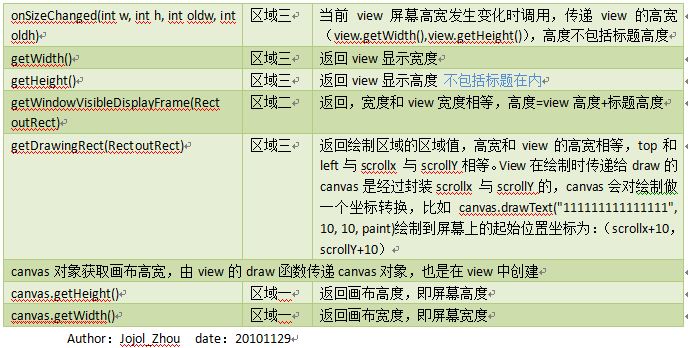
取得 Display 物件的方式是 getWindowManager().getDefaultDisplay(),接著用 getWidth() 與 getHeight() 分別拿到螢幕寬與螢幕高。也可以讓 Display 幫你填入 DisplayMetrics,再由 metrics 取值,本質上是同一份資料:
Display display = getWindowManager().getDefaultDisplay();

int screenWidth  = display.getWidth();   // 螢幕寬度
int screenHeight = display.getHeight();  // 螢幕高度

DisplayMetrics metrics = new DisplayMetrics();
display.getMetrics(metrics);
int widthPixels  = metrics.widthPixels;
int heightPixels = metrics.heightPixels;
補充一點:Canvas、Display、DisplayMetrics 三者都能取得螢幕高寬,實務上以 DisplayMetrics 最常用,因為它同時帶了 density 等資訊,方便做 dp 與 px 的換算。
decorView 是整個 Window 最上層的 View。它提供的 getWindowVisibleDisplayFrame(Rect) 會把「應用程式實際可見的區域」填進 Rect,這個區域包含標題列、但不包含狀態列。因此 Rect.top 就是狀態列高度:
Rect frame = new Rect();
getWindow().getDecorView().getWindowVisibleDisplayFrame(frame);
int statusBarHeight = frame.top;findViewById(Window.ID_ANDROID_CONTENT) 取到的是「不含標題列」的那層容器,它的 getTop() 等於狀態列加上標題列的總高度。兩者相減即可得到標題列高度:
int contentTop = getWindow().findViewById(Window.ID_ANDROID_CONTENT).getTop();
// statusBarHeight 為上一步求得的狀態列高度
int titleBarHeight = contentTop - statusBarHeight;上述做法在早期版本上非常通用,但值得留意幾個演進:Display.getWidth()/getHeight() 在 API 30 已標記為 deprecated,官方建議改用 WindowManager.getCurrentWindowMetrics();取得狀態列與導覽列高度,較新的寫法是 View.setOnApplyWindowInsetsListener() 搭配 WindowInsets.getInsets(WindowInsets.Type.statusBars()),在全面屏、瀏海與手勢導覽列環境下更可靠。若只是要讓某個 View 延伸到狀態列下方,記得搭配 fitsSystemWindows 或自行處理 insets padding。
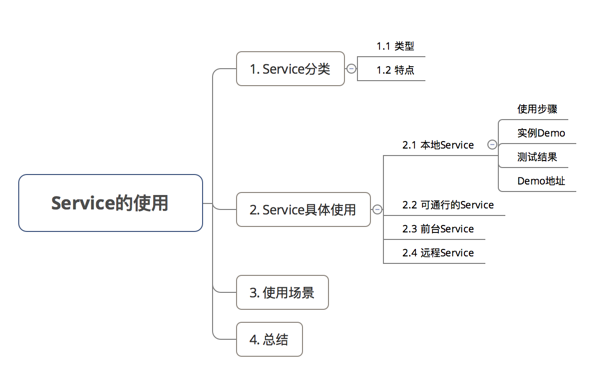 Android Service 全攻略:本地、可通訊、前台與遠端服務一次搞懂
前言 Service 是 Android 四大組件之一,應用範圍很廣。本文從最基礎的生命週期談起,並依序說明本地 Service、可通訊 Service、前台 Servi
 Android 屬性動畫(Property Animation)完全指南
一、概述 Android 提供了幾種動畫類型:View Animation、Drawable Animation 與 Property Animation。View An
 Android 自定義 View 高級特效:神奇的貝塞爾曲線
效果預覽 效果圖中我們實現了一個隨手指滑動變化的二階貝塞爾曲線,還有一個能穿越所有已知點的複雜貝塞爾曲線。學會使用貝塞爾曲線後,可以做出 QQ 紅點滑動刪除、360 動
 深入剖析 Android 事件分派機制:View 與 ViewGroup 的源碼級解讀
Android 之所以好用,很大一部分要歸功於優秀的觸控事件分派機制。想做出互動順暢的 App,就必須把這套機制吃透。本文從 View 與 ViewGroup 的源碼出發