

編輯:關於 Android 程式設計
一、從 resource 的 raw 資料夾取得檔案並讀取資料(資源檔只能讀不能寫)
String res = "";
try{
InputStream in = getResources().openRawResource(R.raw.bbi);
//在\Test\res\raw\bbi.txt,
int length = in.available();
byte [] buffer = new byte[length];
in.read(buffer);
//res = EncodingUtils.getString(buffer, "UTF-8");
//res = EncodingUtils.getString(buffer, "UNICODE");
res = EncodingUtils.getString(buffer, "BIG5");
//依bbi.txt的編碼類型選擇合適的編碼,如果不調整會亂碼
in.close();
}catch(Exception e){
e.printStackTrace();
}

myTextView.setText(res);//把得到的內容顯示在TextView上
二、從 asset 取得檔案並讀取資料(資源檔只能讀不能寫)
String fileName = "yan.txt"; //文件名字
String res="";
try{
InputStream in = getResources().getAssets().open(fileName);
// \Test\assets\yan.txt這裡有這樣的文件存在
int length = in.available();
byte [] buffer = new byte[length];
in.read(buffer);
res = EncodingUtils.getString(buffer, "UTF-8");
}catch(Exception e){
e.printStackTrace();
}
三、從 sdcard 讀取檔案
首先要把本機上的檔案透過 \android-sdk-windows\tools\adb.exe 複製到 sdcard,例如 adb.exe push e:/Y.txt /sdcard/(注意不可寫成 adb.exe push e:\Y.txt \sdcard\)。同樣地,把模擬器上的檔案複製回本機則使用:adb pull ./data/data/com.tt/files/Test.txt e:/
String fileName = "/sdcard/Y.txt";
//也可以用String fileName = "mnt/sdcard/Y.txt";
String res="";
try{
FileInputStream fin = new FileInputStream(fileName);
//FileInputStream fin = openFileInput(fileName);
//用這個就不行了,必須用FileInputStream
int length = fin.available();
byte [] buffer = new byte[length];
fin.read(buffer);
res = EncodingUtils.getString(buffer, "UTF-8");
fin.close();
}catch(Exception e){
e.printStackTrace();
}
myTextView.setText(res);
四、寫檔案
一般寫在 \data\data\com.test\files\ 裡面,開啟 DDMS 查看 file explorer 即可看到模擬器檔案的存放目錄結構。
String fileName = "TEST.txt";
String message = "FFFFFFF11111FFFFF" ;
writeFileData(fileName, message);
public voidwriteFileData(String fileName,String message){
try{
FileOutputStream fout =openFileOutput(fileName, MODE_PRIVATE);
byte [] bytes = message.getBytes();
fout.write(bytes);
fout.close();
}
catch(Exception e){
e.printStackTrace();
}
}
五、讀寫 data/data/ 目錄(等同 App 工作目錄)上的檔案,使用 openFileOutput
//寫文件在./data/data/com.tt/files/下面
public voidwriteFileData(String fileName,String message){
try{
FileOutputStream fout =openFileOutput(fileName, MODE_PRIVATE);
byte [] bytes = message.getBytes();
fout.write(bytes);
fout.close();
}
catch(Exception e){
e.printStackTrace();
}
}
//-------------------------------------------------------
//讀文件在./data/data/com.tt/files/下面
public String readFileData(String fileName){
String res="";
try{
FileInputStream fin = openFileInput(fileName);
int length = fin.available();
byte [] buffer = new byte[length];
fin.read(buffer);
res = EncodingUtils.getString(buffer, "UTF-8");
fin.close();
}
catch(Exception e){
e.printStackTrace();
}
return res;
}
六、讀寫 sdcard 目錄上的檔案,要用 FileOutputStream,不能用 openFileOutput
//寫在/mnt/sdcard/目錄下面的文件
public voidwriteFileSdcard(String fileName,String message){
try{
//FileOutputStream fout = openFileOutput(fileName, MODE_PRIVATE);
FileOutputStream fout = newFileOutputStream(fileName);
byte [] bytes = message.getBytes();
fout.write(bytes);
fout.close();
}
catch(Exception e){
e.printStackTrace();
}
}
//讀在/mnt/sdcard/目錄下面的文件
public String readFileSdcard(String fileName){
String res="";
try{
FileInputStream fin = new FileInputStream(fileName);
int length = fin.available();
byte [] buffer = new byte[length];
fin.read(buffer);
res = EncodingUtils.getString(buffer, "UTF-8");
fin.close();
}
catch(Exception e){
e.printStackTrace();
}
return res;
}
註:openFileOutput 是針對 App 內部儲存空間編譯的方法,而 FileOutputStream 則可用於任意檔案。
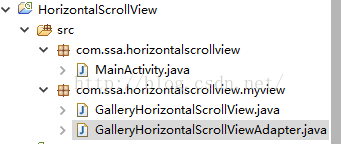 用 HorizontalScrollView 仿 ViewPager 相冊:思路、代碼與 OOM 優化
前陣子看了一堂在線公開課,講的是如何用 HorizontalScrollView 仿造 ViewPager 做一個簡單相冊。核心思想其實是借鑑 ViewPager 的緩存
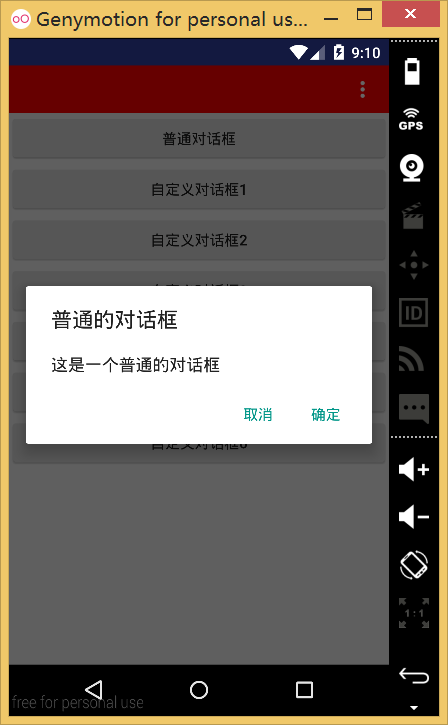 Android Dialog 實戰大全:從系統彈窗到自定義底部菜單
做 Android 開發,Dialog 幾乎是繞不開的一塊。提示確認要用它,底部彈出的操作面板要用它,仿 Toolbar 菜單也要用它。但 Dialog 的玩法實在太多,
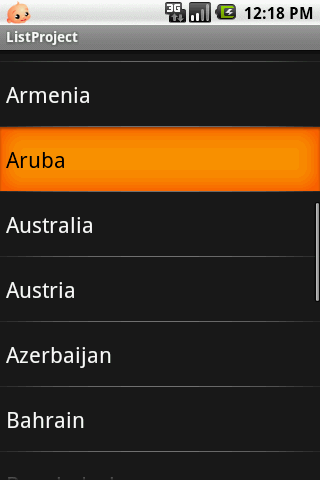 ArrayAdapter 入門實戰:用一行 setAdapter 綁定字符串數組到 ListView
ListView 是 Android 開發中出場率極高的控件,但「怎麼把數據塞進去」這一步,對剛入門的人來說往往最難理解。筆者上大學時學過 Java,可惜基本等於沒學,真
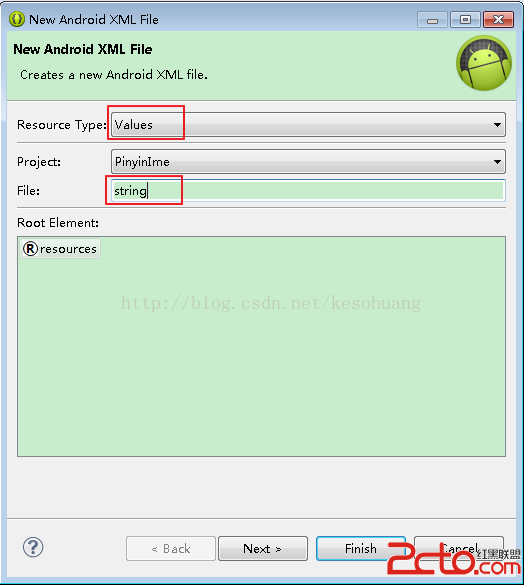 Android 多語言資源建置:讓 App 自動切換語言與字型
要在 Android 專案中支援多語言,靠的是資源目錄的「限定符(qualifier)」機制:系統會依裝置目前的語言地區,自動挑選最相符的一組資源。開發者不需要寫任何判斷