

編輯:關於 Android 程式設計
做機型相容性調查、線上客服的環境資訊頁,或是錯誤回報模組時,往往需要把裝置資訊一次蒐集齊全。Android 把這些資料分散在 android.os.Build 與 TelephonyManager 兩處,以下是一次取足的寫法。
StringBuilder phoneInfo = new StringBuilder();

// 一、Build 類別:硬體與系統資訊
phoneInfo.append("Product: " + android.os.Build.PRODUCT + System.getProperty("line.separator"));
phoneInfo.append("CPU_ABI: " + android.os.Build.CPU_ABI + System.getProperty("line.separator"));
phoneInfo.append("TAGS: " + android.os.Build.TAGS + System.getProperty("line.separator"));
phoneInfo.append("VERSION_CODES.BASE: " + android.os.Build.VERSION_CODES.BASE + System.getProperty("line.separator"));
phoneInfo.append("MODEL: " + android.os.Build.MODEL + System.getProperty("line.separator"));
phoneInfo.append("SDK: " + android.os.Build.VERSION.SDK + System.getProperty("line.separator"));
phoneInfo.append("VERSION.RELEASE: " + android.os.Build.VERSION.RELEASE + System.getProperty("line.separator"));
phoneInfo.append("DEVICE: " + android.os.Build.DEVICE + System.getProperty("line.separator"));
phoneInfo.append("DISPLAY: " + android.os.Build.DISPLAY + System.getProperty("line.separator"));
phoneInfo.append("BRAND: " + android.os.Build.BRAND + System.getProperty("line.separator"));
phoneInfo.append("BOARD: " + android.os.Build.BOARD + System.getProperty("line.separator"));
phoneInfo.append("FINGERPRINT: " + android.os.Build.FINGERPRINT + System.getProperty("line.separator"));
phoneInfo.append("ID: " + android.os.Build.ID + System.getProperty("line.separator"));
phoneInfo.append("MANUFACTURER: " + android.os.Build.MANUFACTURER + System.getProperty("line.separator"));
phoneInfo.append("USER: " + android.os.Build.USER + System.getProperty("line.separator"));

// 二、TelephonyManager:通訊相關資訊
TelephonyManager tm = (TelephonyManager) getSystemService(Context.TELEPHONY_SERVICE);
phoneInfo.append("DeviceId(IMEI) = " + tm.getDeviceId() + System.getProperty("line.separator"));
phoneInfo.append("DeviceSoftwareVersion = " + tm.getDeviceSoftwareVersion() + System.getProperty("line.separator"));
phoneInfo.append("Line1Number = " + tm.getLine1Number() + System.getProperty("line.separator"));
phoneInfo.append("NetworkCountryIso = " + tm.getNetworkCountryIso() + System.getProperty("line.separator"));
phoneInfo.append("NetworkOperator = " + tm.getNetworkOperator() + System.getProperty("line.separator"));
phoneInfo.append("NetworkOperatorName = " + tm.getNetworkOperatorName() + System.getProperty("line.separator"));
phoneInfo.append("NetworkType = " + tm.getNetworkType() + System.getProperty("line.separator"));
phoneInfo.append("PhoneType = " + tm.getPhoneType() + System.getProperty("line.separator"));
phoneInfo.append("SimCountryIso = " + tm.getSimCountryIso() + System.getProperty("line.separator"));
phoneInfo.append("SimOperator = " + tm.getSimOperator() + System.getProperty("line.separator"));
phoneInfo.append("SimOperatorName = " + tm.getSimOperatorName() + System.getProperty("line.separator"));
phoneInfo.append("SimSerialNumber = " + tm.getSimSerialNumber() + System.getProperty("line.separator"));
phoneInfo.append("SimState = " + tm.getSimState() + System.getProperty("line.separator"));
phoneInfo.append("SubscriberId(IMSI) = " + tm.getSubscriberId() + System.getProperty("line.separator"));
phoneInfo.append("VoiceMailNumber = " + tm.getVoiceMailNumber() + System.getProperty("line.separator"));
<uses-permission android:name="android.permission.READ_PHONE_STATE" />
Build 類別中,MODEL 是使用者看到的機型名稱(如「Pixel 7」),MANUFACTURER 是製造商,BRAND 是品牌,DEVICE 是設計代號,PRODUCT 是產品名稱,BOARD 是主板名稱。DISPLAY 是完整版本字串,FINGERPRINT 則是包含品牌/版本/裝置/時間等資訊的系統指紋,最適合原封不動貼進錯誤回報中。CPU_ABI 用來判斷 CPU 架構,決定要載入哪個 ABI 的原生函式庫。
TelephonyManager 類別則涵蓋通訊面向:IMEI/MEID、軟件版本、號碼、網路與 SIM 卡的國家碼與電信商、網路類型、SIM 狀態等。
權限與隱私規範。這份清單中的 getDeviceId()、getSubscriberId()、getSimSerialNumber()、getLine1Number() 都屬於敏感資訊。Android 10 之後,一般應用程式呼叫前兩者已會直接回傳 null;而 Google Play 政策亦明文限制 IMEI 等硬體識別碼的使用。若目的是統計裝置分布,請改用 MODEL 與 MANUFACTURER 的組合,這已能涵蓋絕大多數需求,且不涉及個人隱私。
大量字串串接的效能。範例中反覆呼叫 System.getProperty("line.separator"),每次都會走一層屬性查詢。改用 "\n" 常數即可,或乾脆用 String.format() 統一組裝,程式碼也會精簡許多。
部分欄位可能為 null。直接串接 null 會顯示成字串「null」而非空值,在無 SIM 卡的平板或模擬器上尤其明顯。建議包一個小工具方法做 null 轉空字串處理,讓輸出的資訊頁看起來整齊一致。
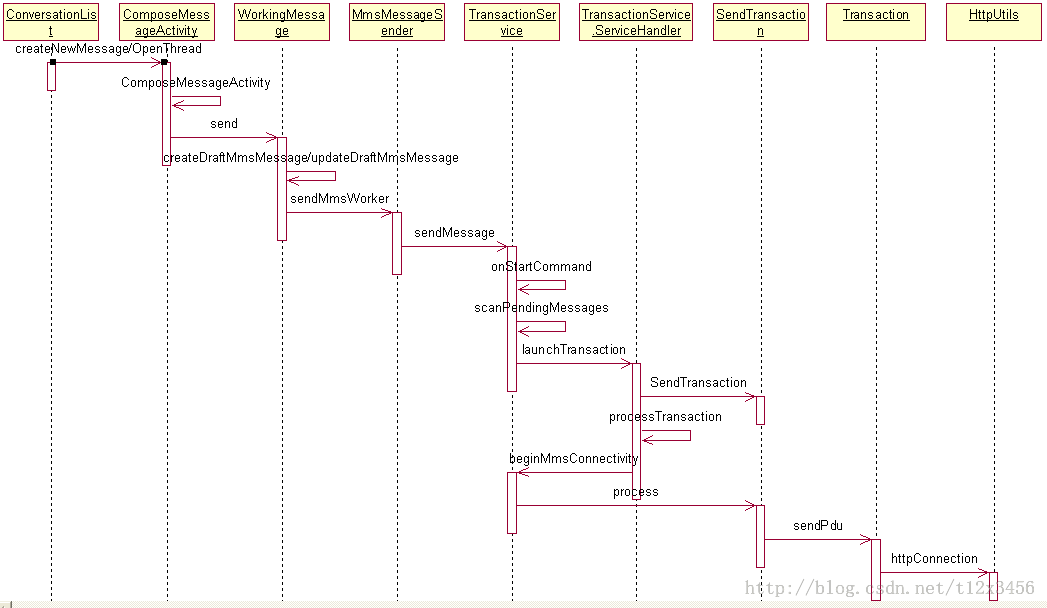 Android 彩信開發透解:發送流程、接收時序與附件增刪機制
一、彩信的發送 彩信比短信複雜得多,光看 sendMmsWorker 的參數簽名就能感受到:它需要上下文、Uri、PduPersister(彩信以 PDU 為資料單元)、
 Android 網路圖片載入:HttpURLConnection 搭配 Handler 更新 UI
要把網路上的圖片顯示到 ImageView,關鍵在於執行緒分工:網路連線必須放在子執行緒,UI 更新則必須回到主執行緒。Android 裡最直白的搭配就是 HttpURL
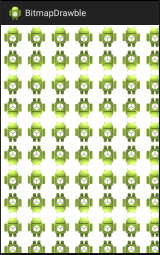 Android Drawable 全解析:六種常見派生類的用法
一、Drawable 簡介 Android 中的 Drawable 種類繁多。它可以是一張位圖,也可以是由顏色和形狀構造出來的圖形,因此有時候它並沒有明確的「尺寸」概念。
 魅族PRO 6與MX6有什麼不同?兩款機型的規格與定位對照
MX6開賣之後,很多人開始在兩者之間猶豫:預算足夠該直接上 PRO 6,還是MX6已經夠用?要回答這個問題,得先看兩台手機各自是怎麼被設計出來的。魅族MX6:把規格做滿的