

編輯:關於 Android 程式設計
除了 GPS,Android 也能透過行動電話的基站資訊搭配網路服務來定位。做法是讀取當前連接的基站識別碼(Cell ID)、位置區碼(LAC)等資訊,再送到定位服務查詢對應座標。以下是一個完整範例。
import java.io.BufferedReader;
import java.io.InputStreamReader;
import org.apache.http.HttpResponse;
import org.apache.http.HttpStatus;
import org.apache.http.client.methods.HttpPost;
import org.apache.http.entity.StringEntity;
import org.apache.http.impl.client.DefaultHttpClient;
import org.json.JSONArray;
import org.json.JSONObject;

import android.app.Activity;
import android.content.Context;
import android.os.Bundle;
import android.os.Handler;
import android.os.Message;
import android.telephony.TelephonyManager;
import android.telephony.gsm.GsmCellLocation;
import android.view.View;
import android.view.View.OnClickListener;
import android.widget.Button;
import android.widget.LinearLayout;
import android.widget.TextView;

public class Test extends Activity {

    Context context = this;
    LinearLayout mainView = null;
    Button button = null;
    TextView tv = null;

    public void onCreate(Bundle savedInstanceState) {
        super.onCreate(savedInstanceState);
        this.setTitle("基站+聯網+google數據庫定位");
        mainView = new LinearLayout(this);
        mainView.setOrientation(LinearLayout.VERTICAL);

        button = new Button(this);
        button.setText("定位測試");
        button.setOnClickListener(new OnClickListener() {
            @Override
            public void onClick(View v) {
                (new HttpThread(context)).start();
            }
        });
        mainView.addView(button, new LinearLayout.LayoutParams(-2, -2));

        tv = new TextView(this);
        tv.setText("Hello!\n");
        mainView.addView(tv);
        setContentView(mainView);
    }

    class HttpThread extends Thread {

        TelephonyManager tm = null;
        GsmCellLocation gcl = null;
        int cid = 0;
        int lac = 0;
        int mcc = 0;
        int mnc = 0;
        StringBuffer sb = null;

        Handler handler = new Handler() {
            public void handleMessage(Message msg) {
                switch (msg.what) {
                    case 1:
                        tv.append(sb.toString());
                        break;
                }
                super.handleMessage(msg);
            }
        };

        HttpThread(Context context) {
            tm = (TelephonyManager) context.getSystemService(Context.TELEPHONY_SERVICE);
            gcl = (GsmCellLocation) tm.getCellLocation();
            cid = gcl.getCid();
            lac = gcl.getLac();
            mcc = Integer.valueOf(tm.getNetworkOperator().substring(0, 3));
            mnc = Integer.valueOf(tm.getNetworkOperator().substring(3, 5));

            sb = new StringBuffer();
            sb.append("cid:" + cid + "\n");
            sb.append("lac:" + lac + "\n");
            sb.append("mcc:" + mcc + "\n");
            sb.append("mnc:" + mnc + "\n");
        }

        public void run() {
            try {
                JSONObject jObject = new JSONObject();
                jObject.put("version", "1.1.0");
                jObject.put("host", "maps.google.com");
                jObject.put("request_address", true);
                if (mcc == 460) {
                    jObject.put("address_language", "zh_CN");
                } else {
                    jObject.put("address_language", "en_US");
                }
                JSONArray jArray = new JSONArray();
                JSONObject jData = new JSONObject();
                jData.put("cell_id", cid);
                jData.put("location_area_code", lac);
                jData.put("mobile_country_code", mcc);
                jData.put("mobile_network_code", mnc);
                jArray.put(jData);
                jObject.put("cell_towers", jArray);

                DefaultHttpClient client = new DefaultHttpClient();
                HttpPost post = new HttpPost("https://www.google.com/loc/json");
                StringEntity se = new StringEntity(jObject.toString());
                post.setEntity(se);
                HttpResponse resp = client.execute(post);
                BufferedReader br = null;
                if (resp.getStatusLine().getStatusCode() == HttpStatus.SC_OK) {
                    sb.append("聯網成功\n");
                    br = new BufferedReader(new InputStreamReader(resp.getEntity().getContent()));
                } else {
                    sb.append("聯網獲取數據失敗!\n");
                }

                String result = br.readLine();
                while (result != null) {
                    sb.append(result);
                    result = br.readLine();
                }
            } catch (Exception ex) {
                sb.append(ex.getMessage());
            }
            Message msg = new Message();
            msg.what = 1;
            handler.sendMessage(msg);
        }
    }
}<uses-permission android:name="android.permission.INTERNET"></uses-permission>
<uses-permission android:name="android.permission.ACCESS_COARSE_LOCATION"></uses-permission>整體流程是:透過 TelephonyManager 取得基站資訊(cid、lac、mcc、mnc),組成 JSON 送到定位服務查詢,再把結果透過 Handler 回主執行緒顯示。相較 GPS,基站定位在室內或訊號不佳處也能發揮作用,是互補定位的好方案。
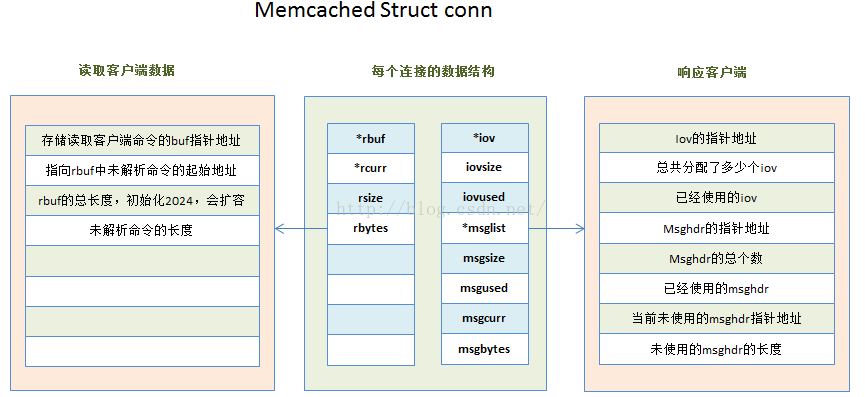 Memcached 原始碼剖析:命令執行流程與狀態機機制
一、執行命令 首先是啟動 memcached 的常用參數: -p <num> 設置 TCP 埠號(預設為 11211) -U <num>
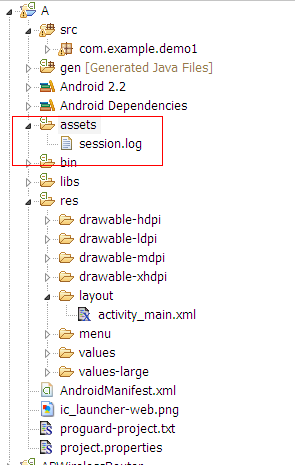 Android 使用 sharedUserId 獲取系統權限的詳盡教程
Android 會為每個 apk 進程分配獨立的空間(例如只能訪問 /data/data/自己包名/ 下的文件),一般情況下 apk 之間禁止相互訪問數據。透過 Shar
 ViewDragHelper 拖拽手勢處理完整指南
ViewDragHelper 是什麼ViewDragHelper 是 support 套件中處理拖拽與滑動的輔助類,DrawerLayout 內部也使用它。自定義 Vie
 Android TabActivity 用法整理:TabHost 與 TabSpec 完整解析
Android 早期提供了 TabActivity 這個方便的類別,讓我們能快速做出分頁切換的效果。要理解它,先從相關的幾個核心類別與方法開始。 TabActivity