

編輯:關於 Android 程式設計
Android 中提供了四種基本動畫:AlphaAnimation(透明度)、ScaleAnimation(縮放)、TranslateAnimation(位移)與 RotateAnimation(旋轉)。本文聚焦於 TranslateAnimation(位移動畫)。
TranslateAnimation 相當常用,例如 QQ、網易新聞的菜單條動畫就可以用它來實現。透過以下構造函數即可定義動畫:
TranslateAnimation(float fromXDelta, float toXDelta, float fromYDelta, float toYDelta)
animation.setDuration(long durationMillis);// 設置動畫持續時間
animation.setRepeatCount(int i);// 設置重複次數
animation.setRepeatMode(Animation.REVERSE);// 設置反方向執行
android:duration:運行動畫的時間
android:repeatCount:定義動畫重複的時間
以下範例讓 ImageView 向右位移 150,並反覆執行兩次:
public class MainActivity extends Activity {
ImageView image;
Button start;
Button cancel;
@Override
public void onCreate(Bundle savedInstanceState) {
super.onCreate(savedInstanceState);
setContentView(R.layout.activity_main);
image = (ImageView) findViewById(R.id.main_img);
start = (Button) findViewById(R.id.main_start);
cancel = (Button) findViewById(R.id.main_cancel);
/** 設置位移動畫,向右位移 150 */
final TranslateAnimation animation = new TranslateAnimation(0, 150,0, 0);
animation.setDuration(2000);// 設置動畫持續時間
animation.setRepeatCount(2);// 設置重複次數
animation.setRepeatMode(Animation.REVERSE);// 設置反方向執行
start.setOnClickListener(new OnClickListener() {
public void onClick(View arg0) {
image.setAnimation(animation);
/** 開始動畫 */
animation.startNow();
}
});
cancel.setOnClickListener(new OnClickListener() {
public void onClick(View v) {
/** 結束動畫 */
animation.cancel();
}
});
}
}
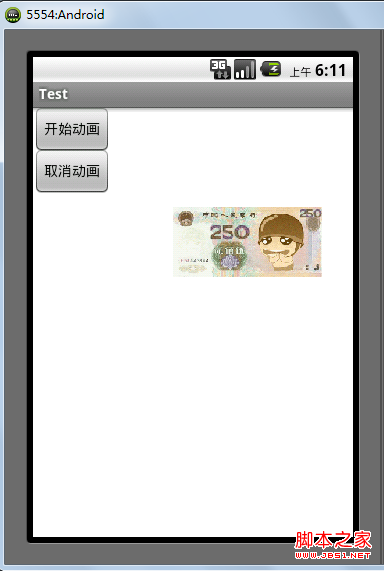
效果圖:
 Android Calendar Provider 完整解析:表結構、權限與 Intent 用法
Calendar Provider 是系統內建的日曆資料倉庫,它透過 ContentProvider 的標準形式對外開放,讓應用程式能讀寫使用者在日曆應用中建立的事件。本
 GeekBand 第十一周學習筆記:Gradle、NDK、依賴管理與 Git
本週主要內容包括 Gradle、NDK、依賴管理以及 Git 這幾個主題。 一、Gradle Gradle 是一款基於 Apache Ant 和 Apache Maven
 Android 軟鍵盤彈出遮擋輸入框的解決方案
問題描述點擊輸入框時系統會彈出軟鍵盤,而手機屏幕空間有限,鍵盤往往會把輸入界面擋住。先看一眼問題效果: 輸入用戶名和密碼時,鍵盤彈出後把文本框遮住了:
 深入解析 Android ViewStub:延遲加載的適用邊界與實踐要點
開發中經常遇到這種情形:某些 View 或某塊布局要不要顯示,得等運行時才能定。最直覺的寫法是把所有候選 View 都寫進布局,初始設為 View.GONE,再在代碼裡按