

編輯:關於 Android 程式設計
Android 中提供了四種基本動畫:AlphaAnimation(透明度)、ScaleAnimation(縮放)、TranslateAnimation(位移)與 RotateAnimation(旋轉)。本文聚焦於 AlphaAnimation(透明度動畫)。
視窗的淡入淡出效果,或某些遊戲的歡迎動畫、Logo 淡入淡出,都是 AlphaAnimation 的經典應用場景。直接看程式碼:
public class MainActivity extends Activity {
ImageView image;
Button start;
Button cancel;
@Override
public void onCreate(Bundle savedInstanceState) {
super.onCreate(savedInstanceState);
setContentView(R.layout.activity_main);
image = (ImageView) findViewById(R.id.main_img);
start = (Button) findViewById(R.id.main_start);
cancel = (Button) findViewById(R.id.main_cancel);
/** 設置透明度漸變動畫 */
final AlphaAnimation animation = new AlphaAnimation(1, 0);
animation.setDuration(2000);// 設置動畫持續時間
/** 常用方法 */
//animation.setRepeatCount(int repeatCount);// 設置重複次數
//animation.setFillAfter(boolean);// 動畫執行完後是否停留在執行完的狀態
//animation.setStartOffset(long startOffset);// 執行前的等待時間
start.setOnClickListener(new OnClickListener() {
public void onClick(View arg0) {
image.setAnimation(animation);
/** 開始動畫 */
animation.startNow();
}
});
cancel.setOnClickListener(new OnClickListener() {
public void onClick(View v) {
/** 結束動畫 */
animation.cancel();
}
});
}
}
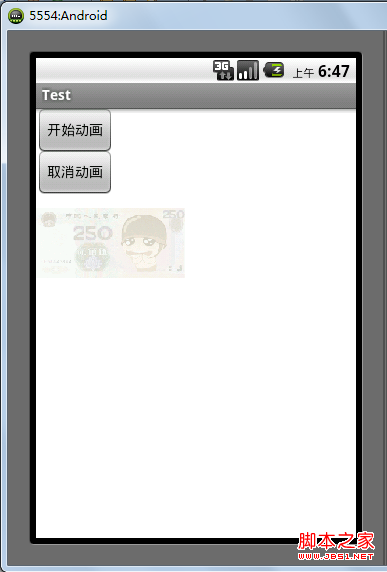
在這個範例中,new AlphaAnimation(1, 0) 表示從完全不透明(1)漸變到完全透明(0),實現淡出效果;若寫成 (0, 1) 則為淡入。
效果圖:
 圖文深入解析 Android Activity 生命週期(含實作 Demo)
大家好,今天要和大家深入聊聊 Android 中 Activity 的生命週期。這個主題網路上談的人很多,但多數文章都只是照著 Android API 翻譯,講得比較籠統
 自定義 View 實現彈幕:垂直固定與隨機兩種模式
這次要實現兩種彈幕效果:一種是彈幕在垂直方向位置固定,另一種是垂直方向隨機分佈。 效果一:垂直方向固定 效果二:垂直方向隨機 效果圖中的白色背景就是彈幕容器本身。這
 Binder 機制初探:從 Java 層到源碼深層的跨進程通信解析
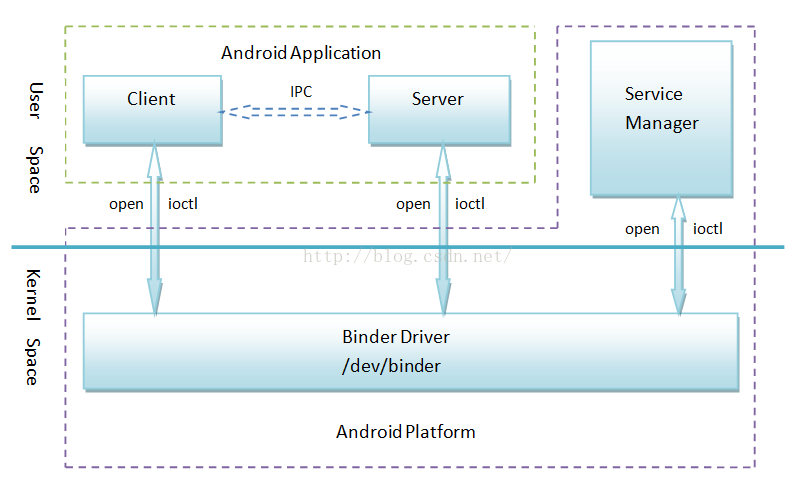
注意:本文出現的部分類與方法只能在 Android 源碼中或通過反射才能使用,在 SDK 中無法編譯通過!例如 Android.os.Service、MemoryFile
 Activity 啟動模式之 singleTask:跨應用場景下的棧行為
先看 singleTask 的官方定義: 只有一個實例。在同一個應用中啟動它時,若不存在該實例,則在當前任務棧頂創建;若已存在,則銷毀其之上的所有 Activity 實例