

編輯:關於 Android 程式設計
要讓 Android 4.1 到 4.2 開機後預設以 180 度方向顯示,需要同時改動屬性、SurfaceFlinger、Java 框架層、最近程式檢視與截圖五個部分。
在 system/build.prop 中加入:
ro.sf.hwrotation= 80
在 frameworks/native/services/surfaceflinger/SurfaceFlinger.cpp 中找到 setDisplayHardware 方法,於 switch 中補上一個分支:
case 180:
displayOrientation = ISurfaceComposer::eOrientation180;
break;
a > 在 frameworks/base/core/java/android/view/Surface.java 中加入兩個方法:
/**
* @hide
*/
public static int getDefaultRotation(){
return android.os.SystemProperties.getInt("ro.sf.hwrotation", 0);//180
}
/**
* @hide
*/
public static int getDefaultRotationIndex(){
int rotation = getDefaultRotation();
switch(rotation){
case 0:
return ROTATION_0;
case 90:
return ROTATION_90;
case 180:
return ROTATION_180;
case 270:
return ROTATION_270;
}
return ROTATION_0;
}
b > 在 frameworks/base/services/java/com/android/server/vm/ScreenRotationAnimation.java 中找到方法 setRotation(Android 4.1)或 setRotationInTransaction(Android 4.2),把:
deltaRotation(rotation,Surface.ROTATION_0);
改為:
deltaRotation(rotation,Surface.getDefaultRotationIndex());
在 frameworks/base/packages/systemui/src/com/android/systemui/RecentsPanelView.java 中,先補上一個成員變數:
private int mThumbnailHeight;//add
接著在 updateVoluesFromResources 方法中加上:
mThumbnailHeight = Math.round(res.getDimension(R.dimen.status_bar_recents_thumbnail_height));//add
然後在 updateThumbnail 方法的 else 分支中,於既有縮放處理之後追加旋轉邏輯:
Matrix scaleMatrix = new Matrix();
float scale = mThumbnailWidth / (float) thumbnail.getWidth();
scaleMatrix.postScale(scale, scale);//setScale
h.thumbnailViewImage.setScaleType(ScaleType.MATRIX);
h.thumbnailViewImage.setImageMatrix(scaleMatrix);
//add
if(Surface.getDefaultRotation() > 0){
Matrix rotateMatrix = new Matrix();
rotateMatrix.setRotate(Surface.getDefaultRotation(),mThumbnailWidth/2,mThumbnailHeight/2);
h.thumbnailViewImage.setImageMatrix(rotateMatrix);
}
//add end
在 frameworks/base/packages/systemui/src/com/android/systemui/GlobalScreenshot.java 中找到 takeScreenshot 方法,把:
float degrees = getDegreesForRotation(mDisplay.getRotation());
改為:
int rotation = mDisplay.getRotation();
if(Surface.getDefaultRotation() > 0){
rotation = (rotation + Surface.getDefaultRotationIndex())%4;
}
float degrees = getDegreesForRotation(rotation);
以上五處改完,螢幕旋轉 180 度就完成了。
 Android 自定義 ProgressDialog:兩種加載等待框的完整實現
系統自帶的等待框樣式比較單一,項目裡往往需要一個帶自定義動畫和文案的版本。這裡整理兩種實現方式,可以按需挑選修改。 效果預覽 示例一:居中顯示的 frame 動畫加提示
 為 Android RecyclerView 加上「上拉加載更多」
上一篇已經介紹了如何為 RecyclerView 加上 FootView,在此基礎上要實作分頁加載,其實已經非常簡單了。 上一篇:為 RecyclerView 添加 Fo
 踩坑筆記:Android Service 中 Toast 不顯示的原因與解法
做 Service 練習時,我在 onCreate、onStart、onDestroy 三個方法裡都像 Activity 那樣呼叫了 Toast.makeText,並用兩
 OpenCV 使用 Harris 演算法實作角點檢測
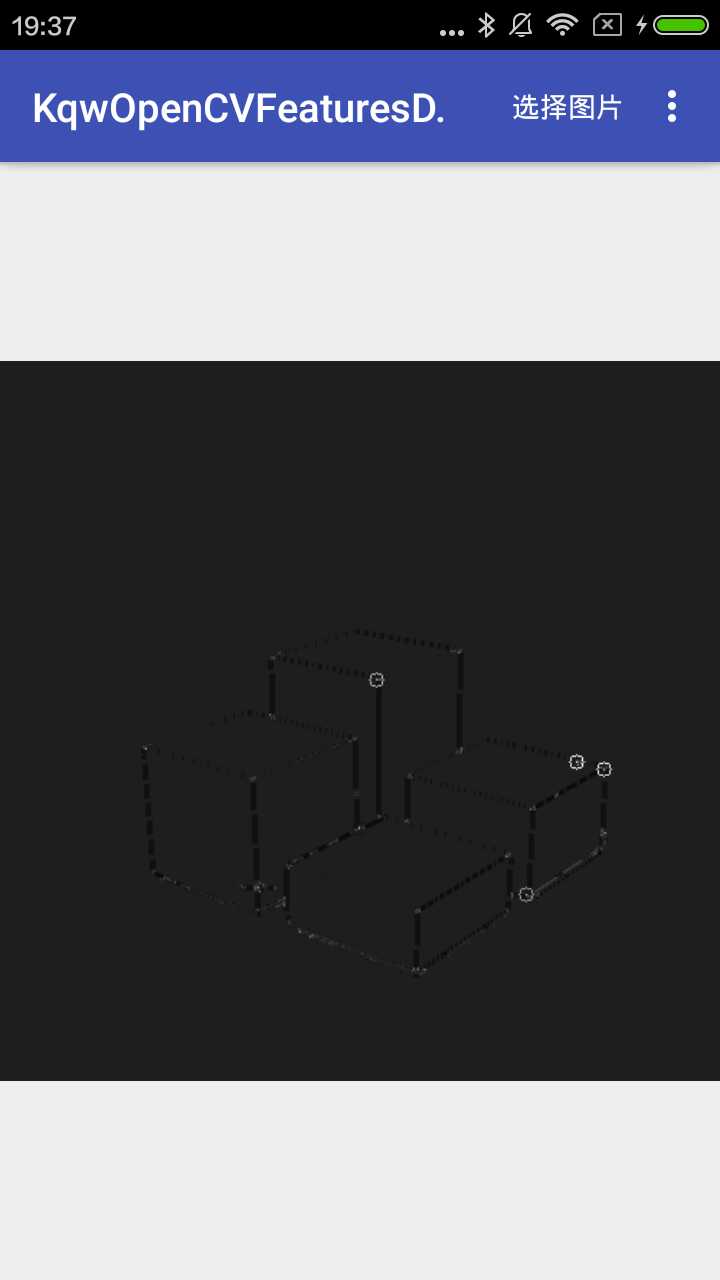
效果展示 下面先觀察 Harris 角點檢測在圖像上的實際輸出。角點通常會以圓點標記,越明顯的交會區域,響應值越高。 什麼是 Harris 角點檢測 角點可以理解為兩