

編輯:關於 Android 程式設計
傳統佈局靠 wrap_content、match_parent 加權重來分配空間,遇到需要嚴格按比例排布的界面就比較吃力。百分比佈局允許直接用百分比指定控件的寬高,寫起來直觀得多。
在 app/build.gradle 中引入 percent 庫:
compile 'com.android.support:percent:25.1.1'
注意這裡的版本號需要與項目中其他 support 庫保持一致,否則容易出現資源或依賴衝突。完整的 dependencies 大致如下:
dependencies {
    compile fileTree(dir: 'libs', include: ['*.jar'])
    androidTestCompile('com.android.support.test.espresso:espresso-core:2.2.2', {
        exclude group: 'com.android.support', module: 'support-annotations'
    })
    compile 'com.android.support:appcompat-v7:25.1.1'
    compile 'com.android.support:percent:25.1.1'
    testCompile 'junit:junit:4.12'
}
修改 gradle 文件後,IDE 通常會提示 Gradle files have changed since last project sync,點擊 Sync Now 完成同步即可。
根佈局換成 PercentRelativeLayout,控件的寬高改用 app:layout_widthPercent 與 app:layout_heightPercent 指定,配合 android:layout_gravity 定位:
<android.support.percent.PercentRelativeLayout
    xmlns:android="https://schemas.android.com/apk/res/android"
    xmlns:app="https://schemas.android.com/apk/res-auto"
    android:layout_width="match_parent"
    android:layout_height="match_parent">

    <Button
        android:id="@+id/button1"
        android:layout_gravity="left|top"
        android:text="Button"
        app:layout_widthPercent="50%"
        app:layout_heightPercent="50%" />

    <Button
        android:id="@+id/button2"
        android:layout_gravity="right|top"
        android:text="Button"
        app:layout_widthPercent="50%"
        app:layout_heightPercent="50%" />

    <Button
        android:id="@+id/button3"
        android:layout_gravity="left|bottom"
        android:text="Button"
        app:layout_widthPercent="50%"
        app:layout_heightPercent="50%" />

    <Button
        android:id="@+id/button4"
        android:layout_gravity="right|bottom"
        android:text="Button"
        app:layout_widthPercent="50%"
        app:layout_heightPercent="50%" />
</android.support.percent.PercentRelativeLayout>
上面這段的效果是屏幕被四等分,四個按鈕各佔一個象限。除了百分比寬高,percent 庫還提供 app:layout_aspectRatio 來按固定寬高比縮放控件,在處理圖片、視頻封面等場景時特別省事。
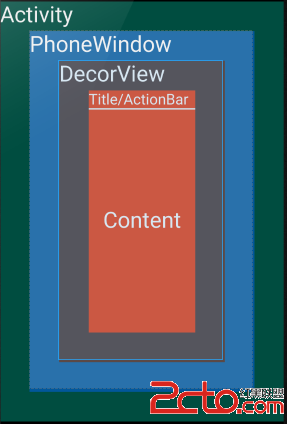 從 setContentView 源碼看 Android 是怎麼把你的 XML 掛上螢幕的
先提一句:當初你選擇繞開的問題,總會在未来的某一天原封不動地回到你面前。所以第一次遇到它的時候,別逃。 很多剛入門的朋友都很好奇一件事——寫在 XML 裡的布局,究竟是經
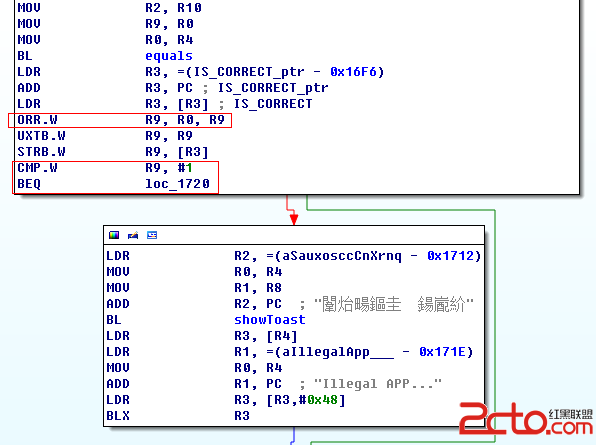 Android 逆向研究:從 APK 簽名校驗看應用完整性保護
研究邊界 本文僅作為 Android 應用安全機制研究,探討 APK 簽名校驗、逆向分析與完整性保護的基本概念。任何繞過他人應用授權、破解商業功能或移除驗證機制之行為,均
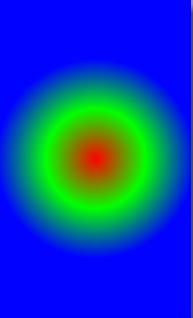 Android 中使用 shape 標籤的屬性詳解
shape 標籤常用的屬性有: - corners —— 圓角 - padding —— 內邊距 - size(height、width)—— 設定寬高 - stroke
 Android 高清加載長圖與大圖的實戰方案
一、問題背景 談到載入圖片,為避免 OOM,一般做法有兩種:顯示時依控制項大小對圖片進行壓縮;圖片數量龐大時則採用 LruCache 等快取機制,把總佔用量維持在可控範圍