

編輯:關於 Android 程式設計
這篇博客我們來介紹策略模式(Strategy Pattern,也叫 Policy Pattern),它同樣屬於行為型模式之一。通常在軟件開發中,我們為一個功能可能會設計多種算法和策略,然後根據實際情況動態選擇對應的算法。比如排序算法中的快速排序、冒泡排序等,需要綜合時間與空間考量在運行時做出選擇。
針對這種情況,一個常規做法是把多種算法寫在同一個類中,每個方法對應一個具體的排序算法;或者寫在同一個方法裡,透過 if…else 或 switch…case 來選擇具體算法。這兩種做法我們都稱為硬編碼,雖然簡單,但隨著算法數量增加,這個類會越來越臃腫,維護成本升高,改一處容易牽動其他地方;每新增一種算法就得修改封裝算法類的源代碼,這就違背了開閉原則和單一職責原則。
如果把这些算法或策略抽象出來,提供一個統一接口,讓不同算法有各自的實現類,那麼客戶端就可以透過注入不同的實現對象來動態替換算法,可擴展性和可維護性都更高——這就是下面要講的策略模式。
策略模式定義了一系列算法,並把每一個算法封裝起來,使它們可以相互替換,讓算法獨立於使用它的客戶而獨立變化。
策略模式的適用場景:
針對同一類型問題有多種處理方式、僅具體行為有差別時;需要安全地封裝多種同一類型操作時;出現同一抽象類有多個子類,又需要用 if-else 或 switch-case 來選擇具體子類時。
我們來看看策略模式的 UML 類圖:
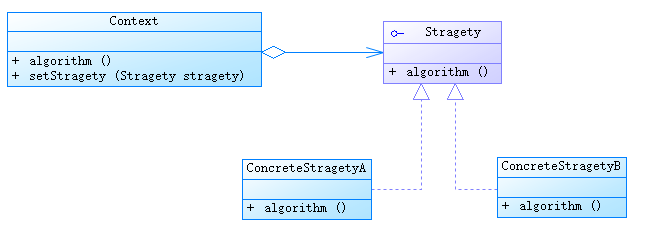
public interface Stragety { void algorithm(); }
ConcreteStragetyA.class 和 ConcreteStragetyB.class
public class ConcreteStragetyA implements Stragety{ @Override public void algorithm() { System.out.print("ConcreteStragetyA\n"); } }
public class ConcreteStragetyB implements Stragety{ @Override public void algorithm() { System.out.print("ConcreteStragetyB\n"); } }
默認策略類 ConcreteStragetyDefault.class
public class ConcreteStragetyDefault implements Stragety{ @Override public void algorithm() { System.out.print("null stragety"); } }
Context.class 和測試代碼
public class Context { private Stragety stragety; public Context() { stragety = new ConcreteStragetyDefault(); } public void algorithm() { stragety.algorithm(); } public void setStragety(Stragety stragety) { if (stragety == null) { throw new IllegalArgumentException("argument must not be null!!!"); } this.stragety = stragety; } public static void main(String args[]) { Context context = new Context(); context.setStragety(new ConcreteStragetyA()); context.algorithm(); context.setStragety(new ConcreteStragetyB()); context.algorithm(); } }
代碼很簡單,一目了然,沒有 if-else,也沒有 switch-case。核心就是建立抽象,把不同策略構建成一個個具體的實現,透過不同的策略實現算法替換,在簡化邏輯與結構的同時,增強了系統的可讀性、穩定性和可擴展性。對於較為複雜的業務邏輯,這樣做顯得更直觀,擴展也更方便。
其實在 Android 源碼中,策略模式的應用次數也很多,大家常見的動畫裡就用到了策略模式:
public abstract class Animation implements Cloneable { /** * The interpolator used by the animation to smooth the movement. */ Interpolator mInterpolator; .... /** * Sets the acceleration curve for this animation. Defaults to a linear * interpolation. * * @param i The interpolator which defines the acceleration curve * @attr ref android.R.styleable#Animation_interpolator */ public void setInterpolator(Interpolator i) { mInterpolator = i; } .... /** * Gets the transformation to apply at a specified point in time. Implementations of this * method should always replace the specified Transformation or document they are doing * otherwise. * * @param currentTime Where we are in the animation. This is wall clock time. * @param outTransformation A transformation object that is provided by the * caller and will be filled in by the animation. * @return True if the animation is still running */ public boolean getTransformation(long currentTime, Transformation outTransformation) { ...... final float interpolatedTime = mInterpolator.getInterpolation(normalizedTime); applyTransformation(interpolatedTime, outTransformation); ...... } }
Animation 類就是一個典型用到策略模式的類,它內部有一個 Interpolator 插值器對象,用來在執行動畫時達到所需的速度變化效果。系統提供的插值器有 LinearInterpolator(線性插值器,動畫執行速度相等)、AccelerateDecelerateInterpolator(加速減速插值器,起始加速、結尾減速)、DecelerateInterpolator(減速插值器,速度隨動畫執行變慢),以及回彈插值器等等,感興趣的可以上網查閱相關資料。
這裡我仍以 wiki 上的代碼為例:商場在不同時段會有打折促銷活動,顧客在不同時段分別購買,最後得出一個價格。
BillingStragety.class
interface BillingStrategy { public double getActPrice(double rawPrice); }
NormalStrategy.class 和 HappyHourStragety.class
// Normal billing strategy (unchanged price) class NormalStrategy implements BillingStrategy { @Override public double getActPrice(double rawPrice) { return rawPrice; } }
// Strategy for Happy hour (50% discount) class HappyHourStrategy implements BillingStrategy { @Override public double getActPrice(double rawPrice) { return rawPrice * 0.5; } }
Customer.class
class Customer { private List drinks; private BillingStrategy strategy; public Customer(BillingStrategy strategy) { this.drinks = new ArrayList(); this.strategy = strategy; } public void add(double price, int quantity) { drinks.add(strategy.getActPrice(price * quantity)); } // Payment of bill public void printBill() { double sum = 0; for (Double i : drinks) { sum += i; } System.out.println("Total due: " + sum); drinks.clear(); } // Set Strategy public void setStrategy(BillingStrategy strategy) { this.strategy = strategy; } }
main
public class StrategyPatternWiki { public static void main(String[] args) { Customer firstCustomer = new Customer(new NormalStrategy()); // Normal billing firstCustomer.add(1.0, 1); // Start Happy Hour firstCustomer.setStrategy(new HappyHourStrategy()); firstCustomer.add(1.0, 2); // New Customer Customer secondCustomer = new Customer(new HappyHourStrategy()); secondCustomer.add(0.8, 1); // The Customer pays firstCustomer.printBill(); // End Happy Hour secondCustomer.setStrategy(new NormalStrategy()); secondCustomer.add(1.3, 2); secondCustomer.add(2.5, 1); secondCustomer.printBill(); } }
不同時段買的東西,最後得出一個價錢,多種算法動態切換,用戶無需關心具體的內部細節。
策略模式主要用來分離算法,在相同的行為抽象下有不同的具體實現策略。這個模式很好地體現了開閉原則:定義抽象後,增加新策略只需新增一個類,再在運行時動態更換即可,不影響原有邏輯,從而獲得了很好的可擴展性。
優點:
結構清晰、使用簡單直觀;耦合度相對較低,擴展方便;操作封裝更徹底,數據更安全。
缺點也很明顯,這當然也是很多設計模式的通病:隨著策略增加,類的數量也會不斷增多。
https://github.com/zhaozepeng/Design-Patterns/tree/master/StrategyPattern
 TextView 實現圖文混合編排的方法
在部分頁面中,我們希望文字與圖片能自然混排,而不是額外使用多個 ImageView 拼接。Android 的 TextView 可透過 HTML 風格標籤與 ImageG
 探討:如何在 ScrollView 中嵌套 ListView
ScrollView 裡放 ListView 是 Android 開發的經典難題,網路上流傳的「解法」多半只解決了一半。本文先釐清問題成因,再說明兩種真正可行的做法。
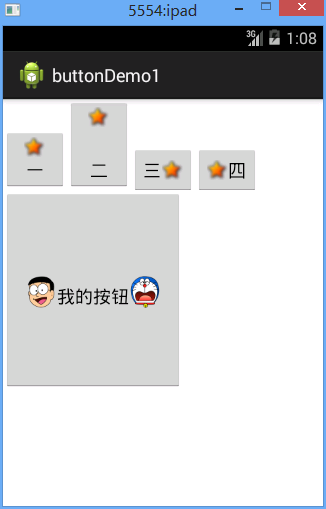 Button 實現圖文混排的兩種方式
本文介紹兩種在 Button 上實現圖文混排的方式。 一、兩種方法 1、使用 android:drawableTop 等屬性,讓文字的上方(或上下左右)顯示圖片。 2、使
 Material Design TabLayout 導航欄使用詳解
TabLayout 的用法其實很簡單,先看效果圖: 平常項目裡要做這樣的效果,通常得靠 ViewPagerIndicator 之類的開源框架,或者自定義 Horizon