

編輯:關於 Android 程式設計
1. 桌面 Widget 小部件;
2. 通知欄通知信息。
if (android.os.Build.VERSION.SDK_INT >= android.os.Build.VERSION_CODES.JELLY_BEAN) {
    remoteViews = new RemoteViews(getPackageName(), R.layout.remoteviews_item_dl);
    remoteViews.setTextViewText(R.id.tv_filename, getPackageName()); // 設置標題
    Intent btIntent = new Intent();
    btIntent.setAction("com.yu.sendnotification.action_dl");
    PendingIntent btPendingIntent = PendingIntent.getBroadcast(this, 1, btIntent, PendingIntent.FLAG_CANCEL_CURRENT);
    remoteViews.setOnClickPendingIntent(R.id.bt_stop, btPendingIntent); // 設置點擊事件
    Intent intent = new Intent(this, NewActivity.class);
    PendingIntent pi = PendingIntent.getActivity(context, 0, intent, PendingIntent.FLAG_CANCEL_CURRENT);
    noti = new Notification.Builder(context).setSmallIcon(R.mipmap.ic_launcher)
        .setTicker("Hello notification")
        .setWhen(System.currentTimeMillis())
        .setAutoCancel(true)
        .setContentIntent(pi).build();
    manager = (NotificationManager) getSystemService(Context.NOTIFICATION_SERVICE);
    manager.notify(0, noti);
}
1. 透過 Notification.Builder 創建 builder 對象;
2. 給 builder 設置相關選項,常用方法有:
setContent(remoteViews) 設置 RemoteViews;setContentIntent(intent) 設置 view 的 intent 事件;setContentText() 設置內容文字;setContentTitle() 設置標題文字;setAutoCancel(bool) 設置自動取消;setSmallIcon() 設置小圖標;setTicker() 設置狀態欄滾動文字;setDeleteIntent() 設置用戶滑動刪除通知的 intent;setProgress() 設置進度;setWhen() 設置發送時間;setSound() 設定鈴聲;setLights() 設定 LED 燈閃爍;setVibrate() 設定震動模式;setDefaults() 設定默認響應(DEFAULT_ALL、DEFAULT_SOUND、DEFAULT_VIBRATE、DEFAULT_LIGHTS)。
需要權限:
<!-- 閃光燈權限 -->
<uses-permission android:name="android.permission.FLASHLIGHT" />
<!-- 振動器權限 -->
<uses-permission android:name="android.permission.VIBRATE" />
3. builder.build() 創建 Notification 對象;
4. 獲取 NotificationManager 並發送通知 manager.notify(0, noti);
1)Intent 是即時發生的意圖,PendingIntent 是不確定發生時間的意圖;
2)用於給 RemoteViews 添加點擊事件;
3)支持啟動 Activity、啟動 Service、發送廣播三種意圖。
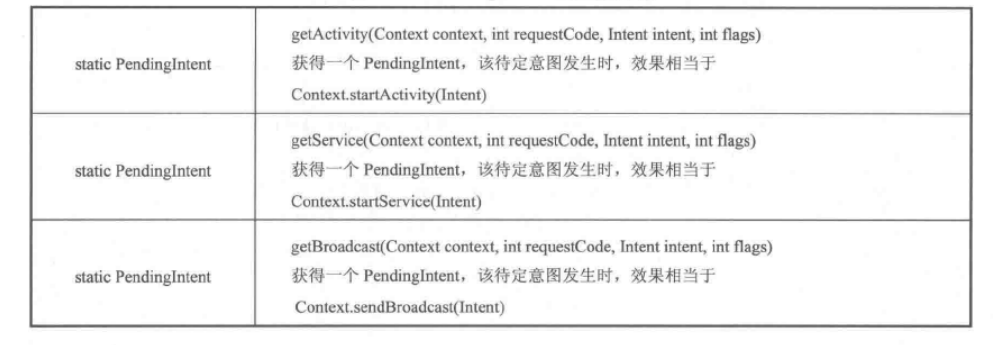
(Context context, int requestCode, Intent intent, int flags),其中 requestCode 表示請求碼,flags 為標志,intent 為意圖。
1. FLAG_CANCEL_CURRENT:若系統中已存在相同的 PendingIntent,先取消已有的,再重新生成一個。
2. FLAG_NO_CREATE:若系統中不存在相同的 PendingIntent,則不創建,直接返回 null。
3. FLAG_ONE_SHOT:該 PendingIntent 只作用一次,send() 觸發後會自動 cancel(),再次調用 send() 會拋出 SendIntentException。
4. FLAG_UPDATE_CURRENT:若存在對等的 PendingIntent,則使用它,但會用新的 Intent 更新其數據(如 Extras)。
兩個 PendingIntent 相同的條件:requestCode 與 Intent 都相同。Intent 相同指 Component 與 intent-filter 相同(與 Extras 無關)。
manager.notify(id, notification) 發通知:當 id 相同時,後面的通知覆蓋原來;當 id 不同時,若 PendingIntent 不匹配則通知互不干擾、不受 flags 影響;若匹配則按 flags 分析:FLAG_ONE_SHOT 會讓後續 PendingIntent 與第一條保持一致(包括 Extras),單擊任意一條後其他無法打開;FLAG_CANCEL_CURRENT 只有最新通知可打開;FLAG_UPDATE_CURRENT 會更新之前所有通知的 PendingIntent(包括 Extras),且都可打開。
public RemoteViews(String packageName, int layoutId)
layout:FrameLayout、LinearLayout、RelativeLayout、GridLayout;
View:AnalogClock、Button、Chronometer、ImageButton、ImageView、ProgressBar、TextView、ViewFlipper、ListView、GridView。
setTextViewText() 設置文本;setTextViewTextSize() 設置字體大小;setTextColor() 設置顏色;setImageViewResource() 設置圖片;setInt()/setLong()/setBoolean() 透過反射調用 View 的對應類型方法;setOnClickPendingIntent() 添加點擊事件(事件類型只能為 PendingIntent)。大部分方法都是透過反射調用 View 的方法。
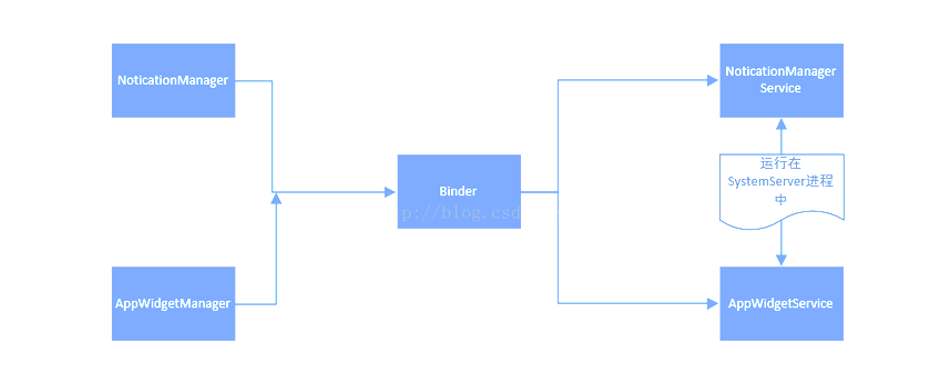
NotificationManager 與 AppWidgetManager 透過 Binder 分別和運行於 SystemServer 的 NotificationManagerService 與 AppWidgetManagerService 通信,通知欄和桌面小部件的布局分別在它們中被加載。
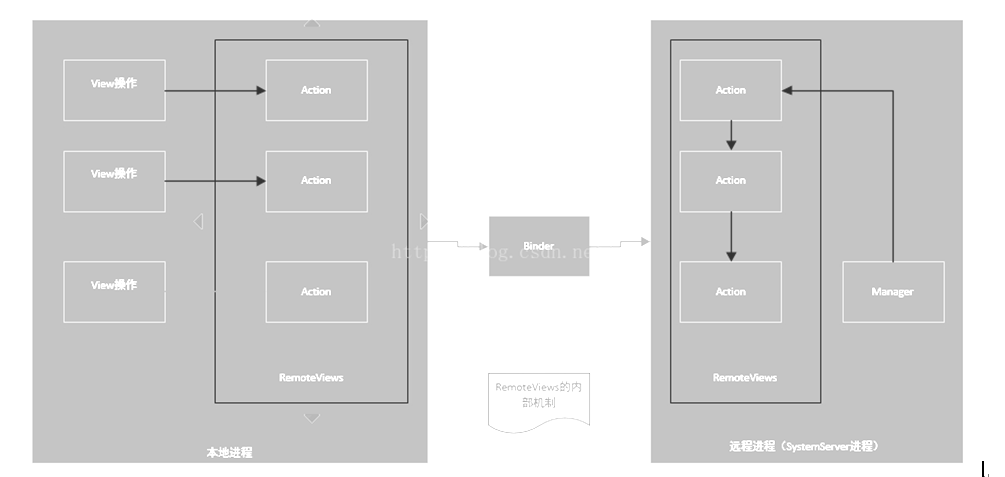
1. RemoteViews 實現了 Parcelable 接口,可跨進程傳輸至 SystemServer;
2. 系統根據 packageName、layoutId 得到該應用的資源,透過 LayoutInflater 加載布局檔;
3. 系統執行一系列更新操作,但不是立即執行,而是記錄所有更新操作,待 RemoteViews 加載後執行;
4. 顯示後再次更新時,調用 set 方法並透過 NotificationManager 與 AppWidgetManager 提交更新任務,具體更新在 SystemServer 中完成;
5. 每次 set 操作對應一個 action(實現了 Parcelable),當更新提交時,這些 action 會被跨進程傳輸並在遠程進程執行。遠程進程透過 apply 方法遍歷並執行所有 action,通知欄和桌面小插件初始化時調用 apply,後續更新調用 reapply。
RemoteViews 只支持發起 PendingIntent,不支持 OnClickListener 模式。setPendingIntentTemplate 與 setOnClickFillInIntent 須結合使用,給 ListView 和 StackView 中的 item 添加點擊事件。
不需要定義大量 Binder 接口;透過在遠程進程批量執行修改操作,避免大量 IPC 操作,提高性能;只需操作 RemoteViews 即可實現效果,簡單易用。
1. 一個應用簡單地更新另一個應用的界面,可選擇 AIDL;但若界面更新頻繁,會有效率問題,且 AIDL 接口可能使問題複雜化,此時不宜使用 AIDL。
2. 界面更新頻繁時,適宜採用 RemoteView 實現,缺點是僅支持一些常見 View,不支持自定義 View。
 Android 自定義 ViewGroup:打造絢麗的仿支付寶咻一咻雷達脈衝動畫
記得春節期間支付寶的集五福與春晚「咻一咻」活動火遍全城,集齊五福即可平分大紅包。當時支付寶咻一咻頁面有一個雷達擴散的動畫效果,視覺上非常出色,於是便嘗試自行實作類似效果。
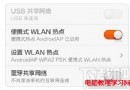 小米手機熱點開啟教學:四步完成WLAN分享
小米手機開啟WLAN熱點,可從設定進入更多無線網路,選擇網路共享,開啟便攜式WLAN熱點,再到設定WLAN熱點中設定名稱與密碼。 完成後其他裝置即可搜尋並連線。
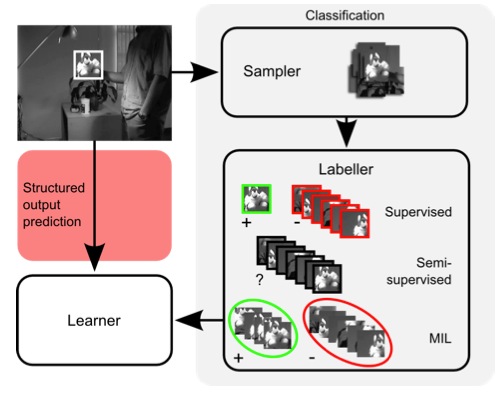 運動目標跟蹤(九):Struck 結構化輸出跟蹤原理詳解
《Struck: Structured Output Tracking with Kernels》由 Sam Hare、Amir Saffari、Philip H. S.
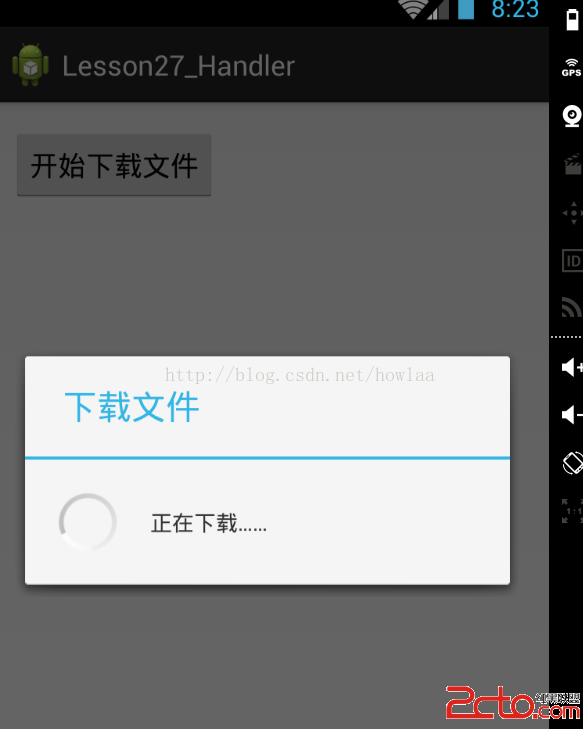 Android Handler 入門:用子執行緒跑耗時任務,再回主執行緒關掉對話框
Handler 最典型的用途,是讓子執行緒把訊息傳回主執行緒,再由主執行緒去處理與 UI 相關的操作。 為什麼非得繞這一圈?因為 Android 只有主執行緒(UI 執