

編輯:關於 Android 程式設計
這一篇記錄的是淘淘商城後台管理系統(taotao-manager)從零跑通的完整過程:先驗證 Maven 聚合工程能不能起來,再建庫、跑逆向工程生成代碼,然後把 Spring + SpringMVC + MyBatis 三層整合起來,最後用一個「根據商品 id 查商品」的最小需求做端到端驗證。
在 webapp 目錄下新建一個 index.jsp,作為「工程是否跑起來」的判斷依據。
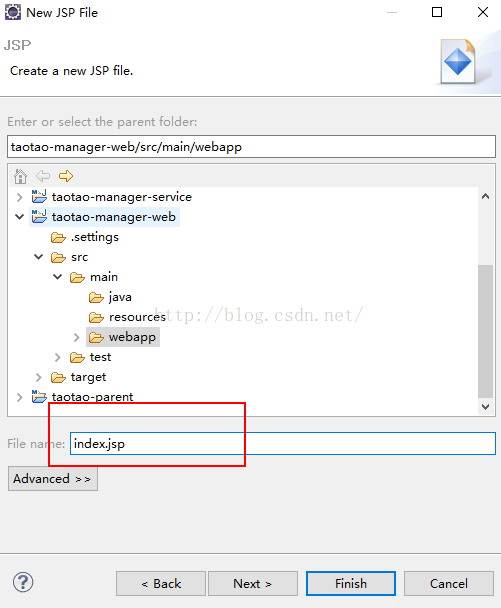
index.jsp:
<%@ page language="java" contentType="text/html; charset=UTF-8" pageEncoding="UTF-8"%>
<!DOCTYPE html>
<html>
<head>
    <meta http-equiv="Content-Type" content="text/html; charset=UTF-8" />
    <title>taotao-manager</title>
</head>
<body>
    <h1>如果你看到這個頁面,說明 taotao-manager 已經運行</h1>
</body>
</html>
要啟動的是聚合工程 taotao-manager,它會把下面的子模塊一起帶起來。
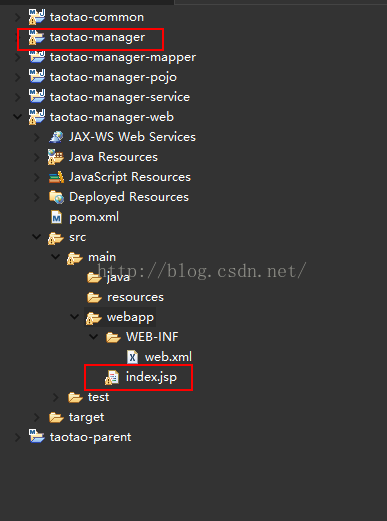
在 taotao-manager 的 pom.xml 中加入 tomcat7-maven-plugin,這樣就能用 Maven 命令直接起容器:
<build>
    <plugins>
        <plugin>
            <groupId>org.apache.tomcat.maven</groupId>
            <artifactId>tomcat7-maven-plugin</artifactId>
            <configuration>
                <port>8080</port>
                <path>/</path>
            </configuration>
        </plugin>
    </plugins>
</build>
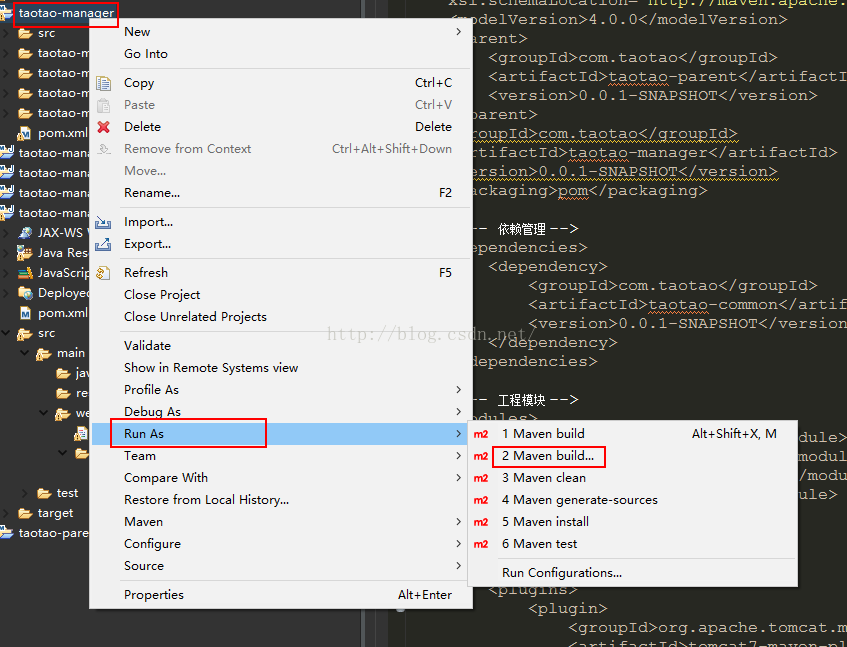
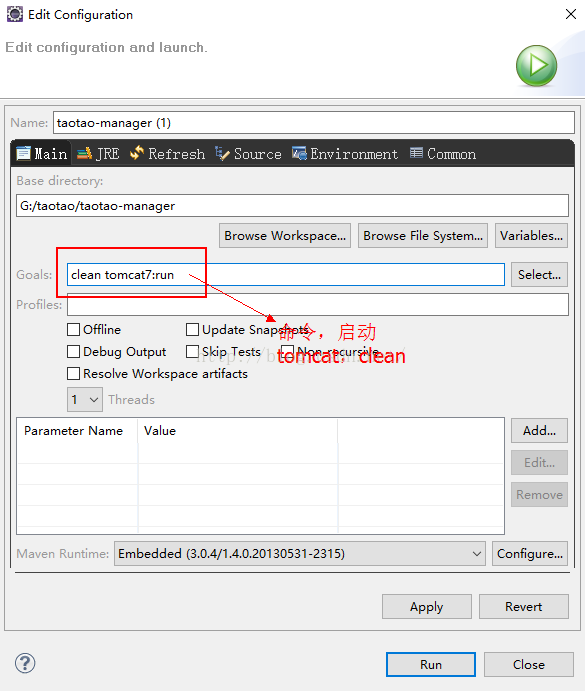

在瀏覽器訪問 https://localhost:8080/,看到歡迎頁就代表成功:
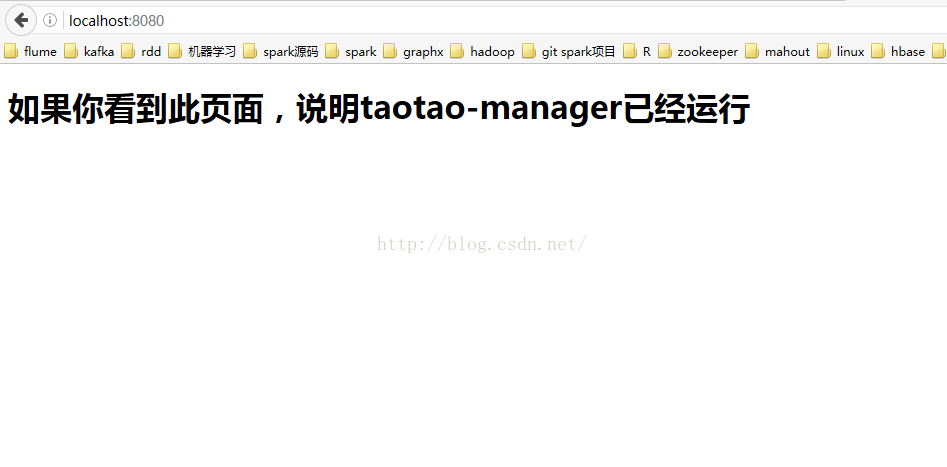
容易卡在這裡的地方:如果 taotao-manager 部署到 Tomcat 時報錯,通常是本地倉庫裡缺少上層工程,按兩步處理即可。
這裡使用 MySQL,示例在 CentOS 7 上搭建。建好服務之後,新建一個名為 taotao 的庫,用客戶端工具執行 taotao.sql 腳本,導入項目需要的全部表。
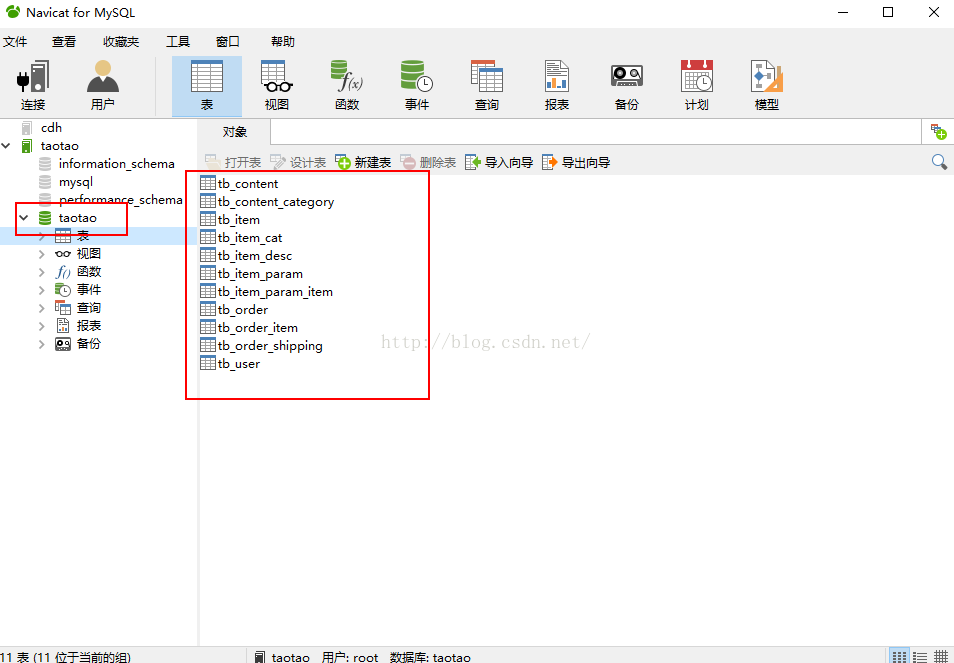
一張值得記住的設計原則:互聯網項目要盡量減少表之間的關聯查詢,寧可用冗餘字段換取查詢性能,這樣後續做分庫分表時會輕鬆很多。
商品表結構:
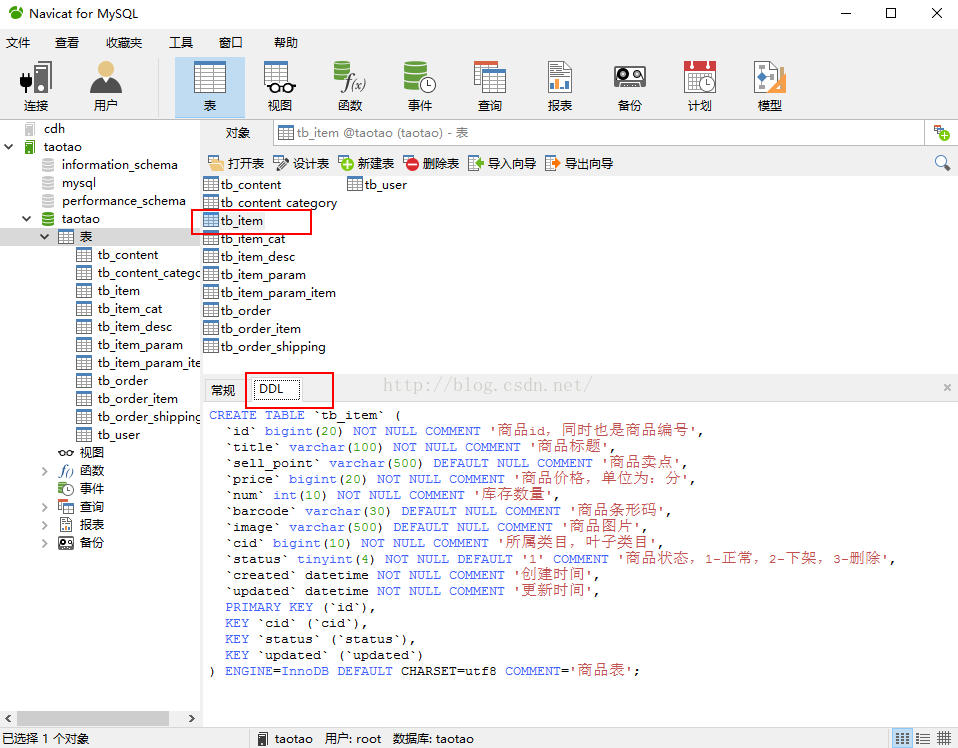
順帶明確一個概念:SKU 是最小庫存單位,也就是最細粒度的商品劃分。每個 SKU 唯一對應一款具體商品,顏色、配置等屬性都已經確定下來。
逆向工程的作用很直接:讀數據庫表,自動生成 POJO、Mapper 接口與 Mapper XML,省掉大量重複勞動。
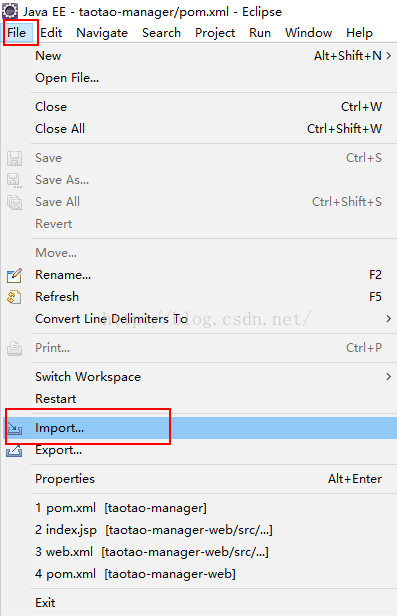
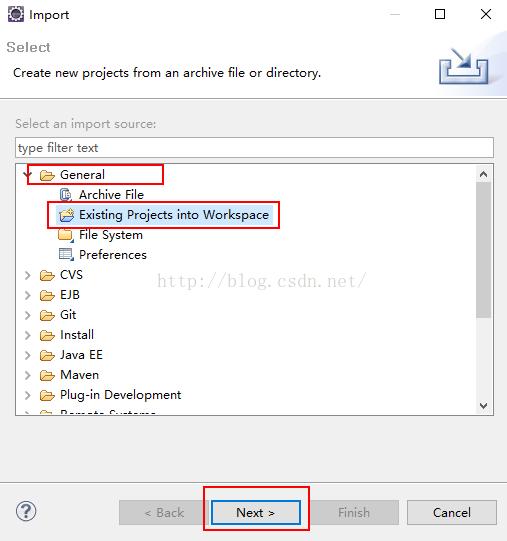
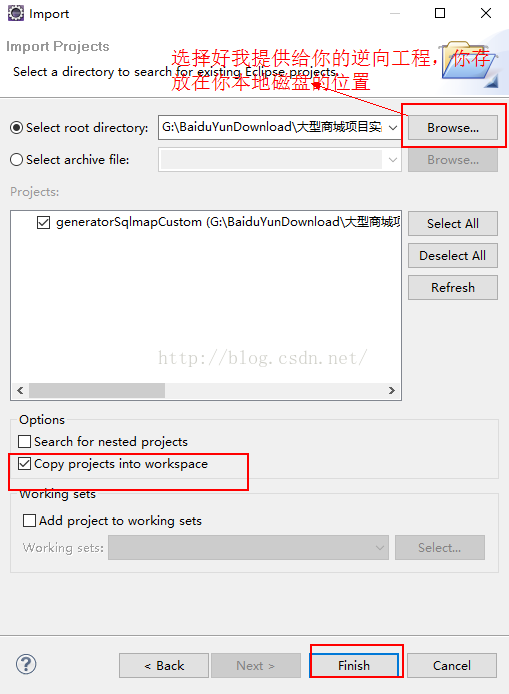
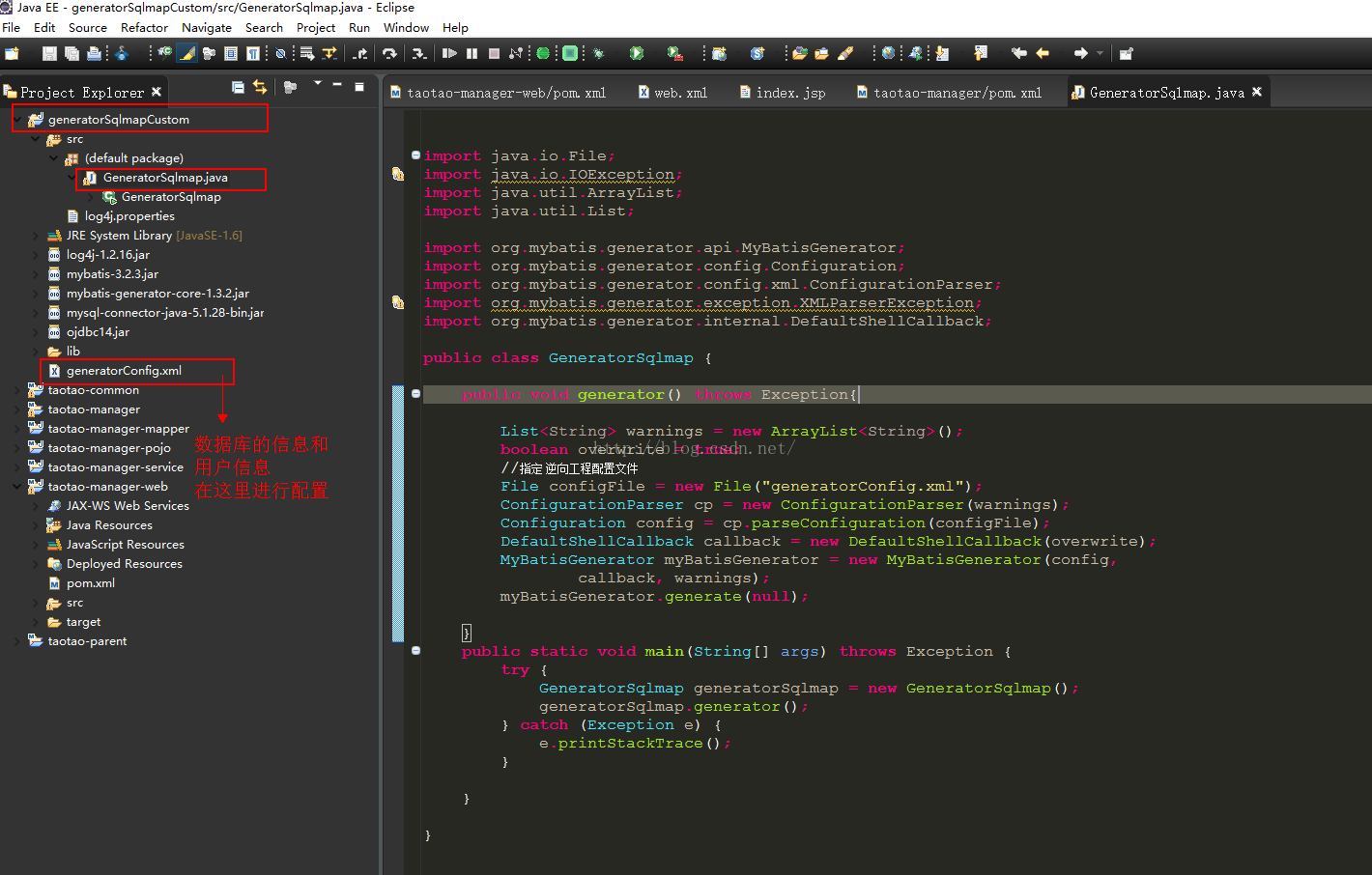
這個文件決定「連哪個庫、生成到哪裡去」,換環境時必須改的是連接信息與各個 targetPackage。
<?xml version="1.0" encoding="UTF-8"?>
<generatorConfiguration>
    <context id="testTables" targetRuntime="MyBatis3">

        <commentGenerator>
            <!-- 是否抑制自動生成的注釋 -->
            <property name="suppressAllComments" value="true" />
        </commentGenerator>

        <jdbcConnection
            driverClass="com.mysql.jdbc.Driver"
            connectionURL="jdbc:mysql://192.168.43.163:3306/taotao"
            userId="root"
            password="你的密碼" />

        <javaTypeResolver>
            <!-- false:把 JDBC 的 DECIMAL / NUMERIC 解析為 Integer;true:解析為 BigDecimal -->
            <property name="forceBigDecimals" value="false" />
        </javaTypeResolver>

        <!-- PO 類生成位置 -->
        <javaModelGenerator targetPackage="com.taotao.pojo" targetProject=".\src">
            <property name="enableSubPackages" value="false" />
            <property name="trimStrings" value="true" />
        </javaModelGenerator>

        <!-- Mapper XML 生成位置 -->
        <sqlMapGenerator targetPackage="com.taotao.mapper" targetProject=".\src">
            <property name="enableSubPackages" value="false" />
        </sqlMapGenerator>

        <!-- Mapper 接口生成位置 -->
        <javaClientGenerator targetPackage="com.taotao.mapper" targetProject=".\src" type="XMLMAPPER">
            <property name="enableSubPackages" value="false" />
        </javaClientGenerator>

        <!-- 指定要生成代碼的表 -->
    </context>
</generatorConfiguration>
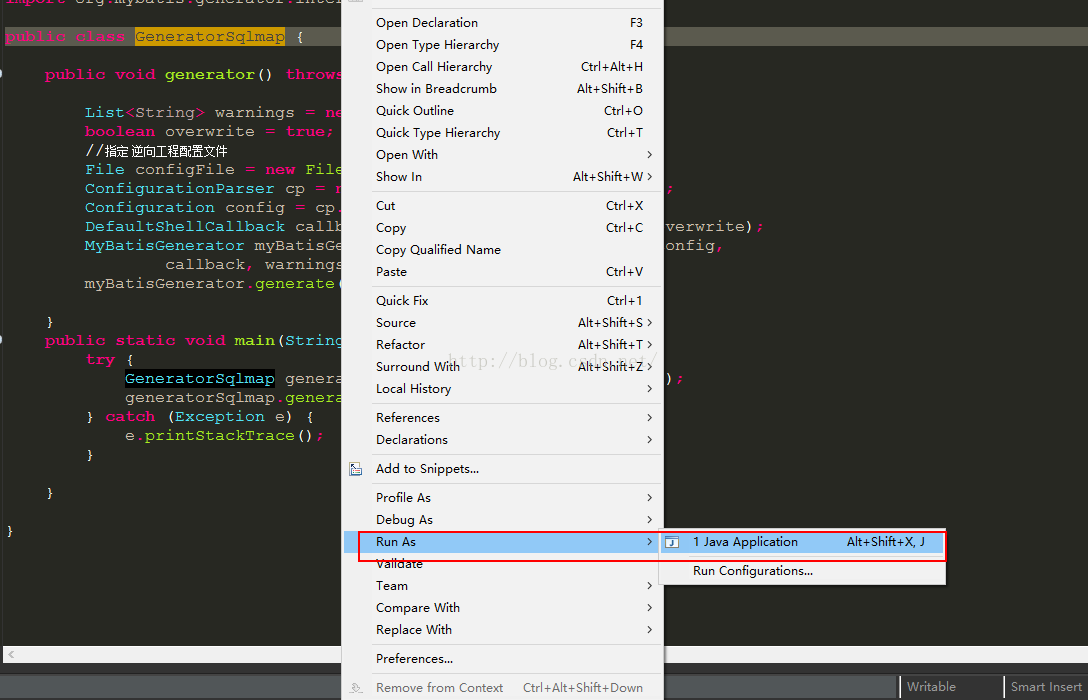
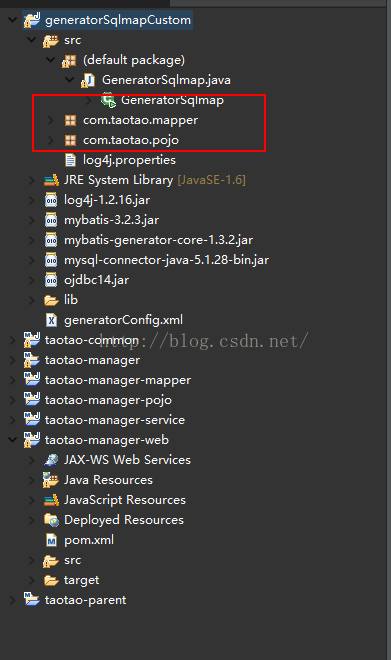
執行成功後,前面配置的兩個包下就會出現對應的 Java 代碼。
答案是 taotao-manager-web。理由不難推:其他子模塊最終都會被打成 jar 包丟進 lib 目錄,jar 裡的配置文件在運行時是讀不到的;只有 war 工程才能保證配置文件被正確加載。
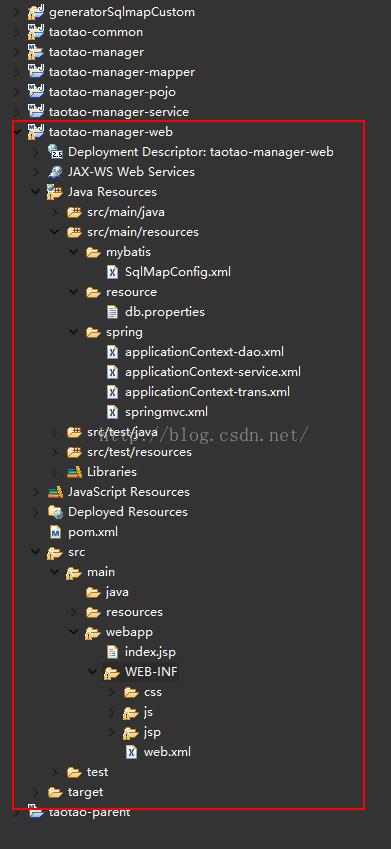
SqlMapConfig.xml
<?xml version="1.0" encoding="UTF-8" ?>
<configuration>
</configuration>
applicationContext-dao.xml
<?xml version="1.0" encoding="UTF-8"?>
<beans xmlns="https://www.springframework.org/schema/beans"
       xmlns:context="https://www.springframework.org/schema/context"
       xmlns:xsi="https://www.w3.org/2001/XMLSchema-instance"
       xsi:schemaLocation="https://www.springframework.org/schema/beans
           https://www.springframework.org/schema/beans/spring-beans-4.0.xsd
           https://www.springframework.org/schema/context
           https://www.springframework.org/schema/context/spring-context-4.0.xsd">

    <!-- 加載 jdbc 配置 -->
    <context:property-placeholder location="classpath:resource/db.properties" />

    <!-- 阿里 Druid 連接池 -->
    <bean id="dataSource" class="com.alibaba.druid.pool.DruidDataSource" destroy-method="close">
        <property name="url" value="${jdbc.url}" />
        <property name="username" value="${jdbc.username}" />
        <property name="password" value="${jdbc.password}" />
        <property name="driverClassName" value="${jdbc.driver}" />
        <property name="maxActive" value="10" />
        <property name="minIdle" value="5" />
    </bean>

    <!-- 讓 Spring 以單例管理 SqlSessionFactory -->
    <bean id="sqlSessionFactory" class="org.mybatis.spring.SqlSessionFactoryBean">
        <property name="configLocation" value="classpath:mybatis/SqlMapConfig.xml" />
        <property name="dataSource" ref="dataSource" />
    </bean>

    <!-- 掃描包,把 Mapper 代理對象註冊進容器 -->
    <bean class="org.mybatis.spring.mapper.MapperScannerConfigurer">
        <property name="basePackage" value="com.taotao.mapper" />
    </bean>

</beans>
applicationContext-service.xml
<?xml version="1.0" encoding="UTF-8"?>
<beans xmlns="https://www.springframework.org/schema/beans"
       xmlns:context="https://www.springframework.org/schema/context"
       xmlns:xsi="https://www.w3.org/2001/XMLSchema-instance"
       xsi:schemaLocation="https://www.springframework.org/schema/beans
           https://www.springframework.org/schema/beans/spring-beans-4.0.xsd
           https://www.springframework.org/schema/context
           https://www.springframework.org/schema/context/spring-context-4.0.xsd">

    <!-- 掃描 Service 實現類 -->
    <context:component-scan base-package="com.taotao.service" />

</beans>
applicationContext-trans.xml(事務)
<?xml version="1.0" encoding="UTF-8"?>
<beans xmlns="https://www.springframework.org/schema/beans"
       xmlns:tx="https://www.springframework.org/schema/tx"
       xmlns:xsi="https://www.w3.org/2001/XMLSchema-instance"
       xsi:schemaLocation="https://www.springframework.org/schema/beans
           https://www.springframework.org/schema/beans/spring-beans-4.0.xsd
           https://www.springframework.org/schema/tx
           https://www.springframework.org/schema/tx/spring-tx-4.0.xsd">

    <!-- 事務管理器 -->
    <bean id="transactionManager"
          class="org.springframework.jdbc.datasource.DataSourceTransactionManager">
        <property name="dataSource" ref="dataSource" />
    </bean>

    <!-- 事務通知:寫操作需要事務,讀操作只讀 -->
    <tx:advice id="txAdvice" transaction-manager="transactionManager">
        <tx:attributes>
            <tx:method name="save*"   propagation="REQUIRED" />
            <tx:method name="insert*" propagation="REQUIRED" />
            <tx:method name="add*"    propagation="REQUIRED" />
            <tx:method name="create*" propagation="REQUIRED" />
            <tx:method name="delete*" propagation="REQUIRED" />
            <tx:method name="update*" propagation="REQUIRED" />
            <tx:method name="find*"   propagation="SUPPORTS" read-only="true" />
            <tx:method name="select*" propagation="SUPPORTS" read-only="true" />
            <tx:method name="get*"    propagation="SUPPORTS" read-only="true" />
        </tx:attributes>
    </tx:advice>

</beans>
springmvc.xml
<?xml version="1.0" encoding="UTF-8"?>
<beans xmlns="https://www.springframework.org/schema/beans"
       xmlns:context="https://www.springframework.org/schema/context"
       xmlns:mvc="https://www.springframework.org/schema/mvc"
       xmlns:xsi="https://www.w3.org/2001/XMLSchema-instance"
       xsi:schemaLocation="https://www.springframework.org/schema/beans
           https://www.springframework.org/schema/beans/spring-beans.xsd
           https://www.springframework.org/schema/mvc
           https://www.springframework.org/schema/mvc/spring-mvc-4.0.xsd
           https://www.springframework.org/schema/context
           https://www.springframework.org/schema/context/spring-context.xsd">

    <context:component-scan base-package="com.taotao.controller" />

    <mvc:annotation-driven />

    <bean class="org.springframework.web.servlet.view.InternalResourceViewResolver">
        <property name="prefix" value="/WEB-INF/jsp/" />
        <property name="suffix" value=".jsp" />
    </bean>

    <!-- 靜態資源映射:DispatcherServlet 映射到 "/" 會攔截所有請求,必須放行靜態資源 -->
    <mvc:resources location="/WEB-INF/css/" mapping="/css/**" />
    <mvc:resources location="/WEB-INF/js/"  mapping="/js/**" />

</beans>
web.xml
<?xml version="1.0" encoding="UTF-8"?>
<web-app id="taotao" version="2.5"
         xmlns="https://java.sun.com/xml/ns/javaee"
         xmlns:xsi="https://www.w3.org/2001/XMLSchema-instance"
         xsi:schemaLocation="https://java.sun.com/xml/ns/javaee
             https://java.sun.com/xml/ns/javaee/web-app_2_5.xsd">

    <display-name>taotao-manager</display-name>

    <welcome-file-list>
        <welcome-file>index.jsp</welcome-file>
    </welcome-file-list>

    <!-- 加載 Spring 容器 -->
    <context-param>
        <param-name>contextConfigLocation</param-name>
        <param-value>classpath:spring/applicationContext-*.xml</param-value>
    </context-param>
    <listener>
        <listener-class>org.springframework.web.context.ContextLoaderListener</listener-class>
    </listener>

    <!-- 解決 POST 亂碼 -->
    <filter>
        <filter-name>CharacterEncodingFilter</filter-name>
        <filter-class>org.springframework.web.filter.CharacterEncodingFilter</filter-class>
        <init-param>
            <param-name>encoding</param-name>
            <param-value>utf-8</param-value>
        </init-param>
    </filter>
    <filter-mapping>
        <filter-name>CharacterEncodingFilter</filter-name>
        <url-pattern>/*</url-pattern>
    </filter-mapping>

    <!-- SpringMVC 前端控制器 -->
    <servlet>
        <servlet-name>taotao-manager</servlet-name>
        <servlet-class>org.springframework.web.servlet.DispatcherServlet</servlet-class>
        <init-param>
            <param-name>contextConfigLocation</param-name>
            <param-value>classpath:spring/springmvc.xml</param-value>
        </init-param>
        <load-on-startup>1</load-on-startup>
    </servlet>
    <servlet-mapping>
        <servlet-name>taotao-manager</servlet-name>
        <url-pattern>/</url-pattern>
    </servlet-mapping>

</web-app>
把後台管理頁面用到的 css / js / 圖片等資源複製到 WEB-INF 目錄下:
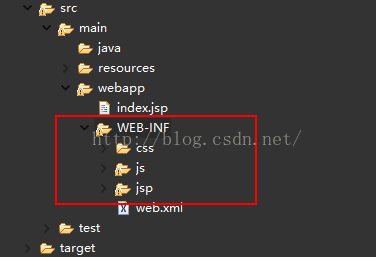
這是整合階段最值得想清楚的問題,答案藏在 SpringMVC 與 Spring 的父子容器關係裡。
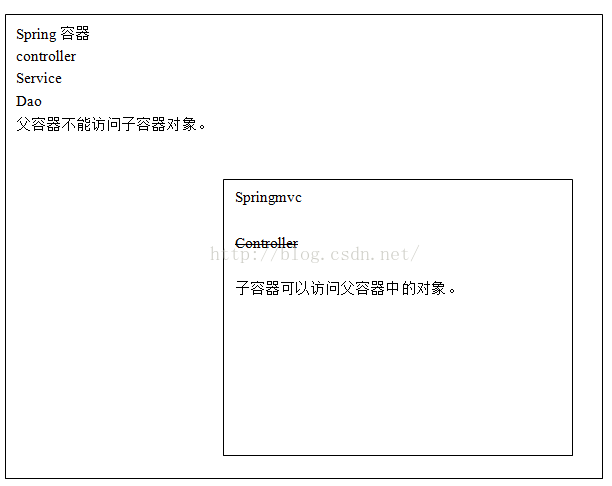
假設在 applicationContext-service.xml 中寫成全局掃描:
<context:component-scan base-package="com.taotao" />
這一行會把 @Controller、@Service、@Repository、@Component 全部掃進 Spring 父容器。而 springmvc.xml 中如果不再掃描,子容器裡就一個 Controller 都沒有,結果就是所有請求都找不到處理者,功能直接失效。
所以結論很明確:Service 與 Controller 必須分開掃描,不能圖省事寫全局掃描。
做一個最小可用的閉環:根據商品 id 查詢商品信息,並以 JSON 返回。
SELECT * FROM tb_item WHERE id = 536563
直接使用逆向工程生成的 TbItemMapper,不需要額外寫代碼。
ItemService 接口:
package com.taotao.service;

import com.taotao.pojo.TbItem;

public interface ItemService {
    TbItem getItemById(long itemId);
}
ItemServiceImpl 實現類:
package com.taotao.service.impl;

import com.taotao.mapper.TbItemMapper;
import com.taotao.pojo.TbItem;
import com.taotao.pojo.TbItemExample;
import com.taotao.service.ItemService;

import org.springframework.beans.factory.annotation.Autowired;
import org.springframework.stereotype.Service;

import java.util.List;

@Service
public class ItemServiceImpl implements ItemService {

    @Autowired
    private TbItemMapper itemMapper;

    @Override
    public TbItem getItemById(long itemId) {
        // 方式一:按主鍵查詢
        // TbItem item = itemMapper.selectByPrimaryKey(itemId);

        // 方式二:按條件查詢
        TbItemExample example = new TbItemExample();
        TbItemExample.Criteria criteria = example.createCriteria();
        criteria.andIdEqualTo(itemId);

        List<TbItem> list = itemMapper.selectByExample(example);
        if (list != null && list.size() > 0) {
            return list.get(0);
        }
        return null;
    }
}
接收頁面的請求,調用 Service 查詢,用 @ResponseBody 直接把對象序列化成 JSON。
package com.taotao.controller;

import com.taotao.pojo.TbItem;
import com.taotao.service.ItemService;

import org.springframework.beans.factory.annotation.Autowired;
import org.springframework.stereotype.Controller;
import org.springframework.web.bind.annotation.PathVariable;
import org.springframework.web.bind.annotation.RequestMapping;
import org.springframework.web.bind.annotation.ResponseBody;

@Controller
public class ItemController {

    @Autowired
    private ItemService itemService;

    @RequestMapping("/item/{itemId}")
    @ResponseBody
    public TbItem getItemById(@PathVariable Long itemId) {
        return itemService.getItemById(itemId);
    }
}
啟動 taotao-manager,訪問 https://localhost:8080/item/536563。第一次大概率會報錯:
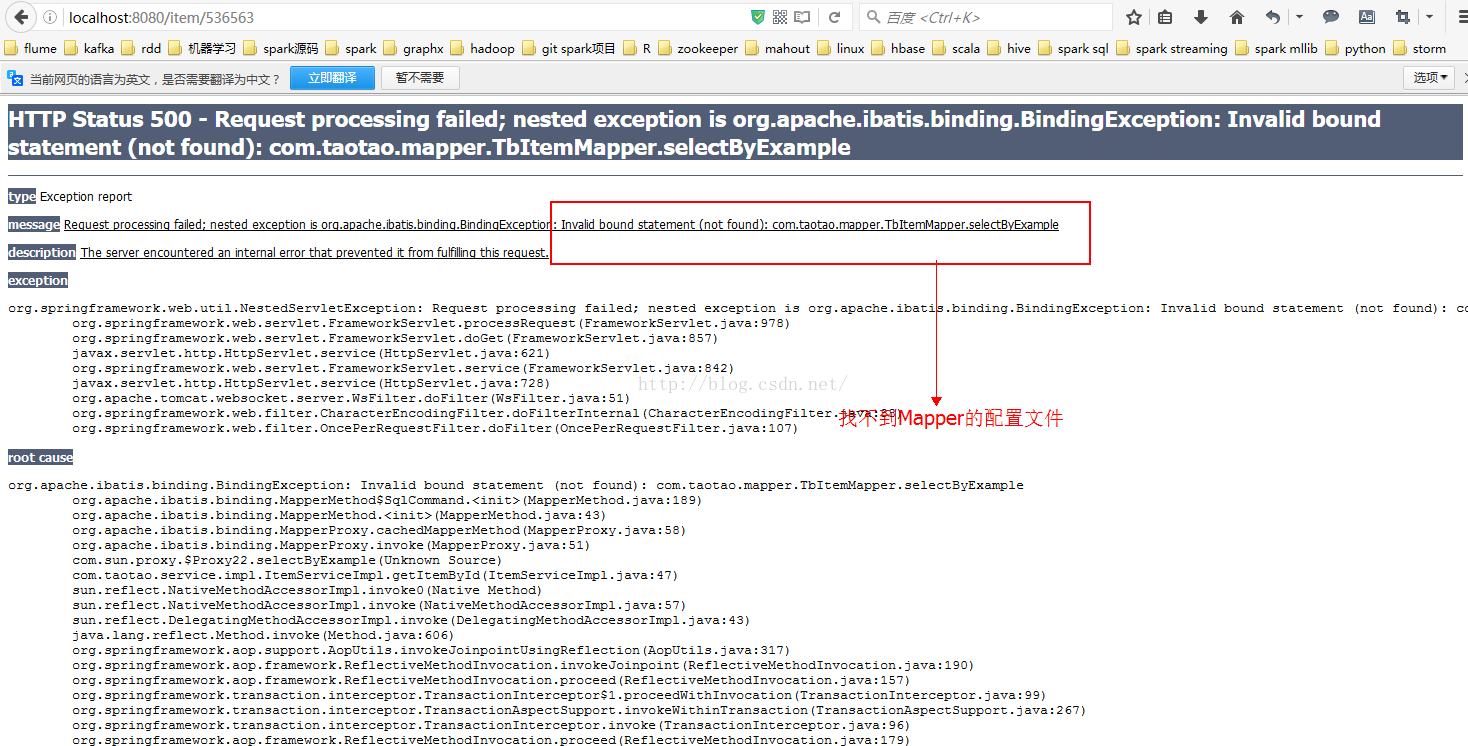
原因很典型:Maven 默認只把 src/main/resources 下的資源打包,Mapper XML 放在 src/main/java 裡會被漏掉,運行時找不到映射文件自然報錯。
修改 taotao-manager-mapper 的 pom.xml,顯式把 java 目錄下的 xml 納入資源:
<build>
    <resources>
        <resource>
            <directory>src/main/java</directory>
            <includes>
                <include>**/*.properties</include>
                <include>**/*.xml</include>
            </includes>
            <filtering>false</filtering>
        </resource>
    </resources>
</build>
改完刷新頁面,JSON 數據正常返回:
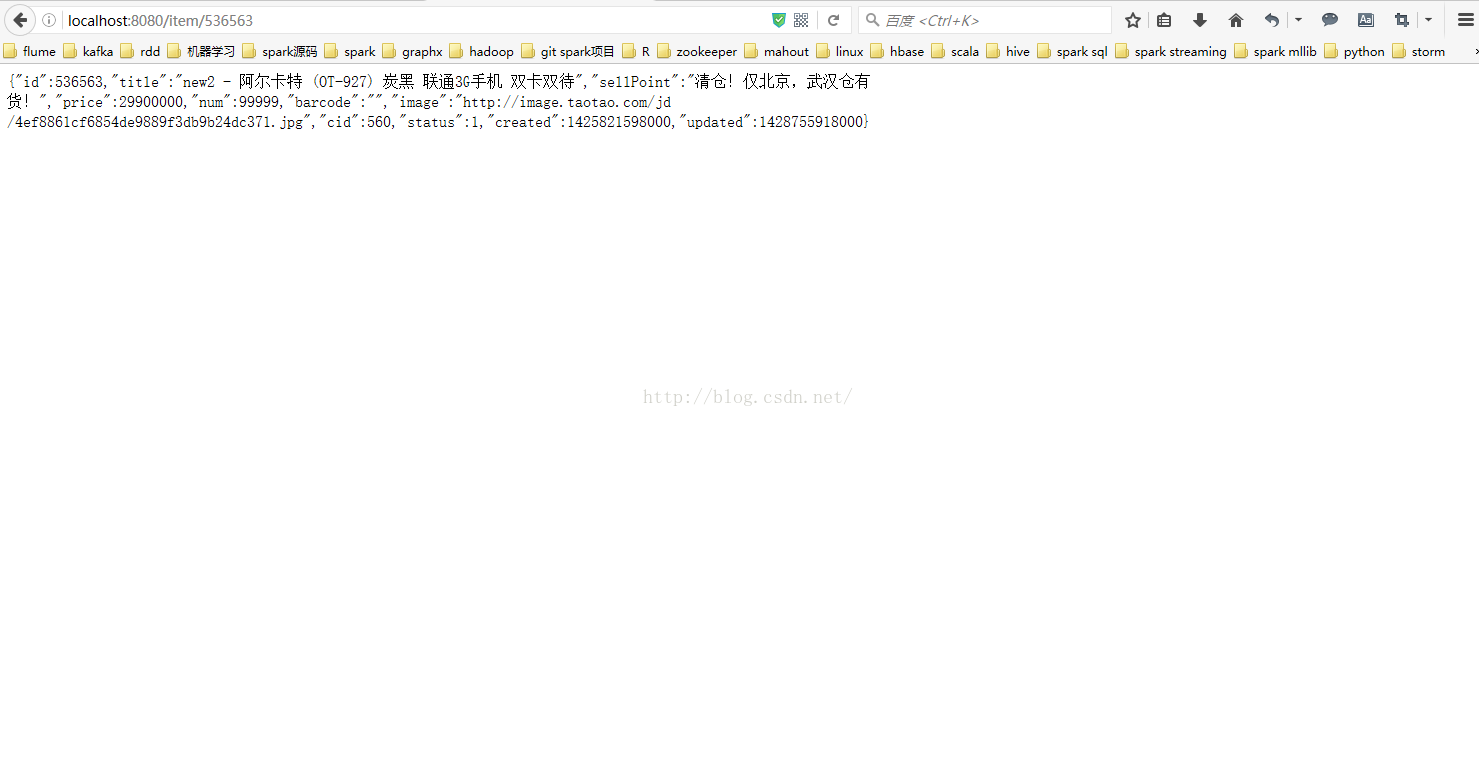
至此,從工程搭建、建庫、逆向生成到 SSM 三方整合的整條鏈路就全部跑通了。

 Android Studio 應用效能優化:記憶體洩漏排查
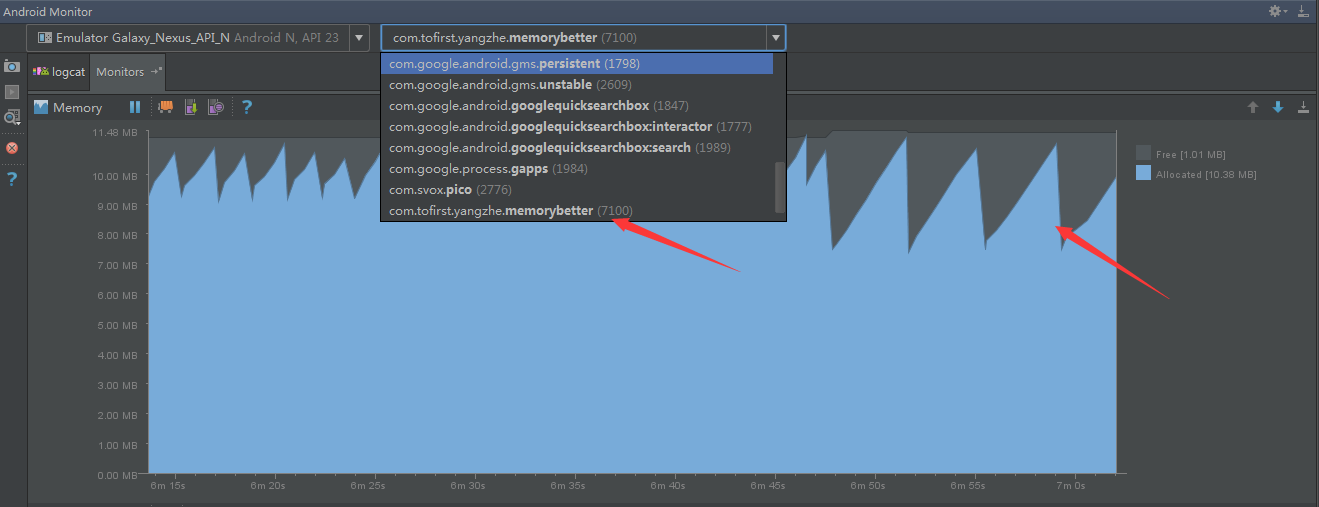
問題場景 應用程式在頁面跳轉後出現卡頓,但未直接崩潰。這類問題常與記憶體使用、物件洩漏或背景任務未停止有關。 使用 Android Studio Memory 分析 A
 深入解析 Android 系統服務的啟動流程與代理模式
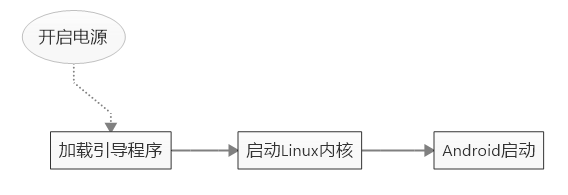
一、系統啟動概覽 Android 設備的開機流程大體可以分為三個階段: 加載引導程式(Bootloader) 引導程式是開機後執行的第一個小程式,因此它是針對特定主機
 Intent.createChooser 源碼解析:如何自訂選擇器標題
Intent 的比對流程分為三個環節:Action、category 與 data。當比對結果不只一筆時,系統會跳出一個對話框讓使用者挑選,長得像這樣: 這個對話框的標
 徹底搞懂 Android 的 Touch 事件分發與消費機制
Activity 或 View 類別的 onTouchEvent() 回呼會接收 touch 事件。一個完整手勢從 ACTION_DOWN 開始,到 ACTION_UP