

編輯:關於 Android 程式設計
或許是門檻較低的原因,早期接觸 Android 的人寫了大量書籍與博文,流傳開一種頗具誤導性的說法:Activity 就是搞界面的,Service 就是搞後台的,進而把「播放音樂」演繹成「耗時操作」,最終得出結論——「耗時的、長時間運行的操作都得用 Service」。對此只想說一句:別再誤導新人了。
本文原本打算全部手寫,但看完官方 API 文檔後發現整理得實在太好,因此會摘錄 API 內容,並結合重點補充一些說明。
API 文檔中的概述如下:
A Service is an application component representing either an application's desire to perform a longer-running operation while not interacting with the user or to supply functionality for other applications to use. Each service class must have a correspondingdeclaration in its package's AndroidManifest.xml. Services can be started with Context.startService() andContext.bindService(). Note that services, like other application objects, run in the main thread of their hosting process. This means that, if your service is going to do any CPU intensive (such as MP3 playback) or blocking (such as networking) operations, it should spawn its own thread in which to do that work. More information on this can be found in Processes and Threads. The IntentService class is available as a standard implementation of Service that has its own thread where it schedules its work to be done.
簡單翻譯一下:Service 是一個應用組件,代表著「在不與用戶交互的情況下持續運行的應用需求」,或者「為其他應用提供功能服務」。每個 Service 類都需要在 Manifest 文件中通過 <service> 節點聲明,並可通過 Context.startService() 與 Context.bindService() 兩種方式啟動。
請注意:Service 與其他應用組件一樣,運行在宿主進程的主線程中。這意味著,如果你的 Service 需要執行頻繁的 CPU 計算(例如播放 MP3)或阻塞操作(例如訪問網絡),就應該另外開闢獨立線程來完成這些工作。此外,IntentService 提供了一個規範的實現,它會在自己的子線程中調度並處理工作,無需你手動開線程。
這裡我刻意用了「持續」而非「長時間」,因為後者總容易被誤解為「阻塞」。
那 Service 到底是個什麼東西?API 用排除法幫我們釐清了疑惑:
? A Service is not a separate process. The Service object itself does not imply it is running in its own process; unless otherwise specified, it runs in the same process as the application it is part of. ? A Service is not a thread. It is not a means itself to do work off of the main thread (to avoid Application Not Responding errors).
翻譯過來就是:
Service 不是一個獨立進程——Service 對象本身並不意味著運行在自己的進程裡;除非另有指定,它與所屬應用運行在同一進程中。
Service 不是線程——它本身並不是把工作移出主線程的手段(也就無法避免 ANR)。
把兩點合起來看:Service 運行在啟動它的應用進程中,而應用進程有主線程(俗稱 UI 線程),Service 並不脫離主線程工作。因此,你絕不能阻塞 Service 的主線程,否則就會引發 ANR。
先擱置生命週期(大家對此基本清楚),我們看看 API 中提到的 Local Service 用法,順便引出一個常見疑惑。先寫一個 Service:
public class LocalService extends Service { private NotificationManager mNM; private int NOTIFICATION = R.string.local_service_started; public class LocalBinder extends Binder { LocalService getService() { return LocalService.this; } } @Override public void onCreate() { mNM = (NotificationManager)getSystemService(NOTIFICATION_SERVICE); showNotification(); } @Override public int onStartCommand(Intent intent, int flags, int startId) { Log.i("LocalService", "Received start id " + startId + ": " + intent); return START_STICKY; } @Override public void onDestroy() { mNM.cancel(NOTIFICATION); Toast.makeText(this, R.string.local_service_stopped, Toast.LENGTH_SHORT).show(); } @Override public IBinder onBind(Intent intent) { return mBinder; } private final IBinder mBinder = new LocalBinder(); private void showNotification() { CharSequence text = getText(R.string.local_service_started); Notification notification = new Notification(R.drawable.stat_sample, text, System.currentTimeMillis()); PendingIntent contentIntent = PendingIntent.getActivity(this, 0, new Intent(this, LocalServiceActivities.Controller.class), 0); notification.setLatestEventInfo(this, getText(R.string.local_service_label), text, contentIntent); mNM.notify(NOTIFICATION, notification); } }
(此處省略 Manifest 聲明。)演示綁定/啟動:
private LocalService mBoundService; private ServiceConnection mConnection = new ServiceConnection() { public void onServiceConnected(ComponentName className, IBinder service) { mBoundService = ((LocalService.LocalBinder)service).getService(); Toast.makeText(Binding.this, R.string.local_service_connected, Toast.LENGTH_SHORT).show(); } public void onServiceDisconnected(ComponentName className) { mBoundService = null; Toast.makeText(Binding.this, R.string.local_service_disconnected, Toast.LENGTH_SHORT).show(); } }; void doBindService() { bindService(new Intent(Binding.this, LocalService.class), mConnection, Context.BIND_AUTO_CREATE); mIsBound = true; } void doUnbindService() { if (mIsBound) { unbindService(mConnection); mIsBound = false; } } @Override protected void onDestroy() { super.onDestroy(); doUnbindService(); }
我們看到,通過 bindService 綁定並啟動 Service,並在 Activity 銷毀時解除綁定。於是有人疑惑:我并不希望 Service 在這時被結束,但不解除綁定又不規範,甚至擔心是否會影響 Activity 的銷毀與回收。
其實,只要重溫 Service 的定義就會明白:沒有任何一句話說它是「為 Activity 提供服務」的。它本身是一個服務,也僅僅是一個服務,而不是「為 Activity 服務的服務」。
前面提到兩種「啟動」Service 的方式:bindService 與 startService。嚴格來說,startService 是「啟動」,而且是 Context 中定義的方法,從未說過是 Activity 專屬;bindService 是「綁定」,綁定時若尚未啟動會順帶幫你啟動,但本質是綁定。二者的差異可以這樣理解:
啟動:我只是把你弄活了,之後彼此沒有半毛錢關係。
綁定:你要跟著我混,我不要你了,你就可以走了。
Context 類對 unbindService 的描述是:
Disconnect from an application service. You will no longer receive calls as the service is restarted, and the service is now allowed to stop at any time.
翻譯:斷開與應用服務的連接,你將不再收到 Service 重啟的回調,此 Service 也可以在任何時候被系統終止。
我們做一個簡單測試:讓兩個 Activity 綁定同一個 Service,觀察解除綁定對 Service 的影響。
// MainActivity(SecondActivity 與此類似,均在 onCreate 中 doBindService,onDestroy 中 doUnbindService) public class MainActivity extends Activity { private final static String TAG = "MainActivity"; @Override protected void onCreate(Bundle savedInstanceState) { super.onCreate(savedInstanceState); setContentView(R.layout.activity_main); Log.d(TAG, "onCreate"); doBindService(); findViewById(R.id.button).setOnClickListener(new OnClickListener() { @Override public void onClick(View v) { startActivity(new Intent(MainActivity.this, SecondActivity.class)); } }); } private LocalService mBoundService; private ServiceConnection mConnection = new ServiceConnection() { public void onServiceConnected(ComponentName className, IBinder service) { mBoundService = ((LocalService.LocalBinder)service).getService(); Log.d(TAG, "service bind"); } public void onServiceDisconnected(ComponentName className) { mBoundService = null; Log.d(TAG, "service unbind"); } }; void doBindService() { Log.d(TAG, "do service bind"); bindService(new Intent(this, LocalService.class), mConnection, Context.BIND_AUTO_CREATE); mIsBound = true; } private boolean mIsBound = false; void doUnbindService() { if (mIsBound) { Log.d(TAG, "do service unbind"); unbindService(mConnection); mIsBound = false; } else { Log.d(TAG, "no necessary to unbind,it is not binding"); } } @Override protected void onDestroy() { Log.d(TAG, "onDestroy"); super.onDestroy(); doUnbindService(); } }
public class LocalService extends Service { private final static String TAG = "LocalService"; public class LocalBinder extends Binder { LocalService getService() { return LocalService.this; } } @Override public void onCreate() { Log.i(TAG, "service onCreate"); } @Override public int onStartCommand(Intent intent, int flags, int startId) { Log.i(TAG, "Received start id " + startId + ": " + intent); return START_STICKY; } @Override public void onDestroy() { Log.i(TAG, "service destroy"); super.onDestroy(); } @Override public IBinder onBind(Intent intent) { Log.i(TAG, "service onBind"); return mBinder; } private final IBinder mBinder = new LocalBinder(); }
我截取了 logcat(eclipse 的背景就不吐槽了):
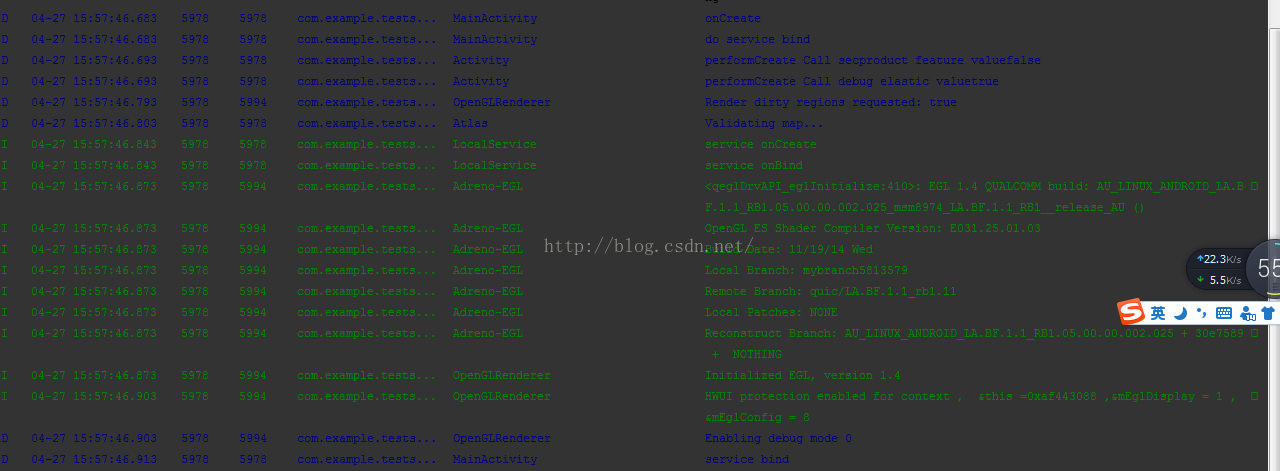
可以看到:並不是「解除綁定就關閉 Service」,而是當 Service 不再被任何一方綁定時,它才會被銷毀。
正如 API demo 的註釋所說:bindService 可以獲得 Service 對象,並與之交互(說白了就是想調用它的方法)。因為我們綁定的是一個明確的、運行在自己進程中的 Service,所以可以直接把它的 IBinder 轉型為具體類並訪問。
文檔這樣描述它:
IntentService is a base class for Services that handle asynchronous requests (expressed as Intents) on demand. Clients send requests through startService(Intent) calls; the service is started as needed, handles each Intent in turn using a worker thread, and stops itself when it runs out of work. This "work queue processor" pattern is commonly used to offload tasks from an application's main thread. The IntentService class exists to simplify this pattern and take care of the mechanics. To use it, extend IntentService and implement onHandleIntent(Intent). IntentService will receive the Intents, launch a worker thread, and stop the service as appropriate. All requests are handled on a single worker thread -- they may take as long as necessary (and will not block the application's main loop), but only one request will be processed at a time.
翻譯:IntentService 是 Service 的子類,專門用於按需處理異步請求(以 Intent 表達)。客戶端通過 startService(Intent) 發送請求;Service 按需啟動,用一個工作線程依次處理每個 Intent,做完後自我停止。這種「工作隊列處理器」模式常用來把任務從主線程卸載。要使用它,只需繼承 IntentService 並實現 onHandleIntent(Intent),剩下的接收 Intent、啟動工作線程、適時停止等機械性工作都由它代勞。所有請求都在單個工作線程上處理——它們可以執行任意長的時間(不會阻塞主線程),但同一時刻只處理一個請求。
onHandleIntent 方法的描述是:
This method is invoked on the worker thread with a request to process. Only one Intent is processed at a time, but the processing happens on a worker thread that runs independently from other application logic. So, if this code takes a long time, it will hold up other requests to the same IntentService, but it will not hold up anything else. When all requests have been handled, the IntentService stops itself, so you should not call stopSelf().
翻譯:Intent 有序到達、逐個處理,先來先辦;耗時的會讓後面的排隊等待,但不會阻塞主線程;所有請求處理完後,IntentService 會自我停止,所以你不必調用 stopSelf()。
這裡要分兩頭說。前面提到 Service 不是 Thread,耗時操作應避開主線程,因此需要另開子線程;IntentService 做了一定封裝,幫你開好了子線程。
在 Android 中使用多線程,還要知道一件事:Dalvik 能提供的資源有限,資源的回收就格外重要。開闢線程能提高資源利用率,但也存在被系統回收的可能。若依托 Activity 開子線程(初衷通常是執行耗時或阻塞代碼),就有「Activity 已關閉、子線程任務卻尚未完成」的風險,例如日記本類應用;而依托 Service,其生命力則相對更頑強一些。
 Volley 網絡請求框架深度解析:Android 學習之路
為什麼我們需要 Volley 在 Android 上做網絡請求,早期基本只有兩條路:HttpURLConnection 與 HttpClient。問題不在於它們不能用,而
 用 JNI 與 inotify 實作 App 自我卸載偵測
前言 這個需求在一般專案中幾乎遇不到,只有少數特殊場景才會需要。問題在於 Android 的 Java 層並沒有提供「監聽自身被移除」的接口,因此只能往 Native 層
 Android 原始碼中的設計模式:從單例到觀察者
閱讀 Android 原始碼時,會發現設計模式幾乎無所不在。從單例、工廠、適配器,到觀察者、建造者與備忘錄,這些模式不只是面試題,而是實際工程中處理物件職責、擴展性與耦合
 FloatingActionButton 進階用法:一鍵展開多個按鈕
FloatingActionButton 常用於主要操作入口,但進階用法可讓一個主按鈕展開多個子按鈕。本文以 futuresimple 的 android-floatin