

編輯:關於 Android 程式設計
需求很常見:點一下 ImageView,叫出系統相簿,選完照片後直接換上去。核心只是一個隱式 Intent 加上 onActivityResult。
執行結果:
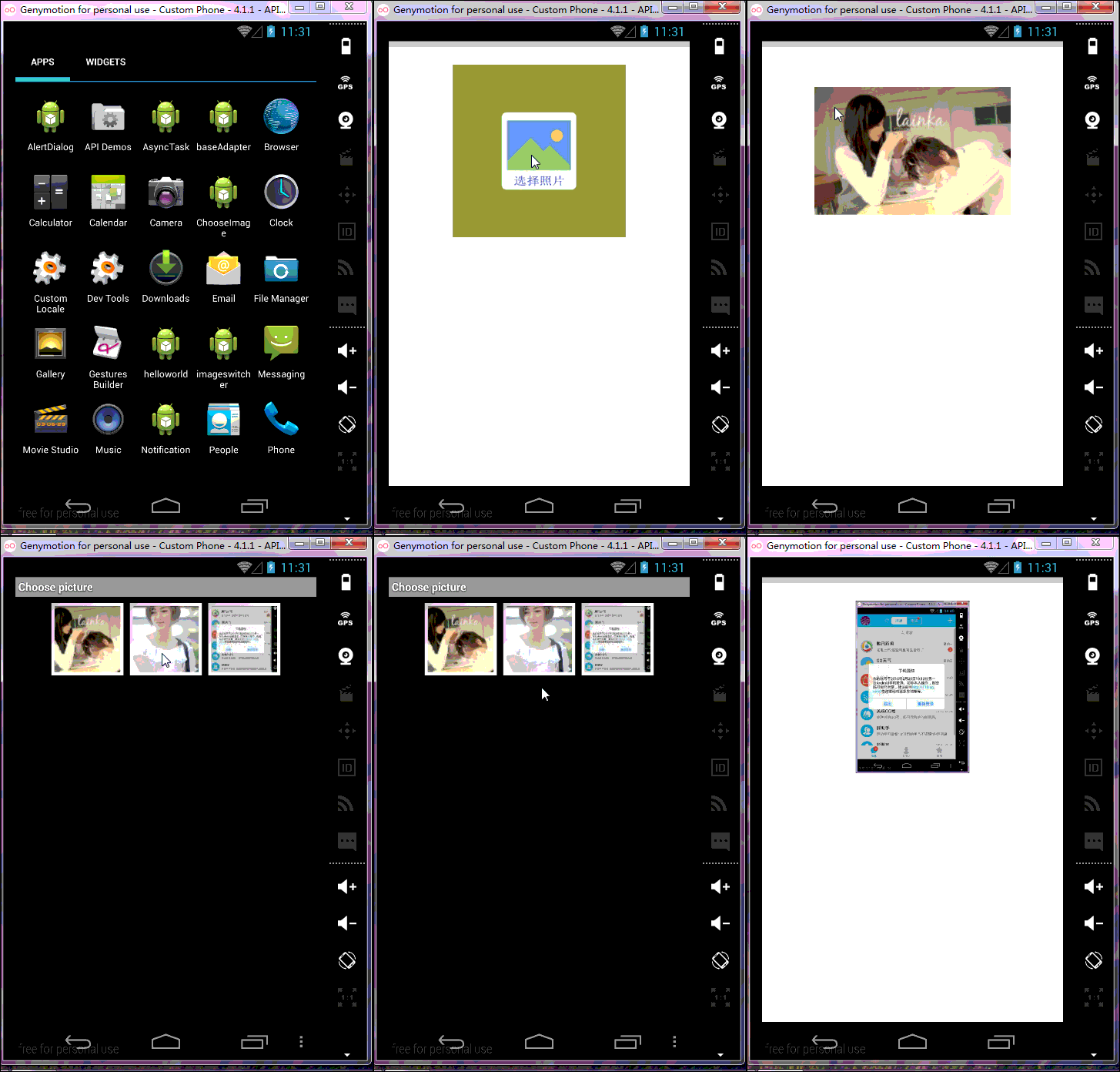
模擬器裡只有三張圖,畫質就別太計較了。
一個置中的方形 ImageView,先放張預設底圖:
<RelativeLayout xmlns:android="https://schemas.android.com/apk/res/android"
    xmlns:tools="https://schemas.android.com/tools"
    android:layout_width="match_parent"
    android:layout_height="match_parent">

    <ImageView
        android:id="@+id/image_choose"
        android:layout_width="250dp"
        android:layout_height="250dp"
        android:layout_centerHorizontal="true"
        android:layout_marginTop="30dp"
        android:background="#CC0000"
        android:padding="5dp"
        android:src="@drawable/default_bg" />

</RelativeLayout>package com.example.chooseimage;
import android.os.Bundle;
import android.provider.MediaStore;
import android.app.Activity;
import android.content.Intent;
import android.view.View;
import android.view.View.OnClickListener;
import android.view.Window;
import android.widget.ImageView;
public class MainActivity extends Activity implements OnClickListener {
private ImageView image_choose;
@Override
protected void onCreate(Bundle savedInstanceState) {
super.onCreate(savedInstanceState);
requestWindowFeature(Window.FEATURE_NO_TITLE);
setContentView(R.layout.activity_main);
image_choose = (ImageView) findViewById(R.id.image_choose);
image_choose.setOnClickListener(this);
}
@Override
public void onClick(View v) {
switch (v.getId()) {
case R.id.image_choose:
Intent intent = new Intent(Intent.ACTION_PICK, null);
intent.setDataAndType(
MediaStore.Images.Media.EXTERNAL_CONTENT_URI, "image/*");
startActivityForResult(intent, 0x1);
break;
}
}
@Override
protected void onActivityResult(int requestCode, int resultCode, Intent data) {
if (requestCode == 0x1 && resultCode == RESULT_OK) {
if (data != null) {
image_choose.setImageURI(data.getData());
}
}
super.onActivityResult(requestCode, resultCode, data);
}
}兩個重點:
Intent.ACTION_PICK 搭配 setDataAndType(..., "image/*"),等於告訴系統「我要從相簿挑一張圖」,無需自己寫選擇器界面。data.getData() 就是圖片的 content URI,直接交給 setImageURI 即可顯示。若要處理大圖,記得後續加上 BitmapFactory.Options 的 inSampleSize 做降採樣,避免 OOM。
 CodeIgniter + Volley 實現多圖片上傳(含服務端、Web 與 Android 完整代碼)
問題背景:App 在加載圖片時,往往還需要同時傳遞參數,並支持一次上傳多張圖片。本文以已配好 CodeIgniter 框架的服務端為例(不用該框架其實也無妨),完整演示服
 手機密碼忘了怎麼解鎖?三種常見方法
忘記手機密碼時,可先判斷是否開啟 USB 調試、是否登入 Google 帳號,以及是否能接受清除資料。 方法一:ADB 解鎖 前提是 USB 調試已開啟。將手機連電腦,
 Android 第三方開源庫精選整理(相容、擴充、工具、資源一次收齊)
我是程式猿,我為自己代言。 一直以來我都喜歡 Android 開發,摸索的過程中在 GitHub 上收集了大量優秀的第三方庫。這篇文章把開發流程中最常用到的一批整理出來,
 Android Socket 與多線程聊天功能:客戶端實作
使用 Socket 與多線程可以建立簡單的聊天客戶端。手機端透過 Socket 連線到伺服器,再分別使用輸入與輸出線程處理訊息接收與傳送,从而实现基本的即時通訊。基本流程