

編輯:關於 Android 程式設計
SharedPreferences 是 Android 提供的最輕量的資料持久化方案,要點有四:
1. 屬於輕量級的資料儲存方式。
2. 本質是基於 XML 檔案保存 key-value 鍵值對。
3. 通常用來存放簡單的組態資訊,例如密碼、視窗狀態、軟體基本設定、桌布路徑等。
4. SharedPreferences 物件只能讀取,寫入與修改必須透過 Editor 物件完成。
有兩種方式:
(1)context.getSharedPreferences(String name, int mode)
回傳的物件可被同一應用下的其他元件共用。name 為檔案名稱,mode 為操作模式,共四種:
· Context.MODE_PRIVATE:預設模式,檔案為私有資料,僅應用本身可存取,寫入會覆蓋原內容。
· Context.MODE_APPEND:檔案存在則追加內容,不存在則建立新檔。
· MODE_WORLD_READABLE:其他應用可讀取(已於新版系統中廢棄)。
· MODE_WORLD_WRITEABLE:其他應用可寫入(同樣已廢棄)。
SharedPreferences pre = getSharedPreferences("myinfo", MODE_PRIVATE);(2)activity.getPreferences(int mode)
產生的檔案僅供呼叫它的 Activity 使用,無需指定檔名。
SharedPreferences pre = getSharedPreferences("myinfo", MODE_PRIVATE);
Editor edit = pre.edit();Xxx 代表不同的資料型別:
edit.putString("name", "zhangsan");
edit.putString("age", "30");
寫完別忘了提交:
edit.commit();SharedPreferences pre = getSharedPreferences("myinfo", MODE_PRIVATE);
pre.getString("name", "");
pre.getString("age", "");讀取時第二個參數是預設值,當 key 不存在時回傳它。
edit.remove("name");
edit.remove("age");
edit.commit();
remove 一樣要 commit 才會生效。若要清空全部,可用 edit.clear()。
運行結果
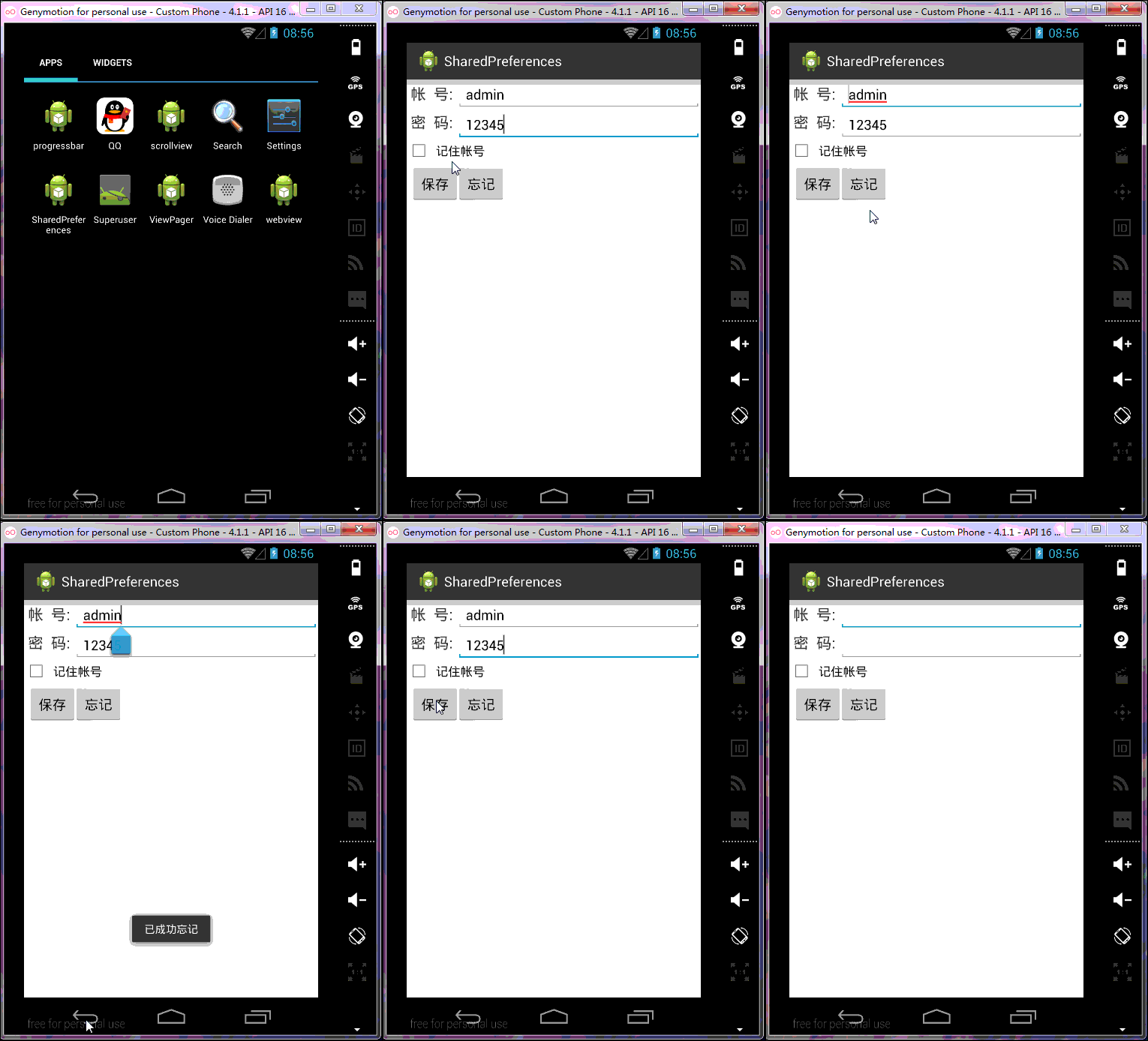
MainActivity.java
package com.example.sharedpreferences;

import android.app.Activity;
import android.content.SharedPreferences;
import android.content.SharedPreferences.Editor;
import android.os.Bundle;
import android.view.View;
import android.widget.CheckBox;
import android.widget.EditText;
import android.widget.Toast;

public class MainActivity extends Activity {

    private EditText et_name;
    private EditText et_passward;
    private CheckBox ckb_save;
    private SharedPreferences pre;
    private Editor edit;

    @Override
    protected void onCreate(Bundle savedInstanceState) {
        super.onCreate(savedInstanceState);
        setContentView(R.layout.activity_main);

        et_name = (EditText) findViewById(R.id.et_name);
        et_passward = (EditText) findViewById(R.id.et_passward);
        ckb_save = (CheckBox) findViewById(R.id.checkBox1);

        pre = getSharedPreferences("myinfo", MODE_PRIVATE);
        edit = pre.edit();

        String name = pre.getString("name", "");
        String passward = pre.getString("passward", "");
        if (name != null && passward != null) {
            et_name.setText(name);
            et_passward.setText(passward);
        }
    }

    public void btnLogin(View v) {
        switch (v.getId()) {
            case R.id.btn_login: {
                String name = et_name.getText().toString();
                String passward = et_passward.getText().toString();
                if (name != null && passward != null) {
                    if (ckb_save.isChecked()) {
                        edit.putString("name", name);
                        edit.putString("passward", passward);
                        edit.commit();
                        Toast.makeText(MainActivity.this, "保存用戶成功",
                                Toast.LENGTH_SHORT).show();
                    } else {
                        Toast.makeText(MainActivity.this, "未勾選保存,保存失敗",
                                Toast.LENGTH_SHORT).show();
                    }
                } else {
                    Toast.makeText(MainActivity.this, "用戶名或者密碼為空,請重新輸入",
                            Toast.LENGTH_SHORT).show();
                    et_name.setText(null);
                    et_passward.setText(null);
                }
                break;
            }
            case R.id.btn_cancel: {
                edit.remove("name");
                edit.remove("passward");
                edit.commit();
                Toast.makeText(MainActivity.this, "已成功忘記",
                        Toast.LENGTH_SHORT).show();
                break;
            }
        }
    }
}
佈局面檔 activity_main.xml
<RelativeLayout xmlns:android="https://schemas.android.com/apk/res/android"
    xmlns:tools="https://schemas.android.com/tools"
    android:layout_width="match_parent"
    android:layout_height="match_parent"
    tools:context=".MainActivity">

    <TextView
        android:id="@+id/tv_name"
        android:layout_width="wrap_content"
        android:layout_height="wrap_content"
        android:layout_margin="5dp"
        android:gravity="center"
        android:text="帳 號:"
        android:textSize="20sp" />

    <EditText
        android:id="@+id/et_name"
        android:layout_width="match_parent"
        android:layout_height="wrap_content"
        android:layout_toRightOf="@id/tv_name"
        android:singleLine="true" />

    <TextView
        android:id="@+id/tv_passward"
        android:layout_width="wrap_content"
        android:layout_height="wrap_content"
        android:layout_below="@id/tv_name"
        android:layout_margin="5dp"
        android:text="密 碼:"
        android:textSize="20sp" />

    <EditText
        android:id="@+id/et_passward"
        android:layout_width="fill_parent"
        android:layout_height="wrap_content"
        android:layout_below="@id/et_name"
        android:layout_toRightOf="@id/tv_passward"
        android:singleLine="true" />

    <CheckBox
        android:id="@+id/checkBox1"
        android:layout_width="wrap_content"
        android:layout_height="wrap_content"
        android:layout_alignParentLeft="true"
        android:layout_below="@+id/tv_passward"
        android:checked="false"
        android:text="記住帳號" />

    <Button
        android:id="@+id/btn_login"
        android:layout_width="wrap_content"
        android:layout_height="wrap_content"
        android:layout_alignLeft="@+id/tv_passward"
        android:layout_below="@+id/checkBox1"
        android:onClick="btnLogin"
        android:text="保存" />

    <Button
        android:id="@+id/btn_cancel"
        android:layout_width="wrap_content"
        android:layout_height="wrap_content"
        android:layout_alignBaseline="@+id/btn_login"
        android:layout_alignBottom="@+id/btn_login"
        android:layout_alignLeft="@+id/et_passward"
        android:onClick="btnLogin"
        android:text="忘記" />

</RelativeLayout>
這個例子把「勾選保存 → 寫入 → 下次進入自動回填」與「忘記 → 移除」兩條路徑串了起來,是 SharedPreferences 最典型的用法。需要注意的是,SharedPreferences 存的是明文,正式專案中若要保存密碼或 token,應改用 Keystore 或加密後再寫入。
 Android 網路請求實戰:POST 與 GET 的實作與差異
Android 應用幾乎都離不開與伺服器互動,而互動的本質就是手機客戶端送出網路請求。下面先釐清最常見的兩種請求方式——POST 與 GET——的差別,再分別用它們實作一
 Intent 的基本用法:顯式啟動、隱式啟動與 Activity 的關閉時機
一、Intent 是什麼角色 Android 應用通常包含多個 Activity。在當前 Activity 中呼叫 StartActivity 並傳入一個 Intent
 Android 版面配置與 CSS Flex 布局屬性對照表
一、前言 身為 Android 開發者,用 XML 寫 UI 實在太方便了。近來學習 Weex 時需要用 CSS 來布局,學完之後發現 CSS 的 Flex 布局同樣相當
 VoLTE 高清語音通話支持哪些手機?機型清單一次看
隨著蘋果向 iPhone 6 以上機型推送 VoLTE 高清語音通話的運營商配置更新,越來越多網友開始關注這項新的語音技術。那麼目前國內有哪些手機支持 VoLTE 高清語