

編輯:關於 Android 程式設計
給 App 加夜間模式這件事,說起來簡單,真動手卻常常卡住。我在準備接入夜間模式時把市面上的方案翻了一遍,結果都不太順手:MultipleTheme 的思路沒問題,但它要求你把每一個需要換膚的 View 都自己改寫一遍,接入成本太高;Prism 倒是省心,可惜不支援 Theme 機制,而且早已停止維護。既然現成的輪子都不好用,那就自己造一個——於是有了 Colorful。
Colorful 的核心思路是「基於 Theme」:不用重啟 Activity,也不用自定義任何 View,就能在日間與夜間模式之間平滑切換。
一個以 Theme 為基礎的 Android 動態換膚庫,用極低的接入成本實現夜間模式。
效果如下:
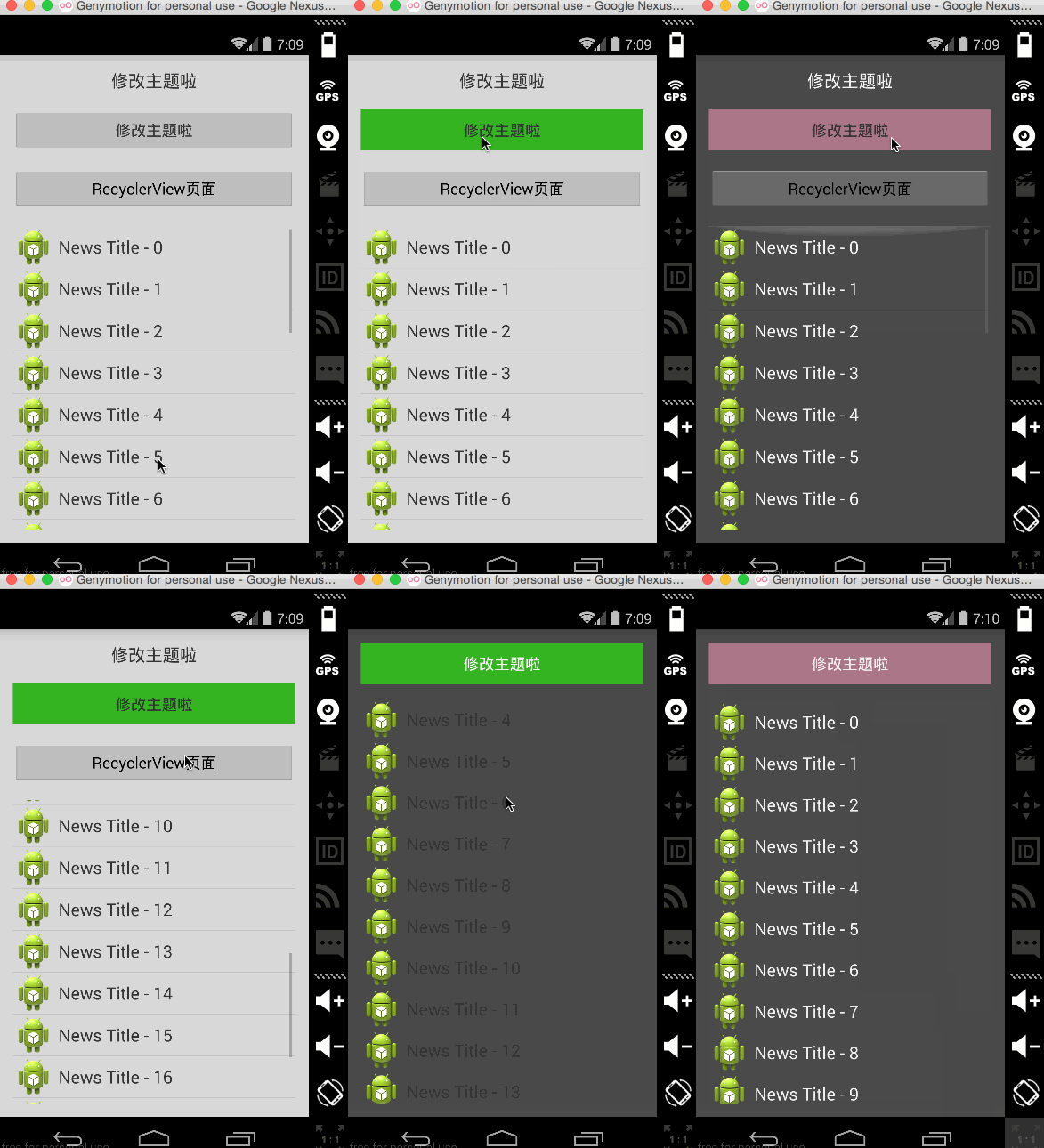
第一步,宣告一批準備動態替換的屬性,例如根佈局背景、按鈕底色、文字顏色等。
<?xml version="1.0" encoding="utf-8"?>
<resources>
    <!-- 自定義屬性 -->
    <attr name="root_view_bg" format="reference|color" />
    <attr name="btn_bg" format="reference|color" />
    <attr name="text_color" format="reference|color" />
</resources>佈局裡不再寫死具體顏色,而是用 ?attr/xxx 的方式引用剛才宣告的屬性。
<RelativeLayout xmlns:android="https://schemas.android.com/apk/res/android"
    xmlns:tools="https://schemas.android.com/tools"
    android:id="@+id/root_view"
    android:layout_width="match_parent"
    android:layout_height="match_parent"
    android:background="?attr/root_view_bg"
    tools:context="com.example.androidthemedemo.MainActivity">

    <TextView
        android:id="@+id/textview"
        android:layout_width="match_parent"
        android:layout_height="wrap_content"
        android:gravity="center"
        android:text="@string/change_theme"
        android:textColor="?attr/text_color"
        android:textSize="20sp" />

    <Button
        android:id="@+id/change_btn"
        android:layout_width="match_parent"
        android:layout_height="wrap_content"
        android:layout_below="@id/textview"
        android:layout_marginTop="20dp"
        android:text="@string/change_theme"
        android:textColor="?attr/text_color" />

    <Button
        android:id="@+id/second_btn"
        android:layout_width="match_parent"
        android:layout_height="wrap_content"
        android:layout_below="@id/change_btn"
        android:layout_marginTop="20dp"
        android:text="@string/sec_act" />

    <ListView
        android:id="@+id/listview"
        android:layout_width="match_parent"
        android:layout_height="match_parent"
        android:layout_below="@id/second_btn"
        android:layout_marginTop="20dp" />
</RelativeLayout>
關鍵點在於前綴:寫成 ?attr/root_view_bg 時,取值會延後到主題解析階段,換主題時自然重新計算;如果寫成 @color/xxx,顏色在資源階段就被定死了,換膚時不會變。上面這段佈局裡,root_view 的背景綁定了 root_view_bg,TextView 與 Button 的文字顏色綁定了 text_color。
接著為同一批屬性準備不同的取值。以最常見的日間/夜間兩套配色為例,styles.xml 可以這樣寫:
<resources>
    <style name="AppBaseTheme" parent="Theme.AppCompat.Light" />
    <style name="AppTheme" parent="AppBaseTheme" />

    <!-- 日間主題 -->
    <style name="DayTheme" parent="AppTheme">
        <item name="root_view_bg">@drawable/bg_day</item>
        <item name="btn_bg">@color/white_btn_color</item>
        <item name="text_color">@color/black_tx_color</item>
    </style>

    <!-- 夜間主題 -->
    <style name="NightTheme" parent="AppTheme">
        <item name="root_view_bg">@drawable/bg_night</item>
        <item name="btn_bg">@color/black_btn_color</item>
        <item name="text_color">@color/white_tx_color</item>
    </style>
</resources>
兩套主題為同一屬性指定了不同取值,切換主題時 View 的相關屬性也就跟著變了。對應的 colors.xml:
<?xml version="1.0" encoding="utf-8"?>
<resources>
    <!-- 日間模式 -->
    <color name="white_btn_color">#3BB32E</color>
    <color name="black_tx_color">#333333</color>

    <!-- 夜間模式 -->
    <color name="black_btn_color">#aa7788</color>
    <color name="white_tx_color">#f0f0f0</color>
</resources>有了主題還不夠,得告訴 Colorful「哪些控件的哪個屬性需要替換」:
ListView mNewsListView = (ListView) findViewById(R.id.listview);

// 為 ListView 建立 setter,這裡不改動 ListView 自身屬性
ViewGroupSetter listViewSetter = new ViewGroupSetter(mNewsListView, 0);
// 綁定 Item 佈局中的 news_title,換膚時修改它的 text_color
listViewSetter.childViewTextColor(R.id.news_title, R.attr.text_color);

Colorful mColorful = new Colorful.Builder(this)
        .backgroundDrawable(R.id.root_view, R.attr.root_view_bg)  // 背景 Drawable
        .backgroundColor(R.id.change_btn, R.attr.btn_bg)          // 按鈕背景色
        .textColor(R.id.textview, R.attr.text_color)              // 文字顏色
        .setter(listViewSetter)                                   // 手動加入 setter
        .create();
這裡做了兩件事。一是用 Chaining 的方式把 root_view、change_btn、textview 三個控件與自定義屬性綁定起來,比如 backgroundDrawable(R.id.root_view, R.attr.root_view_bg) 表示 root_view 的背景取 root_view_bg 的值;二是透過 ViewGroupSetter 處理 ListView 這類需要遍歷子項的場景——換膚時它會走一遍所有 Item View,把 news_title 的文字顏色一併改掉。
最後一行調用即可生效:
boolean isNight = false;

// 切換主題
private void changeThemeWithColorful() {
    if (!isNight) {
        mColorful.setTheme(R.style.DayTheme);
    } else {
        mColorful.setTheme(R.style.NightTheme);
    }
    isNight = !isNight;
}
Colorful 目前功能還比較基礎,歡迎有興趣的同學一起參與,把屬性支援、列表復用等場景慢慢補齊。
 Android NDK 編譯配置全解析:Android.mk 與 Application.mk 深入指南
在 Android NDK 開發體系中,Android.mk 與 Application.mk 是兩個舉足輕重的配置檔。它們各司其職,共同引導編譯器完成原始碼的構建,並最
 Android NDK 開發入門:JNI 核心觀念一次搞懂
一、JNI 方法的命名規則 先在 Java 層宣告一個 native 方法。下面的 test 是本地方法,參數與回傳值都是字串。 package com.kltz88.
 TextView 實現圖文混合編排的方法
在部分頁面中,我們希望文字與圖片能自然混排,而不是額外使用多個 ImageView 拼接。Android 的 TextView 可透過 HTML 風格標籤與 ImageG
 Android 常用除錯命令與工具彙整(一)命令篇
一、命令篇 記憶體查看 使用情境:追蹤行程的記憶體使用狀況,用來排查是否存在記憶體無法回收、甚至洩漏的問題。若程式有洩漏,從動態佔用的變化往往能看出端倪。 查看系統為每