

編輯:關於 Android 程式設計
做 App 時 TextView 大概是使用頻率最高的控制項,功能也確實強大。但它仍有幾個邊角處不太順手,最典型的例子就是換行對齊。當一段字串超過螢幕寬度時,系統會自動換行,然而預設的換行效果是「頂齊」,也就是每一行都從最左側開始,視覺上參差不齊。設計稿要求的卻往往是換行後整體置中——這件事在 iOS 上垂手可得,在 Android 就得自己動手做一個 View。
先看最終效果:
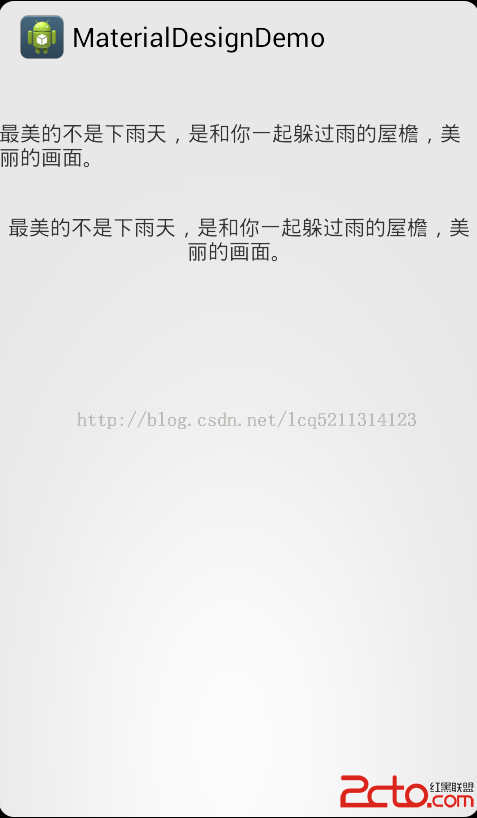
翻 android.text 包的時候,注意到幾個平常幾乎不會碰到的類別:Layout、StaticLayout、DynamicLayout。查了資料才理解它們的角色——這 trio 正是負責對 CharSequence 及其子類做排版的核心,只要傳入不同的 Alignment,它們就會依該對齊方式處理文字。
既然如此,思路就很清楚了:覆寫 TextView 的 onDraw,把畫面的主導權交給 StaticLayout,並將對齊方式指定為 ALIGN_CENTER。
public class CenterTextView extends TextView {

    private StaticLayout myStaticLayout;
    private TextPaint tp;

    public CenterTextView(Context context, AttributeSet attrs) {
        super(context, attrs);
    }

    @Override
    protected void onSizeChanged(int w, int h, int oldw, int oldh) {
        super.onSizeChanged(w, h, oldw, oldh);
        initView();
    }

    private void initView() {
        tp = new TextPaint(Paint.ANTI_ALIAS_FLAG);
        tp.setTextSize(getTextSize());
        tp.setColor(getCurrentTextColor());
        // 關鍵在這裡:對齊方式改為 ALIGN_CENTER
        myStaticLayout = new StaticLayout(getText(), tp, getWidth(),
                Alignment.ALIGN_CENTER, 1.0f, 0.0f, false);
    }

    @Override
    protected void onDraw(Canvas canvas) {
        myStaticLayout.draw(canvas);
    }
}用法與一般的 TextView 幾乎相同,只是要把標籤換成自訂 View 的完整類別名稱:
<RelativeLayout xmlns:android="https://schemas.android.com/apk/res/android"
    android:layout_width="match_parent"
    android:layout_height="match_parent">

    <TextView
        android:id="@+id/text"
        android:layout_width="wrap_content"
        android:layout_height="wrap_content"
        android:layout_centerHorizontal="true"
        android:layout_marginTop="30dp"
        android:text="最美的不是下雨天,是和你一起躲過雨的屋檐,美麗的畫面。" />

    <com.example.materialdesigndemo.CenterTextView
        android:layout_width="wrap_content"
        android:layout_height="wrap_content"
        android:layout_below="@id/text"
        android:layout_centerHorizontal="true"
        android:layout_marginTop="30dp"
        android:text="最美的不是下雨天,是和你一起躲過雨的屋檐,美麗的畫面。" />
</RelativeLayout>整個改動只集中在一個 onDraw 方法上,成本極低,但代價也相當明確:因為畫面完全交由 StaticLayout 一手包辦,CenterTextView 就只認得文字,沒辦法再顯示 drawableLeft、drawableRight 這類複合圖示。若需求裡真的有圖示要一起排,就必須在 onDraw 中自行計算圖示的繪製位置並呼叫 canvas 相關方法,複雜度會上升一截。
另一個實務上的小陷阱是:StaticLayout 是在 onSizeChanged 時機以當下的 getWidth() 建構的,若你的 TextView 寬度會隨 LayoutParams 或字級設定變動,記得在對應的回呼裡重新呼叫一次 initView,否則排版會與實際寬度脫節。
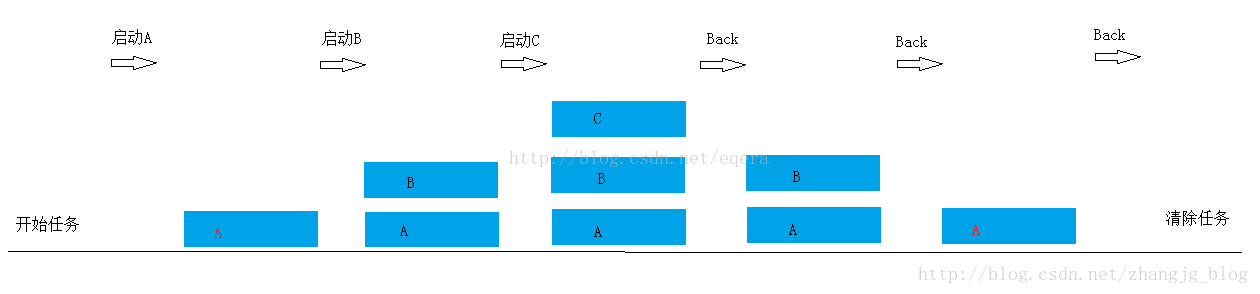 Android Activity 四種啟動模式與 taskAffinity 深入解析
在使用者眼裡,App 就是一個個畫面的堆疊;但在 Framework 層,這些畫面的組織方式其實由「Task(任務)」與「Back Stack(回退堆疊)」決定。Acti
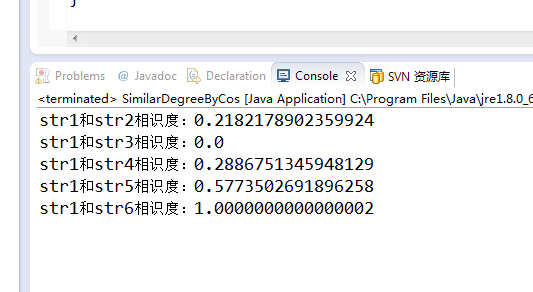 用 Java 實作餘弦相似度(Cosine)匹配演算法完整範例
用 Java 實作餘弦相似度匹配演算法最近在做一个通訊交友專案,裡面有個需求:根據使用者填寫的興趣愛好,幫他推薦興趣相近的朋友。思路其實不複雜——把每個使用者的興趣標籤互
 Tinker 熱更新完整指南:集成、補丁生成與加載流程
Tinker 的效果與限制 Tinker 是常見的 Android 熱更新方案,可在不重新發佈完整安裝包的情況下,推送補丁修正部分問題。不過,Tinker 也有已知限制,
 Fragment 底部導航欄實作:TextView 方案
底部導航欄是 Android 應用中常見的頁面切換方式。使用 Fragment 搭配 TextView,可以實作出輕量且易於維護的底部導航效果。這篇文章以 TextVie