

編輯:關於 Android 程式設計
用 Android Studio 開發時,看到被畫上刪除線的 API 就想把它換掉,結果反而被一個「不是問題的問題」困了很久。這篇記錄一下整個排查過程。
做固定 Tabs 這種效果時,原本用的是 ActionBar.Tab:

但 ActionBar.Tab 已標記為 deprecated,官方替代方案是 TabLayout 搭配 ViewPager。於是引入 Design Support Library,卻在啟動時炸掉了。
Caused by: android.view.InflateException: Binary XML file line #8:
    Error inflating class android.support.design.widget.TabLayout
    at android.view.LayoutInflater.createView(LayoutInflater.java:633)
    at android.view.LayoutInflater.createViewFromTag(LayoutInflater.java:743)
    at android.view.LayoutInflater.rInflate(LayoutInflater.java:806)
    at android.view.LayoutInflater.inflate(LayoutInflater.java:504)
    at com.android.internal.policy.impl.PhoneWindow.setContentView(PhoneWindow.java:377)
    at android.app.Activity.setContentView(Activity.java:2144)
    at com.example.hp.myapplication.MainActivity.onCreate(MainActivity.java:15)
訊息說得很明白:XML 第 8 行解析 TabLayout 失敗,導致 MainActivity 第 15 行的 setContentView(R.layout.activity_main) 也跟著出錯。
SDK 已升到 API 21 以上,Support Library 也是最新的,依賴寫法看起來沒問題:
dependencies {
    compile fileTree(dir: 'libs', include: ['*.jar'])
    compile 'com.android.support:appcompat-v7:22.2.0'
    compile 'com.android.support:support-v4:22.2.0'
    compile 'com.android.support:design:22.2.0'
}
布局檔也確實有寫入 TabLayout:
<LinearLayout xmlns:android="https://schemas.android.com/apk/res/android"
    xmlns:app="https://schemas.android.com/apk/res-auto"
    android:layout_width="match_parent"
    android:layout_height="match_parent"
    android:orientation="vertical">
</LinearLayout>問題不在依賴,而在 styles.xml。AppTheme 必須繼承 AppCompat 系的主題,Design 库的元件才能正常 inflate。原本的寫法用了自訂的中間層,結果 parent 解析不到正確鏈路。
app 模組的 styles.xml 改為:
<resources>
    <style name="AppTheme" parent="Base.AppTheme">
        <!-- Customize your theme here. -->
    </style>

    <!-- Base application theme. -->
    <style name="Base.AppTheme" parent="Theme.AppCompat.Light.DarkActionBar">
        <item name="colorPrimary">#673AB7</item>
        <item name="colorPrimaryDark">#512DA8</item>
        <item name="colorAccent">#FF4081</item>
    </style>
</resources>
另一份 styles.xml 也對齊同樣的 parent:
<resources>
    <style name="AppTheme" parent="Base.AppTheme">
    </style>
</resources>
改完之後問題就消失了。
InflateException 本身就是個資訊量很低的錯誤——它只告訴你「某個 View 解析失敗」,幾乎不會直指原因。遇到 Design Library 元件出現這個錯誤時,建議依序檢查三件事:
<ViewStub> 或版本判斷使用。另外,觀察完整的 stack trace 比只看第一行有用得多——這次的線索其實就藏在 LayoutInflater.createView 那幾行裡。
類似問題參考:https://stackoverflow.com/questions/30547323/error-when-using-any-android-design-support-library-elements/30557995#30557995
 自訂 View 系列(四):用 Canvas 畫出一鍵清除動畫
1. 前言 過去也曾參考過不少自訂 View 的範例,累積了一些基本功底。這次同樣參考資料加上自己的理解,做出一個一鍵清除的動態效果。當年我第一次實作時用的是好幾張圖片搭
 IntentService 全面解析:使用方式、執行流程與源碼剖析
一、IntentService 是什麼 理解 IntentService,可以從三個問題入手:它是什麼?怎麼用?內部如何運作? 官方文檔的說明如下: // 是什麼、怎麼
 Android Wear 元件介紹:WearableListView(附範例)
WearableListView 是專為 Android 小型裝置(智慧手錶這類)設計的清單元件。它支援捲動,能在錶面上以「中間醒目、上下淡化」的方式顯示列表,每次約呈現
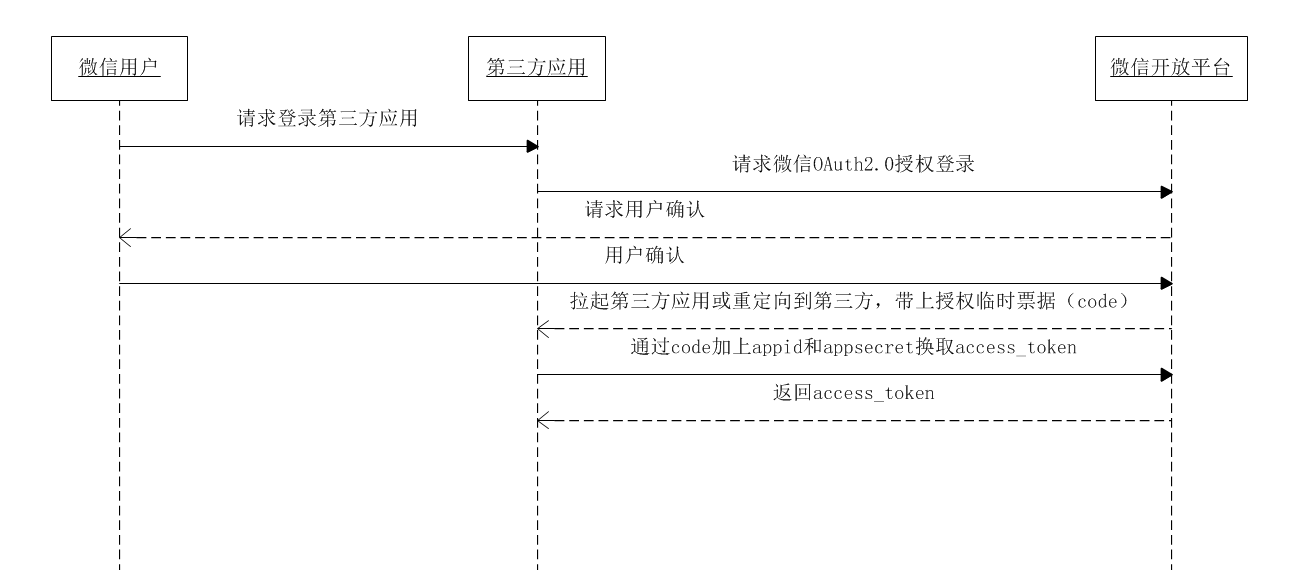 微信網頁第三方登錄原理詳解:OAuth2.0 全流程拆解
微信開放平台與公眾平台的區別1. 公眾平台面向普通用戶,如自媒體、媒體與企業官方帳號的運營人員。若團隊有開發能力,也能調用自定義菜單、自動回覆、查詢等接口,目前多數通過認