

編輯:關於 Android 程式設計
很多辦公類應用都有「查看附件」的需求,而自己實現一套 doc/xls/ppt 的渲染器顯然不現實。實用做法是調起第三方辦公軟件。以下記錄如何指定調用 WPS 中文版打開文檔,並監聽其保存與關閉事件。
注意 WPS 不同語言版本的包名不同,接入前請務必核對。
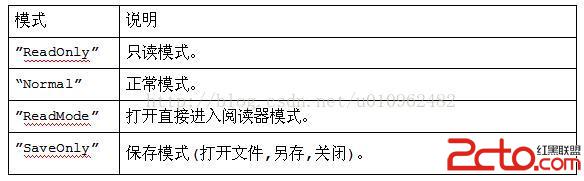
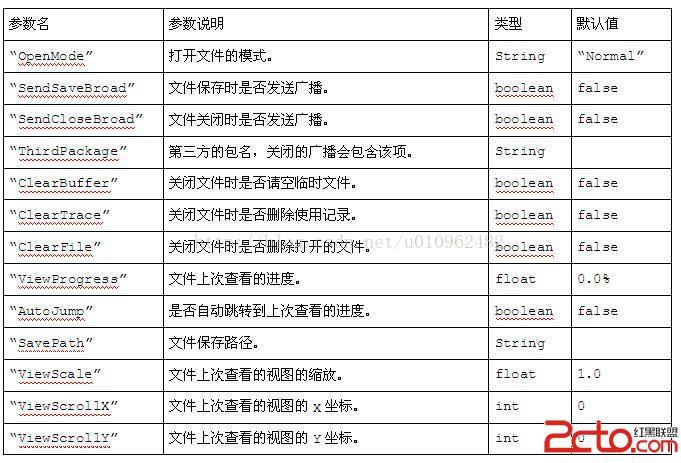
通過 startActivity 拉起 WPS,關鍵是 setClassName 指定準確的組件,並通過 Bundle 傳遞一系列控制參數:
boolean openFile(String path) {
    Intent intent = new Intent();
    Bundle bundle = new Bundle();

    // 打開模式:只讀 / 讀寫
    bundle.putString(OPEN_MODE, READ_ONLY);
    // 關閉時是否發送廣播
    bundle.putBoolean(SEND_CLOSE_BROAD, true);
    // 傳入調用方包名,WPS 廣播時會帶回來,便於校驗來源
    bundle.putString(THIRD_PACKAGE, selfPackageName);
    // 是否在關閉時清除緩存
    bundle.putBoolean(CLEAR_BUFFER, true);
    bundle.putBoolean(CLEAR_TRACE, true);
    // bundle.putBoolean(CLEAR_FILE, true);

    intent.addFlags(Intent.FLAG_ACTIVITY_NEW_TASK);
    intent.setAction(android.content.Intent.ACTION_VIEW);
    intent.setClassName(packageName, className);

    File file = new File(path);
    if (file == null || !file.exists()) {
        return false;
    }

    Uri uri = Uri.fromFile(file);
    intent.setData(uri);
    intent.putExtras(bundle);

    try {
        startActivity(intent);
    } catch (ActivityNotFoundException e) {
        e.printStackTrace();
        return false;    // 設備上沒有安裝 WPS
    }
    return true;
}
className 為 cn.wps.moffice.documentmanager.PreStartActivity2;packageName 依版本不同分別為:
普通版:cn.wps.moffice_eng
英文版:cn.wps.moffice_eng
要打開的文件通過 Uri 傳入,其餘參數含義見上表。
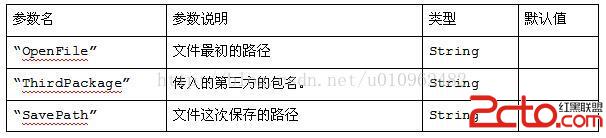
【保存文件】文件保存時 WPS 會發送 cn.wps.moffice.file.save 廣播,第三方程序按需接聽。廣播中帶有文件路徑、打開文件時傳入的包名等信息。
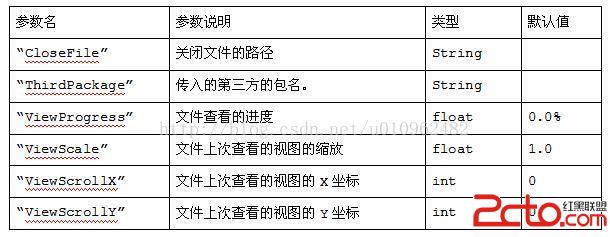
【關閉文件】文件關閉時會發送 cn.wps.moffice.file.close 廣播,內容結構同上。
接聽示例:
private BroadcastReceiver wpsReceiver = new BroadcastReceiver() {
    @Override
    public void onReceive(Context context, Intent intent) {
        String action = intent.getAction();
        if ("cn.wps.moffice.file.save".equals(action)) {
            String path = intent.getStringExtra("path");
            // 文檔已保存,可在這裡刷新列表或上傳
        } else if ("cn.wps.moffice.file.close".equals(action)) {
            String path = intent.getStringExtra("path");
            // 文檔已關閉,可回收臨時文件
        }
    }
};

// 別忘了動態註冊與反註冊
@Override
protected void onResume() {
    super.onResume();
    registerReceiver(wpsReceiver, new IntentFilter("cn.wps.moffice.file.save"));
    registerReceiver(wpsReceiver, new IntentFilter("cn.wps.moffice.file.close"));
}

@Override
protected void onPause() {
    super.onPause();
    unregisterReceiver(wpsReceiver);
}
支持方式
關閉文件
保存文件
打開文件
Uri.fromFile 在高版本 Android 上會失效。Android 7.0 起禁止在應用間傳遞 file:// 類型的 Uri,會拋 FileUriExposedException。需要改用 FileProvider.getUriForFile() 生成 content:// 形式的 Uri,並在 provider_paths.xml 中配置對應路徑,同時調用 intent.addFlags(Intent.FLAG_GRANT_READ_URI_PERMISSION) 授予臨時讀權限。
接收廣播時要校驗來源。由於系統裡可能裝有多個辦公軟件,建議在註冊時判斷包名,或者用 THIRD_PACKAGE 傳入的標識在回調裡比對,避免處理到其他應用的廣播。
記得判斷是否安裝。startActivity 一定要包在 try-catch 裡捕獲 ActivityNotFoundException,否則用戶沒裝 WPS 時直接崩潰。更友好的做法是先用 PackageManager.queryIntentActivities 檢測,若無可用應用則引導下載或改用 WebView 預覽。
動態廣播要在 onPause 反註冊。靜態聲明在 Android 8.0 之後已不適用於大部分隱式廣播,動態註冊是唯一可靠途徑,而忘記反註冊會導致內存洩露。
 Android Studio 忽略本地檔案、避免誤傳至 SVN Server 的解決方法
在團隊共享專案時,很容易把本地的設定檔(例如 *.iml 這類檔案)一起上傳到共享伺服器,這會給隊友帶來不小的困擾。為了解決這個問題,可以用下面的方法處理,以下以上傳到伺
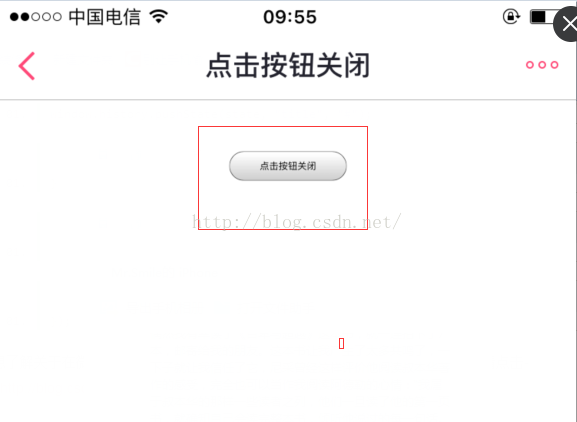 百度糯米 App 內關閉網頁的實現方法
我們曾做過一款接入百度錢包移動網頁支付的產品:用戶用百度錢包或百度糯米掃碼,選購商品後點擊支付,會自動拉起百度錢包完成付款,成功後跳轉到我們自定義的成功頁,頁面上有一個「
 Android UI 自定義控件入門——打造自己的 ImageButton
概述 我們在使用一些 App 時,應該很少看到完全不加修飾的「裸控件」吧?除非是系統內建軟體,為了風格統一而做出權衡。這裡並不是要批評 Android 原生控件不好看——
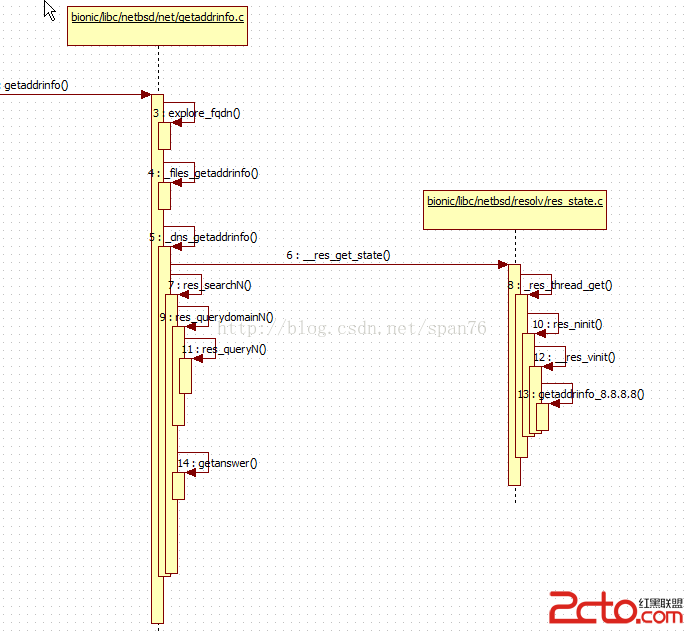 Android DNS 解析流程簡析
Android 的 DNS 相關程式碼主要位於 bionic/libc/netbsd 目錄中。雖然 netbsd 已不是活躍專案,但其中的 DNS 解析部分仍被 Andr