

編輯:關於 Android 程式設計
本節重點是把網絡請求與 XML 解析串起來,讓界面上的天氣數據真正來自服務端,而不是寫死的常量。
public class MainActivity extends Activity {

    private GridView gv_airs;
    private TextView tv_city;
    private TextView tv_number;
    private TextView tv_rain;
    private TextView tv_cloth;

    @Override
    protected void onCreate(Bundle savedInstanceState) {
        super.onCreate(savedInstanceState);
        setContentView(R.layout.activity_main);
        gv_airs = (GridView) findViewById(R.id.gv_airs);
        tv_city = (TextView) findViewById(R.id.tv_city);
        tv_number = (TextView) findViewById(R.id.tv_number);
        tv_rain = (TextView) findViewById(R.id.tv_rain);
        tv_cloth = (TextView) findViewById(R.id.tv_cloth);
        setViewData();
        makeGridView();
    }

    /** 設置界面數據 */
    private void setViewData() {
        String city;
        try {
            city = URLEncoder.encode("北京", "gb2312");
        } catch (UnsupportedEncodingException e) {
            e.printStackTrace();
            return;
        }
        HttpUtil.get(ApiContants.WEATHER_URL + "?city=" + city
                + "&password=DJOYnieT8234jlsK&day=0", new HttpListener() {
            @Override
            public void onSuccess(String result) {
                Weather weather = (Weather) HttpUtil.xml2object(result);
                setViewWeather(weather);
            }

            @Override
            public void onError(String result) {
                System.out.println(result);
            }
        });
    }

    protected void setViewWeather(Weather weather) {
        tv_city.setText(weather.getCity());
        tv_number.setText(weather.getHot());
        tv_rain.setText(weather.getRain());
        tv_cloth.setText(weather.getCloth());
    }

    /** 組裝 GridView */
    private void makeGridView() {
        List<Map<String, String>> data = new ArrayList<>();
        data.add(item("83", "濕度(%)"));
        data.add(item("11.3", "可見度(km)"));
        data.add(item("2級", "東南風"));
        data.add(item("最弱", "紫外線"));
        data.add(item("1005.5", "氣壓(mb)"));
        data.add(item("22.4", "體感"));

        SimpleAdapter adapter = new SimpleAdapter(this, data, R.layout.main_grid_item,
                new String[]{"title", "desc"},
                new int[]{R.id.tv_title, R.id.tv_desc});
        gv_airs.setAdapter(adapter);
    }

    private Map<String, String> item(String title, String desc) {
        Map<String, String> map = new HashMap<>();
        map.put("title", title);
        map.put("desc", desc);
        return map;
    }
}網絡工具類承擔三件事:發起 GET 請求、讀取輸入流、把 XML 轉成對象。線程切換則借助 Handler 完成,子線程負責請求,主線程負責回調界面。
public class HttpUtil {

    public static final int SUCCESS = 1;
    public static final int ERROR = 2;

    /** 獲取 GET 數據 */
    public static void get(final String apiUrl, final HttpListener listener) {
        final Handler handler = new HttpHandler(listener);
        new Thread(new Runnable() {
            @Override
            public void run() {
                Message msg = new Message();
                try {
                    URL url = new URL(apiUrl);
                    HttpURLConnection conn = (HttpURLConnection) url.openConnection();
                    conn.setRequestMethod("GET");
                    conn.setConnectTimeout(5000);
                    if (conn.getResponseCode() == 200) {
                        String result = readInputStream(conn.getInputStream());
                        msg.what = SUCCESS;
                        msg.obj = result;
                    } else {
                        listener.onError(String.valueOf(conn.getResponseCode()));
                        return;
                    }
                    handler.sendMessage(msg);
                } catch (Exception e) {
                    e.printStackTrace();
                    msg.what = ERROR;
                    msg.obj = "網絡異常";
                    handler.sendMessage(msg);
                }
            }
        }).start();
    }

    /** 讀取輸入流 */
    public static String readInputStream(InputStream is) {
        ByteArrayOutputStream baos = new ByteArrayOutputStream();
        byte[] buffer = new byte[1024];
        int len;
        try {
            while ((len = is.read(buffer)) != -1) {
                baos.write(buffer, 0, len);
            }
            is.close();
            return new String(baos.toByteArray());
        } catch (Exception e) {
            e.printStackTrace();
        }
        return null;
    }

    /** 解析 XML */
    public static Object xml2object(String xmlString) {
        Weather weather = new Weather();
        try {
            XmlPullParser parser = Xml.newPullParser();
            parser.setInput(new StringReader(xmlString));
            int event = parser.getEventType();
            while (event != XmlPullParser.END_DOCUMENT) {
                switch (event) {
                    case XmlPullParser.START_TAG:
                        String tagName = parser.getName();
                        if (!tagName.equals("Weather") && !tagName.equals("Profiles")) {
                            String value = parser.nextText();
                            if (tagName.equals("status1")) {
                                weather.setRain(value);
                            } else if (tagName.equals("tgd1")) {
                                weather.setHot(value);
                            } else if (tagName.equals("chy_l")) {
                                weather.setCloth(value);
                            } else if (tagName.equals("city")) {
                                weather.setCity(value);
                            }
                        }
                        break;
                    default:
                        break;
                }
                event = parser.next();
            }
        } catch (Exception e) {
            e.printStackTrace();
        }
        return weather;
    }
}

/** 位於主線程的 Handler */
class HttpHandler extends Handler {
    private final HttpListener listener;

    public HttpHandler(HttpListener listener) {
        this.listener = listener;
    }

    @Override
    public void handleMessage(Message msg) {
        String res = (String) msg.obj;
        if (msg.what == HttpUtil.SUCCESS) {
            listener.onSuccess(res);
        } else {
            listener.onError(res);
        }
    }
}回調接口保持簡單,只區分成功與失敗兩種結果:
public interface HttpListener {
    void onSuccess(String result);
    void onError(String result);
}
整條鏈路可以概括為:Activity 拼接請求地址並提交,HttpUtil 在子線程完成請求與解析,結果通過 Handler 回到主線程,最後由 setViewWeather 更新界面。相比直接寫死數據,這種分層方式後續替換數據源時只需改動工具類即可。
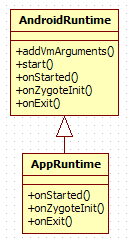 Android 啟動流程解析:Zygote 如何開啟 Java 世界
Android 系統以 Linux 核心為基礎,因此同時存在 Native 空間與 Java 空間。系統啟動初期主要運行於 Native 空間,而 Zygote 正是負責
 深入淺出 Android ContentProvider 資料共享機制
在 Android 的四大元件中,ContentProvider(內容提供者)是唯一專責「對外共享資料」的元件。它讓不同應用之間能以統一的方式存取彼此(或系統)的資料,像
 微信公眾平台手機版上線:功能、登入與限制
微信公眾平台手機版以HTML5方式提供基本營運功能,可查看消息、評論、粉絲數、贊賞,也能群發與編輯文章。 目前功能仍較精簡,沒有自訂菜單與自動回覆,但適合隨時回覆訊息與查
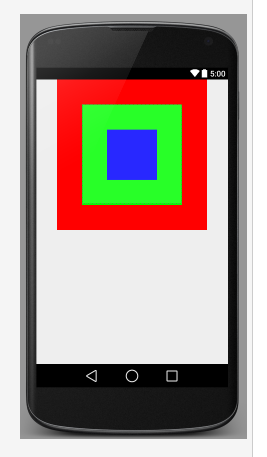 Android FrameLayout 幀布局介紹
FrameLayout 是 Android 最簡單的布局之一。它會在螢幕上提供一個空白區域,所有加入的子元件都會疊放在同一層,預設從左上角開始排列。 基本特性 由於子元件