

編輯:關於 Android 程式設計
在Android中,為了給用戶友好的提示,常見的表現形式有Dialog、PopupWindow和Toast。自從Snackbar出現後,它在提示體驗上幾乎秒殺了Toast——不僅能實現Toast的效果,還支持setAction。不過仍有大量應用在使用Toast,加之系統也保留了Toast能力,可見它自有存在的價值。
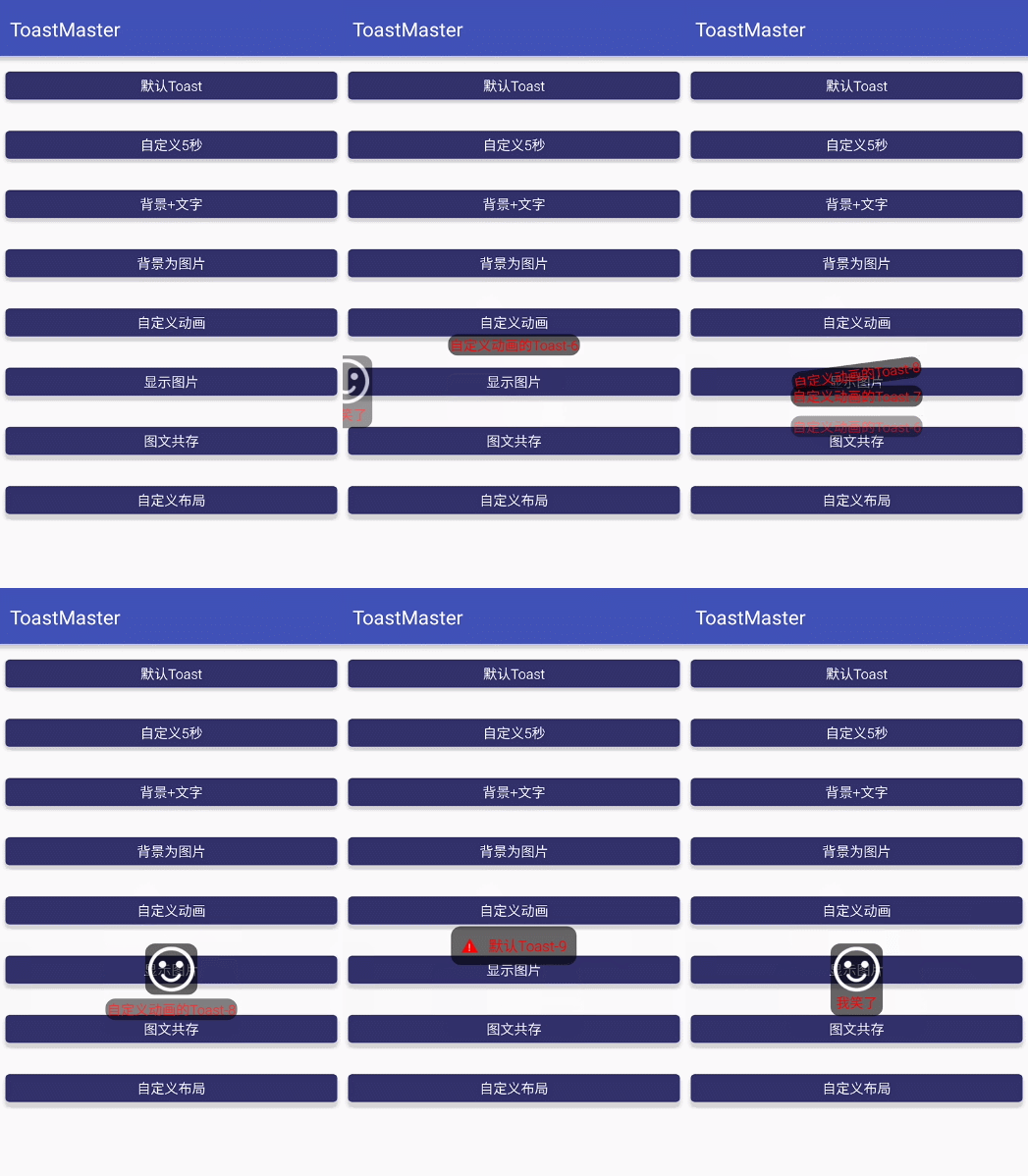
CSDN傳圖有大小限制,就放兩張動圖:

Toast窗口和之前分析過的Activity、Dialog、PopupWindow都不同,它和輸入法、壁紙類似,屬於系統窗口。先來看Toast的靜態makeText方法:
public static Toast makeText(Context context, CharSequence text, @Duration int duration) { //new一個Toast對象 Toast result = new Toast(context); //獲取LayoutInflater LayoutInflater inflate = (LayoutInflater) context.getSystemService(Context.LAYOUT_INFLATER_SERVICE); //加載解析Toast的布局,transient_notification.xml實質是一個LinearLayout中套了一個@android:id/message的TextView View v = inflate.inflate(com.android.internal.R.layout.transient_notification, null); //取出布局中的TextView TextView tv = (TextView)v.findViewById(com.android.internal.R.id.message); //把文字設置到TextView上 tv.setText(text); //設置一些屬性 result.mNextView = v; result.mDuration = duration; //返回新建的Toast return result; }
可以看到,這個方法構造了一個Toast,把要顯示的文字放進這個View的TextView中,初始化相關屬性後返回這個新的Toast對象。
拿到Toast對象後,通過show方法就能把它顯示出來,源碼如下:
public void show() { ...... //通過AIDL(Binder)通信拿到NotificationManagerService的服務訪問接口,當前Toast類相當於客戶端 INotificationManager service = getService(); String pkg = mContext.getOpPackageName(); TN tn = mTN; tn.mNextView = mNextView; try { //把TN對象和一些參數傳遞到遠程NotificationManagerService中去 service.enqueueToast(pkg, tn, mDuration); } catch (RemoteException e) { // Empty } }
接著看service.enqueueToast(pkg, tn, mDuration)這句——service實際是遠程的NotificationManagerService,所以enqueueToast方法是NotificationManagerService類的:
private final IBinder mService = new INotificationManager.Stub() { @Override public void enqueueToast(String pkg, ITransientNotification callback, int duration) { ...... synchronized (mToastQueue) { int callingPid = Binder.getCallingPid(); long callingId = Binder.clearCallingIdentity(); try { ToastRecord record; //查看該Toast是否已在隊列當中 int index = indexOfToastLocked(pkg, callback); //如果已存在則直接取出update if (index >= 0) { record = mToastQueue.get(index); record.update(duration); } else { //限制每個包(除android包外)可加入隊列的Toast數量,防止DOS攻擊與洩漏 ...... //將Toast封裝成ToastRecord對象,放入mToastQueue中 record = new ToastRecord(callingPid, pkg, callback, duration); mToastQueue.add(record); index = mToastQueue.size() - 1; //將當前Toast所在進程設置為前台進程 keepProcessAliveLocked(callingPid); } //如果index為0,說明當前入隊的Toast在隊頭,需要調用showNextToastLocked直接顯示 if (index == 0) { showNextToastLocked(); } } finally { Binder.restoreCallingIdentity(callingId); } } } }
簡單說,Toast都是先加入一個enqueueToast隊列,再通過Handler來處理。因為它是系統窗口,所以換了界面而Toast還沒消失,也不必感到奇怪。
通過分析TN類的Handler可以發現:如果想在非UI線程使用Toast,需要自行聲明Looper,否則會拋出Looper相關異常;UI線程則不需要,因為系統已幫忙聲明。使用Toast時,context參數盡量傳getApplicationContext(),可有效防止靜態引用導致的內存洩露。此外,由於Toast.makeText是一個靜態工廠方法,每次都會new一個新對象,當你在此對象上調用show時,它就會被加入NotificationManagerService管理的mToastQueue隊列排隊等候顯示——所以彈出過多就會延遲顯示。如果改用單例、不每次都新建Toast對象,就不需要排隊,也能及時更新。
下面是一個封裝了多種效果的SuperCustomToast實現,核心思路是通過反射拿到Toast內部的mTN,進而調用其show和hide方法來控制顯示與隱藏,並借助Handler刷新UI,同時支持自定義文字、背景顏色、背景圖片、圖片與時長等:
public class SuperCustomToast { static int currentapiVersion = Build.VERSION.SDK_INT; private static final int TIME_START_ANIM = 500; //入場動畫時長 private static final int TIME_END_ANIM = 500; //離場動畫時長 private static final int TIME_DURATION = 2500; //每條Toast顯示時長 Handler mHandler; Context mContext; LinearLayout mTopView, mTopView2; public LinearLayout mView; LayoutParams lp_WW, lp_MM; int screenWidth; int screenHeight; Integer defaultBackgroundResid; Drawable defaultBackgroundColor; int defaultTextColor; private View layout; boolean hasReflectException = false; private static SuperCustomToast instance; public static SuperCustomToast getInstance(Context context) { if (instance == null) { instance = new SuperCustomToast(context); } return instance; } private SuperCustomToast(Context context) { if (context == null || context.getApplicationContext() == null) { throw new NullPointerException("context can't be null"); } mContext = context.getApplicationContext(); initView(); initTN(); } // initView、show、hide、getStartAnimation、getEndAnimation、initTN、showToast、hideToast 等方法封裝了視圖構建、動畫與反射控制邏輯 // 具體實現可參考完整源碼 }
可以看到,內部通過反射創建Toast、獲取mTN下的show和hide方法來控制顯示與隱藏,再用Handler處理UI刷新,並通過參數控制文字、背景顏色、背景圖片、顯示圖片和時長等。
配套的activity_main.xml放置了多個用於觸發不同效果的TextView(默認Toast、自定義時長、背景+文字、背景圖片、自定義動畫、顯示圖片、圖文共存、自定義布局等)。示例代碼中針對這8種效果逐一演示,基本能覆蓋日常開發的大部分場景:
@OnClick({R.id.showToast1, R.id.showToast2, R.id.showToast3, R.id.showToast4, R.id.showToast5, R.id.showToast6, R.id.showToast7, R.id.showToast8}) public void onClick(View view) { switch (view.getId()) { case R.id.showToast1: //默認toast toast.show(info + i++); break; case R.id.showToast2: //持續5秒 toast.showSameMsg(sameString, 5000); break; case R.id.showToast3: //帶背景色 toast.setDefaultBackgroundColor(Color.RED, 200); toast.setDefaultTextColor(Color.BLUE); toast.show("帶有背景色Toast"); break; case R.id.showToast4: //背景圖片 toast.setDefaultBackgroundResource(R.drawable.bg); toast.setDefaultTextColor(Color.BLACK); toast.show("背景圖片的Toast"); break; case R.id.showToast5: //自定義動畫 showAnimate(); break; case R.id.showToast6: //帶圖片 toast.setDefaultBackgroundResource(R.drawable.frame_bg_theme_light); toast.show(R.drawable.tips_smile, "", null, null, null); break; case R.id.showToast7: //圖文混合 toast.setDefaultTextColor(Color.RED); toast.setDefaultBackgroundResource(R.drawable.frame_bg_theme_light); toast.show(R.drawable.tips_smile, "我笑了", null, null, null); break; case R.id.showToast8: //自定義布局 toast.setDefaultTextColor(Color.RED); toast.show(info + i++, R.layout.super_toast_theme_light, R.id.content_toast, MainActivity.this); break; } }
以上就是對8種Toast效果的展示,基本能適應開發中的絕大多數場景。實在滿足不了需求的話,那就用Snackbar咯。
項目中用的是ButterKnife,升級到8.0.1後差點被坑:@BindView、@OnClick會提示unused(未使用)。查閱GitHub後,需要在模塊中採用apt方式:
apply plugin: 'com.neenbedankt.android-apt' dependencies { compile 'com.jakewharton:butterknife:8.0.1' apt 'com.jakewharton:butterknife-compiler:8.0.1' }
同時工程的buildscript也要相應調整:
buildscript { repositories { jcenter() } dependencies { classpath 'com.android.tools.build:gradle:2.0.0' classpath 'com.neenbedankt.gradle.plugins:android-apt:1.8' } }
把Toast的源碼翻出一部分來看,會發現它和我們一般封裝的Toast還是有不少差別。封裝好Toast確實能提升開發效率,代碼中也順帶複習了動畫相關知識。學習就是這樣由難到易、循序漸進。
以上就是全部講解,能力有限,若有不足之處還請指正。
 Android Studio 安裝與調試完整入門指南
對於剛踏入 Android 開發領域的朋友來說,Android Studio 是幾乎每個人都得跨過的第一道門檻。這篇文章會帶你從下載安裝開始,一路走到新建專案、配置模擬器
 Android 內核 sysfs 的 switch 類別使用實例
週末終於能摸摸自己想玩的東西了。這次要談的是 Android 內核裡 sysfs 的 switch 類別。 先說來歷。在一般的嵌入式 Linux 平台上,驅動作者多半各自
 Android Develop 系列:構建系統解析
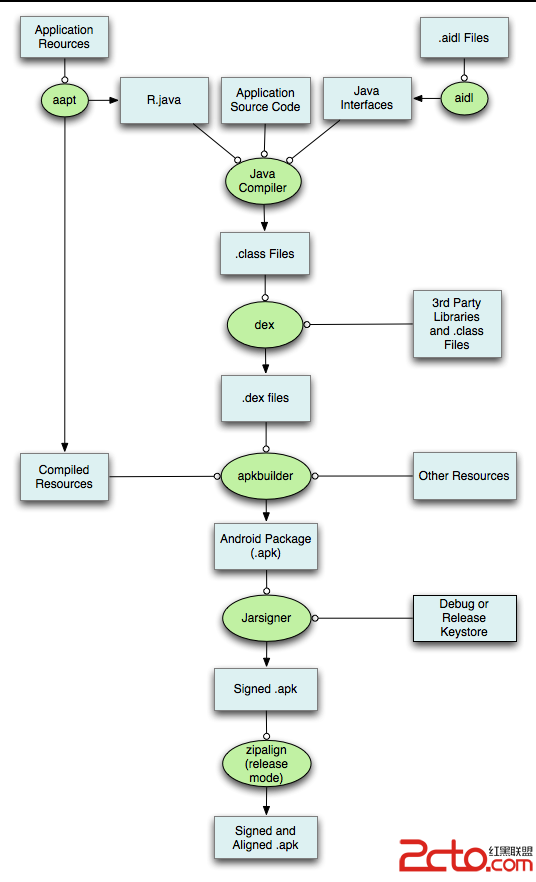
Android 構建系統是你用來構建、測試、運行和打包 App 的一整套工具。它既可以作為 Android Studio 的集成工具在菜單裡調用,也可以作為獨立命令執行。
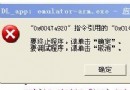 emulator-arm.exe應用程式錯誤?AVD與SD卡設定排查
若Eclipse啟動AVD時出現emulator-arm.exe錯誤,可檢查AVD名稱與SD卡設定。名稱建議以小寫英數為主,避免特殊字元。 若已建立sdcard.img,