

編輯:關於 Android 程式設計
本文彙整了一批 Android 開發中經常用到的代碼片段,涵蓋撥打電話、短信收发、SD 卡讀寫與容量判斷、XML 序列化與解析、ListView 優化、網絡請求以及 Service 的基礎用法,方便日常查閱。
Intent intent = new Intent(); intent.setAction(Intent.ACTION_CALL); intent.setData(Uri.parse("tel:"+number)); startActivity(intent);
短信過長時需要拆分發送。一條短信的最大文本長度:中文約 70 個漢字,英文約 160 個字符。
SmsManager smsmanager = SmsManager.getDefault(); /* sentIntent 發送報告, deliveryIntent 送達報告 */ ArrayList messages = smsmanager.divideMessage(content); for(String message : messages){ smsmanager.sendTextMessage(number, null, message, null, null); }
//MEDIA_MOUNTED:sd卡已經掛載,可用 if(Environment.getExternalStorageState().equals(Environment.MEDIA_MOUNTED)) { File file = new File(Environment.getExternalStorageDirectory(), "info.txt"); FileOutputStream fos; try { fos = new FileOutputStream(file); fos.write((name + "##" + pass).getBytes()); fos.close(); } catch (Exception e) { e.printStackTrace(); } } else { Toast.makeText(this, "sd卡不可用", 0).show(); }
File path = Environment.getExternalStorageDirectory(); StatFs stat = new StatFs(path.getPath()); long blockSize; long totalBlocks; long availableBlocks; if(Build.VERSION.SDK_INT >= Build.VERSION_CODES.JELLY_BEAN_MR2){ blockSize = stat.getBlockSizeLong(); totalBlocks = stat.getBlockCountLong(); availableBlocks = stat.getAvailableBlocksLong(); } else{ blockSize = stat.getBlockSize(); totalBlocks = stat.getBlockCount(); availableBlocks = stat.getAvailableBlocks(); } TextView tv = (TextView) findViewById(R.id.tv); tv.setText(formatSize(availableBlocks * blockSize));
XmlSerializer xs = Xml.newSerializer(); File file = new File("sdcard/sms2.xml"); try { FileOutputStream fos = new FileOutputStream(file); xs.setOutput(fos, "utf-8"); xs.startDocument("utf-8", true); xs.startTag(null, "message"); for (Message sms : smsList) { xs.startTag(null, "sms"); xs.startTag(null, "body"); xs.text(sms.getBody()); xs.endTag(null, "body"); xs.endTag(null, "sms"); } xs.endTag(null, "message"); xs.endDocument(); } catch (Exception e) { e.printStackTrace(); }
InputStream is = getClassLoader().getResourceAsStream("weather.xml"); XmlPullParser xp = Xml.newPullParser(); try { xp.setInput(is, "gbk"); int type = xp.getEventType(); while(type != XmlPullParser.END_DOCUMENT){ switch (type) { case XmlPullParser.START_TAG: if("city".equals(xp.getName())){ city = new City(); } else if("name".equals(xp.getName())){ String name = xp.nextText(); city.setName(name); } break; case XmlPullParser.END_TAG: break; } type = xp.next(); } } catch (Exception e) { e.printStackTrace(); }
核心思路是復用 convertView,並借助 ViewHolder 緩存子 View,避免重複的 findViewById:
public View getView(int position, View convertView, ViewGroup parent) { News news = newsList.get(position); View v = null; ViewHolder mHolder; if(convertView == null){ v = View.inflate(MainActivity.this, R.layout.item_listview, null); mHolder = new ViewHolder(); mHolder.tv_title = (TextView) v.findViewById(R.id.tv_title); mHolder.tv_detail = (TextView) v.findViewById(R.id.tv_detail); mHolder.tv_comment = (TextView) v.findViewById(R.id.tv_comment); v.setTag(mHolder); }else{ v = convertView; mHolder = (ViewHolder) v.getTag(); } mHolder.tv_title.setText(news.getTitle()); mHolder.tv_detail.setText(news.getDetail()); mHolder.tv_comment.setText(news.getComment() + "條評論"); return v; } class ViewHolder{ TextView tv_title; TextView tv_detail; TextView tv_comment; }
在 manifest 中加入 InstrumentationTestRunner,在 application 下加入 uses-library,讓測試類繼承 AndroidTestCase,最後編寫測試方法即可。
原理是拼接 URL:
String param1 = URLEncoder.encode(name); String param2 = URLEncoder.encode(password); URL url = new URL(path + "?name=" + param1 + "&password=" + param2); HttpURLConnection conn = (HttpURLConnection) url.openConnection(); conn.setRequestMethod("GET"); conn.setReadTimeout(5000); InputStream is = conn.getInputStream();
服務端(Tomcat 默認 iso8859-1)可將參數重新編碼:name = new String(name.getBytes("iso8859-1"), "utf-8");;安卓端則在提交前對中文做 URLEncoder.encode 編碼。
相較於 GET 只能提交較小的數據量(約 4K),POST 以表單或流的方式寫入服務器,可提交更大的數據:
conn.setRequestMethod("POST"); conn.setConnectTimeout(5000); conn.setDoOutput(true); conn.setRequestProperty("Content-Type", "application/x-www-form-urlencoded"); OutputStream os = conn.getOutputStream(); os.write(data.getBytes()); int code = conn.getResponseCode(); if (code == 200) { InputStream is = conn.getInputStream(); byte[] result = StreamTool.getBytes(is); return new String(result); }
HttpClient 相當於對瀏覽器的簡單封裝,GET 與 POST 兩種方式 respectively 使用 HttpGet 與 HttpPost 對象,透過 client.execute() 發送並解析返回流。
在短信監聽器的 onReceive 方法中,通過 get("pdus") 拿到 PDU 數組,再用 SmsMessage.createFromPdu() 解析出正文與發送者地址。
Service 運行在主線程中,需在 AndroidManifest 中配置。可通過 startService() 啟動,或通過 bindService() 綁定。服務的生命周期包含 onCreate、onStart(onStartCommand)與 onDestroy,適合用於後台的音訊監聽、文件上傳等場景。
 實現安卓二級聯動列表:仿「餓了麼」點餐頁面
寫在前面 最近手感不錯,总想写点轮子。正好周末外卖点得多,就仿一仿「饿了么」吧。先上图,这样的订单页面是不是特别眼熟: 右边的 ListView 分好组后,在左边的
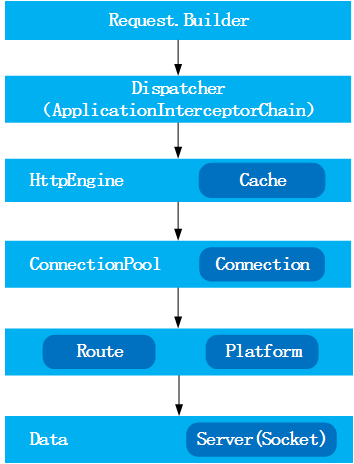 OkHttp 源碼解析:請求流程、攔截器、連接池與重連機制
OkHttp 是 Android 與 Java 應用中常見的 HTTP 客戶端。它支援 SPDY、連接池、GZIP、快取與自動重連,並提供近似 HttpURLConnec
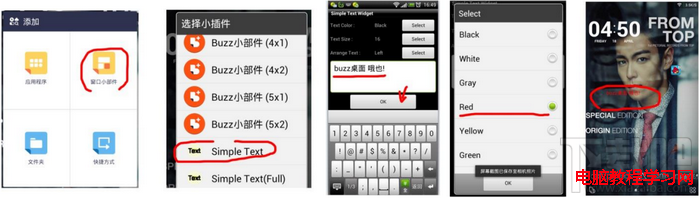 Buzz 桌面教學:在桌面加入文字
有些使用者想在 Buzz 桌面上添點小浪漫、小驚喜或一點文藝氣息,這時候在桌面放幾行字是最直接的做法。Buzz 桌面支援很方便的文字小工具,寫上「Honey, I lov
 MyHttpUtils:輕量異步網路請求框架使用指南
框架能解決什麼MyHttpUtils 是一個輕量的 Android 異步網路請求框架。開發者只需要傳入 url 與 JavaBean 型別,就能在回調方法中取得解析後的物