

編輯:關於 Android 程式設計
Android 4.3(API Level 18)起內置框架引入了藍牙低功耗(Bluetooth Low Energy,BLE)支持。在角色方面,Android 手機只能作為主設備(central role),開發者可透過其提供的 API 發現設備、遍歷服務(services)、讀寫服務中的特性(characteristics)。與傳統藍牙相比,BLE 出於更低的電量消耗考慮而設計,使 Android 應用能與近距離傳感器、心率測量設備、健康設備等低功耗設備進行交流。
GATT 規範針對在 BLE 連接上發送與接收少量數據而制定,現有的低功耗應用規範都基於此。藍牙技術聯盟(Bluetooth SIG)為低功耗設備定義了許多 Profile(規範),一個 Profile 就是設備在特定應用中如何工作的詳述。一個設備可以實現多個規範,例如同時包含心率檢測器與電量檢測器。
GATT 建立在 ATT 之上,通常合稱為 GATT/ATT。ATT 旨在優化 BLE 設備運行,盡可能使用最少的字節。ATT 中的每個屬性都由一個 UUID(Universally Unique Identifier,128 比特標準字符串 ID)唯一標識,ATT 中定義的屬性即 Characteristic(特性)與 Service(服務)。
一個 Characteristic 包含一個值和若干 Descriptor(描述符)用於描述該值,可被視為類似於「類」的一個類型。
描述符被定義為一些屬性,用於描述 Characteristic 的值,例如可讀的描述、特性值的可接受範圍或測量單元。
服務是 Characteristic 的集合。例如一個名為「Heart Rate Monitor(心率監控)」的服務,包含了「Heart Rate Measurement(心率測量)」特性。可在 bluetooth.org 官網查詢基於 GATT 的服務與規範列表。
Android 設備與 BLE 設備互動時涉及兩組角色:中心設備與外圍設備(適用於 BLE 連接,中心設備掃描查找廣播,外圍設備發送廣播),以及 GATT 服務器與 GATT 客戶端(決定連接建立後如何通信)。建立 BLE 連接需要中心設備與外圍設備同時存在。一旦連接建立,雙方交換 GATT 元數據,並根據傳輸的數據類型動態決定誰作為服務器——例如智能腕表向手機報告傳感器數據時作為 GATT 服務器,而從手機接收更新數據時手機則作為 GATT 服務器。
要在應用中使用藍牙功能,必須在 AndroidManifest.xml 中聲明藍牙權限。所有藍牙通信操作都需要 BLUETOOTH 權限;若要發起設備搜索或管理藍牙設置,還需提前聲明 BLUETOOTH_ADMIN 權限(前提是必須先聲明 BLUETOOTH)。
若應用只需勝任 BLE 設備工作,可加上 <uses-feature android:name="android.hardware.bluetooth_le" android:required="true" />。若希望在手機不支持時仍能安裝,可將 required 設為 false,再在運行時用 PackageManager.hasSystemFeature() 判斷 BLE 是否可用。
使用 BLE 前需驗證設備是否支持並開啟藍牙。首先獲取 BluetoothAdapter:
final BluetoothManager bluetoothManager = (BluetoothManager) getSystemService(Context.BLUETOOTH_SERVICE); mBluetoothAdapter = bluetoothManager.getAdapter();
然後用 isEnabled() 檢查藍牙是否開啟,若未開啟可通過 ACTION_REQUEST_ENABLE 請求打開。
調用 startLeScan() 並傳入一個實現了 LeScanCallback 的參數來搜索設備。由於藍牙搜索非常耗電,應遵循「一發現設備就中斷」與「不循環掃描、設置最大時間限制」的策略。若只想查找特定類型設備,可調用 startLeScan(UUID[], callback) 並提供應用支持的 GATT 服務 UUID 數組。
private BluetoothAdapter.LeScanCallback mLeScanCallback = new BluetoothAdapter.LeScanCallback() { @Override public void onLeScan(final BluetoothDevice device, int rssi, byte[] scanRecord) { runOnUiThread(new Runnable() { @Override public void run() { mLeDeviceListAdapter.addDevice(device); mLeDeviceListAdapter.notifyDataSetChanged(); } }); } };
與 BLE 設備交互的第一步是連接到其 GATT 服務,調用 device.connectGatt(this, false, mGattCallback),返回一個 BluetoothGatt 實例,用於管理 GATT 客戶端操作。Android App 通常作為 GATT 客戶端,透過 BluetoothGattCallback 接收連接狀態、服務發現、特性讀取等結果,並以廣播(如 ACTION_GATT_CONNECTED、ACTION_DATA_AVAILABLE)的形式把數據傳遞給界面。對於心率測量規範,需按規範對數據做特殊解析(判斷 UINT8 或 UINT16 格式後取值)。
連接到 GATT 服務並發現服務後,即可遍歷並讀寫其中的屬性。當某特性開啟通知監聽後,一旦特性改變便會回調 onCharacteristicChanged():
mBluetoothGatt.setCharacteristicNotification(characteristic, enabled); BluetoothGattDescriptor descriptor = characteristic.getDescriptor( UUID.fromString(SampleGattAttributes.CLIENT_CHARACTERISTIC_CONFIG)); descriptor.setValue(BluetoothGattDescriptor.ENABLE_NOTIFICATION_VALUE); mBluetoothGatt.writeDescriptor(descriptor);
使用完畢後,調用 BluetoothGatt 的 close() 方法關閉連接並釋放相關資源:
public void close() { if (mBluetoothGatt == null) { return; } mBluetoothGatt.close(); mBluetoothGatt = null; }
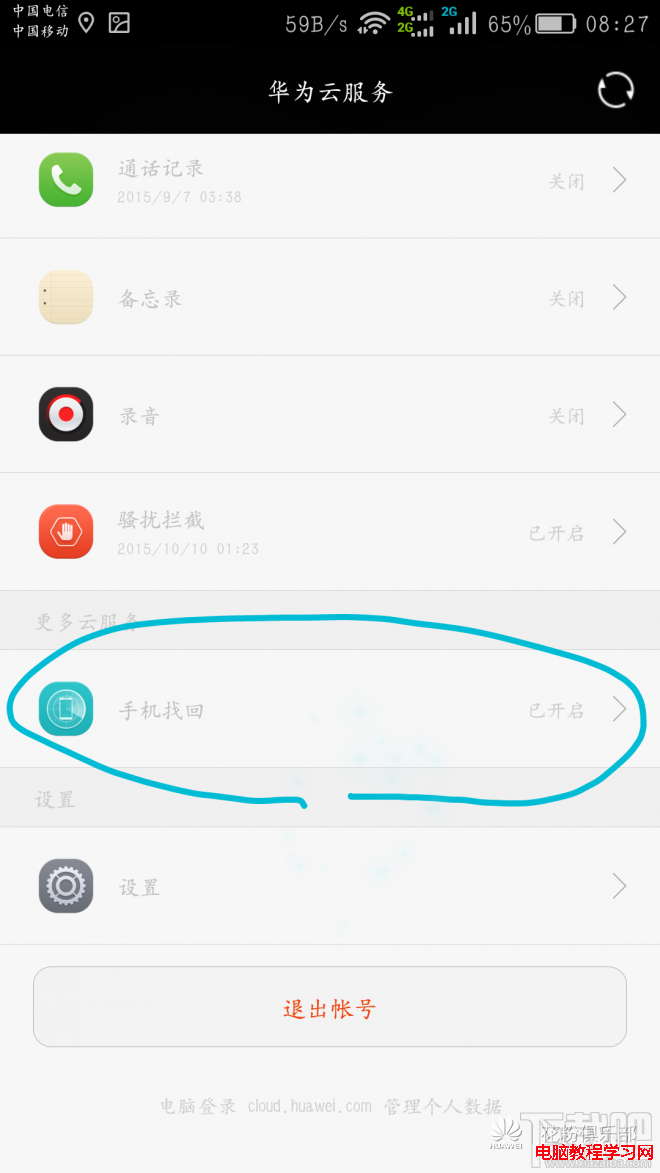 華為手機忘記鎖屏密碼?用雲服務找回不傷資料
華為手機忘記鎖屏密碼時,若指紋可用或已開啟手機找回,可用華為雲服務重置。先在雲服務開啟手機找回,再用電腦登入官方網站,選擇手機找回與鎖定手機,設定新密碼。 網頁端通常只能
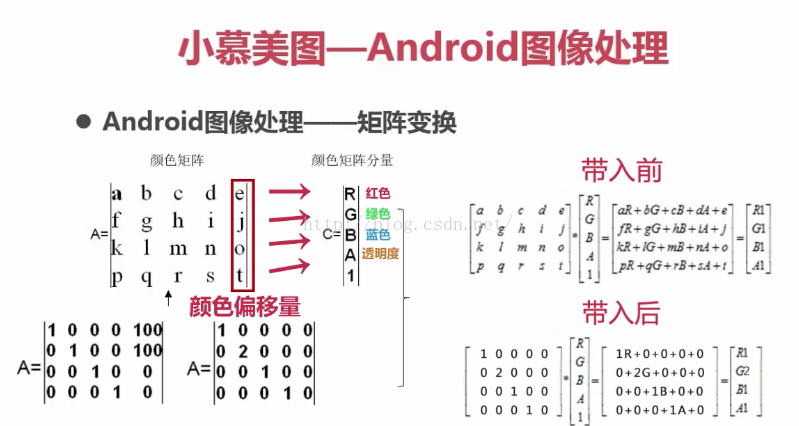 Android 圖像處理:老照片情懷濾鏡實作
老照片濾鏡常被視為一種充滿情懷的視覺效果,它能讓現代數位照片呈現出類似早期相片或復古印刷品的色調。這類效果在 Android 中可以透過逐像素處理 Bitmap 來完成。
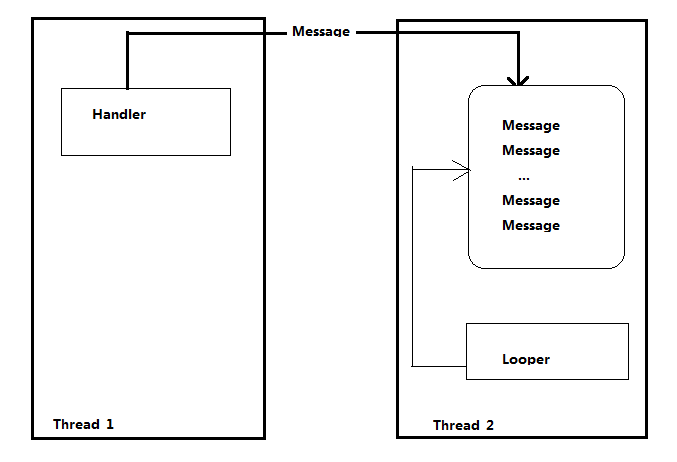 Android 開發藝術探索——第十章 Android 的消息機制
概述 Android 的消息機制核心就是 Handler 的運行機制,而 Handler 的運轉離不開底層的 MessageQueue 與 Looper 支撐。 Mes
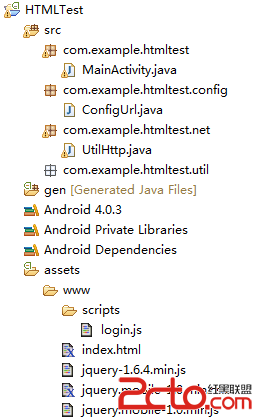 Android 用 WebView 登入,再把 Session Cookie 交棒給 HttpClient
前陣子做了一個小功能:登入介面用 HTML 頁面實作,登入成功後把 cookie 取出來,交給 HttpClient 去跑後續的業務請求。這樣的好處是登入表單可以隨時改版