

編輯:關於 Android 程式設計
前陣子做了一個小功能:登入介面用 HTML 頁面實作,登入成功後把 cookie 取出來,交給 HttpClient 去跑後續的業務請求。這樣的好處是登入表單可以隨時改版而不必重新上架 App,代價則是要處理 WebView 與原生網路層之間的狀態交接。
整個工程的目錄結構如下,html 與 js 都放在 assets 底下:
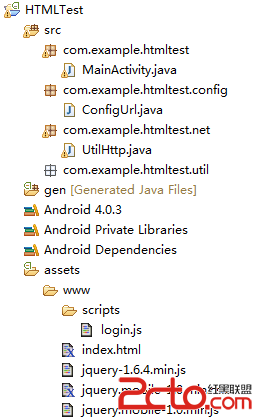
用 jQuery Mobile 搭一個最陽春的表單,關鍵是 login.js 要一起載入:
<meta http-equiv="Access-Control-Allow-Origin" content="*">
<link rel="stylesheet" href="jquery.mobile-1.0.min.css" />
<script src="jquery-1.6.4.min.js"></script>
<script src="jquery.mobile-1.0.min.js"></script>
<script type="text/javascript" charset="utf-8" src="scripts/login.js"></script>

<h1>Login</h1>
<label for="page_login_name">Username</label>
<input type="text" id="page_login_name" />
<label for="page_login_pass">Password</label>
<input type="password" id="page_login_pass" />
<fieldset>
  <button type="button" data-theme="b" id="page_login_submit">Login</button>
</fieldset>
jQuery、jQuery Mobile 與對應的 CSS 要自行到官網下載放進 assets。這裡提醒一句:jQuery Mobile 各版本之間的 API 差異不小,版本對不上會發生一些莫名其妙的失效,值得先確認清楚再往下寫。
$('#page_login_submit').live('click', function(){
    var name = $('#page_login_name').val();
    if (!name) { alert('Please enter your user name.'); return false; }

    var pass = $('#page_login_pass').val();
    if (!pass) { alert('Please enter your password.'); return false; }

    $.ajax({
        url: "https://172.23.10.100/?q=rest_services/user/login.json",
        type: 'post',
        data: 'username=' + encodeURIComponent(name)
            + '&password=' + encodeURIComponent(pass),
        dataType: 'json',
        error: function(XMLHttpRequest, textStatus, errorThrown) {
            alert('page_login_submit - failed to login');
        },
        success: function(data) {
            alert(JSON.stringify(data));  // 直接把結果丟給 WebView
        }
    });
    return false;
});
這裡用了個偷吃步的技巧:把伺服器回傳的 JSON 直接 alert 出來,藉此把資料「傳」回 Java 層。正式專案裡當然應該寫成一個明確的 JS 介面函數(透過 addJavascriptInterface 註冊),讓資料流動更可控。
mWebView = (WebView) findViewById(R.id.webview);
WebSettings wSet = mWebView.getSettings();
wSet.setJavaScriptEnabled(true);
wSet.setJavaScriptCanOpenWindowsAutomatically(true);

// 解決跨域存取問題(API 16 以上)
try {
    if (Build.VERSION.SDK_INT >= 16) {
        Class<?> clazz = mWebView.getSettings().getClass();
        Method method = clazz.getMethod(
                "setAllowUniversalAccessFromFileURLs", boolean.class);
        if (method != null) {
            method.invoke(mWebView.getSettings(), true);
        }
    }
} catch (Exception e) {
    e.printStackTrace();
}

mWebView.clearCache(true);
CookieManager.getInstance().removeSessionCookie();
mWebView.loadUrl(URL);
用反射呼叫 setAllowUniversalAccessFromFileURLs,是因為 local assets 檔案預設被當成 file:// 來源,向 http 發跨域請求會被瀏覽器核心擋下。開啟之前務必想清楚安全性:這個開關等於允許本地檔案任意跨域,只適用在你自己完全掌控的頁面。
接著用 WebChromeClient 攔截 JS 的 alert,把登入結果撈出來,同時順手存下 cookie:
mWebView.setWebChromeClient(new WebChromeClient(){
    public boolean onJsAlert(WebView view, String url,
                             String message, JsResult result) {
        if (message.length() > 15) {
            mLoginBackJson = message;
            if (parseJson(mLoginBackJson)) {
                // 登入成功,立刻發一次業務請求
                new MyTask().execute(ConfigUrl.ALL_CONTENT_VIEW);
            }
        }
        // 保存 cookie 供 HttpClient 使用
        CookieManager cookieManager = CookieManager.getInstance();
        CookieStr = cookieManager.getCookie(COOKIE_URL);
        return super.onJsAlert(view, url, message, result);
    }
});
版面就一個全螢幕的 WebView,非常單純:
<RelativeLayout xmlns:android="https://schemas.android.com/apk/res/android"
    android:layout_width="match_parent"
    android:layout_height="match_parent">
    <WebView
        android:id="@+id/webview"
        android:layout_width="match_parent"
        android:layout_height="match_parent" />
</RelativeLayout>
有了 CookieStr,後續的請求只要把它掛上去即可:
String jsonResponse = UtilHttp.executeGet(
    url + "&sessid=" + mSessionId + "&session_name=" + mSessionName,
    null, CookieStr);
public static String executeGet(String url, List<BasicHeader> dataList, String cookie) {
    try {
        StringBuffer sbResult = new StringBuffer();
        DefaultHttpClient client = getHttpClient();

        if (dataList != null && dataList.size() > 0) {
            url += "?";
            for (BasicHeader h : dataList) {
                url += h.getName() + "=" + h.getValue() + "&";
            }
        }

        HttpGet httpGet = new HttpGet(url);
        httpGet.setHeader("Cookie", cookie);   // 關鍵:把 WebView 的 session 帶過去

        HttpResponse response = client.execute(httpGet);
        sbResult = getResponse(sbResult, response);

        if (response.getStatusLine().getStatusCode() != HttpStatus.SC_OK) {
            return null;
        }
        return sbResult.toString();
    } catch (Exception e) {
        e.printStackTrace();
        return null;
    }
}
如果拿到的 jsonResponse 不是 null,就代表 session 交接成功、業務請求也通了。整個模式的重點在於:WebView 負責登入與驗證,CookieManager 是兩個世界唯一的橋樑。理解這一點之後,不論後端是 PHP、Drupal 還是自家 API,做法都一樣。
 Android 自訂控件之滑動解鎖九宮格
概述 滑動解鎖九宮格的分析:1、需要自訂控件;2、需要重寫 onTouchEvent() 事件;3、需要給九個點設定序號與坐標,這裡用 Map 即可;4、需要判斷手指是否
 Android 基於 Cordova 3.3 的插件開發入門
最近工作中的項目需要用 Cordova 進行插件開發。關於 Cordova 的作用這裡就不再贅述,感興趣的同學可自行搜索。本文直接進入正題,用一個小 Demo 一步步推進
 Android ListView 分頁加載資料實作
分頁加載的概念 在大量資料的清單中,一次載入全部內容會拖慢效能。分頁加載會先顯示部分資料,當使用者滑到接近底部時,再載入下一批。這常見於社群動態、商品列表與訊息紀錄。
 Android 記憶體洩漏優化:用 RxLifecycle 管理 RxJava 生命週期
RxJava 的鏈式寫法雖然方便,但若訂閱在 Activity 或 Fragment 銷毀後仍未解除,可能造成記憶體洩漏。RxLifecycle 的用途,就是把 RxJa