

編輯:關於 Android 程式設計
Android 平台提供兩類動畫:一是 Tween 動畫,透過對場景中的物件連續做圖形變換(平移、縮放、旋轉)產生動畫;二是 Frame 動畫,依序播放事先備好的圖片序列。本文聚焦 Tween 中的 rotate,示範怎麼讓一個 ImageView 持續旋轉。
public class MainActivity extends ActionBarActivity {

    private ImageView infoOperatingIV;

    @Override
    protected void onCreate(Bundle savedInstanceState) {
        super.onCreate(savedInstanceState);
        setContentView(R.layout.activity_main);

        infoOperatingIV = (ImageView) findViewById(R.id.infoOperating);

        // 載入動畫資源,tip 是動畫描述檔
        Animation operatingAnim = AnimationUtils.loadAnimation(this, R.anim.tip);

        // 線性插值器:讓旋轉保持等速,不會有加減速的突兀感
        LinearInterpolator lin = new LinearInterpolator();
        operatingAnim.setInterpolator(lin);

        if (operatingAnim != null) {
            infoOperatingIV.startAnimation(operatingAnim);
        }
    }
}這裡放了兩個重疊的 ImageView:底圖靜止,上層負責旋轉,兩張圖疊起來才會有「外框不動、內圈轉動」的視覺效果。
<RelativeLayout xmlns:android="https://schemas.android.com/apk/res/android"
    xmlns:tools="https://schemas.android.com/tools"
    android:layout_width="match_parent"
    android:layout_height="match_parent"
    android:layout_gravity="center"
    android:gravity="center"
    tools:context="com.example.testanimation.MainActivity">

    <ImageView
        android:id="@+id/infobg"
        android:layout_width="200dp"
        android:layout_height="200dp"
        android:src="@drawable/cemung_out_roate" />

    <ImageView
        android:id="@+id/infoOperating"
        android:layout_width="200dp"
        android:layout_height="200dp"
        android:src="@drawable/cemung_in_roate" />

</RelativeLayout><?xml version="1.0" encoding="utf-8"?>
<set xmlns:android="https://schemas.android.com/apk/res/android">
<rotate
android:fromDegrees="0"
android:toDegrees="359"
android:duration="1300"
android:repeatCount="-1"
android:pivotX="50%"
android:pivotY="50%" />
</set>fromDegrees/toDegrees:起始與結束角度,0 到 359 就是轉一整圈。duration:單次動畫的毫秒數,這裡 1300ms 轉一圈。repeatCount:-1 代表無限次循環,要一直轉就得設成這個值。pivotX/pivotY:旋轉中心。寫 50% 是相對於自身尺寸的正中央;若省略,預設會以左上角為軸心,圖片就會繞著邊角甩出去——這是新手最常看到「動畫跑掉了」的原因。搭配 LinearInterpolator 是必要的:預設插值器會讓旋轉有加速減速的節奏,用在「持續轉動」的情境看起來會一頓一頓的。
 努比亞 Z5S Mini 取得 Root 後,哪些系統檔案可以刪
很多人折腾 root 的目的就是為了替手機減負,把用不到的東西清掉。但系統目錄裡一堆 .apk,名字看不懂、功能也猜不出來,亂刪的下場往往是開不了機。以下把努比亞 Z5S
 Android 應用開發:小巫 CSDN 博客客戶端 Jsoup 篇
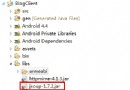
本篇介紹如何用 Jsoup 這個庫解析網頁,以及如何分析要抓取的頁面。Jsoup 下載網址為 jsoup.org/download,本例使用 jsoup-1.7.2,下載
 Android View 觸控事件派發機制詳解與源碼分析
PS:最終還是選擇 CSDN 來整理發表這幾年的知識點,本文平行遷移到 CSDN,因為 CSDN 也支援 MarkDown 語法了,很方便! 一、背景 最近在社群與論壇上
 Android View 框架總結(九):KeyEvent 按鍵事件分發機制
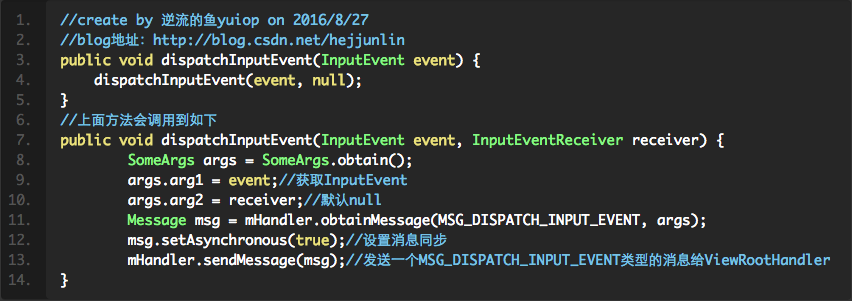
本篇開始分析按鍵事件的分發流程(提醒:本文源碼基於 Android 6.0)。先列出要談的內容: ViewRootImpl 的 dispatchInputEvent →