

編輯:關於 Android 程式設計
要做一個從畫面底部升起的分享面板,關鍵在於 Dialog 的視窗參數設定,而不是版面配置本身。
if (dialShareDialog == null) {
    dialShareDialog = new Dialog(context, R.style.dialog);
    dialShareDialog.setContentView(R.layout.dialog_share);
    dialShareDialog.setCanceledOnTouchOutside(true);

    // 取得視窗並調整參數
    WindowManager.LayoutParams lp = dialShareDialog.getWindow().getAttributes();
    lp.dimAmount = 0.7f;                                  // 背景遮罩濃度
    dialShareDialog.getWindow().getDecorView().setPadding(0, 0, 0, 0);
    lp.width = WindowManager.LayoutParams.MATCH_PARENT;   // 寬度填滿
    lp.height = WindowManager.LayoutParams.WRAP_CONTENT;  // 高度依內容
    dialShareDialog.getWindow().setGravity(Gravity.BOTTOM);
}

ImageView weixinIv   = (ImageView) dialShareDialog.findViewById(R.id.share_weixin_iv);
ImageView friendIv   = (ImageView) dialShareDialog.findViewById(R.id.share_friend_iv);
ImageView kongjianIv = (ImageView) dialShareDialog.findViewById(R.id.share_kongjian_iv);
ImageView sinaIv     = (ImageView) dialShareDialog.findViewById(R.id.share_sina_iv);

weixinIv.setOnClickListener(shareOnClickListener);
friendIv.setOnClickListener(shareOnClickListener);
kongjianIv.setOnClickListener(shareOnClickListener);
sinaIv.setOnClickListener(shareOnClickListener);

dialShareDialog.show();
三個參數決定了「底部彈出」的視覺:setGravity(Gravity.BOTTOM) 讓它貼齊下緣、MATCH_PARENT 讓它撐滿寬度、dimAmount 控制背後變暗的程度。另外 decorView 的 padding 必須歸零,否則系統主題自帶的內距會讓面板兩側露出縫隙。
<RelativeLayout xmlns:android="https://schemas.android.com/apk/res/android"
    android:id="@+id/dialog_share_rl"
    android:layout_width="match_parent"
    android:layout_height="wrap_content"
    android:background="@android:color/transparent">

    <LinearLayout
        android:layout_width="match_parent"
        android:layout_height="wrap_content"
        android:background="@color/public_white"
        android:orientation="vertical">

        <TextView
            android:layout_width="match_parent"
            android:layout_height="42dp"
            android:gravity="center"
            android:text="分享到"
            android:textColor="#8d8f92"
            android:textSize="16dp" />

        <View
            android:layout_width="match_parent"
            android:layout_height="0.5dp"
            android:layout_marginLeft="10dp"
            android:layout_marginRight="10dp"
            android:layout_marginTop="10dp"
            android:background="#e5e5e5" />

        <LinearLayout
            android:layout_width="fill_parent"
            android:layout_height="wrap_content"
            android:orientation="horizontal">

            <LinearLayout
                android:layout_width="0dp"
                android:layout_height="120dp"
                android:layout_weight="1"
                android:gravity="center"
                android:orientation="vertical">
                <ImageView
                    android:id="@+id/share_weixin_iv"
                    android:layout_width="60dp"
                    android:layout_height="60dp"
                    android:background="@drawable/selector_share_weixin" />
                <TextView
                    android:layout_width="wrap_content"
                    android:layout_height="wrap_content"
                    android:layout_marginTop="5dp"
                    android:text="微信"
                    android:textColor="#8d8f92"
                    android:textSize="12dp" />
            </LinearLayout>

            <!-- 朋友圈、QQ 空間、新浪微博 結構相同 -->
        </LinearLayout>
    </LinearLayout>
</RelativeLayout>
四個分享管道用 layout_weight="1" 搭配 layout_width="0dp" 做等分,這樣在不同螢幕寬度下都能平均分布,比寫死寬度可靠得多。
<style name="dialog" parent="@android:style/Theme.Dialog">
    <item name="android:windowFrame">@null</item>           <!-- 去掉邊框 -->
    <item name="android:windowIsFloating">true</item>        <!-- 浮在 Activity 上 -->
    <item name="android:windowIsTranslucent">true</item>     <!-- 半透明 -->
    <item name="android:windowNoTitle">true</item>           <!-- 無標題列 -->
    <item name="android:background">@android:color/transparent</item>
    <item name="android:windowBackground">@android:color/transparent</item>
    <item name="android:backgroundDimEnabled">true</item>     <!-- 啟用背景變暗 -->
    <item name="android:backgroundDimAmount">0.6</item>      <!-- 變暗程度 -->
    <item name="android:windowContentOverlay">@null</item>
    <item name="android:windowAnimationStyle">@null</item>
    <item name="android:colorBackgroundCacheHint">@null</item>
</style>
這裡有兩處設定容易互相干擾,值得留意:backgroundDimAmount 寫在 style 裡是 0.6,而程式碼中又透過 lp.dimAmount 設為 0.7。後者會覆蓋前者,因為它作用在實際的視窗參數上,style 只是初始值。若想要兩者一致,應該只留一處設定,避免日後維護時困惑。
另外,若要加上進場動畫,把 windowAnimationStyle 指向一個定義了 windowEnterAnimation 與 windowExitAnimation 的 style 即可,通常搭配 slide_in_left 這類 translate 動畫,就能做出面板從底部滑入的效果。
 東東手游模擬器閃退怎麼辦 原因與解法一次講清
東東手游助手是一款官方推出的安卓模擬器,運行時偶爾會出現閃退的狀況。這究竟是什麼原因造成的,又該如何解決?下面小編帶你逐一排查。 先分析東東手游助手閃退的常見原因: 一、
 Android 系統服務之 Vibrator:震動控制實作
轉載請註明出處:coder-pig Vibrator 是 Android 提供的一項系統服務,讓應用能驅動裝置的震動馬達,常用於點擊回饋、通知提醒等場景。 核心方法
 Android Gallery 仿圖像集瀏覽效果
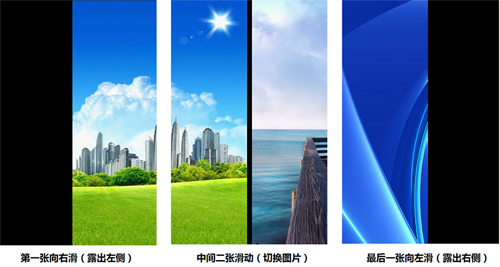
Android 內建的 Gallery 能提供流暢的圖片瀏覽體驗,但若想做出更貼近系統相簿的滑動效果,可以自行實作一個仿 Gallery 的圖像集瀏覽元件。基本原理這種效
 微信怎麼定時開啟消息勿擾模式
有時候只想安靜休息,微信卻響個不停——尤其是一些群聊,消息一條接一條地刷,自己又沒空去看。這種情況下,把勿擾模式用起來會舒服很多。 微信怎麼定時設置消息勿打擾? 1. 打