

編輯:關於 Android 程式設計
接口定義請參考上篇。這裡採用成熟的第三方 asmack 套件庫——它是 smack 的 Android 版本,而 smack 是封裝 XMPP 協定的成熟 jar 檔。服務端部署 Openfire,透過呼叫 asmack 的接口即可完成用戶間通訊。
ConnectionConfiguration:XMPP 連線的配置類,用來設定伺服器位址與連接埠。
ConnectionConfiguration imConfig =
        new ConnectionConfiguration(IMConfig.IMSERVER, IMConfig.IMPORT);
XMPPConnection:連線管理類,配置完成後據以建立連線實例。
Roster:相當於聯絡人清單,存放聯絡人相關資訊。
Presence(狀態):分為在線、離線等數種狀態。
IMChat 採用單例模式,建構時完成連線初始化,並在靜態區塊中註冊 ReconnectionManager 以支援斷線自動重連:
static {
    try {
        Class.forName("org.jivesoftware.smack.ReconnectionManager");
    } catch (ClassNotFoundException ex) {
        // 載入重連管理器失敗
    }
}

private void initIMConnection() {
    recentDao = new RecentDao(iContext);
    messageDao = new MessageDao(iContext);

    imConfig = new ConnectionConfiguration(IMConfig.IMSERVER, IMConfig.IMPORT);
    imConfig.setCompressionEnabled(false);
    imConfig.setSecurityMode(ConnectionConfiguration.SecurityMode.disabled);
    imConfig.setReconnectionAllowed(true);
    imConfig.setSendPresence(true);
    imConfig.setDebuggerEnabled(false);

    chatConfig();
    imConnection = new XMPPConnection(imConfig);
}

public static IMChat getInstace(Context context) {
    if (chatInstance == null) {
        chatInstance = new IMChat(context);
    }
    return chatInstance;
}
chatConfig() 負責註冊各項 XMPP 擴充服務的 Provider,包括服務探索(disco#items、disco#info)、離線訊息(offline)、vCard、多重收件位址,以及檔案傳輸所需的 StreamInitiation 與 Bytestreams。這些註冊是後續功能能正常運作的前提。
@Override
public boolean login(String account, String password) {
    if (imConnection.isConnected()) {
        imConnection.disconnect();
    }
    try {
        imConnection.connect();
        imConnection.login(account, password);
    } catch (XMPPException e) {
        e.printStackTrace();
        return false;
    }
    if (imConnection.isAuthenticated()) {
        roster = imConnection.getRoster();
        roster.setSubscriptionMode(Roster.SubscriptionMode.accept_all);
        initMessageListener();
        initFileListener();
        return true;
    }
    return false;
}

private void initMessageListener() {
    imConnection.getChatManager().addChatListener(new ChatManagerListener() {
        @Override
        public void chatCreated(Chat chat, boolean createdLocally) {
            chat.addMessageListener(messageListener);
        }
    });
}private MessageListener messageListener = new MessageListener() {
@Override
public void processMessage(Chat chat, Message message) {
if (message.getType() == Message.Type.chat) {
String fromId = message.getFrom().split("@")[0];
String friendAlias = getFriendName(fromId);
String msgContent = message.getBody();
String msgTime = DateTime.getSimpleTime();
addRecentMessageDao(fromId, friendAlias, msgTime, msgContent,
ChatMessage.MSG_TYPE_TXT_IN);
}
}
};從 JID 中以 @ 切分出用戶名,再寫入訊息資料庫與最近聊天清單,最後送出廣播通知 UI 更新:
Intent intent = new Intent(IMConfig.MSG_ACTION);
intent.putExtra(IMConfig.CHAT_ACCOUNT, chatAccount);
intent.putExtra(IMConfig.CHAT_USERNAME, chatUser);
intent.putExtra(IMConfig.CHAT_CONTENT, msgContent);
iContext.sendBroadcast(intent);FileTransferManager 註冊 FileTransferListener 後,收到請求先取對方 JID 與描述,再依描述判斷是圖片(.img)還是語音(.arm),決定檔案副檔名與訊息型別。儲存路徑會先檢查外部儲存空間是否可用,不可用則退回內部 filesDir:
if (Environment.MEDIA_MOUNTED.equals(Environment.getExternalStorageState())) {
    path = iContext.getExternalFilesDir(fromId.split("@")[0]);
} else {
    path = iContext.getFilesDir();
}
接收完成後同樣呼叫 addRecentMessageDao 落庫並廣播,只不過 msgContent 存的是檔案絕對路徑,型別標記為 MSG_TYPE_IMG_IN 或 MSG_TYPE_VOICE_IN。UI 層收到廣播後,再依型別把路徑渲染成縮圖或語音按鈕。
其餘方法都是對 Roster 與 ChatManager 的薄封裝:getFriends() 遍歷 roster.getEntries() 組出聯絡人清單;addFriend、removeFriend、setAlias 分別對應 createEntry、removeEntry、setName;getFriendName 會在聯絡人不存在時自動補建條目;sendMessage 透過 createChat 取得聊天通道後送出;sendFile 則用 OutgoingFileTransfer 傳檔;logout 直接中斷連線。
1. 單例中的 Context 記得存成 ApplicationContext(示範中已用 getApplicationContext()),否則會造成 Activity 洩漏。
2. 單例的雙重檢查鎖定寫法在 Java 5 之後必須加上 volatile 關鍵字才是正確的,示範中的寫法在多線程下有風險。
3. 檔案接收路徑若使用外部儲存,需依目標 Android 版本申請對應的儲存權限並處理執行期授權。
4. 廣播更新 UI 的耦合度偏高,改用 LocalBroadcastManager 或 ResultReceiver 會更安全,也能避免其他應用攔截到聊天內容。
5. 訊息落庫建議在背景線程進行,避免阻塞 XMPP 的接收線程導致後續訊息延遲。
6. asmack 與 Openfire 這套組合已相當老舊,若為新專案,可考慮 Smack 官方較新版本,或改用 MQTT、自建 WebSocket 通道等方案。
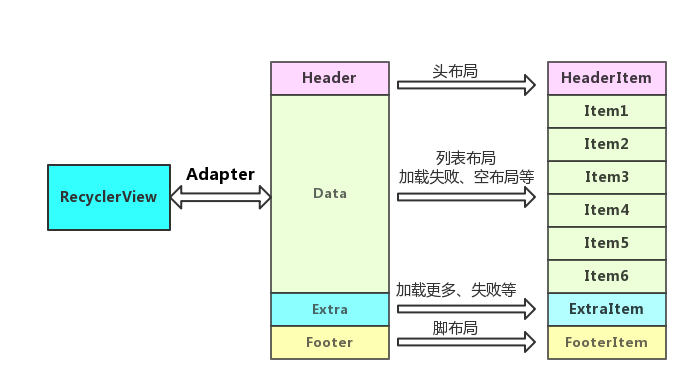 深入解析 Android 中 RecyclerView Adapter 的封裝思路
前言 關於 Adapter 的封裝,網路上已有許多成熟開源庫可以直接取用,省下不少功夫。最近閒來無事,便想自己動手封裝一個。 問題所在 一般封裝時,通常可以簡化到下面這個
 Android 仿今日頭條頻道移動:ListView Item 動畫遷移實作
效果與思路這個範例模擬資訊類應用中常見的頻道管理效果:上方與下方各有一個 ListView,當使用者點擊下方項目時,該項目會以動畫方式移動到上方清單的最後一項,同時下方清
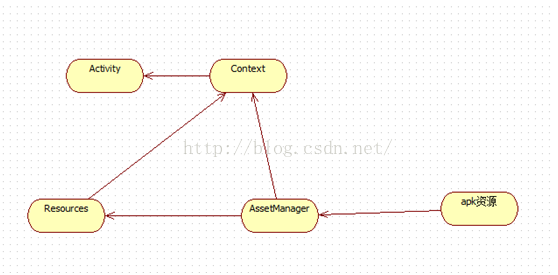 Android 插件化之資源動態加載:原理、衝突處理與 R 文件難題
一、要解決的問題 插件化裡,代碼加載只是入門題,資源訪問才是真正的坎。需要回答三個問題:怎麼把插件的資源加載進來?插件與宿主的資源衝突怎麼處理?如何確保插件和宿主拿到的都
 Android 模擬登入教務系統的學習與合規提醒
在 Android 中實作登入功能,是學習網路請求、表單處理、狀態保存與介面設計的常見題目。若要以學校教務系統作為練習對象,必須先確認是否具備授權,並僅在合法合規的前提下