

編輯:關於 Android 程式設計
相比佔用資源較多、且無法同時播放多個音頻的 MediaPlayer,SoundPool 更適合處理按鍵音、提示音以及遊戲中大量短音效的場景。以下介紹它的用法。
/**
 * @param maxStreams  最多可容納多少個音頻流
 * @param streamType  指定的聲音類型,透過 AudioManager 提供的常量指定
 * @param srcQuality  音頻質量,默認為 0
 */
public SoundPool(int maxStreams, int streamType, int srcQuality)
/**
 * @param context  應用上下文
 * @param resId    資源 ID
 * @param priority 優先級,目前無實際作用,建議傳 1 以向後兼容
 * @return 音頻 ID,可用於播放或卸載
 */
public int load(Context context, int resId, int priority);
/**
 * @param soundID      load 方法返回的音頻 ID
 * @param leftVolume   左聲道音量
 * @param rightVolume  右聲道音量
 * @param priority     優先級,值越大越高
 * @param loop         循環次數:0 不循環,-1 無限循環
 * @param rate         播放速率,正常為 1,最低 0.5,最高 2
 * @return 成功返回非零 streamID,失敗返回 0
 */
public final int play(int soundID, float leftVolume, float rightVolume,
                      int priority, int loop, float rate);
布局文件放置幾個按鈕:
<LinearLayout xmlns:android="https://schemas.android.com/apk/res/android"
    android:layout_width="fill_parent"
    android:layout_height="fill_parent"
    android:orientation="horizontal">
    <Button android:id="@+id/button1" android:layout_width="wrap_content"
        android:layout_height="wrap_content" android:text="風鈴聲" />
    <Button android:id="@+id/button2" android:layout_width="wrap_content"
        android:layout_height="wrap_content" android:text="布谷鳥叫聲" />
    <Button android:id="@+id/button3" android:layout_width="wrap_content"
        android:layout_height="wrap_content" android:text="門鈴聲" />
    <Button android:id="@+id/button4" android:layout_width="wrap_content"
        android:layout_height="wrap_content" android:text="電話聲" />
</LinearLayout>
MainActivity 中用 HashMap 管理各音頻資源,並為按鈕綁定播放事件:
package com.mingrisoft;

import java.util.HashMap;
import android.app.Activity;
import android.media.AudioManager;
import android.media.SoundPool;
import android.os.Bundle;
import android.view.KeyEvent;
import android.view.View;
import android.view.View.OnClickListener;
import android.widget.Button;

public class MainActivity extends Activity {
    private SoundPool soundpool;
    private HashMap<Integer, Integer> soundmap = new HashMap<Integer, Integer>();

    @Override
    public void onCreate(Bundle savedInstanceState) {
        super.onCreate(savedInstanceState);
        setContentView(R.layout.main);

        Button chimes = (Button) findViewById(R.id.button1);
        Button enter = (Button) findViewById(R.id.button2);
        Button notify = (Button) findViewById(R.id.button3);
        Button ringout = (Button) findViewById(R.id.button4);

        // 創建可容納 5 個音頻流的 SoundPool
        soundpool = new SoundPool(5, AudioManager.STREAM_SYSTEM, 0);

        soundmap.put(1, soundpool.load(this, R.raw.chimes, 1));
        soundmap.put(2, soundpool.load(this, R.raw.enter, 1));
        soundmap.put(3, soundpool.load(this, R.raw.notify, 1));
        soundmap.put(4, soundpool.load(this, R.raw.ringout, 1));
        soundmap.put(5, soundpool.load(this, R.raw.ding, 1));

        chimes.setOnClickListener(new OnClickListener() {
            @Override
            public void onClick(View v) {
                soundpool.play(soundmap.get(1), 1, 1, 0, 0, 1);
            }
        });
        enter.setOnClickListener(new OnClickListener() {
            @Override
            public void onClick(View v) {
                soundpool.play(soundmap.get(2), 1, 1, 0, 0, 1);
            }
        });
        notify.setOnClickListener(new OnClickListener() {
            @Override
            public void onClick(View v) {
                soundpool.play(soundmap.get(3), 1, 1, 0, 0, 1);
            }
        });
        ringout.setOnClickListener(new OnClickListener() {
            @Override
            public void onClick(View v) {
                soundpool.play(soundmap.get(4), 1, 1, 0, 0, 1);
            }
        });
    }

    // 重寫按鍵事件,播放按鍵音
    @Override
    public boolean onKeyDown(int keyCode, KeyEvent event) {
        soundpool.play(soundmap.get(5), 1, 1, 0, 0, 1);
        return true;
    }
}
需要注意的是,load() 是異步加載的,首次播放時音頻可能尚未準備好;實戰中可借助 SoundPool 提供的加載完成監聽,在資源就緒後再觸發播放,效果更穩定。
 Android Touch 事件傳遞解析:三個方法與回傳值
事件傳遞的核心方法在 Android 中,與 TouchEvent 最相關的方法有三個:dispatchTouchEvent、onInterceptTouchEvent
 Android 模擬登入並評論 CSDN 的實作解析
有些應用會需要模擬網站登入與互動,例如自動發佈評論。本文以 CSDN 為例,說明如何分析表單欄位、取得動態參數,並以 HTTP 請求完成登入與留言。實際操作時仍需遵守網站
 Android 筆記:用 startActivityForResult 接收另一個 Activity 回傳的資料
Activity 之間不只單向傳值,被叫起來的那一頁也可以把結果送回來,這靠的是 startActivityForResult() 搭配 onActivityResult
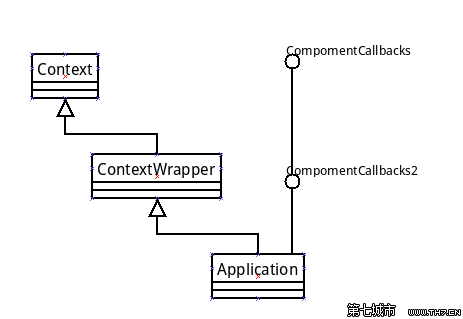 Android Application 全面解析:生命週期、資料共享與記憶體風險
Application 的定位 在 Android 中,Application 常被視為應用程式的全域容器。它與 Activity、Service 等四大組件一樣屬於系統