

編輯:關於 Android 程式設計
有些 App 需要提供「鎖定方向」的切換按鈕,例如影片播放器或需要看寬表的報表頁。Android 透過 ActivityInfo 的常數搭配 setRequestedOrientation() 就能做到。
<?xml version="1.0" encoding="utf-8"?>
<LinearLayout xmlns:android="https://schemas.android.com/apk/res/android"
    android:layout_width="fill_parent"
    android:layout_height="fill_parent"
    android:orientation="vertical">

    <Button
        android:id="@+id/mybtn"
        android:layout_width="wrap_content"
        android:layout_height="wrap_content"
        android:text="改變螢幕方向(目前為直向)" />

    <ImageView
        android:id="@+id/myview"
        android:layout_width="wrap_content"
        android:layout_height="wrap_content"
        android:src="@drawable/aa" />
</LinearLayout>
package org.lxh.demo;

import android.app.Activity;
import android.content.pm.ActivityInfo;
import android.os.Bundle;
import android.view.View;
import android.view.View.OnClickListener;
import android.widget.Button;
import android.widget.ImageView;

public class Hello extends Activity {

    private Button change = null;
    private ImageView img = null;

    public void onCreate(Bundle savedInstanceState) {
        super.onCreate(savedInstanceState);
        super.setContentView(R.layout.main);

        this.change = (Button) super.findViewById(R.id.mybtn);
        this.img = (ImageView) super.findViewById(R.id.myview);
        this.change.setOnClickListener(new OnClickListenerImpl());
    }

    private class OnClickListenerImpl implements OnClickListener {
        public void onClick(View arg0) {
            if (Hello.this.getRequestedOrientation()
                    == ActivityInfo.SCREEN_ORIENTATION_UNSPECIFIED) {
                Hello.this.change.setText("無法進行螢幕方向切換");
            } else if (Hello.this.getRequestedOrientation()
                    == ActivityInfo.SCREEN_ORIENTATION_LANDSCAPE) {
                Hello.this.setRequestedOrientation(
                        ActivityInfo.SCREEN_ORIENTATION_PORTRAIT);
            } else if (Hello.this.getRequestedOrientation()
                    == ActivityInfo.SCREEN_ORIENTATION_PORTRAIT) {
                Hello.this.setRequestedOrientation(
                        ActivityInfo.SCREEN_ORIENTATION_LANDSCAPE);
            }
        }
    }
}
<?xml version="1.0" encoding="utf-8"?>
<manifest xmlns:android="https://schemas.android.com/apk/res/android"
    package="org.lxh.demo"
    android:versionCode="1"
    android:versionName="1.0">

    <uses-sdk android:minSdkVersion="10" />

    <uses-permission android:name="android.permission.CHANGE_CONFIGURATION" />

    <application>
        <activity
            android:name=".Hello"
            android:configChanges="orientation|keyboard"
            android:screenOrientation="portrait">
            <intent-filter>
                <action android:name="android.intent.action.MAIN" />
                <category android:name="android.intent.category.LAUNCHER" />
            </intent-filter>
        </activity>
    </application>
</manifest>
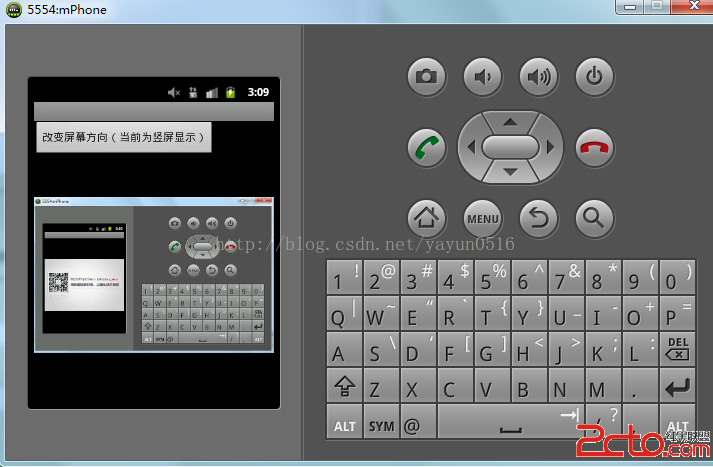
android:configChanges="orientation|keyboard" 的意思是:方向或鍵盤狀態改變時,不要讓系統重啟 Activity,而是回呼 onConfigurationChanged()。這裡有個重要取捨——如果不重啟,就必須自己在 onConfigurationChanged 裡重新量測並刷新版面,否則畫面會停在舊方向的排版上。若你的版面完全靠不同資源目錄(layout-land/layout-port)區隔,反而不該加上這個屬性,讓系統正常重建才對。
另外,CHANGE_CONFIGURATION 這個權限在一般應用上並非必要,它屬於 signature 等級,普通簽章的 App 拿不到;可以移除,不影響功能。
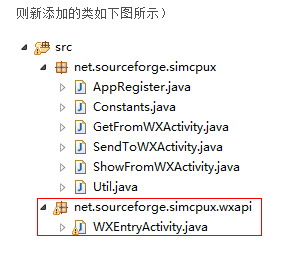 Android 整合微信登入、分享與支付的完整實作教學
用過微信 SDK 的朋友應該都體會過那種痛苦:比起 QQ SDK,微信的呼叫流程繁瑣得多,回調機制也相當綁手,而且必須在指定包名下的固定 Activity 才能接收回調。
 Android 開發系列(十九):為 SimpleAdapter 自訂樣式
Adapter 的核心作用,是把資料處理好之後再呈現到視圖上。對一般的 ArrayAdapter 來說,只要把一個陣列與一個樣式傳給它,就能用列表把這個字串陣列顯示出來。
 Android 高仿微信底部漸變導航欄:用 ImageView tint 實現平滑過渡
從微信底部導航的視覺細節說起 微信底部導航之所以看起來細膩,關鍵在於它把「邊框」與「內容」拆成兩個視覺層。外框會在灰色與綠色之間切換,內部圖形則以綠色到透明的深淺變化呈現
 Android 智能短信應用實作(二):會話刪除、自定義對話框與簡訊發送
本篇接續短信應用的開發,處理幾個實務上一定會遇到的環節:批次刪除會話、打造可重複使用的自定義對話框、帶進度條的刪除流程、會話詳情頁的資料傳遞與異步載入,以及簡訊的發送。