

編輯:關於 Android 程式設計
用 Java 做 AES 加密時,獲取安全隨機數的標準寫法是:
SecureRandom sr = SecureRandom.getInstance("SHA1PRNG");但在 Android 4.2 及以上版本執行加解密時,這樣寫會拋出類似 badPadding 的解密異常。原因在於不同版本對 provider 的實現有差異。改成明確指定 provider 即可恢復正常:
SecureRandom sr = SecureRandom.getInstance("SHA1PRNG", "Crypto");本質上,這個 API 依賴不安全的自訂行為來從口令派生密鑰,並不適合正式場景。生產環境更推薦直接使用 SecretKeySpec 明確指定密鑰字節,或改用 PBKDF2 等標準密鑰派生方式。
import java.security.SecureRandom;
import javax.crypto.Cipher;
import javax.crypto.KeyGenerator;
import javax.crypto.SecretKey;
import javax.crypto.spec.SecretKeySpec;

public class AESUtil {

    public static String encrypt(String seed, String cleartext) throws Exception {
        byte[] rawKey = getRawKey(seed.getBytes());
        byte[] result = encrypt(rawKey, cleartext.getBytes());
        return toHex(result);
    }

    public static String decrypt(String seed, String encrypted) throws Exception {
        byte[] rawKey = getRawKey(seed.getBytes());
        byte[] enc = toByte(encrypted);
        byte[] result = decrypt(rawKey, enc);
        return new String(result);
    }

    private static byte[] getRawKey(byte[] seed) throws Exception {
        KeyGenerator kgen = KeyGenerator.getInstance("AES");
        // SecureRandom sr = SecureRandom.getInstance("SHA1PRNG");
        SecureRandom sr = SecureRandom.getInstance("SHA1PRNG", "Crypto");
        sr.setSeed(seed);
        kgen.init(128, sr);   // 192 and 256 bits may not be available
        SecretKey skey = kgen.generateKey();
        return skey.getEncoded();
    }

    private static byte[] encrypt(byte[] raw, byte[] clear) throws Exception {
        SecretKeySpec skeySpec = new SecretKeySpec(raw, "AES");
        Cipher cipher = Cipher.getInstance("AES");
        cipher.init(Cipher.ENCRYPT_MODE, skeySpec);
        return cipher.doFinal(clear);
    }

    private static byte[] decrypt(byte[] raw, byte[] encrypted) throws Exception {
        SecretKeySpec skeySpec = new SecretKeySpec(raw, "AES");
        Cipher cipher = Cipher.getInstance("AES");
        cipher.init(Cipher.DECRYPT_MODE, skeySpec);
        return cipher.doFinal(encrypted);
    }

    public static String toHex(String txt) {
        return toHex(txt.getBytes());
    }

    public static String fromHex(String hex) {
        return new String(toByte(hex));
    }

    public static byte[] toByte(String hexString) {
        int len = hexString.length() / 2;
        byte[] result = new byte[len];
        for (int i = 0; i < len; i++) {
            result[i] = Integer.valueOf(hexString.substring(2 * i, 2 * i + 2), 16).byteValue();
        }
        return result;
    }

    public static String toHex(byte[] buf) {
        if (buf == null) return "";
        StringBuffer result = new StringBuffer(2 * buf.length);
        for (int i = 0; i < buf.length; i++) {
            appendHex(result, buf[i]);
        }
        return result.toString();
    }

    private final static String HEX = "0123456789ABCDEF";

    private static void appendHex(StringBuffer sb, byte b) {
        sb.append(HEX.charAt((b >> 4) & 0x0f)).append(HEX.charAt(b & 0x0f));
    }
}支持 ECB 與 CBC 兩種模式,CBC 額外需要 IV:
import java.io.UnsupportedEncodingException;
import java.security.Key;
import java.util.Locale;
import javax.crypto.Cipher;
import javax.crypto.SecretKeyFactory;
import javax.crypto.spec.DESedeKeySpec;
import javax.crypto.spec.IvParameterSpec;

/**
 * DES 加密
 */
public class DesUtils {

    private static final String KEY = "********************";

    /** 對字符串進行 DES3 加密 */
    public static String encode(String str) {
        try {
            byte[] key = KEY.getBytes("UTF-8");
            byte[] data = str.getBytes("UTF-8");
            byte[] encodedData = des3EncodeECB(key, data);
            return byte2HexString(encodedData);
        } catch (UnsupportedEncodingException e) {
            e.printStackTrace();
        } catch (Exception e) {
            e.printStackTrace();
        }
        return null;
    }

    public static String decode(String str) {
        try {
            byte[] key = KEY.getBytes("UTF-8");
            byte[] data = hexString2Byte(str);
            byte[] decodedData = des3DecodeECB(key, data);
            return new String(decodedData, "UTF-8");
        } catch (Exception e) {
            e.printStackTrace();
        }
        return null;
    }

    /** ECB 加密,不需要 IV */
    public static byte[] des3EncodeECB(byte[] key, byte[] data) throws Exception {
        Key deskey = null;
        DESedeKeySpec spec = new DESedeKeySpec(key);
        SecretKeyFactory keyfactory = SecretKeyFactory.getInstance("desede");
        deskey = keyfactory.generateSecret(spec);
        Cipher cipher = Cipher.getInstance("desede/ECB/PKCS5Padding");
        cipher.init(Cipher.ENCRYPT_MODE, deskey);
        return cipher.doFinal(data);
    }

    /** ECB 解密,不需要 IV */
    public static byte[] des3DecodeECB(byte[] key, byte[] data) throws Exception {
        Key deskey = null;
        DESedeKeySpec spec = new DESedeKeySpec(key);
        SecretKeyFactory keyfactory = SecretKeyFactory.getInstance("desede");
        deskey = keyfactory.generateSecret(spec);
        Cipher cipher = Cipher.getInstance("desede/ECB/PKCS5Padding");
        cipher.init(Cipher.DECRYPT_MODE, deskey);
        return cipher.doFinal(data);
    }

    /** CBC 加密 */
    public static byte[] des3EncodeCBC(byte[] key, byte[] keyiv, byte[] data) throws Exception {
        Key deskey = null;
        DESedeKeySpec spec = new DESedeKeySpec(key);
        SecretKeyFactory keyfactory = SecretKeyFactory.getInstance("desede");
        deskey = keyfactory.generateSecret(spec);
        Cipher cipher = Cipher.getInstance("desede/CBC/PKCS5Padding");
        IvParameterSpec ips = new IvParameterSpec(keyiv);
        cipher.init(Cipher.ENCRYPT_MODE, deskey, ips);
        return cipher.doFinal(data);
    }

    /** CBC 解密 */
    public static byte[] des3DecodeCBC(byte[] key, byte[] keyiv, byte[] data) throws Exception {
        Key deskey = null;
        DESedeKeySpec spec = new DESedeKeySpec(key);
        SecretKeyFactory keyfactory = SecretKeyFactory.getInstance("desede");
        deskey = keyfactory.generateSecret(spec);
        Cipher cipher = Cipher.getInstance("desede/CBC/PKCS5Padding");
        IvParameterSpec ips = new IvParameterSpec(keyiv);
        cipher.init(Cipher.DECRYPT_MODE, deskey, ips);
        return cipher.doFinal(data);
    }

    private static String byte2HexString(byte[] b) {
        String a = "";
        for (int i = 0; i < b.length; i++) {
            String hex = Integer.toHexString(b[i] & 0xFF).toUpperCase(Locale.US);
            if (hex.length() == 1) {
                hex = "0" + hex;
            }
            a = a + hex;
        }
        return a;
    }

    private static byte[] hexString2Byte(String str) {
        if (str == null) return null;
        str = str.trim();
        int len = str.length();
        if (len == 0 || len % 2 == 1) return null;
        byte[] b = new byte[len / 2];
        try {
            for (int i = 0; i < str.length(); i += 2) {
                b[i / 2] = (byte) Integer.decode("0x" + str.substring(i, i + 2)).intValue();
            }
            return b;
        } catch (Exception e) {
            return null;
        }
    }
}DES 的有效密鑰僅 56 位,早已不滿足現代安全要求,新專案應直接選用 AES(建議 256 位並配合 GCM 模式)。另外示例中的 Cipher.getInstance("AES") 未指定模式與填充,會退化為 ECB,相同明文塊產生相同密文,容易洩漏結構信息;實戰請顯式寫成 AES/GCM/NoPadding 並妥善管理 IV。
 Universal Image Loader 使用全攻略:功能解析與示例代碼
相關地址介紹: -- Universal Image Loader 項目 GitHub 官方地址:https://github.com/nostra13/Android-
 Android 自定義 View 實戰:打造可滑動的 SlideTab 選擇器
接到的需求很簡單:一條橫線上等距排布 n 個節點,每個節點上方一個圓、下方一段文字;選中哪一個,圓變成藍色空心圈、文字也變藍。這種控制項在系統裡找不到現成的,正好拿來做自
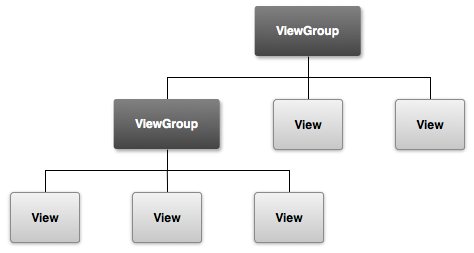 Android 自定義 View 實戰:從繪製流程到屬性封裝的完整路線
Android 為開發者準備了大量現成的 UI 元件——TextView、Button、ImageView,再加上 LinearLayout、RelativeLayout
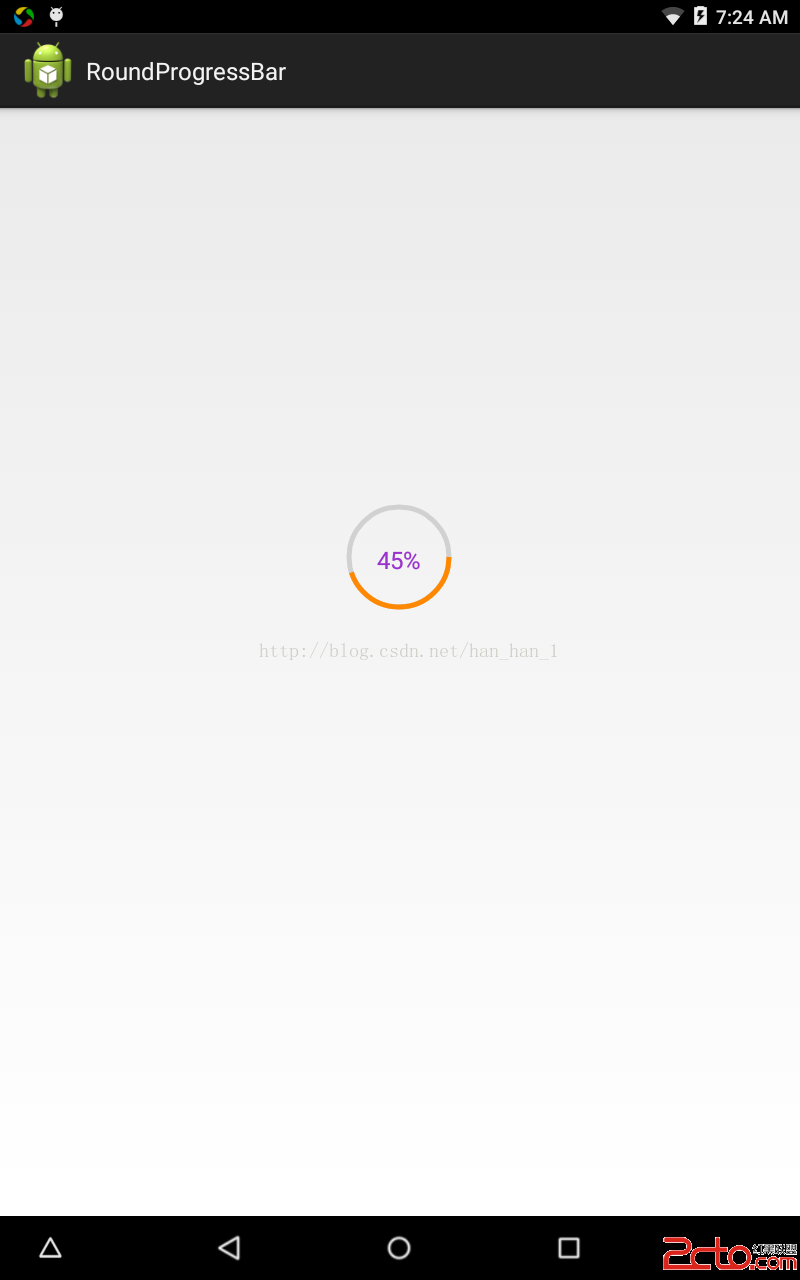 自定義 View 實作 Android 圓形進度條,樣式可自由配置
照著經典寫法自己做了一份當備忘,有興趣的可以對照原始版本一起看。 一、自訂屬性宣告 先在 res/values/attrs.xml 裡把要對外開放的外觀參數宣告出來,這樣