

編輯:關於 Android 程式設計
網上找過一堆寫法,最後發現下面這個版本最穩,主要是加了 duplicate 旗標,不會重複產生捷徑。
private void addShortcut() {
    Intent shortcut = new Intent("com.android.launcher.action.INSTALL_SHORTCUT");

    // 捷徑名稱
    shortcut.putExtra(Intent.EXTRA_SHORTCUT_NAME, getString(R.string.app_name));
    // 不允許重複建立
    shortcut.putExtra("duplicate", false);

    // 注意:這裡要填程式啟動時的第一個 Activity
    Intent intent = new Intent(this, HomeActivity.class);
    intent.setAction("com.figo.activity.home");

    shortcut.putExtra(Intent.EXTRA_SHORTCUT_INTENT, intent);

    // 捷徑圖示
    Parcelable icon = Intent.ShortcutIconResource.fromContext(this, R.drawable.ic_launcher);
    shortcut.putExtra(Intent.EXTRA_SHORTCUT_ICON_RESOURCE, icon);

    sendBroadcast(shortcut);
}
private void delShortcut() {
    Intent shortcut = new Intent("com.android.launcher.action.UNINSTALL_SHORTCUT");
    shortcut.putExtra(Intent.EXTRA_SHORTCUT_NAME, getString(R.string.app_name));

    // 這裡的 intent 必須和建立時完全一致
    Intent intent = new Intent(this, HomeActivity.class);
    intent.setAction("com.figo.activity.home");
    shortcut.putExtra(Intent.EXTRA_SHORTCUT_INTENT, intent);

    sendBroadcast(shortcut);
}
<uses-permission android:name="com.android.launcher.permission.INSTALL_SHORTCUT" />
<uses-permission android:name="com.android.launcher.permission.UNINSTALL_SHORTCUT" />
在 AndroidManifest.xml 中,幫啟動用的 Activity 補上 launchMode、orientation、theme 與 intent-filter:
<activity
    android:name="com.figo.activity.HomeActivity"
    android:launchMode="singleTask"
    android:screenOrientation="portrait"
    android:theme="@style/Theme.NoTitleBar"
    android:windowSoftInputMode="adjustPan" >
    <intent-filter>
        <action android:name="android.intent.action.MAIN" />
        <category android:name="android.intent.category.LAUNCHER" />
    </intent-filter>
</activity>
幾個實務提醒:移除捷徑時的 Intent 必須與建立時一模一樣(含 action),否則辨識不到;另外部分客製化桌面(尤其是各家自製 launcher)對 INSTALL_SHORTCUT 廣播的反應不一,建議在送出前先判斷是否已存在,避免一次跑出好幾顆圖示。
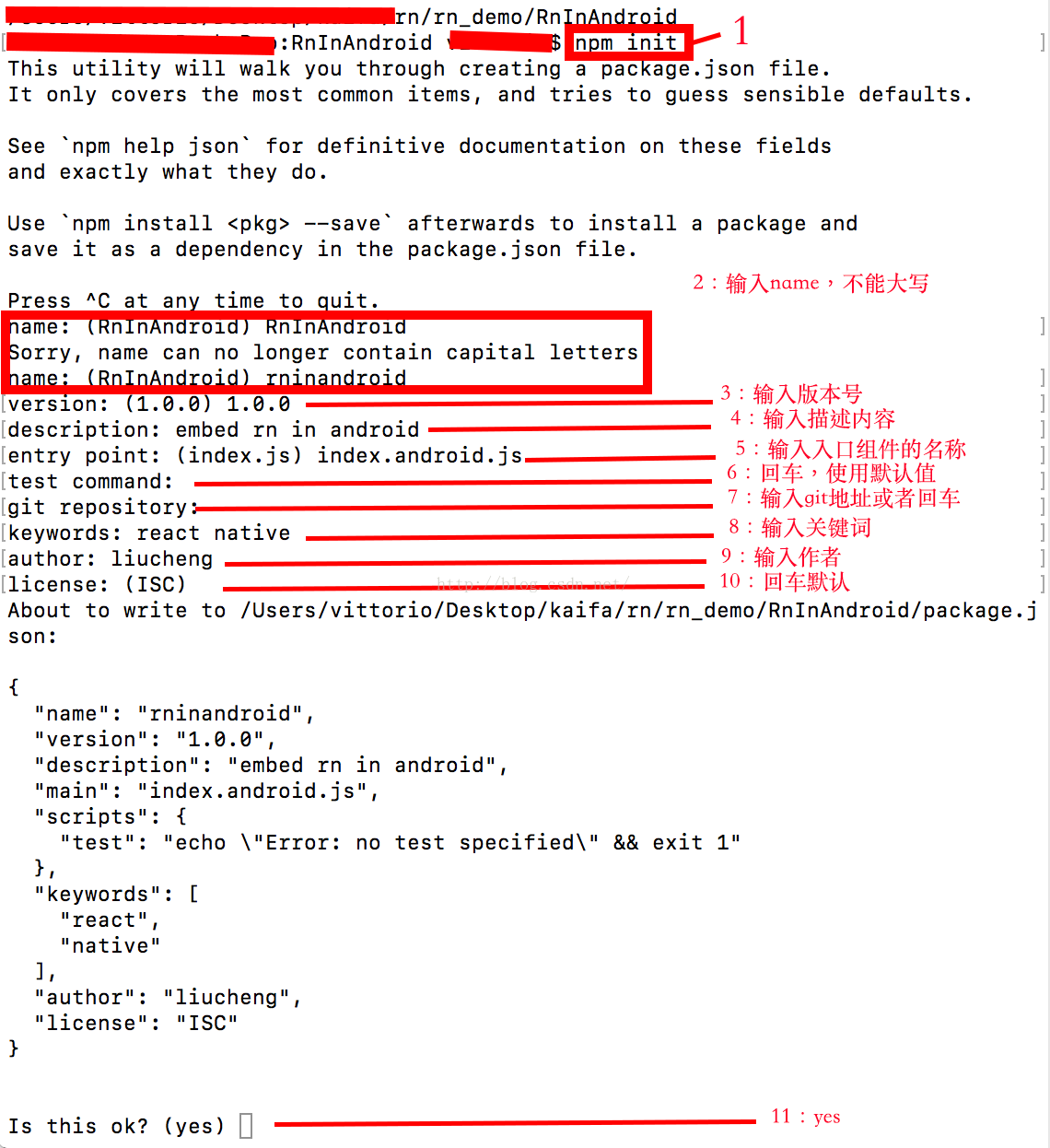 實戰:如何把 React Native 嵌入原生 Android 應用
原生應用並非只能整屏跳轉到 RN 頁面,也可以把 RN 組件當作一個普通控件嵌進原生界面,成為其中的一部分。本文記錄完整的接入過程,以及一路上遇到的各類報錯與解法。 第
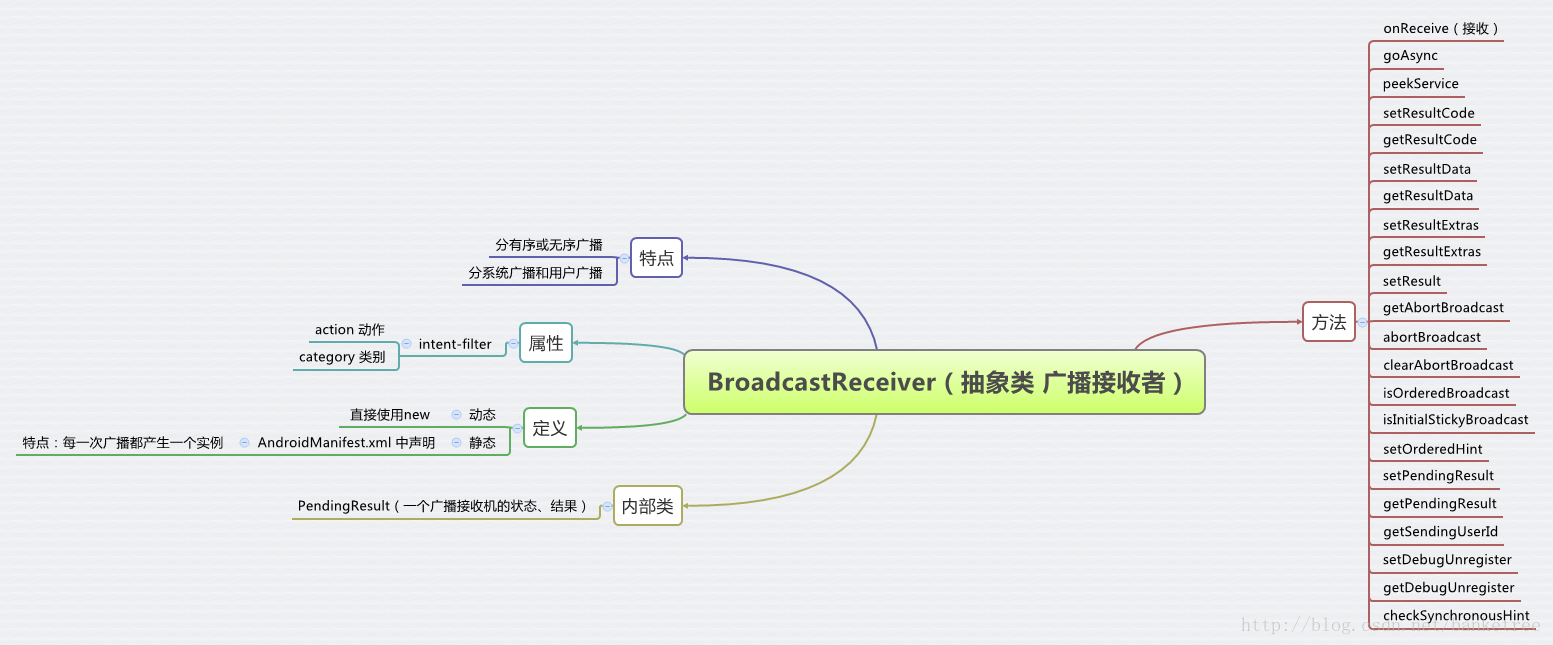 Android 廣播、服務、數據庫、通知、包等核心術語圖解介紹
簡介 Android 系統運用了許多機制,例如廣播、服務、數據庫、通知、包等等。本文將逐一介紹這些核心術語的概念,並搭配示意圖幫助理解。 什麼是廣播?Broadcast
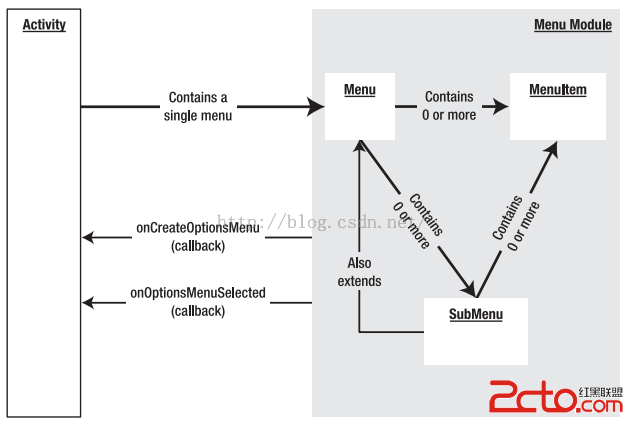 Android 菜單詳解:OptionMenu、ContextMenu 與 SubMenu
菜單的概念如今已十分普及。Windows、Mac、桌面版 Linux、Java Swing 等都有可視化菜單。本文系統梳理 Android 平台的三類菜單及其使用方式。
 Android UI 組件之 TextSwitcher 文本切換器
TextSwitcher 是一個用於文本切換的 UI 組件。它繼承自 ViewSwitcher,因此同樣可以在切換子視圖時應用動畫效果。與 ImageSwitcher 類