

編輯:關於 Android 程式設計
本文記錄在 Android 平台上實現 3G 自動撥號的做法。思路是複用系統自帶的 rild 服務——rild 由 init 守護,正常情況下殺不死,因此只要讓它承擔撥號與監測職責,就能在撥號失敗或網絡掉線後自動重撥,顯著提升上網的可靠性。為聚焦主題,這裡把 RIL 庫中大量無關功能都剝掉了,只保留撥號相關路徑。
先把 .../hardware/ril 下的文件清空,新建一個 rild 目錄,放入以下文件。
#define LOG_TAG "RILD"
#include <unistd.h>
#include <pthread.h>
#include <utils/Log.h>
#include <sys/types.h>
#include <sys/stat.h>
#include "ril_fun.h"

int main(int argc, char *argv[]) {
    int opt;
    int err;
    pthread_t tid;
    char buf[PROPERTY_VALUE_MAX];
    static int device_fd;
    static char *device_path = NULL;

    umask(S_IRGRP | S_IWGRP | S_IXGRP | S_IROTH | S_IWOTH | S_IXOTH);

    while (-1 != (opt = getopt(argc, argv, "d:"))) {   // 解析命令行參數
        switch (opt) {
            case 'd':
                device_path = optarg;
                ALOGD("Opening tty device %s\n", device_path);
                break;
            default:
                ALOGD("Not tty device");
                goto done;
        }
    }

    device_fd = device_open(device_path);            // 打開設備節點
    device_init(device_fd);                          // 初始化串口
    property_set("ctl.stop", PPPD_SERVICE_NAME);     // 先停掉 pppd_gprs
    request_setup_datacall(device_fd);               // 執行撥號

    // 創建 IP 監測線程,掉線後自動重撥
    pthread_create(&tid, NULL, ip_detection, (void *)device_fd);

done:
    while (1) {
        sleep(0x00ffffff);
    }
    return 0;
}
#define LOG_TAG "RIL"
#include <stdio.h>
#include <string.h>
#include <stdlib.h>
#include <sys/types.h>
#include <sys/stat.h>
#include <fcntl.h>
#include <termios.h>
#include <sys/select.h>
#include "ril_fun.h"

#define PPPD_EXIT_CODE      "net.gprs.ppp-exit"
#define PPP_NET_LOCAL_IP    "net.ppp0.local-ip"
#define PPP_SYSFS_RETRY     5
#define PPP_OPERSTATE_PATH  "/sys/class/net/ppp0/operstate"

static int pppd_started = 0;

int device_open(char *device_path) {
    int device_fd = -1;
    while (device_fd < 0) {
        if (device_path != NULL) {
            device_fd = open(device_path, O_RDWR);   // 打開串口 AT 模塊設備
        }
        if (device_fd < 0) {
            ALOGD("opening AT interface. retrying...");
            sleep(3);
        }
    }
    return device_fd;
}

void device_init(int device_fd) {
    struct termios options;
    tcgetattr(device_fd, &options);                  // 獲取串口屬性
    cfsetispeed(&options, B115200);                  // 接收波特率
    cfsetospeed(&options, B115200);                  // 發送波特率
    options.c_iflag &= ~(IGNBRK | BRKINT | PARMRK | ISTRIP | IGNCR | ICRNL | IXON);
    options.c_cflag &= ~PARENB;                       // 無奇偶校驗
    options.c_cflag &= ~CSTOPB;                       // 1 位停止位
    options.c_cflag &= ~CSIZE;
    options.c_cflag |= CS8;                           // 8 位數據位
    options.c_lflag &= ~(ICANON | ECHO | ECHOE | ISIG);
    tcsetattr(device_fd, TCSANOW, &options);
}

int at_send_command(int device_fd, char *cmd) {
    return write(device_fd, cmd, strlen(cmd));
}

void request_setup_datacall(int device_fd) {
    const char *apn = "cmnet";
    char *cmd = NULL;
    int err;

    ALOGD("requesting data connection to APN '%s'", apn);

    if (pppd_started) {
        ALOGD("Stop existing PPPd before activating PDP");
        property_set("ctl.stop", PPPD_SERVICE_NAME);
        pppd_started = 0;
    }

    err = at_send_command(device_fd, "at$qcpdplt=0");
    asprintf(&cmd, "AT+CGDCONT=1,\"IP\",\"%s\",,0,0", apn);   // 設置 PDP 上下文
    err = at_send_command(device_fd, cmd);
    free(cmd);
    if (err < 0) {
        ALOGD("AT Send Command error!");
    }

    err = property_set(PPPD_EXIT_CODE, "");
    if (err < 0) {
        ALOGW("Set PPPD_EXIT_CODE failed!");
        goto ppp_error;
    }

    err = property_set(PPP_NET_LOCAL_IP, "");
    if (err < 0) {
        ALOGW("Set PPPD_NET_LOCAL_IP failed!");
        goto ppp_error;
    }

    err = property_set("ctl.start", PPPD_SERVICE_NAME);      // 啟動 pppd_gprs
    pppd_started = 1;
    if (err < 0) {
        ALOGW("Can not start PPPd");
        goto ppp_error;
    }
    ALOGD("PPPd started");
    return;

ppp_error:
    at_send_command(device_fd, "AT+CGACT=0,1");              // 去激活 PDP 上下文
    if (pppd_started) {
        property_set("ctl.stop", PPPD_SERVICE_NAME);
        pppd_started = 0;
    }
}

void *ip_detection(void *arg) {
    int fd;
    int err;
    int device_fd = (int) arg;
    char buffer[20];
    char exit_code[PROPERTY_VALUE_MAX];
    static char local_ip[PROPERTY_VALUE_MAX];
    static int pppd_started = 0;

    sleep(2);
    while (1) {
        property_get(PPPD_EXIT_CODE, exit_code, "");         // 讀取 pppd 退出碼
        if (strcmp(exit_code, "") != 0) {                    // pppd 異常退出
            ALOGW("PPPd exit with code %s", exit_code);
            request_setup_datacall(device_fd);               // 重新撥號
            goto done;
        }

        fd = open(PPP_OPERSTATE_PATH, O_RDONLY);             // 監控網絡鏈路狀態
        if (fd >= 0) {
            buffer[0] = 0;
            read(fd, buffer, sizeof(buffer));
            close(fd);
            ALOGW("buffer = %s", buffer);

            if (!strncmp(buffer, "up", strlen("up")) ||
                !strncmp(buffer, "unknown", strlen("unknown"))) {
                memset(local_ip, '\0', sizeof(local_ip));
                err = property_get(PPP_NET_LOCAL_IP, local_ip, "");   // 獲取 IP
                if (err < 0) {
                    ALOGW("Get PPPD_NET_LOCAL_IP failed!");
                }
                if (!strcmp(local_ip, "")) {
                    ALOGW("PPP link is up but no local IP is assigned. "
                          "Will retry after %d seconds", PPP_SYSFS_RETRY);
                    property_set("ctl.stop", PPPD_SERVICE_NAME);      // 無 IP 則重撥
                } else {
                    ALOGD("PPP link is up with local IP address %s", local_ip);
                }
            } else {
                ALOGW("PPP link status in %s is %s. Will retry after %d seconds",
                      PPP_OPERSTATE_PATH, buffer, PPP_SYSFS_RETRY);
                property_set("ctl.stop", PPPD_SERVICE_NAME);
            }
        } else {
            ALOGW("Can not detect PPP state in %s. Will retry after %d seconds",
                  PPP_OPERSTATE_PATH, PPP_SYSFS_RETRY);
            request_setup_datacall(device_fd);
        }
done:
        sleep(PPP_SYSFS_RETRY);
    }
    return NULL;
}
#ifndef _RIL_FUN_H_
#define _RIL_FUN_H_

#include <unistd.h>
#include <utils/Log.h>              // ALOG*()
#include <cutils/properties.h>      // property_set()

#define PPPD_SERVICE_NAME "pppd_gprs"

/*************************************************************
 * 功能:打開串口設備文件
 * 參數:device_path 串口設備文件名
 * 返回:串口設備文件描述符
 **************************************************************/
int device_open(char *device_path);

/*************************************************************
 * 功能:初始化設備節點
 * 參數:device_fd 串口設備文件描述符
 **************************************************************/
void device_init(int device_fd);

/*************************************************************
 * 功能:發送 AT 指令
 * 參數:device_fd 串口設備文件描述符;cmd AT 命令
 * 返回:write 的返回值
 **************************************************************/
int at_send_command(int device_fd, char *cmd);

/*************************************************************
 * 功能:建立數據撥號
 * 參數:device_fd 串口設備文件描述符
 **************************************************************/
void request_setup_datacall(int device_fd);

/*************************************************************
 * 功能:創建查詢 IP 線程
 * 參數:arg void 類型指針
 **************************************************************/
void *ip_detection(void *arg);

#endif
LOCAL_PATH := $(call my-dir)
include $(CLEAR_VARS)

LOCAL_SRC_FILES := \
    rild.c \
    ril_fun.c

LOCAL_SHARED_LIBRARIES := \
    libcutils \
    libdl

LOCAL_LDLIBS += -lpthread

LOCAL_MODULE := rild
LOCAL_MODULE_TAGS := optional

include $(BUILD_EXECUTABLE)
文件齊備後開始編譯。若之前已經編譯過,請先執行 make clean 清理,避免殘留產物干擾。
把下列腳本放到板子的 /etc/ppp 目錄下。
#!/system/bin/sh
# 一層無奈的封裝腳本,目的是拿到 pppd 的退出碼

/system/bin/setprop "net.gprs.ppp-exit" ""      # 清空退出碼
/system/bin/log -t pppd "Starting pppd"

/system/bin/pppd connect \
  'chat -v -s -r "/var/log/chat.log" -f "/etc/ppp/3gdata_call.conf"' disconnect \
  'chat -r "/var/log/chat.log" -t 30 -e -v "" +++ATH "NO CARRIER"' \
  /dev/ttyUSB3 115200 mru 1280 mtu 1280 \
  nodetach debug defaultroute usepeerdns crtscts \
  user card password card noipdefault \
  ipcp-accept-local ipcp-accept-remote

PPPD_EXIT=$?                                    # 命令返回碼
/system/bin/log -t pppd "pppd exited with $PPPD_EXIT"
/system/bin/setprop "net.gprs.ppp-exit" "$PPPD_EXIT"
註:/dev/ttyUSB3 是模塊 USB 串口的 Modem 口。
ABORT "NO CARRIER"
ABORT "NO DIALTONE"
ABORT "ERROR"
ABORT "NO ANSWER"
ABORT "BUSY"
TIMEOUT 120
"" at
OK atd*99***1#
CONNECT
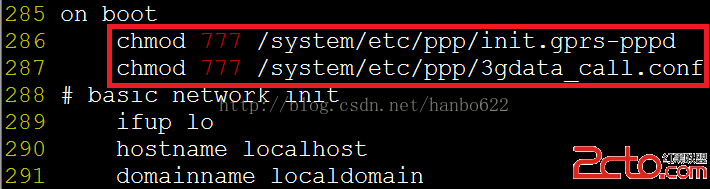
建議先完成源碼編譯,再改編譯產物中的 out/target/product/sabresd_6dq/root/init.rc,直接改源文件反而更麻煩。
打開該文件,按截圖補上 rild 的 service 定義:
接著添加新加入文件的權限聲明:
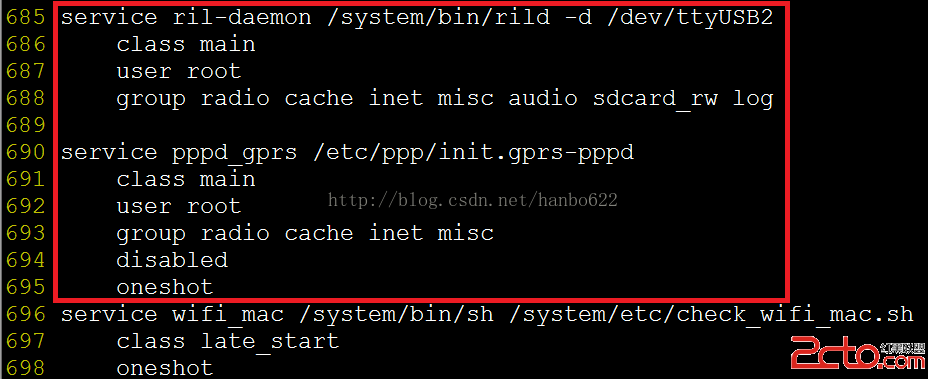
註:/dev/ttyUSB2 是模塊 USB 串口的 AT 口。
執行 make snod 打包,燒寫鏡像後即可測試。
logcat -b radio 查看 rild 的輸出,正常情況下會打印出分配到的 IP;也可以用 ifconfig 之類的命令核對。ping 202.108.22.5(百度)驗證鏈路是否通。能 ping 通,說明自動撥號成功。ps 查看 rild 與 pppd 的進程號,隨便 kill -9 掉其中一個,5 秒之後再看,進程應當已經被重新拉起。做到這一步,斷網自愈的能力基本就具備了。
 Android 系統廣播機制原始碼解析:從註冊到接收
本篇文章整理 Android 應用程式「註冊廣播接收器」與「發送廣播」兩個流程的原始碼走向,參考羅升陽老師《Android 系統原始碼情景分析》中的相關章節。理解這條鏈路
 獲取應用的啟動次數與運行時長:PkgUsageStats 的兩種調用方式
使用場景:需要統計後台應用的運行時長,對超時的應用主動 kill 掉進程以達到省電目的。這個需求可以用 PkgUsageStats 類來實現。 通過 com.androi
 XCL-Charts:以原生 Canvas 打造 Android 開源圖表庫
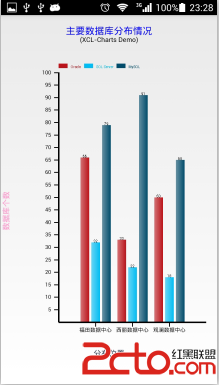
專案概要 XCL-Charts 是一套以 Android 原生 Canvas 繪製的開源圖表庫,支援柱形圖、餅圖、堆疊圖、面積圖、折線圖、曲線圖、環形圖、玫瑰圖與儀表板等
 打造滑動開關:Android自訂SwitchView動畫效果實作
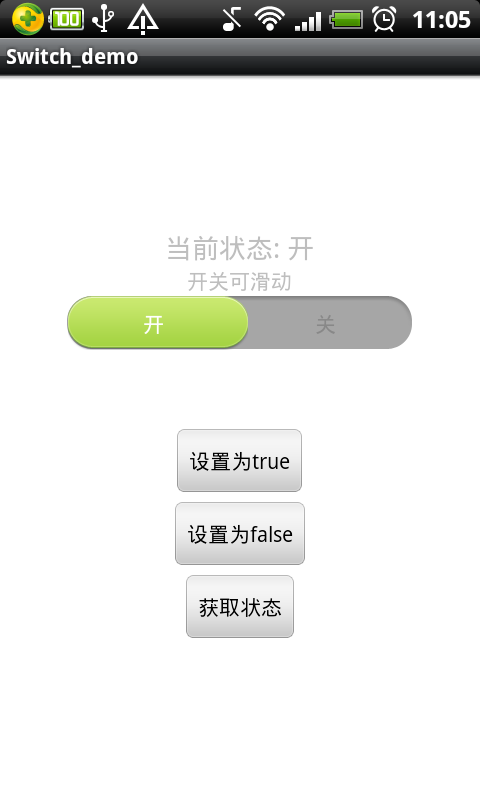
這篇文章要和大家分享一個實作範例:如何透過自訂View,做出可以滑動、並帶有流暢動畫的開關效果。它不是簡單的圖片切換,而是真正跟隨手指移動、松手後自動吸附到兩端的互動組件