

編輯:關於 Android 程式設計
在 Android 應用開發中,處理檔案的打包與還原是相當常見的需求,例如備份使用者資料、下載後的資源包展開,或是批次匯出多個檔案。Java 標準庫已經內建了 java.util.zip 套件,我們只要善用 ZipOutputStream 與 ZipFile 這兩個核心類別,就能輕鬆完成壓縮與解壓縮的任務。
以下這個 Unzip 工具類別,把常用的操作都封裝成了靜態方法,包含批次壓縮整個資料夾、解壓到指定目錄、只解出檔名符合條件的檔案,以及讀取壓縮檔內的清單與註解等。其中特別值得一提的是中文字元的處理:由於 ZIP 格式在早期常用 8859_1 編碼存放檔名,因此解壓時需要透過 new String(str.getBytes("8859_1"), "GB2312") 的方式轉換,才能正確還原中文檔名而不出現亂碼。
import java.io.BufferedInputStream; import java.io.BufferedOutputStream; import java.io.File; import java.io.FileInputStream; import java.io.FileNotFoundException; import java.io.FileOutputStream; import java.io.IOException; import java.io.InputStream; import java.io.OutputStream; import java.io.UnsupportedEncodingException; import java.util.ArrayList; import java.util.Collection; import java.util.Enumeration; import java.util.zip.ZipEntry; import java.util.zip.ZipException; import java.util.zip.ZipFile; import java.util.zip.ZipOutputStream; /** * Android Zip壓縮解壓縮 */ public class Unzip { private static final int BUFF_SIZE = 1024 * 1024; // 1M Byte /** * 批量壓縮文件(夾) * * @param resFileList 要壓縮的文件(夾)列表 * @param zipFile 生成的壓縮文件 * @throws IOException 當壓縮過程出錯時拋出 */ public static void zipFiles(Collection resFileList, File zipFile) throws IOException { ZipOutputStream zipout = new ZipOutputStream(new BufferedOutputStream(new FileOutputStream( zipFile), BUFF_SIZE)); for (File resFile : resFileList) { zipFile(resFile, zipout, ""); } zipout.close(); } /** * 批量壓縮文件(夾) * * @param resFileList 要壓縮的文件(夾)列表 * @param zipFile 生成的壓縮文件 * @param comment 壓縮文件的注釋 * @throws IOException 當壓縮過程出錯時拋出 */ public static void zipFiles(Collection resFileList, File zipFile, String comment) throws IOException { ZipOutputStream zipout = new ZipOutputStream(new BufferedOutputStream(new FileOutputStream( zipFile), BUFF_SIZE)); for (File resFile : resFileList) { zipFile(resFile, zipout, ""); } zipout.setComment(comment); zipout.close(); } /** * 解壓縮一個文件 * * @param zipFile 壓縮文件 * @param folderPath 解壓縮的目標目錄 * @param isDelete * @throws IOException 當解壓縮過程出錯時拋出 */ public static void upZipFile(File zipFile, String folderPath, boolean isDelete) { String strZipName = zipFile.getName(); folderPath += "/" + strZipName.substring(0, strZipName.lastIndexOf(".")); File desDir = new File(folderPath); if (!desDir.exists()) { desDir.mkdirs(); } ZipFile zf; try { zf = new ZipFile(zipFile); for (Enumeration entries = zf.entries(); entries.hasMoreElements();) { ZipEntry entry = ((ZipEntry)entries.nextElement()); if(entry.isDirectory()) { String dirstr = entry.getName(); dirstr = new String(dirstr.getBytes("8859_1"), "GB2312"); File f=new File(dirstr); f.mkdir(); continue; } InputStream in = zf.getInputStream(entry); String str = folderPath + File.separator + entry.getName(); str = new String(str.getBytes("8859_1"), "GB2312"); File desFile = new File(str); if (!desFile.exists()) { File fileParentDir = desFile.getParentFile(); if (!fileParentDir.exists()) { fileParentDir.mkdirs(); } desFile.createNewFile(); } OutputStream out = new FileOutputStream(desFile); byte buffer[] = new byte[BUFF_SIZE]; int realLength; while ((realLength = in.read(buffer)) > 0) { out.write(buffer, 0, realLength); } in.close(); out.close(); } if (isDelete) { zipFile.delete(); } } catch (ZipException e) { e.printStackTrace(); } catch (IOException e) { e.printStackTrace(); } } /** * 解壓文件名包含傳入文字的文件 * * @param zipFile 壓縮文件 * @param folderPath 目標文件夾 * @param nameContains 傳入的文件匹配名 * @throws ZipException 壓縮格式有誤時拋出 * @throws IOException IO錯誤時拋出 */ public static ArrayList upZipSelectedFile(File zipFile, String folderPath, String nameContains) throws ZipException, IOException { ArrayList fileList = new ArrayList(); File desDir = new File(folderPath); if (!desDir.exists()) { desDir.mkdir(); } ZipFile zf = new ZipFile(zipFile); for (Enumeration entries = zf.entries(); entries.hasMoreElements();) { ZipEntry entry = ((ZipEntry)entries.nextElement()); if (entry.getName().contains(nameContains)) { InputStream in = zf.getInputStream(entry); String str = folderPath + File.separator + entry.getName(); str = new String(str.getBytes("8859_1"), "GB2312"); // str.getBytes("GB2312"),"8859_1" 輸出 // str.getBytes("8859_1"),"GB2312" 輸入 File desFile = new File(str); if (!desFile.exists()) { File fileParentDir = desFile.getParentFile(); if (!fileParentDir.exists()) { fileParentDir.mkdirs(); } desFile.createNewFile(); } OutputStream out = new FileOutputStream(desFile); byte buffer[] = new byte[BUFF_SIZE]; int realLength; while ((realLength = in.read(buffer)) > 0) { out.write(buffer, 0, realLength); } in.close(); out.close(); fileList.add(desFile); } } return fileList; } /** * 獲得壓縮文件內文件列表 * * @param zipFile 壓縮文件 * @return 壓縮文件內文件名稱 * @throws ZipException 壓縮文件格式有誤時拋出 * @throws IOException 當解壓縮過程出錯時拋出 */ public static ArrayList getEntriesNames(File zipFile) throws ZipException, IOException { ArrayList entryNames = new ArrayList(); Enumeration entries = getEntriesEnumeration(zipFile); while (entries.hasMoreElements()) { ZipEntry entry = ((ZipEntry)entries.nextElement()); entryNames.add(new String(getEntryName(entry).getBytes("GB2312"), "8859_1")); } return entryNames; } /** * 獲得壓縮文件內壓縮文件對象以取得其屬性 * * @param zipFile 壓縮文件 * @return 返回一個壓縮文件列表 * @throws ZipException 壓縮文件格式有誤時拋出 * @throws IOException IO操作有誤時拋出 */ public static Enumeration getEntriesEnumeration(File zipFile) throws ZipException, IOException { ZipFile zf = new ZipFile(zipFile); return zf.entries(); } /** * 取得壓縮文件對象的注釋 * * @param entry 壓縮文件對象 * @return 壓縮文件對象的注釋 * @throws UnsupportedEncodingException */ public static String getEntryComment(ZipEntry entry) throws UnsupportedEncodingException { return new String(entry.getComment().getBytes("GB2312"), "8859_1"); } /** * 取得壓縮文件對象的名稱 * * @param entry 壓縮文件對象 * @return 壓縮文件對象的名稱 * @throws UnsupportedEncodingException */ public static String getEntryName(ZipEntry entry) throws UnsupportedEncodingException { return new String(entry.getName().getBytes("GB2312"), "8859_1"); } /** * 壓縮文件 * * @param resFile 需要壓縮的文件(夾) * @param zipout 壓縮的目的文件 * @param rootpath 壓縮的文件路徑 * @throws FileNotFoundException 找不到文件時拋出 * @throws IOException 當壓縮過程出錯時拋出 */ private static void zipFile(File resFile, ZipOutputStream zipout, String rootpath) throws FileNotFoundException, IOException { rootpath = rootpath + (rootpath.trim().length() == 0 ? "" : File.separator) + resFile.getName(); rootpath = new String(rootpath.getBytes("8859_1"), "GB2312"); if (resFile.isDirectory()) { File[] fileList = resFile.listFiles(); for (File file : fileList) { zipFile(file, zipout, rootpath); } } else { byte buffer[] = new byte[BUFF_SIZE]; BufferedInputStream in = new BufferedInputStream(new FileInputStream(resFile), BUFF_SIZE); zipout.putNextEntry(new ZipEntry(rootpath)); int realLength; while ((realLength = in.read(buffer)) != -1) { zipout.write(buffer, 0, realLength); } in.close(); zipout.flush(); zipout.closeEntry(); } } }
壓縮的核心在於 zipFile 這個私有的遞迴方法:當遇到目錄時,它會逐一走訪底下的檔案並持續遞迴;遇到一般檔案時,則透過 putNextEntry 建立壓縮條目,再以固定大小的緩衝區(此處為 1MB)分批寫入,避免一次性將大檔載入記憶體造成 OOM。
解壓縮方面,upZipFile 會依壓縮檔名稱自動建立對應的資料夾,並在 isDelete 為真時於完成後刪除原壓縮檔。若只想取出部分檔案,則可使用 upZipSelectedFile,透過檔名比對精準篩選。整體而言,這套工具類別幾乎涵蓋了日常開發中所需的 ZIP 操作場景。
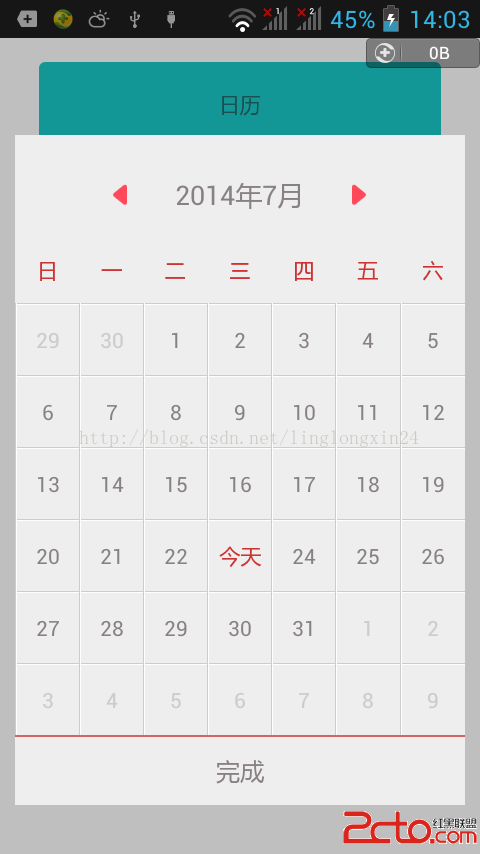 一款精緻美觀的 Android 日曆自訂控件
※效果預覽 ※使用方法 本文介紹一個相當漂亮的日曆控件 KCalendar,透過 PopupWindow 彈出,支援月份切換、日期標記與點選日期後回傳格式化結果。以下為
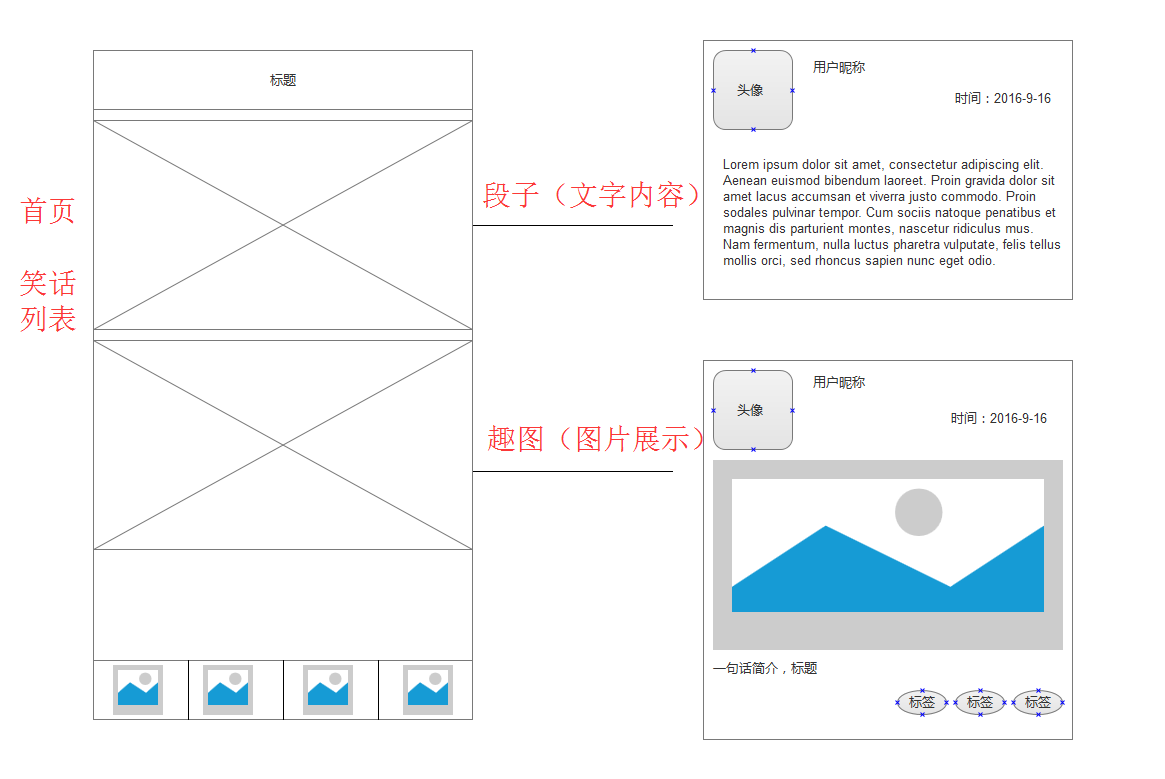 捧腹網 App 實戰:UI 與邏輯實作
介面結構 捧腹網 App 的主介面可以拆成底部導覽與上方列表。底部使用 FragmentTabHost 搭配 Fragment,上方則用 RecyclerView 呈現笑
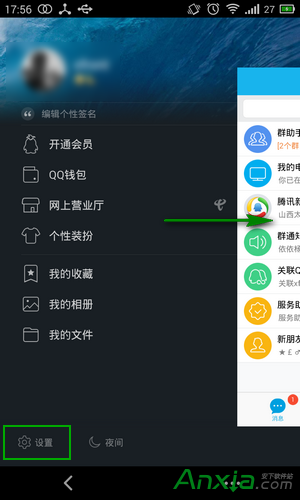 手機 QQ 怎麼截圖?安卓搖一搖與 iOS 按鍵截屏
截圖是聊天時最常用的小功能之一。安卓與 iOS 的實現方式完全不同,下面分別說明。 安卓手機 QQ 安卓版 QQ 內建搖一搖截屏,預設是關閉的,需要手動開啟。在 QQ 應
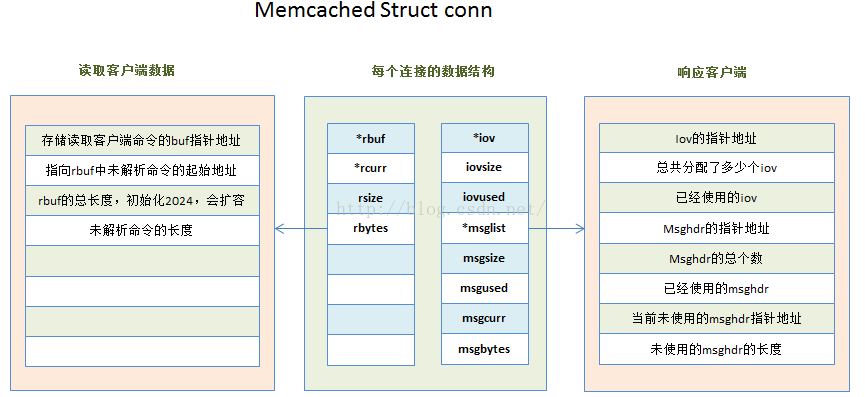 Memcached 原始碼剖析:命令執行流程與狀態機機制
一、執行命令 首先是啟動 memcached 的常用參數: -p <num> 設置 TCP 埠號(預設為 11211) -U <num>